
1. Introducció
This manual provides essential information for setting up, operating, maintaining, and troubleshooting your realme Note 70T smartphone. Please read this guide thoroughly to ensure optimal performance and longevity of your device.
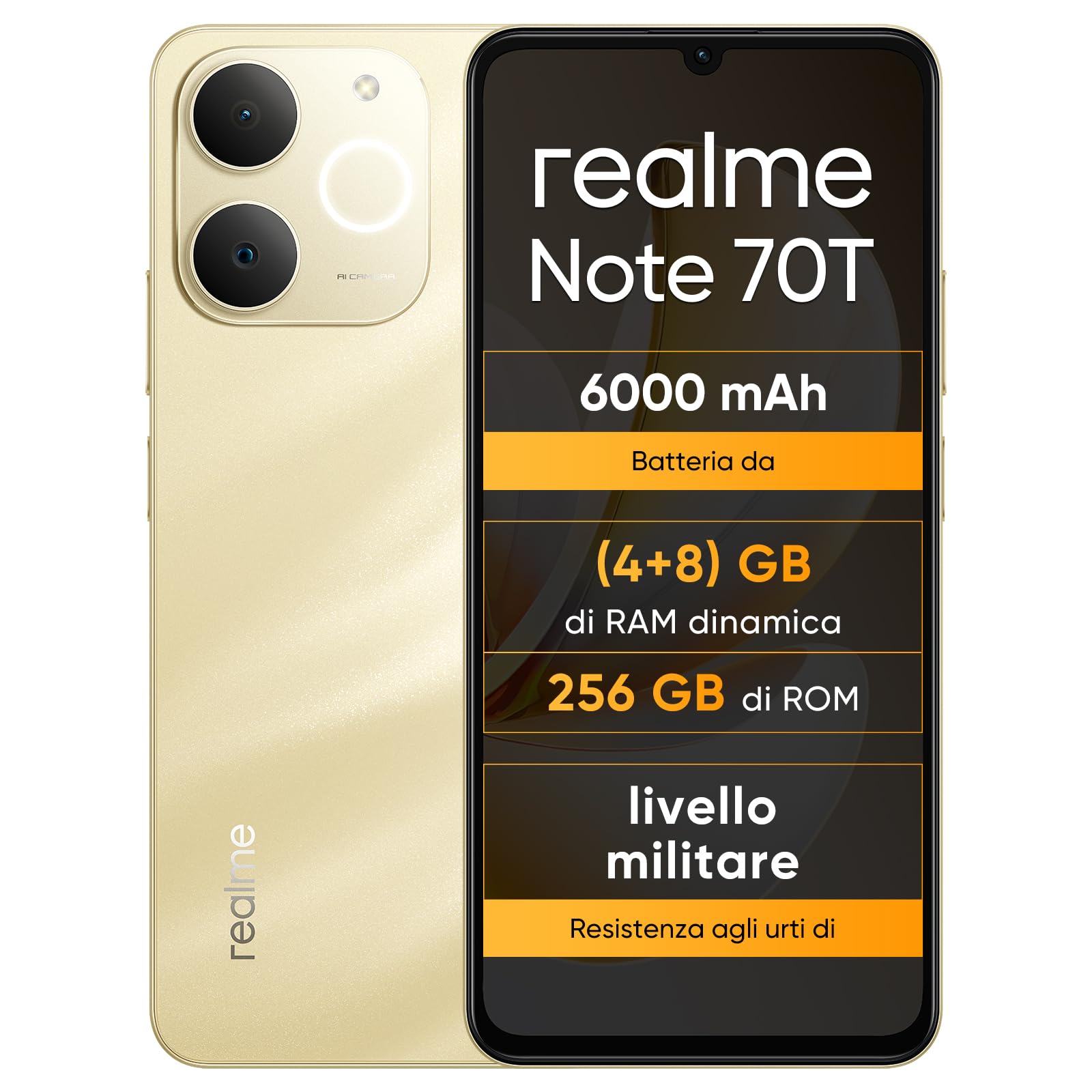
Imatge: Anvers i revers view of the realme Note 70T smartphone.
2. Guia de configuració
2.1 Contingut del paquet
Comproveu que el vostre paquet contingui els elements següents:
- realme Note 70T Smartphone
- Cable USB
- Funda de telèfon
- Pel·lícula protectora
2.2 Inserció de la targeta SIM i engegada
- Locate the SIM card tray on the side of the device. Use the provided SIM ejector tool to open the tray.
- Carefully place your Nano-SIM card(s) and/or microSD card into the tray, ensuring correct orientation. The realme Note 70T supports Dual SIM.
- Empenyeu suaument la safata cap a dins de la ranura fins que quedi alineada amb el cos del telèfon.
- Press and hold the Power button (located on the right side) until the realme logo appears on the screen.

Imatge: Lateral view of the realme Note 70T, illustrating the location of the SIM card tray.
2.3 Càrrega inicial
Before first use, it is recommended to fully charge your device. Connect the USB cable to the phone's USB-C port and the other end to a compatible power adapter (not included) or a computer's USB port.

Imatge: Part inferior view of the realme Note 70T, highlighting the USB-C charging port.
3. Instruccions de funcionament
3.1 Funcions bàsiques
- Encès/apagat: Premeu i manteniu premut el botó d'engegada. Seleccioneu "Apagar" o "Reiniciar".
- Control de volum: Feu servir els botons de pujar el volum i baixar el volum que hi ha al lateral del dispositiu.
- Bloqueig/desbloqueig de pantalla: Premeu breument el botó d'engegada per bloquejar o desbloquejar la pantalla.
- Reconeixement facial: Configure facial recognition in Settings for quick and secure unlocking.

Imatge: Lateral view of the realme Note 70T, showing the power and volume buttons.
3.2 Característiques de visualització
The realme Note 70T features a 6.75-inch Eye Comfort Display with a 90Hz refresh rate. This provides smooth visuals and reduces eye strain. The display offers vivid clarity and comfortable viewing.

Image: The realme Note 70T display showcasing its 90Hz refresh rate and eye comfort features with a vibrant beach scene.
3.3 Funcions de la càmera
Capture every moment with the 13MP rear camera and 5MP front camera. The device includes advanced AI features to enhance your photography:
- AI Clear Face: Improves blurry portraits for sharper results.
- Goma d'esborrar de la IA: Removes unwanted elements from photos.
- AI Image Matting: Allows you to easily remove subjects from backgrounds.

Image: Demonstration of the AI Clear Face feature, showing a blurry portrait before and after AI enhancement.

Image: Demonstration of the AI Eraser feature, showing an object removed from a photo.

Image: Demonstration of the AI Image Matting feature, showing a person isolated from the background.
3.4 Gestió de la bateria
The 6000mAh battery provides up to two days of usage on a single charge. It supports extended standby and includes 38 levels of charging protection for long-term battery health.

Image: Illustration of the realme Note 70T's 6000mAh battery capacity and estimated usage times for various activities.
3.5 Performance and Audio
Powered by an octa-core chipset with speeds up to 1.8 GHz, the realme Note 70T ensures smooth performance for gaming and applications. It supports fast app launch times and keeps up to 16 apps active in the background.
Experience enhanced audio with 300% ultra volume and AI Call 2.0, which provides intelligent noise reduction for clear calls.

Image: Visual representation of the realme Note 70T's octa-core processor.

Image: Illustration of the AI Call 2.0 feature, demonstrating noise reduction during calls.
4. Manteniment
4.1 Resistència a l'aigua i la pols (IP54)
The realme Note 70T is rated IP54 for water and dust resistance, protecting against splashes and dust ingress. The speaker vibrates at a specific frequency to expel accumulated water. This feature ensures the device remains functional in various daily situations.

Image: The realme Note 70T being splashed with water, demonstrating its IP54 water resistance.
4.2 ArmorShell Protection
The device features ArmorShell protection, having passed the MIL-STD 810H military-grade shock resistance test. This includes multi-angle drop tests and high-intensity impact tests, ensuring durability against accidental drops from up to 1.8 meters.

Image: The realme Note 70T being dropped onto a rocky surface, illustrating its military-grade resistance.
4.3 Atenció general
- Keep the device clean using a soft, dry cloth. Avoid abrasive materials.
- Eviteu exposar el telèfon a temperatures extremes o a la llum solar directa durant períodes prolongats.
- No intenteu desmuntar ni reparar el dispositiu vosaltres mateixos, ja que això podria anul·lar la garantia i causar danys.
5. Solució De Problemes
5.1 Problemes comuns i solucions
- El dispositiu no s'encén: Assegureu-vos que la bateria estigui carregada. Connecteu-la a un carregador i torneu-ho a provar.
- La pantalla no respon: Restart the device by holding the Power button for an extended period (usually 10-15 seconds).
- Les aplicacions es bloquegen o tenen un rendiment lent: Close background applications. Utilize the AI Optimization feature to improve app smoothness.

Image: Screenshot of the AI Optimization feature on the realme Note 70T, showing options to improve app smoothness.
5.2 Restabliment de fàbrica
If issues persist, you may consider a factory reset. Avís: This will erase all data on your device. Back up important information before proceeding. Navigate to Configuració > Sistema > Opcions de restabliment > Esborra totes les dades (restabliment de fàbrica).
6. Especificacions
| Característica | Especificació |
|---|---|
| Marca | realme |
| Nom del model | realme Note 70T |
| Sistema operatiu | Android 15 |
| Mida de la memòria RAM | 4 GB |
| Capacitat d'emmagatzematge | 256 GB |
| Mida de la pantalla | 6.75 polzades |
| Resolució | 720 x 1600 |
| Freqüència d'actualització | 90 Hz |
| Tecnologia cel·lular | 4G |
| Tecnologia de connectivitat | Bluetooth |
| Color | Or sorrenc |
| Number of SIM Card Slots | Doble SIM |
| Tipus de port de càrrega | USB-C |
| Biometric Identification Features | Reconeixement facial |
| Nivell de resistència a l'aigua | Resistent a l'aigua (IP54) |
| Conector d'auriculars | No 3.5 mm Jack |
| Maximum Supported Flash Memory Size | 256 GB |
| Front Camera Sensor Resolution | 5 MP |
| Rear Camera Sensor Resolution | 13 MP |
| Number of Rear Cameras | 1 |
| Number of Front Cameras | 1 |
| Potència màxima de la bateria | 6000 milionsamper-hour (mAh) |
| Dimensions de l'article | 15.7 x 7.4 x 0.9 cm |
| Durada mitjana de la bateria | 2 dies |
| Resolució de captura de vídeo | 1080p |
| Velocitat de fotogrames | 30 fps |
| GPS and Georeferencing Features | És cert |
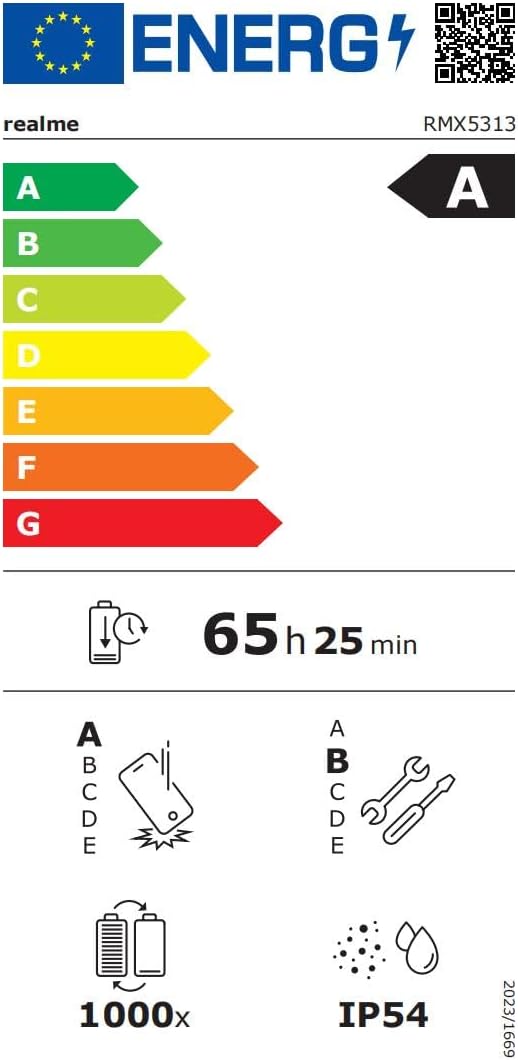
Image: EU Energy Label for realme Note 70T, showing energy efficiency, battery life, and IP54 rating. For more details, visit eprel.ec.europa.eu/qr/2361473.
7. Informació de la garantia
Your realme Note 70T smartphone comes with a limited manufacturer's warranty. Please refer to the warranty card included in your package or visit the official realme weblloc web per obtenir informació detallada sobre els termes i condicions de la cobertura de la garantia, la durada i els procediments de servei.
8. Atenció al client
Per a més ajuda, assistència tècnica o consultes de servei, poseu-vos en contacte amb el servei d'atenció al client de Realme a través del seu servei oficial. website or the contact information provided in your product documentation. You can also find FAQs and troubleshooting tips on the realme support portal.
Additional resources, including a Data Transparency Declaration, can be found aquí.