
1. Informació de seguretat
Please read all instructions carefully before installation and operation. Failure to follow these instructions may result in product damage, vehicle damage, or personal injury.
Seguretat general
- No feu servir el dispositiu de manera que us distregui de la conducció. Prioritzeu sempre la seguretat viària.
- Adjust volume levels responsibly to ensure you can hear external traffic sounds.
Seguretat elèctrica
- Professional installation is highly recommended. Incorrect wiring can cause damage to the unit or your vehicle's electrical system.
- Assegureu-vos que la bateria del vehicle estigui desconnectada abans de començar qualsevol treball elèctric.
- Use only the provided wiring harnesses and connectors. Do not modify or splice wires unless explicitly instructed.
Seguretat de la instal·lació
- Verify compatibility with your Honda Accord 2003-2007 (petrol version only). This unit is not suitable for diesel versions.
- Handle all vehicle trim pieces and components with care to avoid breakage or damage.
- Assegureu-vos que totes les connexions estiguin ben fixades i degudament aïllades per evitar curtcircuits.
2. Què hi ha a la caixa
Verifiqueu que tots els components que s'enumeren a continuació s'inclouen al paquet:
- A0125 reversing camera *1
- Cable d'alimentació *1
- Low-mounted air conditioning adapter cable *1
- Antena GPS *1
- Cable adaptador USB *2
- Audio/video adapter cable *1
- Audio adapter cable *1
- Reverse video input cable *1
- 15A spare fuse *1
- Micròfon extern *1
- Manual *1

The image above illustrates the various components you should find in your product box. Please check against the list to ensure all parts are present before proceeding with installation.
3. Configuració i instal·lació
The Eonon HAC1X7 car stereo is custom-designed for a perfect fit in Honda Accord 2003-2007 models (petrol version only), ensuring a seamless integration with your dashboard without additional frame modifications. It supports your car's factory features like steering wheel controls and AC information.


Esquema de cablejat
Refer to the detailed wiring diagram to ensure correct connections for all components. Each connector is labeled for ease of installation.

Guia de vídeo d'instal·lació
For a visual step-by-step guide on the installation process, please refer to the official Eonon installation video below. This video demonstrates the removal of the original radio and the installation of the new head unit, including wiring connections.
An additional video provides a quick overview of the installation and highlights key features of the Eonon HAC1X7 unit.
4. Instruccions de funcionament
Sistema acabatview
The Eonon HAC1X7 operates on the latest Android 14 system, powered by an RK3562 Quad-core ARM Cortex-A53 CPU at 2.0GHz, with 3GB RAM and 32GB ROM for smooth performance and quick app response.

Visualització i àudio
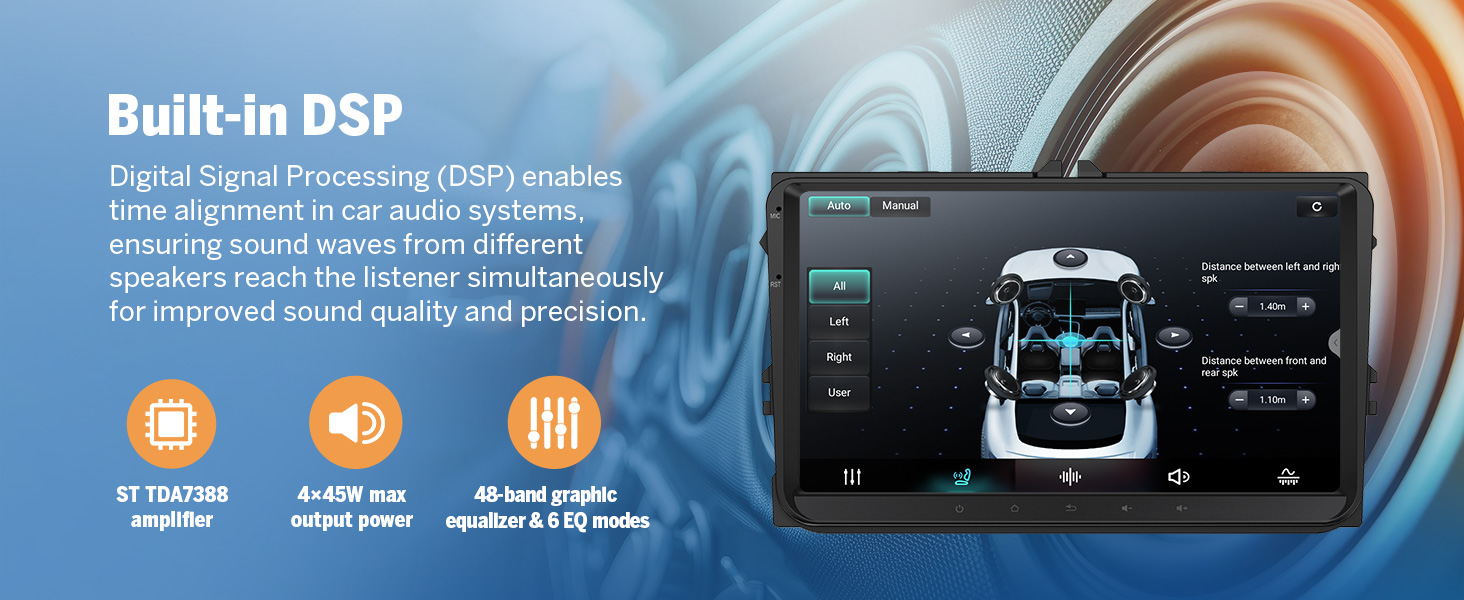
The unit features a 10.1-inch IPS HD capacitive touchscreen with a 1280x720 resolution and a wide 178° viewing angle for clear visuals. Audio is enhanced by a built-in 48-band EQ and a 4x45W surround sound ampmés viu.
CarPlay sense fil i Android Auto
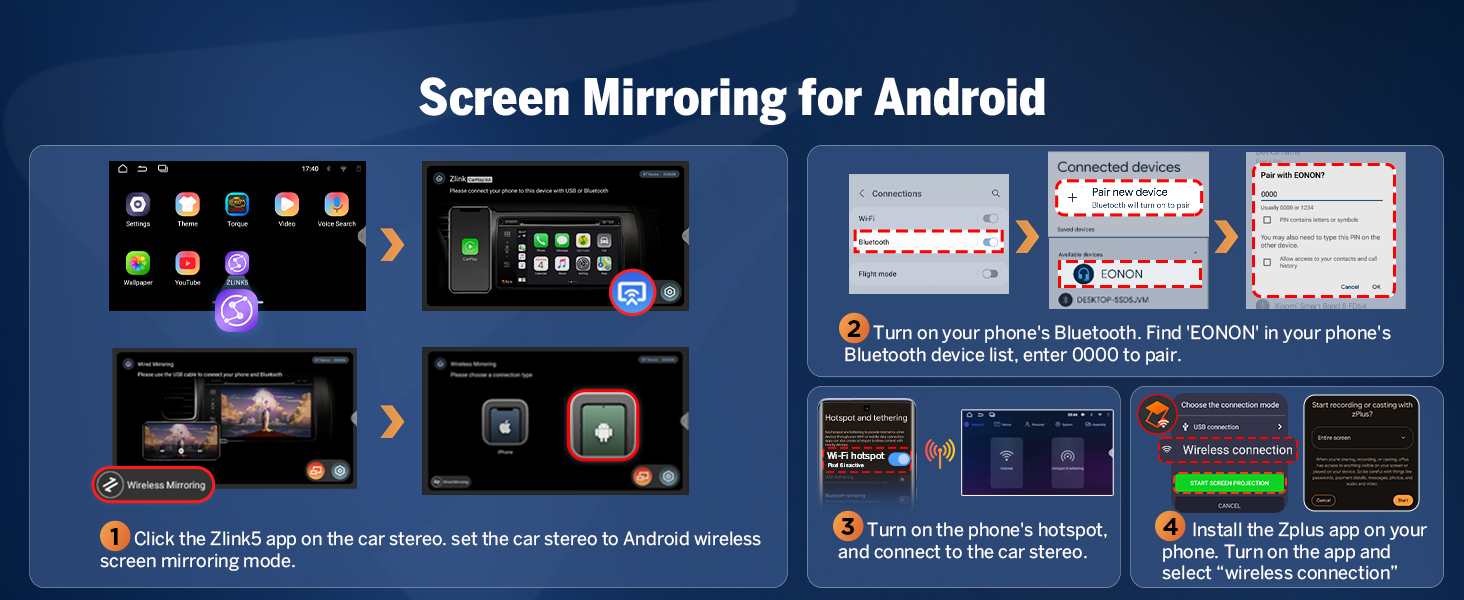
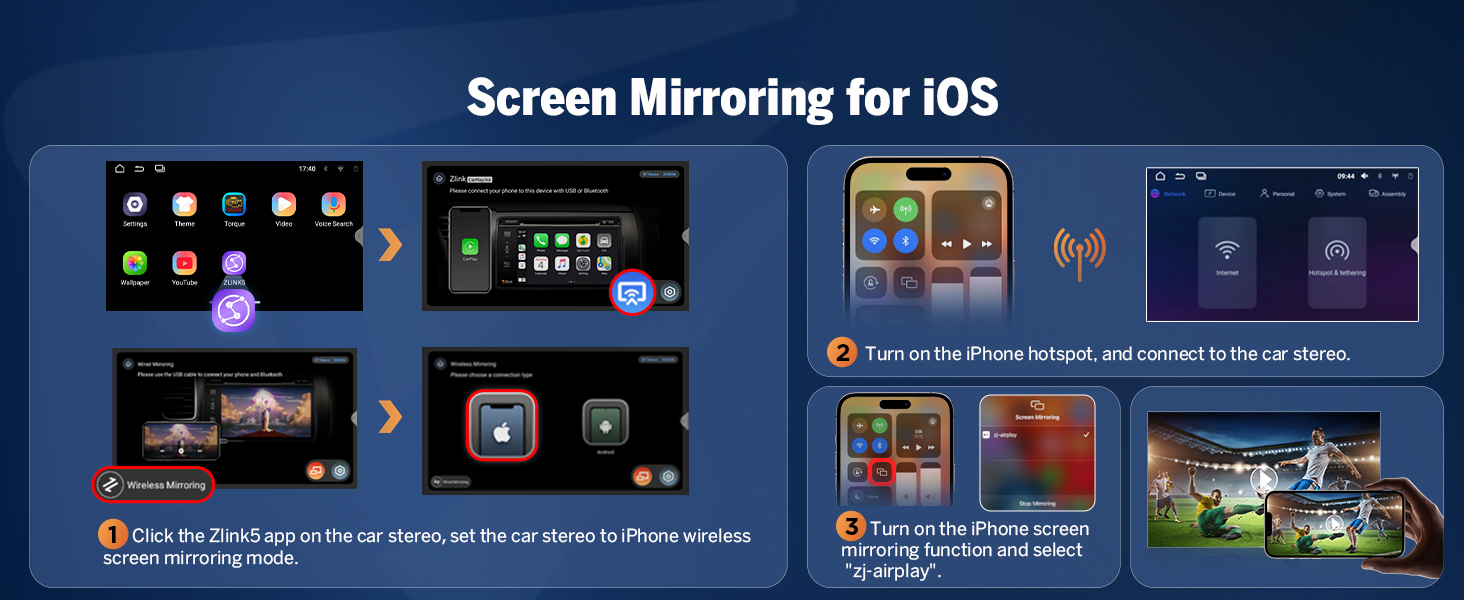
Enjoy effortless connectivity with Wireless CarPlay and Android Auto. Access navigation, music, calls, and messages using voice commands or the intuitive touchscreen. Wireless functionality provides a clean, hassle-free setup, with wired options also available.

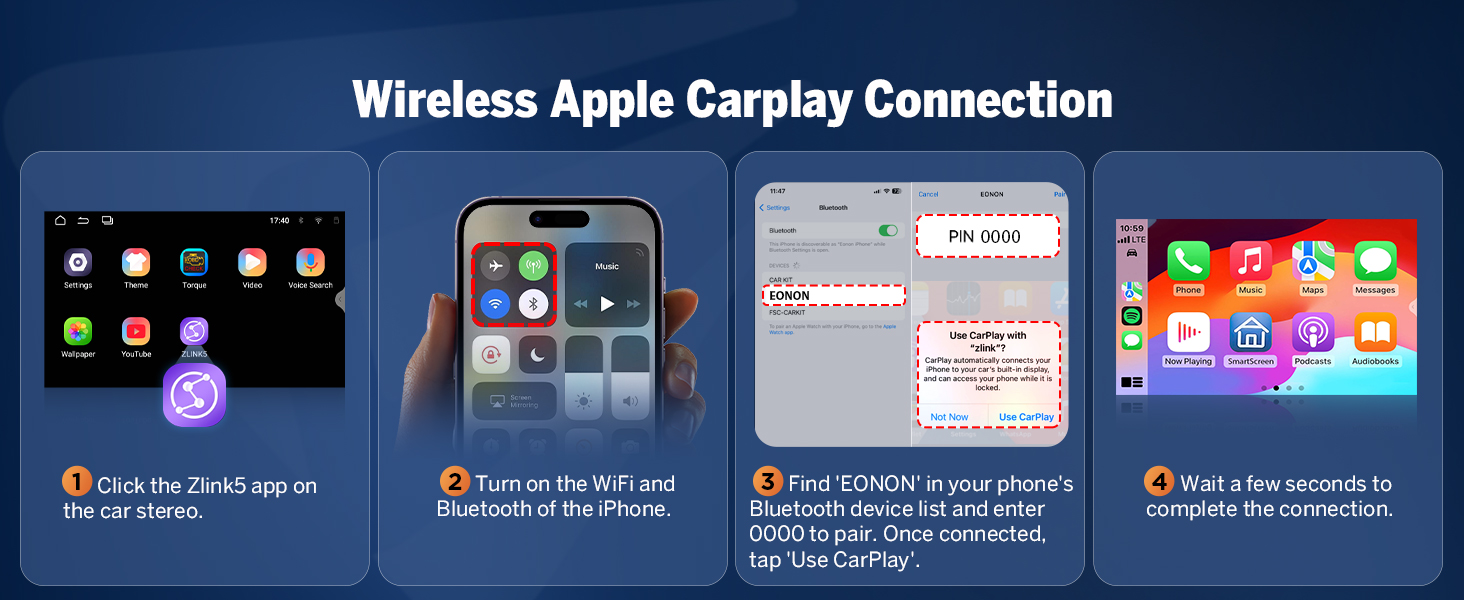
Connecting Wireless Apple CarPlay
- Click the Zlink5 app on the car stereo.
- Turn on Wi-Fi and Bluetooth on your iPhone.
- Find 'EONON' in your phone's Bluetooth device list and enter '0000' to pair. Once connected, tap 'Use CarPlay'.
- Espereu uns segons per completar la connexió.

Connecting Wireless Android Auto
- Click the Zlink5 app on the car stereo.
- Turn on Wi-Fi and Bluetooth on your Android phone.
- Find 'EONON' in your phone's Bluetooth device list, enter '0000' to pair, and click 'OK'.
- Espereu uns segons per completar la connexió.

Bluetooth & Other Connectivity
The unit features an independent Bluetooth 5.4 module with an extra antenna for quick and stable connections, noise reduction, clear call quality, and high-quality music streaming. It also includes 3 USB ports for external devices and supports dual-band Wi-Fi (2.4G/5G).

Backup Camera and Dashcam Support
The unit supports backup camera input and includes a free A0125 reversing camera. It also supports Eonon dashcams (A100, sold separately) and OBD2 scanners (sold separately).

5. Manteniment
Actualitzacions de programari
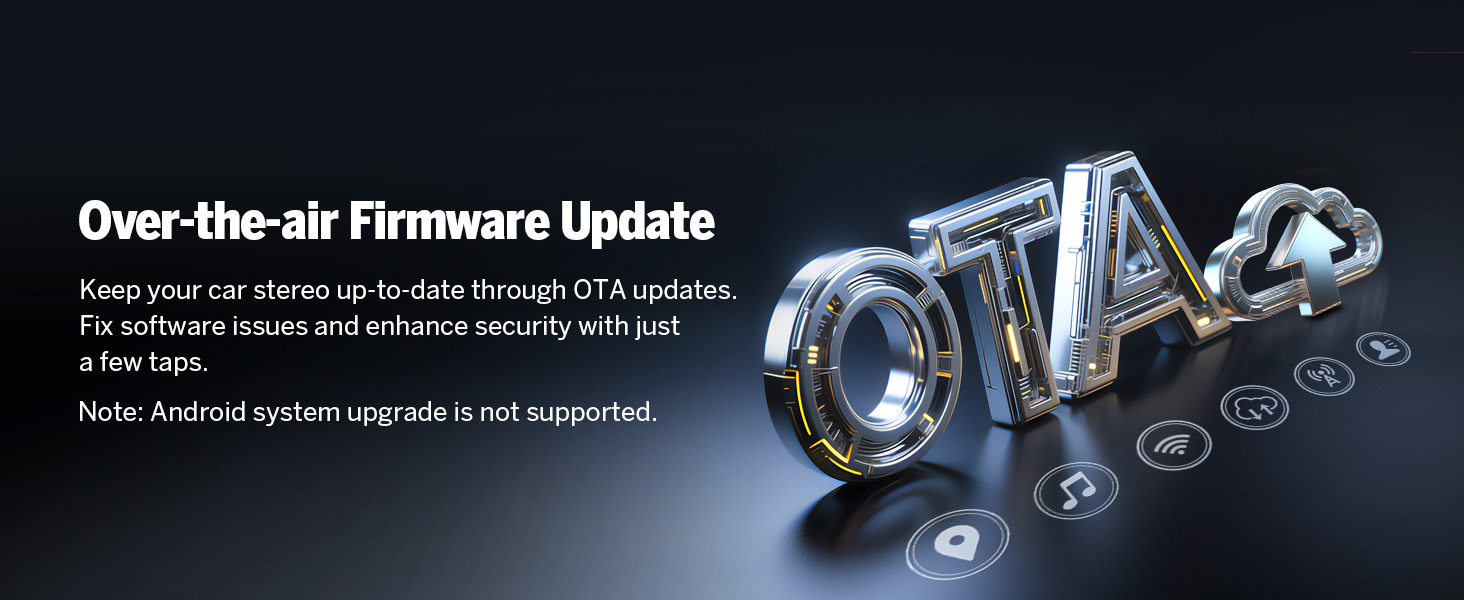
The Eonon HAC1X7 supports Over-The-Air (OTA) software updates. These updates are crucial for fixing software issues, enhancing security, and improving device performance. Updates are for the software only and do not upgrade the Android system version.

6. Solució De Problemes
If you encounter any issues with your Eonon HAC1X7 car stereo, please refer to the following general troubleshooting tips. For more complex problems, contact customer support.
Problemes comuns
- Sense energia: Check all power connections and ensure the fuse is intact. Verify the vehicle's battery is properly connected.
- Sense so: Confirm speaker connections are correct. Check audio settings and ensure volume is not muted or set too low. Verify the amplifier (if external) is powered on.
- Pantalla tàctil que no respon: Perform a system reset using the RST button (if available). Ensure the screen is clean and free from debris.
- Problemes de connexió amb CarPlay/Android Auto: Ensure Wi-Fi and Bluetooth are enabled on your phone and the stereo. Re-pair the device. Check for any software updates for both your phone and the stereo.
- Pèrdua de senyal GPS: Ensure the GPS antenna is correctly installed and has a clear line of sight to the sky. Check antenna connection to the unit.
- Els comandaments del volant no funcionen: Verify the steering wheel control wires are correctly connected according to the wiring diagram. Perform the steering wheel learning function in the settings.
If these steps do not resolve the issue, please contact Eonon customer support for further assistance.
7. Especificacions
| Característica | Especificació |
|---|---|
| Número de model | HAC1X7 |
| Sistema operatiu | Android 14 |
| CPU | RK3562 Quad-core ARM Cortex-A53 @ 2.0GHz |
| RAM | 3 GB |
| ROM | 32 GB |
| Mida de la pantalla | 10.1 polzades |
| Tipus de visualització | IPS HD Capacitive Touchscreen |
| Resolució | 1280 x 720 |
| Viewangle ing | 178° |
| AmpSortida més viva | 4x45W |
| Equalitzador | EQ de 48 bandes |
| Versió Bluetooth | 5.4 |
| Wi-Fi | Doble banda (2.4G/5G) |
| Ports USB | 3 |
| Models de cotxes compatibles | Honda Accord 2003-2007 (Petrol Version) |
| Pes de l'article | 7.7 lliures (3.5 quilograms) |
| Dimensions del paquet | 13.27 x 12.32 x 6.65 polzades |
8. Garantia i Suport
For any product-related inquiries, technical support, or warranty claims, please contact Eonon customer service. Refer to your purchase documentation for specific warranty terms and contact details.
Online resources, including FAQs and additional support materials, may be available on the official Eonon weblloc.