
Introducció
Thank you for choosing the OMOTON Foldable Bluetooth Keyboard. This manual provides essential information for setting up, operating, and maintaining your device. This keyboard is designed for portability and multi-device compatibility, offering a full-size typing experience with a numeric keypad.
Les característiques clau inclouen:
- Suport multidispositiu: Connects to up to 3 devices simultaneously, allowing quick switching between them.
- Àmplia compatibilitat: Supports iOS, Android, Windows, and MacOS devices.
- Disseny portàtil: Folds into a compact size for easy transport.
- Disseny a mida completa: Inclou un teclat numèric per a una major productivitat.
- Llarga vida útil de la bateria: Offers extended use with a quick charging time.
- Suport de telèfon integrat: Enhances comfort and efficiency when using with smartphones or tablets.

The OMOTON Foldable Bluetooth Keyboard is shown in its compact, folded form, its full-size unfolded state, and alongside the adjustable phone stand. This illustrates its portability and readiness for use with mobile devices.
Instruccions de configuració
Contingut del paquet
Abans de començar, assegureu-vos que hi hagi tots els elements presents:
- OMOTON Foldable Bluetooth Keyboard
- Cable de càrrega USB (tipus C)
- Adjustable Phone/Tablet Stand
- Bossa amb cordó
- Manual d'instruccions
Carregant el teclat
The keyboard comes with a built-in rechargeable battery. For optimal performance, fully charge the keyboard before first use.
- Localitza el port de càrrega USB-C al teclat.
- Connect the provided USB charging cable to the keyboard and a power source (e.g., computer USB port, USB wall adapter).
- L'indicador lluminós de càrrega s'il·luminarà. Una càrrega completa sol trigar aproximadament 2 hores.
- Once fully charged, the indicator light will change or turn off, depending on the model.

The keyboard is depicted on an airplane tray table next to a tablet, emphasizing its long battery life with 90 days standby and a quick 2-hour full charge, ideal for travel.
Encès/Apagat
To power on the keyboard, unfold it completely. The keyboard will automatically power on. To power off, fold the keyboard. It will automatically enter sleep mode after 30 minutes of inactivity.
Emparellament Bluetooth
The OMOTON Foldable Bluetooth Keyboard can connect to up to three devices simultaneously.
- Seleccioneu el mode del sistema: Before pairing, press the appropriate function key combination to switch to your device's operating system:
- FN + Q per a iOS (iPad, iPhone)
- FN + W per a Android (tauletes, telèfons intel·ligents)
- FN + E for Windows (Laptops, PCs)
- FN + R for MacOS (MacBook, iMac)
- Activa el mode de vinculació: Press and hold one of the Bluetooth channel buttons (BT1, BT2, or BT3) for 3 seconds until its indicator light flashes quickly. This indicates the keyboard is in pairing mode.
- Activa el Bluetooth al teu dispositiu: Ves a la configuració de Bluetooth del dispositiu i activa el Bluetooth.
- Selecciona el teclat: Look for "Bluetooth Keyboard" in the list of available devices and select it to connect.
- Confirmeu la connexió: Once connected, the indicator light on the keyboard will stop flashing and remain solid for a few seconds before turning off.
- Repeat steps 2-5 for additional devices using BT2 and BT3.

A visual guide illustrating the function key combinations required to switch the keyboard's compatibility mode for iOS, Android, Windows, and Mac devices, ensuring proper key mapping.

Un detallat view of the keyboard's Bluetooth channel buttons (BT1, BT2, BT3) and status indicators, accompanied by text explaining the pairing process for multiple devices.
Instruccions de funcionament
Canvi entre dispositius connectats
Once paired with multiple devices, you can easily switch between them:
- Premeu el botó BT1 button to switch to the first paired device.
- Premeu el botó BT2 button to switch to the second paired device.
- Premeu el botó BT3 button to switch to the third paired device.
The keyboard will connect to the selected device within seconds.

This image demonstrates the keyboard's multi-device connectivity, showing it paired with a tablet, a smartphone in its stand, and a laptop, highlighting the ability to switch between them.
Using the Adjustable Stand
The included adjustable stand can be used to prop up your smartphone or tablet for a comfortable viewangle d'escriptura i escriptura.
- Unfold the stand to its desired angle. It offers 5 adjustable angles.
- Place your device (smartphone or tablet) securely in the stand.

A user is shown typing on the keyboard with a tablet positioned in the adjustable stand, highlighting the stand's five adjustable angles for ergonomic viewing and comfortable typing.
Funcions del teclat
The keyboard features a full-size layout with a numeric keypad and various function keys:
- F1-F12: Standard function keys, often combined with the FN key for multimedia or system controls.
- Control de volum: Dedicated keys for adjusting audio volume.
- Teclat numèric: Per a una entrada de dades eficient.
Funció de son
To conserve battery, the keyboard will automatically enter sleep mode after 30 minutes of inactivity. Press any key to wake it up.
This video demonstrates the OMOTON Foldable Bluetooth Keyboard's multi-device support, showing how to connect and switch between a laptop, tablet, and smartphone for seamless workflow.
Manteniment
To ensure the longevity and optimal performance of your OMOTON Foldable Bluetooth Keyboard, follow these maintenance guidelines:
- Neteja: Feu servir un drap suau, sec i sense borrissol per netejar la superfície del teclat. Per a la brutícia persistent, netegeu lleugerament.ampNetegeu el drap amb aigua o un netejador suau i no abrasiu. Eviteu la humitat excessiva.
- Eviteu líquids: Do not expose the keyboard to liquids. In case of accidental spills, power off the keyboard immediately and allow it to dry completely before use.
- Emmagatzematge: When not in use, fold the keyboard to protect the keys and store it in the provided drawstring pouch. Avoid storing in extreme temperatures or high humidity.
- Cura de la bateria: To maintain battery health, avoid fully discharging the battery frequently. Charge the keyboard regularly, even if not in constant use.
- Manejar amb cura: Avoid dropping the keyboard or subjecting it to strong impacts, as this can damage internal components.
Resolució de problemes
If you encounter any issues with your OMOTON Foldable Bluetooth Keyboard, please refer to the following common solutions:
El teclat no es connecta/s'emparella
- Comproveu la potència: Assegureu-vos que el teclat estigui encès i que la bateria estigui prou carregada.
- Bluetooth activat: Verify that Bluetooth is enabled on your device (smartphone, tablet, laptop).
- Mode del sistema: Confirm you have selected the correct operating system mode (FN+Q/W/E/R) for your device.
- Torna a entrar al mode d'emparellament: Press and hold the desired BT button (BT1/BT2/BT3) for 3 seconds until the indicator flashes, then attempt to pair again from your device's Bluetooth settings.
- Oblida el dispositiu: If previously paired, try 'forgetting' or 'removing' the keyboard from your device's Bluetooth list and then re-pair.
- Interferència: Allunyeu-vos d'altres dispositius sense fil que puguin causar interferències.
Keys Not Responding/Typing Incorrectly
- Mode del sistema: Double-check that the keyboard is set to the correct operating system mode (FN+Q/W/E/R). Incorrect mode can lead to incorrect key mapping.
- Nivell de bateria: A low battery can affect keyboard performance. Charge the keyboard fully.
- Reconnexió: Disconnect and reconnect the keyboard via Bluetooth.
Keyboard Disconnects Frequently
- Distància: Ensure your device is within the effective Bluetooth range (typically 10 meters/33 feet).
- Bateria: Carregueu el teclat completament.
- Interferència: Minimize interference from other wireless devices or strong electromagnetic fields.
Adjustable Stand Issues
- Estabilitat: Ensure the stand is fully unfolded and placed on a flat, stable surface.
- Device Fit: Confirm your device is properly seated in the stand's grooves.
Especificacions
| Característica | Detall |
|---|---|
| Número de model | B0FH55LY29 |
| Marca | OMOTON |
| Tecnologia de connectivitat | Bluetooth |
| Dispositius compatibles | iOS, Android, Windows, MacOS, iPad, iPhone, Samsung Tablets, PC, Laptop, Computer |
| Descripció del teclat | Teclat de mida completa |
| Característiques especials | 3 Bluetooth Channels, Foldable, Rechargeable |
| Color | Negre |
| Material | Plàstic |
| Pes de l'article | 15.2 unces |
| Dimensions del paquet | 12.36 x 5.12 x 1.1 polzades |
| Bateries | Necessita 1 bateria de ions de liti (inclosa) |
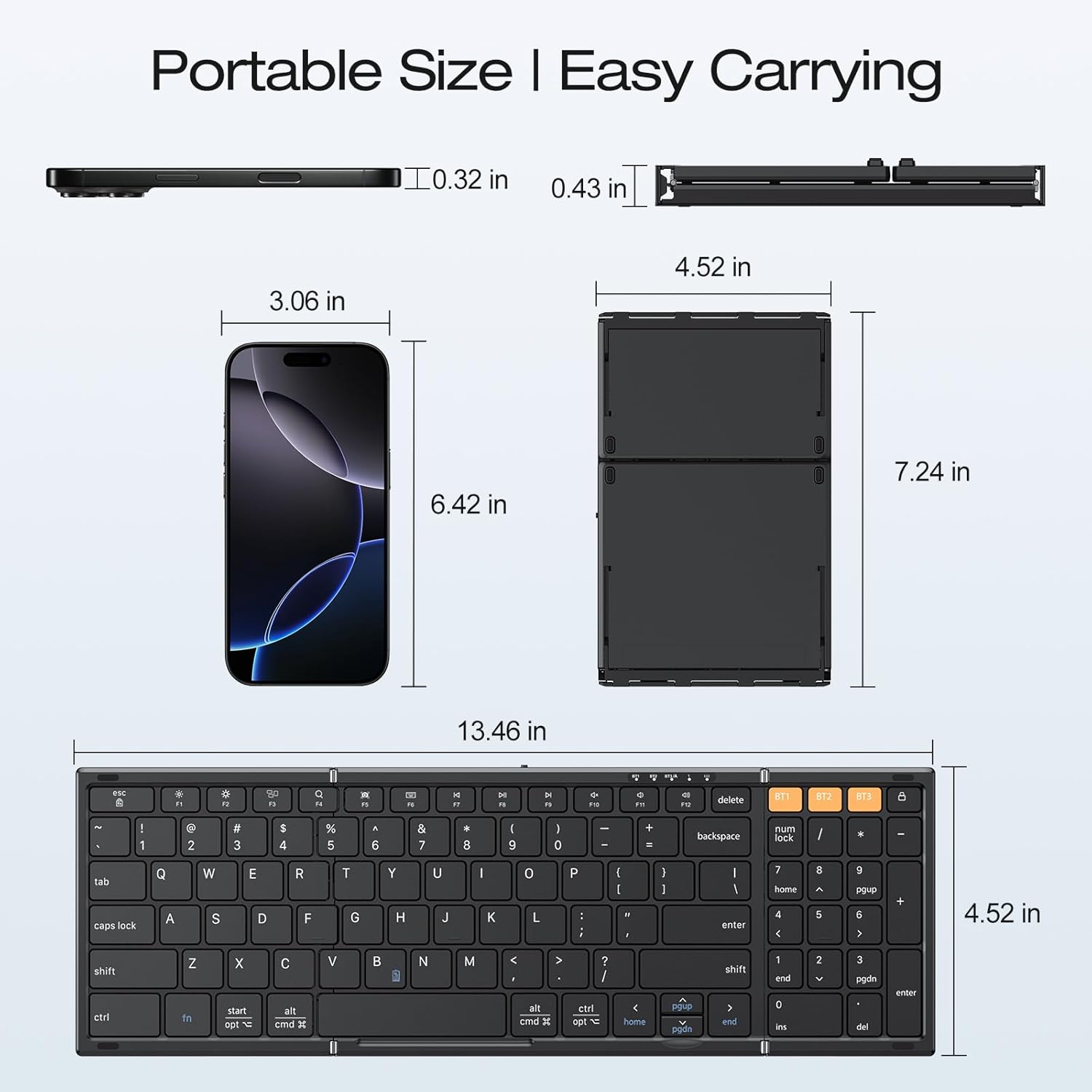
This image provides a size comparison of the folded keyboard next to a smartphone, illustrating its highly portable and compact design for easy carrying.
Garantia i Suport
OMOTON products are designed for reliability and performance. For specific warranty details, please refer to the warranty card included in your product packaging or visit the official OMOTON weblloc.
If you experience any issues not covered in the troubleshooting section or require further assistance, please contact OMOTON customer support through their official channels. Have your product model number (B0FH55LY29) and purchase information ready.