
1. Introducció
This manual provides detailed instructions for the installation, operation, and maintenance of your ZALMAN P60 Mid Tower PC Case. Please read this manual thoroughly before beginning assembly to ensure correct setup and optimal performance. Keep this manual for future reference.
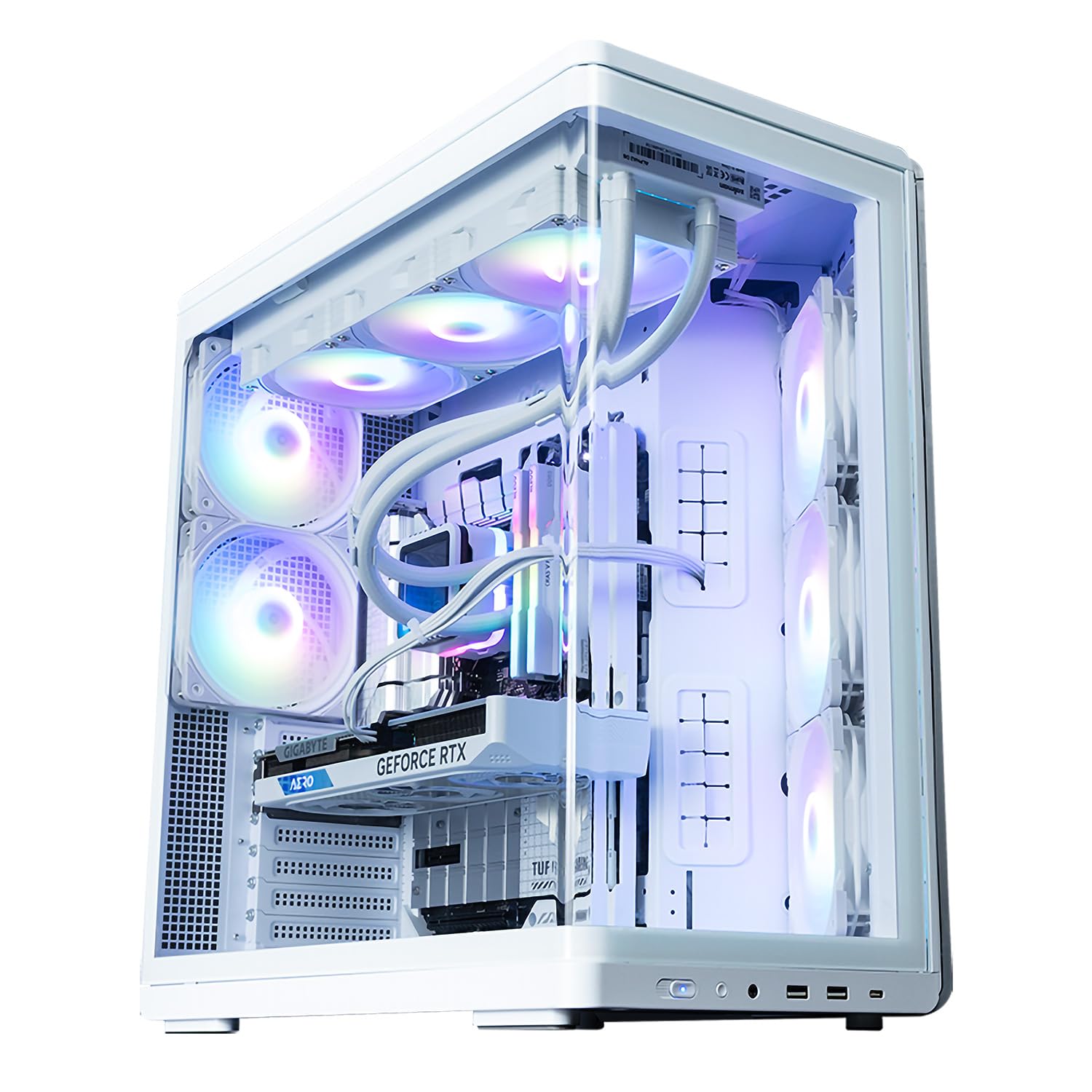
Image 1.1: ZALMAN P60 White Mid Tower PC Case with internal RGB lighting, showcasing its curved glass panel and spacious interior.
2. Informació de seguretat
- Desconnecteu sempre l'alimentació de la presa de corrent abans d'instal·lar o treure qualsevol component.
- Handle all components with care to prevent damage. Static electricity can harm sensitive electronic parts. Consider using an anti-static wrist strap.
- Keep small parts and accessories out of reach of children.
- Assegureu-vos que hi hagi una ventilació adequada al voltant de la carcassa de l'ordinador per evitar el sobreescalfament.
- No intenteu modificar l'estructura de la carcassa, ja que això podria anul·lar la garantia i suposar riscos per a la seguretat.
3. Contingut del paquet
Si us plau, verifiqueu que tots els elements que s'enumeren a continuació siguin presents al vostre paquet:
- ZALMAN P60 Mid Tower PC Case
- Kit d'accessoris (cargols, separadors, brides per a cables)
- Guia d'inici ràpid
- Suport de suport de GPU
- Pre-installed Fans: 3x 120mm Reverse ARGB Fans (Side), 2x 120mm ARGB Fans (Rear)
4. Característiques del producte
- Curved Tempered Glass Design: Features integrated curved tempered glass on the front and side, creating an open design that highlights ARGB lighting and allows for neat cable management.
- Flux d'aire optimitzat: Includes a total of five 120mm ARGB fans for angled side airflow, with support for up to 11 fans. This ensures robust cooling performance and ideal airflow.
- Interior espaiós: Proporciona ample space for graphics cards up to 435mm in length and supports 360mm radiators, offering flexible compatibility for various builds.
- Compatibilitat de la placa base: Compatible with ATX, Micro-ATX, and Mini-ITX motherboards, including those with rear-facing connectors from brands like ASUS, MSI, and GIGABYTE.
- Dedicated GPU Support: Standard equipped with a height-adjustable dedicated GPU support bracket for secure installation of large graphics cards.

Image 4.1: The ZALMAN P60 case design, highlighting its aesthetic appeal and available color options.
5. Configuració i instal·lació
5.1. Preparació del cas
- Col·loqueu la caixa sobre una superfície plana i estable.
- Carefully remove the side panels by unscrewing the thumbscrews at the rear of the case and sliding the panels off.
5.2. Instal·lació de la placa base
- Instal·leu la protecció d'E/S a l'obertura de la safata de la placa base des de l'interior de la carcassa.
- Align the motherboard with the pre-installed standoffs. If necessary, install additional standoffs from the accessory kit for your specific motherboard size (ATX, Micro-ATX, Mini-ITX).
- Fixeu la placa base amb els cargols proporcionats.
5.3. Instal·lació de la font d'alimentació (PSU)
- Mount the PSU into its designated compartment at the rear of the case.
- Secure the PSU with screws from the accessory kit.
5.4. Instal·lació de la unitat d'emmagatzematge
The ZALMAN P60 supports 1x 2.5/3.5" Combo, 1x 2.5", and 2x 3.5" drives.
- Unitats de 2.5": Locate the 2.5" drive mounts, typically behind the motherboard tray. Secure the SSDs using the provided screws.
- Unitats de 3.5": Install HDDs into the drive cages, usually located in the lower chamber. Slide the drives into the trays and secure them.
5.5. Instal·lació de la targeta gràfica (GPU)
- Traieu les cobertes de les ranures d'expansió necessàries a la part posterior de la carcassa.
- Inseriu la targeta gràfica a la ranura PCIe de la placa base.
- Fixeu la targeta gràfica amb cargols.
- Utilize the included height-adjustable GPU support bracket to prevent sag for larger cards. Adjust its height to firmly support the GPU.

Imatge 5.1: Interna view highlighting the GPU support bracket and drive bay area.
5.6. Instal·lació del ventilador i del radiador
The ZALMAN P60 comes with 5 pre-installed ARGB fans and supports additional fans and radiators as detailed in the specifications.
- Ventiladors addicionals: Mount additional 120mm or 140mm fans to the top, side, or bottom mounts as needed, securing them with screws.
- Radiadors: Install liquid cooling radiators to the top, rear, or bottom mounts, ensuring proper alignment and securing with screws.

Imatge 5.2: Interna view illustrating various fan mounting locations and radiator support.
5.7. Gestió de cables
Utilize the cable routing cutouts and tie-down points behind the motherboard tray to manage cables neatly. This improves airflow and aesthetics.
6. Funcionament
6.1. Encès
After all components are installed and cables are connected, close the side panels. Connect the power cable to the PSU and a wall outlet. Press the power button on the front I/O panel to start your PC.
6.2. Control d'il·luminació ARGB
The pre-installed ARGB fans can be controlled via your motherboard's ARGB software (if compatible) or a dedicated ARGB controller (if included or purchased separately). Refer to your motherboard manual for specific ARGB header connections and software instructions.
7. Manteniment
7.1. Neteja dels filtres de pols
Regularly clean the dust filters to maintain optimal airflow and cooling performance. Dust filters are typically located at the top, front, and bottom of the case and can be easily removed for cleaning.
7.2. Neteja general
Use a soft, dry cloth to wipe down the exterior of the case. For stubborn marks, a slightly damp cloth can be used. Avoid abrasive cleaners or solvents that may damage the finish or tempered glass.
8. Solució De Problemes
- PC not powering on: Ensure all power cables (24-pin ATX, 8-pin CPU, GPU power) are securely connected. Check the power switch on the PSU. Verify front panel header connections to the motherboard.
- Fans not spinning/RGB not lighting up: Check fan and ARGB cable connections to the motherboard or controller. Ensure ARGB software is correctly configured.
- Sobreescalfament: Verify all fans are spinning correctly and are oriented for proper airflow (intake/exhaust). Clean dust filters. Ensure no cables are obstructing airflow.
- Loose components: Periodically check that all screws and connections are secure, especially after moving the PC.
9. Especificacions
| Característica | Especificació |
|---|---|
| Marca | ZALMAN |
| Nom del model | P60 |
| Tipus de cas | Torre mitja |
| Color | Blanc |
| Dimensions del producte (W×D×H) | 290 × 475 × 478 mm |
| Pes del producte | 10.2 kg |
| Materials | Acer, vidre temperat, plàstic |
| Plaques base compatibles | ATX, Micro ATX, Mini ITX |
| Font d'alimentació compatible | ATX (Rear Mount) |
| Drive Bays | 1x 2.5"/3.5" Combo, 1x 2.5", 2x 3.5" |
| Ranures d'expansió | 7 |
| Included Case Fans | Side: 3x 120mm Reverse ARGB, Rear: 2x 120mm ARGB |
| Supported Case Fans | Top: 3x 120mm / 2x 140mm, Side/Bottom: 3x 120mm, Rear: 2x 120mm |
| Supported Radiators | Top: 360/280/240/140/120mm, Rear: 120mm, Bottom: 360/240/120mm |
| Alçada lliure del refrigerador de CPU | Màxim 170 mm |
| Liquidació de la longitud de la GPU | Màxim 435 mm |
| Longitud de la font d'alimentació | Màxim 180 mm |
| Ports d'E / S frontals | 1x USB 20Gbps Type-C, 2x USB 5Gbps Type-A, 1x Audio Jack |
| Característiques especials | Curved Tempered Glass, Dual-Chamber Structure, Included GPU Support Bracket, ARGB Lighting |
10. Garantia i assistència
10.1. Informació de la garantia
The ZALMAN P60 Mid Tower PC Case comes with a 1 any de garantia from the date of purchase. This warranty covers manufacturing defects and faulty materials under normal use. It does not cover damage caused by misuse, accidents, unauthorized modifications, or improper installation.
10.2. Suport tècnic
For technical assistance, troubleshooting, or warranty claims, please visit the official ZALMAN website or contact their customer support. Ensure you have your product model and proof of purchase ready when seeking support.
Official ZALMAN Weblloc: www.zalman.com