
karuisrc K610
Manual d'usuari del dron GPS Karuisrc K610
Model: K610
1. Introducció
This manual provides essential information for the safe operation and maintenance of your karuisrc K610 GPS Drone. Please read this manual thoroughly before operating the drone to ensure proper usage and to prevent damage or injury. The K610 is a foldable GPS quadcopter equipped with a 4K camera, designed for both beginners and experienced users, featuring intelligent flight modes and stable performance.

Image 1.1: The karuisrc K610 GPS Drone in flight.
2. Pautes de seguretat
Operating a drone requires responsibility. Adhere to the following safety guidelines to ensure a safe flight experience for yourself and others:
- Comprovació prèvia al vol: Always inspect the drone, propellers, and battery before each flight. Ensure all components are securely attached and undamaged.
- Condicions ambientals: Fly in open areas, away from people, animals, buildings, and obstacles. Avoid flying in strong winds, rain, snow, or fog.
- Seguretat de la bateria: Feu servir només bateries i carregadors aprovats. No sobrecarregueu ni perforeu les bateries. Deixeu d'utilitzar-les si les bateries estan danyades o inflades.
- Línia de visió: Mantingueu la línia de visió amb el dron en tot moment.
- Respectar la privadesa: Do not use the drone to invade privacy.
- Normativa local: Be aware of and comply with all local laws and regulations regarding drone operation.
3. Contingut del paquet
Verifiqueu que tots els elements siguin presents al vostre paquet:
- K610 Drone x 1
- Control remot x 1
- Batteries x 1 (Nonstandard Battery)
- Spare Propellers x 4
- Tornavís x 1
- Cable USB x 1
- Maleta de transport x 1
- Manual d'instruccions x 1

Image 3.1: Included items in the karuisrc K610 drone package.
4. Components mésview
4.1 Drone
The K610 drone features a foldable design for portability, brushless motors for stable flight, and an integrated 4K camera.

Image 4.1: The karuisrc K610 drone and remote control.
4.2 Control remot
The remote control provides intuitive flight control and a mount for your smartphone to view l'alimentació FPV.
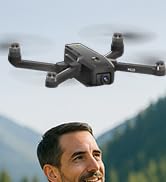
Image 4.2: Remote control with smartphone for FPV viewing.
5. Configuració
5.1 Instal·lació i càrrega de la bateria
- Insert the modular battery into the drone's battery compartment until it clicks into place.
- To charge, remove the battery from the drone. Connect the USB charging cable to the battery and a suitable USB power adapter (not included).
- The charging indicator on the battery will show its status. Ensure the battery is fully charged before flight.

Image 5.1: Modular battery for the K610 drone.
5.2 Instal·lació de l'hèlix
Attach the propellers according to the markings (A and B) on the propellers and motor arms. Ensure they are securely fastened with the provided screwdriver.
5.3 Configuració del control remot
- Install 3x AA batteries (not included) into the remote control.
- Extend the phone holder and securely mount your smartphone.
5.4 Instal·lació i connexió de l'aplicació
- Download the official karuisrc drone app from your smartphone's app store.
- Engegueu el dron i, a continuació, engegueu el comandament a distància.
- On your smartphone, connect to the drone's Wi-Fi network (usually named 'K610-XXXXXX').
- Obre l'aplicació per establir una connexió i view la transmissió FPV en directe.

Image 5.2: 5GHz WiFi transmission for real-time viewing.
5.5 Calibració
Before the first flight and after any significant change in location, perform compass and gyroscope calibration as instructed in the app or quick start guide. This ensures stable flight and accurate GPS positioning.
6. Funcionament
6.1 Controls bàsics de vol
Refer to the remote control diagram in the quick start guide for specific joystick and button functions. Generally:
- Left Joystick: Controls altitude (up/down) and rotation (yaw left/right).
- Right Joystick: Controls forward/backward and left/right movement (pitch/roll).
6.2 Enlairament i aterratge
- Enlairament amb una sola clau: Press the designated take-off button on the remote or in the app. The drone will automatically ascend to a safe height and hover.
- Enlairament manual: Push both joysticks to the bottom-outer corners to unlock motors, then slowly push the left joystick up to ascend.
- Aterratge d'una sola clau: Press the designated landing button. The drone will descend and land automatically.
- Aterratge manual: Slowly pull the left joystick down to descend. Once landed, push both joysticks to the bottom-outer corners to stop motors.
6.3 GPS Features
The K610 drone utilizes GPS for enhanced stability and intelligent flight functions.
- Auto Return Home (RTH): The drone can automatically return to its take-off point if the signal is lost, battery is low, or the RTH button is pressed.

Image 6.1: GPS Auto Return Home functionality.
6.4 Modes de vol avançats
Access these modes via the drone's app:
- Segueix-me: The drone will automatically follow the remote control or smartphone, capturing footage a mesura que et mous.
- Waypoint Flight (Tap Fly): Tap points on the map in the app, and the drone will fly along the specified path.
- Point-of-Interest (Circle Fly): Select a point on the map, and the drone will circle around it at a set radius and altitude.

Image 6.2: Advanced flight modes: Follow Me, Circle Fly, and Tap Fly.
6.5 4K Camera Operation
The K610 is equipped with a 4K UHD camera with 90° adjustable tilt for capturing high-quality aerial footage i fotos.
- Captura de foto/vídeo: Feu servir els botons dedicats del comandament a distància o de la interfície de l'aplicació per fer fotos o iniciar/aturar la gravació de vídeo.
- Angle de càmera ajustable: The camera's tilt can be adjusted remotely via the app or remote control.
- Suport de la targeta SD: Insert an SD card (not included) into the drone for direct storage of high-resolution media.

Image 6.3: The K610's 4K HD Camera.
6.6 Producte acabatview Vídeo
Watch this video for a visual guide on the karuisrc K610 GPS Drone's features and operation.
Vídeo 6.4: Acabatview of the karuisrc K610 GPS Drone's features and capabilities.
7. Manteniment
Un manteniment regular garanteix la longevitat i el rendiment òptim del vostre dron.
- Neteja: Gently wipe the drone and remote control with a soft, dry cloth after each use. Avoid using harsh chemicals.
- Inspecció de l'hèlix: Regularly check propellers for cracks, bends, or damage. Replace damaged propellers immediately using the provided spares.
- Cura de la bateria: Guardeu les piles en un lloc fresc i sec. No emmagatzemeu piles completament carregades o completament esgotades durant períodes prolongats. Carregueu-les fins a un 50-60% aproximadament per a l'emmagatzematge a llarg termini.
- Emmagatzematge: Quan no l'utilitzeu, plegueu el dron i guardeu-lo a la seva funda de transport per protegir-lo de la pols i els danys físics.
8. Solució De Problemes
Si teniu problemes, consulteu els següents problemes i solucions habituals:
| Problema | Causa possible | Solució |
|---|---|---|
| El dron no s'enlaira ni respon als controls. | Low battery, improper calibration, motors locked. | Charge drone/remote batteries. Perform calibration. Unlock motors (refer to section 6.2). |
| Vol inestable o a la deriva. | Poor calibration, strong winds, damaged propellers. | Recalibrate the drone. Fly in calm conditions. Inspect and replace damaged propellers. |
| No FPV feed on smartphone. | Wi-Fi not connected, app not open, drone/phone too far apart. | Ensure phone is connected to drone's Wi-Fi. Open the app. Move closer to the drone. |
| GPS features (RTH, Follow Me) not working. | Insufficient GPS signal, drone not calibrated. | Fly in an open area with clear sky. Wait for sufficient GPS satellites to connect (indicated by app). Perform GPS calibration. |
9. Especificacions
Key technical specifications for the karuisrc K610 GPS Drone:
| Característica | Detall |
|---|---|
| Nom del model | K610 |
| Pes de l'article | 204 grams (7.2 unces) |
| Càmera | 4K UHD (4096×3072P images), 12 MP Effective Still Resolution, 90° Adjustable, CMOS Sensor |
| Resolució de captura de vídeo | 1080p (MP4 format) |
| Tecnologia de connectivitat | Wi-Fi, RF (5GHz FPV Transmission) |
| Tipus de control | Control remot |
| Característiques especials | Adjustable, Auto-Landing, Portable, GPS Auto Return, Follow Me, Waypoint Flight, Point-of-Interest Circle |
| Tipus de motor | Motor sense escombretes |
| Bateria | 1 Nonstandard Lithium Ion Battery (included) |
| Temps de vol | Up to 20 minutes (typical 18 minutes) |
| Material | Plàstic |
| Dimensions del producte | 7 cm de llargada x 2 cm d'amplada x 8 cm d'alçada |

Image 9.1: Brushless motor technology for the K610 drone.
10. Garantia i Suport
For warranty information or technical support, please contact karuisrc customer service. Keep your purchase receipt as proof of purchase.
- Telèfon: +44 7419 298225
- Correu electrònic: Karuisrc@gmail.com

Image 10.1: karuisrc customer support.
Ask a question about this manual
Ask about setup, troubleshooting, compatibility, parts, safety, or missing instructions. Manuals+ will review the question and use this page’s manual context to help answer it.