
Introducció
This manual provides instructions for the ASHATA Outdoor Solar Powered 4G LTE Modem Router. This device offers reliable internet connectivity in various outdoor environments, utilizing a 15W solar panel and a 20800mAh battery for sustained operation. It supports both wired and wireless WiFi access and can connect up to 8 devices simultaneously.
Les característiques clau inclouen:
- Connectivitat dual: Supports wired and wireless WiFi access with an industrial 4G module for stability.
- Suport multidispositiu: Connects up to 8 devices (e.g., IPC, phones, computers) via WiFi.
- 4G LTE Mobile Network: Provides high-speed WiFi using an LTE modem for live streaming and other internet-enabled devices.
- Rugged & Waterproof: Classificació IP66 casing ensures durability against harsh weather conditions.
- Funció de repetidor: Converts 4G signals to WiFi and can amplify existing networks without a SIM card.
Contingut del paquet
Verifiqueu que tots els elements siguin presents al paquet:
- 1 x Solar Router
- 4 x antena
- 4 x tub d'expansió de plàstic
- 4 x Long Screw
- 2 x Short Screw
- 2 x Bra (Bracket)
Instruccions de configuració
1. Instal·lació de la targeta SIM
The router requires a small SIM card (not included) for 4G LTE mobile network access.
- Locate the 4G SIM Card Slot on the device.
- Carefully insert your small SIM card into the slot until it clicks into place. Ensure correct orientation.
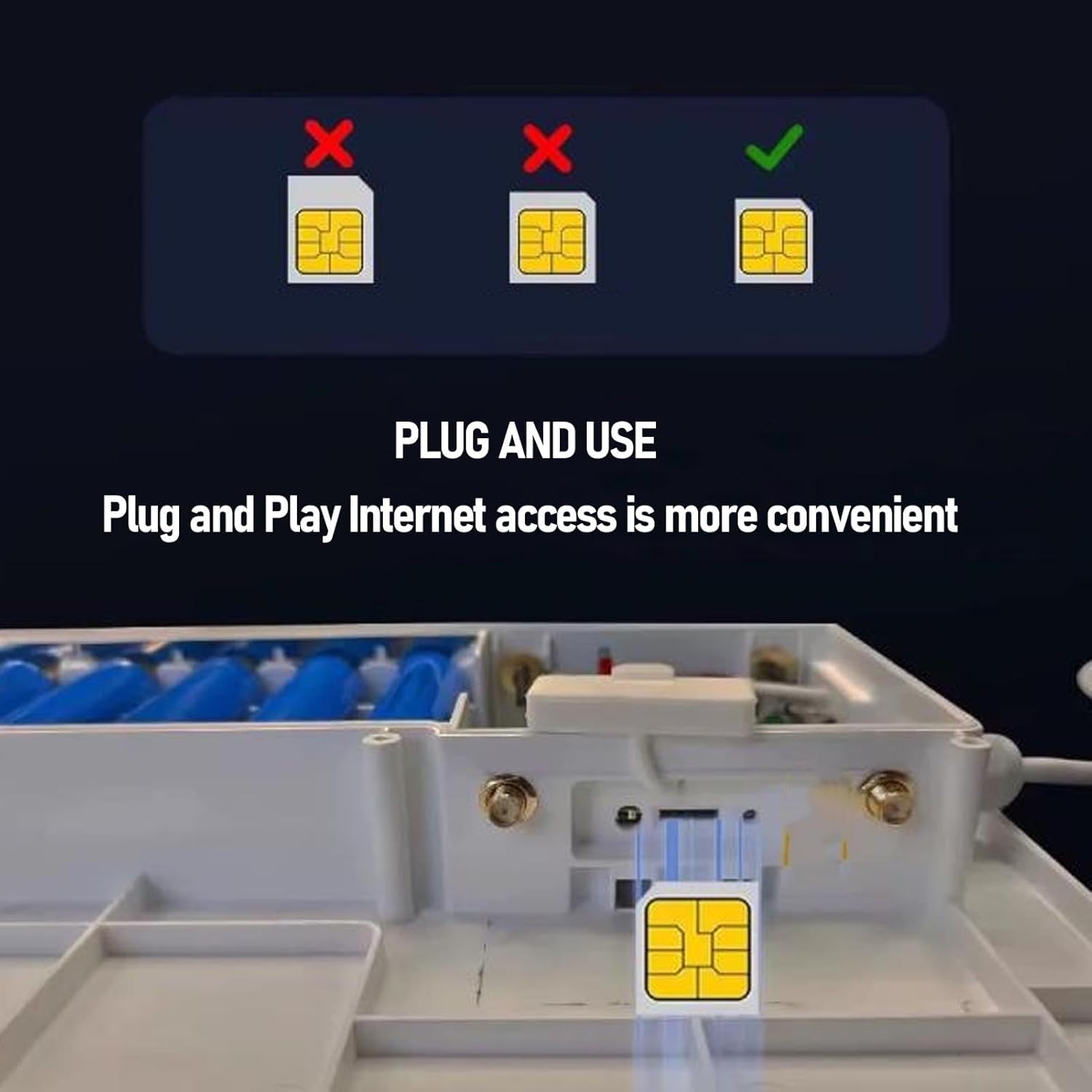
Image: Inserting a SIM card into the router's dedicated slot. The router supports plug-and-play internet access once the SIM card is correctly installed.
2. Instal·lació d'antenes
Attach the four provided antennas to the corresponding ports on the router. Hand-tighten them securely.
3. Muntatge del router
The router is designed for outdoor use and can be mounted on a wall or pole. Use the provided plastic expansion tubes, long screws, and short screws with the bracket for secure installation. Ensure the solar panel faces direct sunlight for optimal charging.
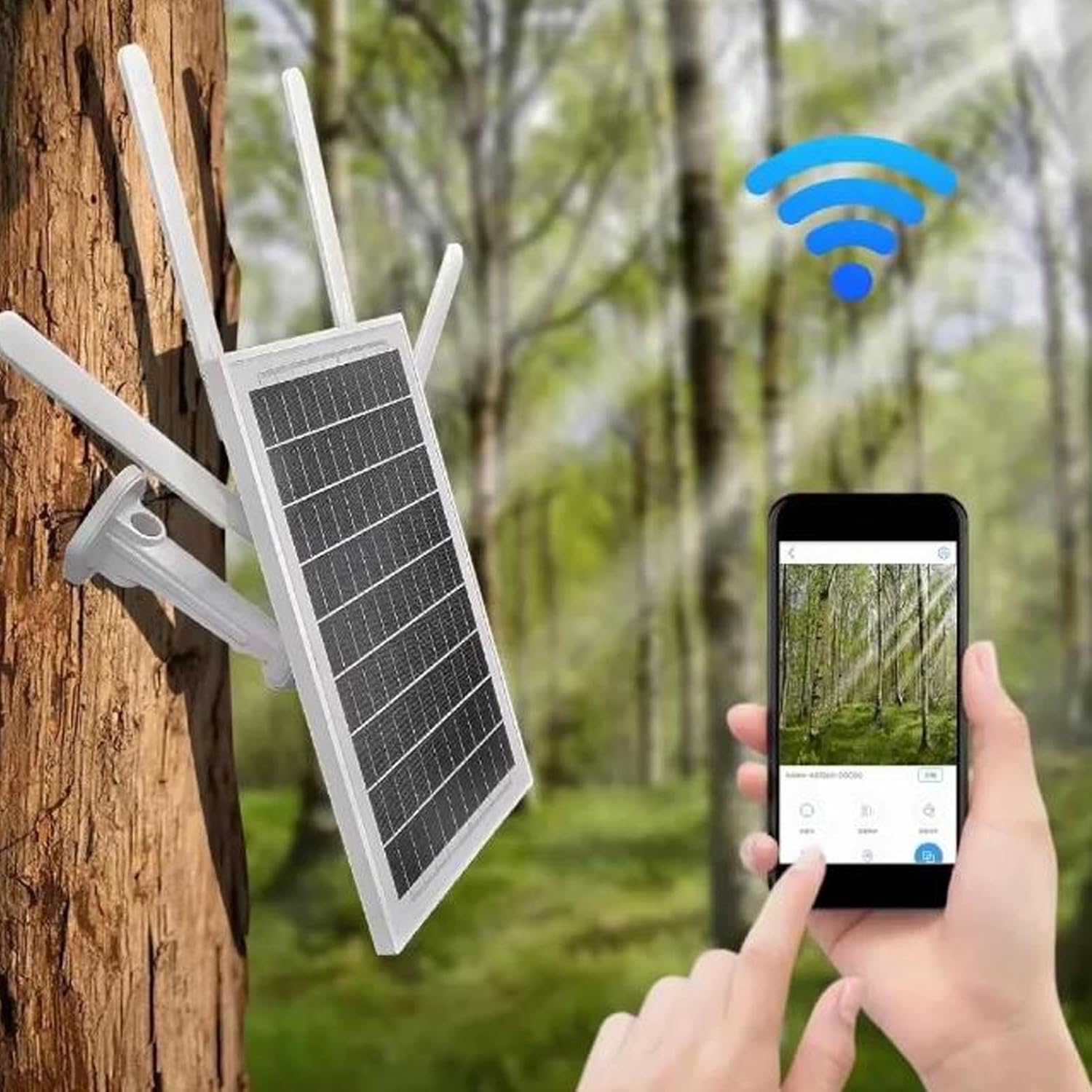
Image: The ASHATA router mounted on a tree, demonstrating its outdoor application for security cameras and remote monitoring.
4. Engegada i càrrega inicial
The router can be powered by its built-in 20800mAh battery, which is charged via the integrated 15W solar panel or a USB power cable (DC 5V 2A input). Ensure the solar panel is exposed to sunlight for charging. The device has a power switch (Right On / Left Off).

Image: The solar panel of the ASHATA router, illustrating its 15W power generation and energy-saving capability through sunlight.
Instruccions de funcionament
1. Llums indicadores
Monitor the device status using the indicator lights:
- Llum verda encès: Full Charge / Full Power
- Llum blava intermitent: Solar Charging in progress
- Llum vermella encès: Bateria baixa
- Blau intermitent: SIM Card Working / Network Activity

Image: Detailed diagram of the router's components, including the indicator lights for power and SIM card status.
2. Connecting Devices via WiFi
The router broadcasts a WiFi signal, allowing up to 8 devices to connect simultaneously.
- On your device (phone, computer, etc.), search for available WiFi networks.
- Select the network name (SSID) corresponding to your ASHATA router.
- Enter the WiFi password. The default password can be found in the WEB client or on a label on the device.

Image: The ASHATA router providing internet connectivity to multiple devices, showcasing la seva versatilitat.
3. Accedint al WEB Interfície
El incorporat WEB client allows for managing settings such as 4G signal strength, WiFi passwords, and network configurations.
- Connect a device to the router's WiFi network or via the RJ45 network port.
- Obre a web browser and enter the router's default IP address (usually 192.168.1.1 or similar, check device label).
- When prompted, enter the default login password: admin.
- From the interface, you can customize settings as needed.
4. Repeater Function
To use the router as a repeater to amplify an existing network without a SIM card, configure this setting through the WEB interface. Refer to the online documentation or the WEB client's help section for detailed steps.
Manteniment
- Neteja de panells solars: Regularly clean the solar panel surface to ensure maximum sunlight absorption and charging efficiency. Use a soft, damp drap per eliminar la pols, la brutícia o els residus.
- Comprovació de la connexió: Periodically inspect all cable connections (antennas, USB power) to ensure they are secure and free from damage.
- Cura de la bateria: While the 20800mAh battery is designed for outdoor use, avoid prolonged exposure to extreme temperatures (very hot or very cold) to maximize its lifespan.
- Actualitzacions de firmware: Comproveu el del fabricant weblloc o del router WEB interfície per a qualsevol actualització de firmware disponible per garantir un rendiment i una seguretat òptims.
Resolució de problemes
Sense connexió a Internet
- Comproveu la targeta SIM: Ensure the SIM card is correctly inserted and activated with a data plan. The blue indicator light should be flashing.
- Intensitat del senyal: Verify 4G signal strength via the WEB interfície. Si el senyal és feble, proveu de reposicionar el router o les antenes.
- Configuració de l'APN: Confirmeu que la configuració del nom del punt d'accés (APN) del router WEB interface match your mobile carrier's requirements.
Router Not Powering On / Low Battery
- Interruptor d'alimentació: Assegureu-vos que l'interruptor d'alimentació estigui en la posició "On".
- Càrrega solar: Confirm the solar panel is clean and receiving direct sunlight. The blue light should flash during solar charging.
- Càrrega USB: If solar charging is insufficient, connect the router to a 5V 2A USB power source using a USB cable.
- Llum vermella: If the red light is on, the battery is low and requires charging.
Slow WiFi Speeds
- Senyal 4G: Weak 4G signal will result in slower internet speeds. Improve signal as described above.
- Càrrega del dispositiu: Too many devices connected simultaneously (up to 8 supported) can impact performance.
- Interferència: Ensure the router is not placed near other electronic devices that might cause WiFi interference.
No es pot accedir WEB Interfície
- Connexió de xarxa: Ensure your device is connected to the router's WiFi or via Ethernet.
- Adreça IP: Double-check the router's IP address in your browser.
- Contrasenya per defecte: Confirm you are using the correct default password (admin). If changed, use the new password. If forgotten, a factory reset might be necessary (refer to the reset button on the device diagram).
Especificacions
| Tipus d'element | Solar Powered Modem Router |
| Marca | ASHATA |
| Número de model | ASHATA7suocgry9x-12 |
| Material | PVC, EVA, Tempered Glass, ABS |
| Mida del producte | Aprox. 328 x 220 x 46 mm / 12.91 x 8.66 x 1.81 polzades |
| Pes | Aprox. 2372.00 g / 83.67 oz |
| Energia solar | 15W |
| Bateria | Li Battery 20800mAh (Built-in) |
| Font d'alimentació | Solar Power or USB Power Cable (DC 5V 2A) |
| 4G Main Chip | ZX297520M |
| WIFI Chip | RTL8192ES CG |
| Tipus de xarxa | FDD LTE, TDD LTE, WCDMA, HSPA+, TD SCDMA, GSM, GPRS, EDGE |
| Speed (FDD LTE, TDD LTE) | Up to 50Mbps (Upload), Down to 150Mbps (Download) |
| Speed (HSPA+) | Up to 5.76Mbps (Upload), Down to 2Mbps (Download) |
| Speed (TD SCDMA) | Up to 2.2Mbps (Upload), Down to 2.8Mbps (Download) |
| Port de xarxa | 10/100M Adaptive RJ45 Interface |
| Estàndard WIFI | 2412MHz to 2472MHz, 802.11b, g, n, Up to 72Mbps |
| USIM or SIM Card | Small SIM Card (Not Included) |
| WEB Login Default Password | admin |
Informació de la garantia
This product comes with a manufacturer warranty for 90 days from the date of purchase. Please retain your proof of purchase for warranty claims. The warranty covers defects in materials and workmanship under normal use. It does not cover damage caused by misuse, accidents, unauthorized modifications, or natural disasters.
Suport
Per a assistència tècnica, resolució de problemes més enllà d'aquest manual o consultes sobre la garantia, poseu-vos en contacte directament amb el venedor o el fabricant. Consulteu la documentació de compra per obtenir dades de contacte específiques.