
Raycon RBO715
Manual d'usuari dels auriculars oberts Raycon Essential
Model: RBO715 | Marca: Raycon
Introducció
Welcome to the user manual for your Raycon Essential Open Earbuds. These true wireless open-ear Bluetooth headphones are designed for comfort and awareness, allowing you to enjoy high-quality audio while staying connected to your surroundings. Featuring an ultra-lightweight design, comfort hook, IPX5 water resistance, and up to 36 hours of battery life, these earbuds are perfect for an active lifestyle.

Figure 1: Raycon Essential Open Earbuds (Black)
Contingut del paquet
Si us plau, assegureu-vos que tots els articles estiguin presents al vostre paquet:
- Auriculars oberts Raycon Essential (esquerra i dreta)
- Estoig de càrrega
- Cable de càrrega USB
- Manual d'usuari (aquest document)

Figura 2: Auriculars a l'estoig de càrrega
Característiques clau
- Disseny d'orella oberta: Experience crystal-clear sound while staying fully aware of your surroundings. The open-ear design delivers high-quality audio without blocking your environment — perfect for workouts, outdoor runs, or multitasking throughout the day.

Figure 3: Open-Ear Design for Environmental Awareness
- Ajust lleuger com una ploma: The Essential Open Earbuds are so lightweight and comfortable, you might forget you're even wearing them. The minimalist, ear-hugging design ensures a secure fit that won’t budge during intense movement, all while keeping you stylish and streamlined.

Figure 4: Ultra-Lightweight Design (13.3g)
- Built for On-The-Go (IPX5 Water Resistant): Sweat-resistant and made for motion, these wireless earbuds are ideal for gym sessions, cycling, and daily hustle. They’re pocket-sized and portable – the perfect essential earbuds that fit into your life with zero bulk. The IPX5 rating means they are resistant to splashes and sweat.

Figura 5: Resistència a l'aigua IPX5
- Long Battery Life + Easy Charging: Stay powered through your day with all-day battery life and a sleek charging case that fits in the palm of your hand. Fast charging means less downtime and more freedom to move. Enjoy up to 8 hours of non-stop playback and a total of 36 hours with the charging case.

Figura 6: Durada de la bateria estesa
- Ganxo flexible per a l'orella: The ergonomic ear hook bends to fit the shape of any ear, ensuring a secure and comfortable fit.

Figure 7: Flexible Ear Hook Design
- Disseny compacte: Slide in your pocket or toss in your bag. Portable, fun-sized, and ready for any adventure.

Figura 8: Disseny compacte i portàtil
- Connexió multipunt: Connect to two devices and switch between them seamlessly — without the juggling.

Figure 9: Multipoint Connection Capability
Guia de configuració
1. Càrrega dels auriculars
Before first use, fully charge your Raycon Essential Open Earbuds and their charging case.
- Col·loca els dos auriculars a l'estoig de càrrega. Assegura't que estiguin ben col·locats.
- Connecteu el cable de càrrega USB proporcionat al port de càrrega de la carcassa i connecteu l'altre extrem a una font d'alimentació USB (per exemple, un adaptador de paret, un port USB de l'ordinador).
- El llum indicador de la caixa de càrrega mostrarà l'estat de càrrega. Un cop completament carregada, el llum canviarà o s'apagarà.
Video 1: Demonstrates charging the earbuds and case, as well as wearing them. This video is provided by the seller and is relevant for setup and operation.
2. Emparellament amb el dispositiu
Els auriculars entraran automàticament en mode d'emparellament quan es treguin de l'estoig per primera vegada.
- Obre l'estoig de càrrega i treu els dos auriculars. S'encendran automàticament i entraran en mode d'emparellament.
- Al dispositiu (telèfon intel·ligent, tauleta, ordinador), aneu a la configuració de Bluetooth.
- Cerca "Raycon Essential Open Earbuds" in the list of available devices.
- Select the earbuds to connect. You will hear an audible confirmation once connected.
For subsequent connections, the earbuds will automatically connect to the last paired device when removed from the case, if Bluetooth is enabled on the device.
Instruccions de funcionament
Portant els auriculars
Gently loop the ear hook over your ear and position the earbud speaker near your ear canal. Adjust for a comfortable and secure fit.
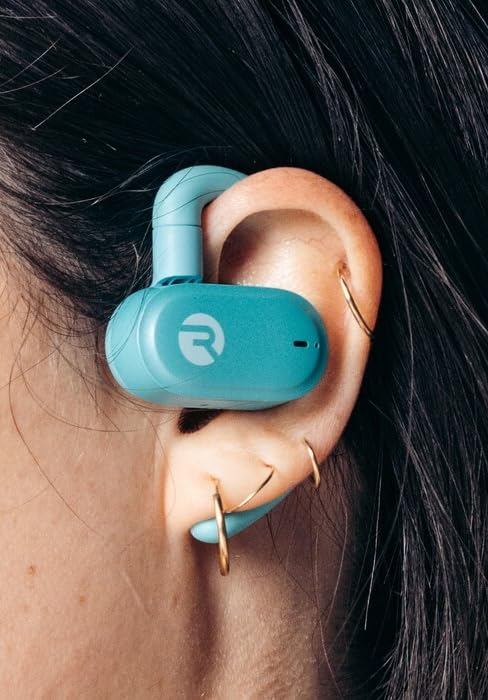
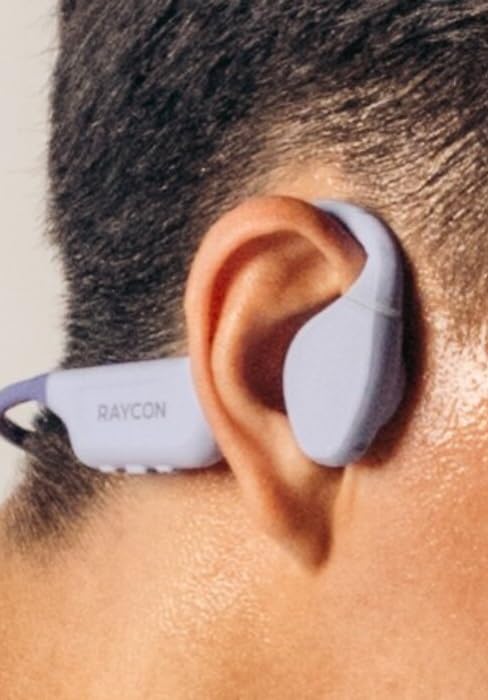
Figure 10: Proper Wearing of Essential Open Earbuds
Controls tàctils
The Essential Open Earbuds feature touch controls for various functions. Please note that the touch controls are sensitive. Refer to the quick start guide or the Raycon app for a full list of touch control functions, as specific actions (e.g., play/pause, skip track, answer call) are typically managed via taps on the earbud surface.
| Acció | Funció |
|---|---|
| Un sol toc | Reproduir/Pausar música, Respondre/Finalitzar trucada |
| Doble toc (auricular dret) | Pista següent |
| Doble toc (auricular esquerre) | Pista anterior |
| Premsa llarga | Activa l'Assistent de veu |
Note: Specific touch control gestures may vary. Consult the official Raycon support resources for the most accurate and up-to-date information.
Manteniment
Neteja
Per mantenir un rendiment i una higiene òptims, netegeu els auriculars i l'estoig de càrrega regularment.
- Feu servir un drap suau, sec i sense borrissol per netejar els auriculars i l'estoig de càrrega.
- Per a la brutícia persistent, lleugerament dampen the cloth with water. Avoid excessive moisture.
- No utilitzeu netejadors abrasius, dissolvents ni aerosols.
- Assegureu-vos que els contactes de càrrega tant dels auriculars com de la funda estiguin nets i secs abans de carregar-los.
Emmagatzematge
When not in use, store your earbuds in their charging case to protect them and keep them charged.
- Emmagatzemar en un lloc fresc i sec, allunyat de temperatures extremes i de la llum solar directa.
- Avoid storing in humid environments.
Cura de la bateria
Per allargar la durada de la bateria:
- Eviteu esgotar completament la bateria amb freqüència.
- Charge the earbuds regularly, even if not used for extended periods.
- Feu servir només el cable de càrrega proporcionat o un equivalent certificat.
Resolució de problemes
If you encounter issues with your Raycon Essential Open Earbuds, try the following solutions:
| Problema | Possible solució |
|---|---|
| Els auriculars no s'encenen. | Ensure the earbuds and charging case are fully charged. Place earbuds in the case, close it, then open it again. |
| Earbuds won't pair with device. |
|
| Sound breaks up or is intermittent. |
|
| Touch controls are too sensitive or unresponsive. |
|
| Un auricular no fa so. |
|
Especificacions
| Característica | Detall |
|---|---|
| Nom del model | Auriculars oberts Raycon Essential |
| Número de model | RBO715 |
| Tecnologia de connectivitat | Sense fil (Bluetooth 6.0) |
| Col·locació de l'orella | Orella oberta |
| Factor de forma | Over Ear (with hook design) |
| Tipus de control | Control tàctil |
| Nivell de resistència a l'aigua | IPX5 (resistent a l'aigua) |
| Durada de la bateria (auriculars) | Fins a 8 hores |
| Durada total de la bateria (amb funda) | Fins a 36 hores |
| Pes de l'article | 5 g (auriculars + funda) |
| Pes de l'auricular | Aprox. 13.3 g per auricular |
| Fabricant | Raycon Global |
| ASIN | B0FHJ7G4WF |
| UPC | 811162032989 |
Garantia i Suport
Informació de la garantia
Raycon products typically come with a limited manufacturer's warranty. Please refer to the official Raycon website or the warranty card included with your product for specific terms, conditions, and duration of the warranty.
Atenció al client
For further assistance, technical support, or warranty claims, please contact Raycon customer support:
- Weblloc: Visit the official Raycon website for FAQs, support articles, and contact options. (www.rayconglobal.com)
- Correu electrònic/Telèfon: Specific contact details can usually be found on the support section of their weblloc.
Please have your product model number (RBO715) and purchase information ready when contacting support.
Ask a question about this manual
Ask about setup, troubleshooting, compatibility, parts, safety, or missing instructions. Manuals+ will review the question and use this page’s manual context to help answer it.