
1. Producte acabatview
The Raycon Essential Open Earbuds are true wireless open-ear Bluetooth headphones designed for comfort and awareness. Their ultra-lightweight design, comfort hook, and IPX5 water resistance make them ideal for active lifestyles, allowing you to enjoy high-quality audio while remaining aware of your surroundings.

Image: A pair of purple Raycon Essential Open Earbuds, showcasing their sleek design and ear hook.
2. Què hi ha a la caixa
- Auriculars oberts Raycon Essential
- Estoig de càrrega
- Cable de càrrega USB
- Manual d'usuari

Image: The purple Raycon Essential Open Earbuds nestled within their compact charging case.
3. Característiques clau
- Disseny d'orella oberta: Delivers clear sound while allowing you to stay aware of your surroundings.
- Ajust lleuger com una ploma: Ultra-lightweight and comfortable for extended wear.
- Resistent a l'aigua IPX5: Built to withstand sweat and light splashes, suitable for workouts and outdoor activities.
- Llarga vida útil de la bateria: Fins a 36 hores de durada total de la bateria amb l'estoig de càrrega.
- Disseny compacte: Portàtil i fàcil de transportar.
- Connexió multipunt: Connect to two devices simultaneously and switch seamlessly.

Image: A graphic demonstrating the open-ear design, highlighting how the earbuds allow ambient sound.

Image: A graphic emphasizing the 36-hour battery life, indicating extended usage.
4. Configuració
4.1 Càrrega dels auriculars i l'estoig
- Col·loca els auriculars a l'estoig de càrrega. Assegura't que estiguin correctament col·locats.
- Connect the USB charging cable to the charging port on the case and plug the other end into a USB power source (e.g., wall adapter, computer).
- The LED indicator on the case will show charging status. A full charge is indicated when the light turns solid or off, depending on the model.
4.2 Emparellament amb el dispositiu
- Assegureu-vos que els auriculars estiguin carregats.
- Open the charging case. The earbuds will automatically enter pairing mode, indicated by a flashing LED light on the earbuds.
- Al dispositiu (telèfon intel·ligent, tauleta, ordinador), aneu a la configuració de Bluetooth.
- Select "Raycon Essential Open Earbuds" from the list of available devices.
- Once connected, the LED indicator on the earbuds will stop flashing or change to a solid light.
5. Instruccions de funcionament
5.1 Encès/Apagat
- Encès: Obriu la funda de càrrega i els auriculars s'encendran automàticament.
- Apagar: Torneu a col·locar els auriculars a l'estoig de càrrega i tanqueu la tapa. S'apagaran automàticament i començaran a carregar-se.
5.2 Reproducció de música
- Reproduir/pausa: Toqueu qualsevol dels auriculars una vegada.
- Pista següent: Fes doble toc a l'auricular dret.
- Pista anterior: Fes doble toc a l'auricular esquerre.
5.3 Gestió de trucades
- Respondre/Finalitzar la trucada: Toqueu qualsevol dels auriculars una vegada.
- Rebutja la trucada: Manteniu premut qualsevol dels auriculars durant 2 segons.
5.4 Assistent de veu
- Activa l'Assistent de veu: Toqueu tres vegades qualsevol dels auriculars.
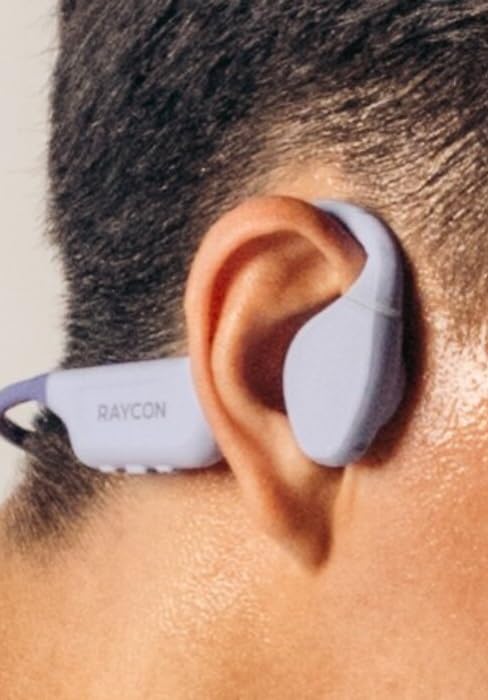
Image: A close-up of the Raycon Essential Open Earbud worn comfortably on a person's ear.
6. Manteniment
6.1 Neteja
Regularly clean your earbuds and charging case to ensure optimal performance and hygiene. Use a soft, dry, lint-free cloth. Do not use abrasive cleaners or solvents.
6.2 Resistència a l'aigua (IPX5)
The Essential Open Earbuds are IPX5 water resistant, meaning they can withstand sweat and light splashes of water. They are not designed for submersion in water. Do not expose them to running water or wear them while swimming or showering.

Image: A graphic depicting the earbuds being splashed with water, symbolizing their IPX5 water resistance.
6.3 Emmagatzematge
When not in use, store the earbuds in their charging case to protect them and keep them charged. Avoid storing them in extreme temperatures or humid environments.
7. Solució De Problemes
| Problema | Possible solució |
|---|---|
| Els auriculars no s'aparellen | Assegura't que els auriculars estiguin carregats. Desactiva i activa el Bluetooth del dispositiu. Oblida't del dispositiu a la configuració del Bluetooth i torna a emparellar-lo. |
| Sense so | Check volume levels on both earbuds and connected device. Ensure earbuds are properly connected. |
| Els auriculars no es carreguen | Assegura't que el cable de càrrega estigui ben connectat. Prova un altre port USB o adaptador de corrent. Neteja els contactes de càrrega dels auriculars i de la funda. |
| Mala qualitat d'àudio | Move closer to your device to reduce interference. Ensure no physical obstructions between earbuds and device. |
8. Especificacions
| Característica | Detall |
|---|---|
| Nom del model | Auriculars oberts Raycon Essential |
| Número de model de l'article | RBO715 |
| Tecnologia de connectivitat | Sense fil (Bluetooth 6.0) |
| Col·locació de l'orella | Orella oberta |
| Nivell de resistència a l'aigua | Resistent a l'aigua IPX5 |
| Tipus de control | Control tàctil |
| Pes de l'article | 5 unces |
| Components inclosos | Cable |
9. Vídeo oficial del producte
Vídeo: Presentació oficial del producte en vídeoasing the Raycon Essential Open Earbuds, their design, and features.
10. Garantia i Suport
Raycon products are designed for durability and performance. For specific warranty information and support inquiries, please refer to the official Raycon weblloc web o contacteu directament amb el seu servei d'atenció al client. També podeu visitar el Raycon Store on Amazon per obtenir recursos addicionals.


