
Introducció
The TopMade Smart Luggage Tag is designed to help you keep track of your luggage, travel bags, backpacks, and other personal items using Apple's Find My network. This manual provides instructions on how to set up, operate, and maintain your smart luggage tag.

Image: The TopMade Smart Luggage Tag, featuring a beach design, shown alongside an iPhone displaying its location on the Apple Find My map.
Característiques clau
- Full Apple Find My Support: Seamlessly integrates with the Apple Find My network for real-time location tracking, sound alerts, Left Behind notifications, and Lost Mode. No separate AirTag es requereix.
- High Quality & Durable Construction: Crafted from premium PU leather, offering a soft touch and resistance to deformation. Stitched with silk thread for enhanced durability.
- Adjunt fàcil: Features a detachable metal wire buckle for simple and secure installation and removal from luggage or bags.
- Protecció de privadesa: Includes a privacy back cover to conceal personal information, preventing unauthorized viewing.
- Bateria recarregable de llarga durada: Equipped with a lithium-ion battery that lasts up to 6 months on a single charge. Supports wireless charging (no special cable needed).
Configuració
Pairing with Apple Find My
- Ensure your iPhone or iPad is running the latest iOS/iPadOS version and has Bluetooth enabled.
- Obriu l'aplicació Apple Find My al vostre dispositiu.
- Tap the "Items" tab at the bottom of the screen.
- Toqueu la icona "+" i seleccioneu "Afegeix un altre element".
- Follow the on-screen prompts to search for and connect to your TopMade Smart Luggage Tag. The app will display "TopMade Find Tag" when discovered.
- Dona el teu tag a name (e.g., "My Luggage") and choose an emoji to represent it.
- Confirm the pairing. Your tag is now connected to your Find My network.
Video: This video demonstrates the unboxing of the TopMade Smart Luggage Tag, its components including extra information cards and the user manual, and the simple process of pairing the tag with the Apple Find My app on an iPhone. It also showcases the sound alert feature for locating the tag.
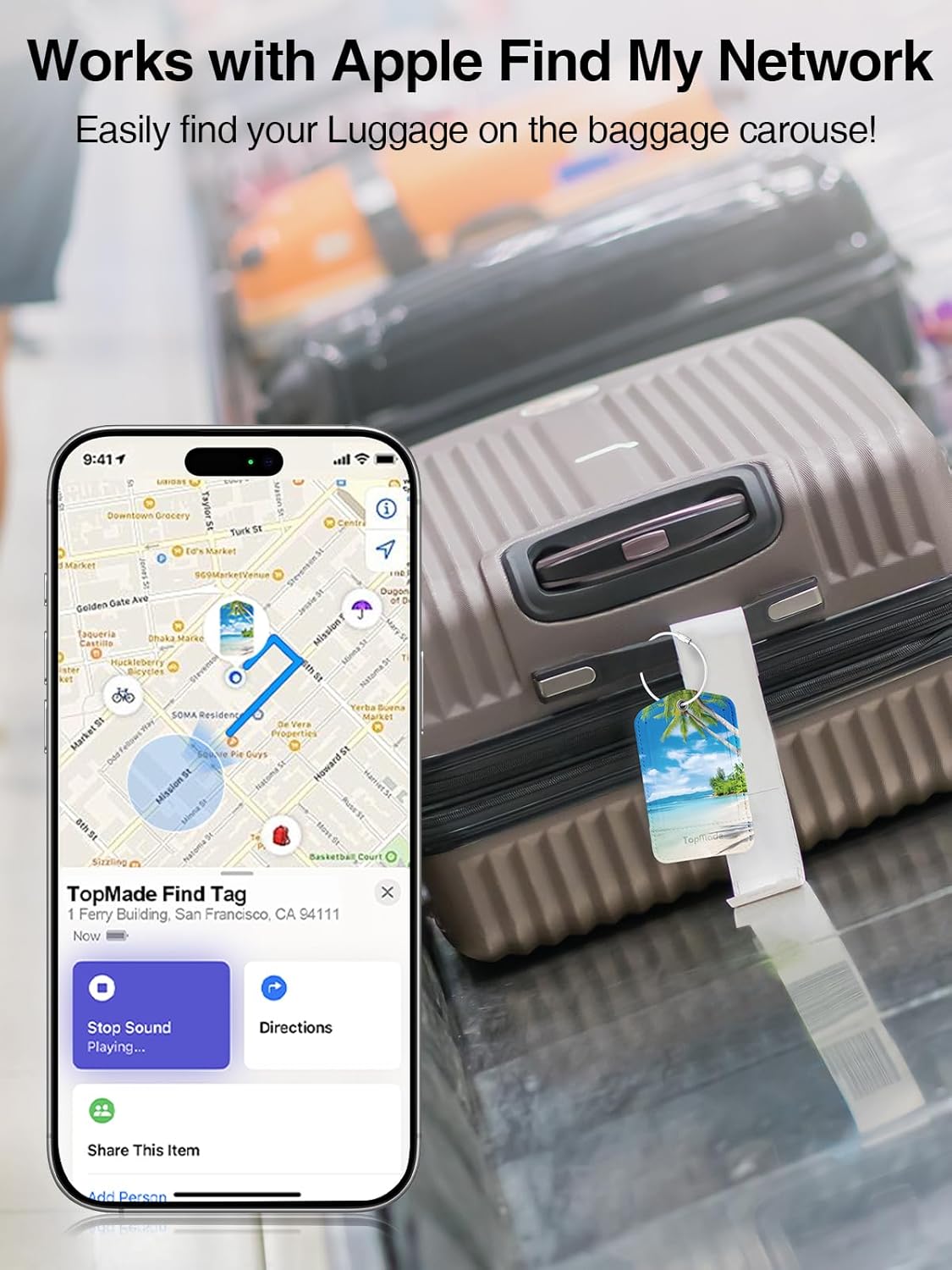
Image: An iPhone screen showing the Apple Find My map, with a TopMade Smart Luggage Tag attached to a suitcase on a baggage carousel, illustrating its tracking capability.
Instruccions de funcionament
Localitzant el vostre Tag
- View Ubicació: Open the Find My app and select your TopMade Smart Luggage Tag from the "Items" list to see its current or last known location on a map.
- Reproduir so: Si el teu tag is nearby, tap "Play Sound" in the Find My app to make the tag emit an audible alert (100dB alarm) to help you locate it quickly.
- Indicacions: Si el teu tag is not nearby, you can get directions to its location through the Find My app.

Image: An iPhone displaying the Apple Find My app, showing the option to 'Play Sound' to locate the luggage tag, with a visual representation of the sound waves and Bluetooth range.
Left Behind Notifications
- The Find My app can notify you if you leave your TopMade Smart Luggage Tag behind at an unfamiliar location.
- To enable this feature, go to the item details in the Find My app, tap "Notify When Left Behind," and toggle the option on. You can also set exceptions for trusted locations.

Image: An iPhone screen showing a 'Handbag left behind' notification from the Find My app, indicating that the item is no longer detected nearby.
Mode perdut
- Si el teu tag is lost, you can enable "Lost Mode" in the Find My app.
- When in Lost Mode, you can enter a contact phone number or email address. If someone finds your tag, they can tap it with their NFC-enabled smartphone to see your contact information and help return it.
Manteniment
Carregant el Tag
- The TopMade Smart Luggage Tag features a rechargeable lithium-ion battery.
- To charge, place the tag on a compatible wireless charging pad. No special charging cable is required.
- A full charge can last up to 6 months, depending on usage.
Care for the Leather
- Wipe the leather surface with a soft, dry cloth to remove dust and dirt.
- Eviteu exposar el tag to excessive moisture, direct sunlight, or extreme temperatures.
- No utilitzeu productes químics agressius ni netejadors abrasius a la pell.

Imatge: Una imatge detallada view of the TopMade Smart Luggage Tag, highlighting its PU leather construction, private flap, protective film, and the information card slot for privacy protection.
Resolució de problemes
- Tag not appearing in Find My app: Ensure Bluetooth is enabled on your iOS device. Make sure the tag's battery is charged. Try restarting the Find My app or your device.
- Sense so tag: Comproveu si el tag is within Bluetooth range (up to 60m). Ensure the tagLa bateria no s'ha esgotat.
- Compatibilitat: This Smart Luggage Tag is designed to work exclusively with Apple's Find My network and iOS devices. It is not compatible with Android devices.
- Difficulty attaching/detaching: Refer to the "Metal Loop Lock" image for correct attachment steps. Ensure the metal wire buckle is fully twisted and secured.

Image: A visual guide demonstrating the three steps to securely attach and lock the metal loop of the TopMade Smart Luggage Tag to your luggage.
Especificacions
| Marca | TopMade |
| Número de model | B0FHKQ141B |
| ASIN | B0F23RMFH5 |
| Data de primera disponibilitat | 21 de març de 2025 |
| Connectivitat | Apple Find My Network (Bluetooth) |
| Volum de l'alarma | 100 dB |
| Interval Bluetooth | 60 m |
| Durada de la bateria | Fins a 6 mesos amb una única càrrega |
| Carregant | Càrrega sense fils |
Garantia i Suport
Specific warranty details and direct support contact information are not provided within this manual. Please refer to the product packaging or the retailer's website for warranty claims and customer service inquiries.
