
1. Introducció
Thank you for choosing the Schneider 43A1 4K UHD LED TV. This television combines advanced display technology with smart features to provide an immersive viewing experience. Featuring a 4K Ultra High Definition display, QLED-LCD technology with Direct LED backlighting, and the VIDAA Smart TV platform, your new TV offers vibrant colors, deep blacks, and access to a wide range of entertainment.
This manual provides essential information for the safe and efficient use of your television. Please read it thoroughly before operating the device and retain it for future reference.
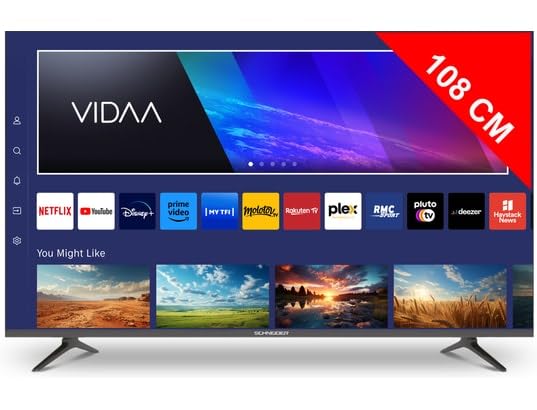
Imatge 1.1: Frontal view of the Schneider 43A1 TV with VIDAA interface.
2. Informació de seguretat
Per garantir un funcionament segur i evitar danys, observeu les següents precaucions de seguretat:
- Col·locació: Position the TV on a stable, level surface. Avoid placing it in direct sunlight, near heat sources, or in environments with high humidity or dust.
- Ventilació: Ensure adequate ventilation around the TV. Do not block ventilation openings. Maintain a minimum distance of 10 cm from walls or other objects.
- Font d'alimentació: Utilitzeu només la font d'alimentació especificadatage. Ensure the power cord is not pinched or walked on. Disconnect the power plug during lightning storms or when unused for extended periods.
- Neteja: Desendolleu el televisor abans de netejar-lo. Feu servir un drap suau i sec. No utilitzeu netejadors líquids ni en aerosol.
- Líquids: Do not expose the TV to dripping or splashing liquids. Do not place objects filled with liquids, such as vases, on the TV.
- Nens: Superviseu els nens per assegurar-vos que no s'enfilin al televisor ni als mobles.
- Muntatge a la paret: If wall-mounting, use a VESA compatible bracket (200 x 200 mm) and ensure proper installation by qualified personnel to prevent injury.
3. Contingut del paquet
Si us plau, comproveu que tots els elements siguin presents i en bon estat:
- Schneider 43A1 4K UHD LED TV
- Control remot
- Cable d'alimentació
- Moble per a TV (2 peces)
- Cargols per a suport de TV
- Manual d'usuari (aquest document)
4. Configuració
4.1 Desembalatge
Carefully remove the TV from its packaging. It is recommended to keep the original packaging for potential future transport or service needs.
4.2 Instal·lació de l'estand
If you are not wall-mounting the TV, attach the included stand pieces to the bottom of the TV using the provided screws. Ensure the stand is securely fastened before placing the TV upright.
4.3 Muntatge a la paret (opcional)
The Schneider 43A1 is compatible with VESA 200 x 200 mm wall mounts. For safe installation, it is highly recommended to use a professional installer. Refer to your wall mount's instructions for specific details.
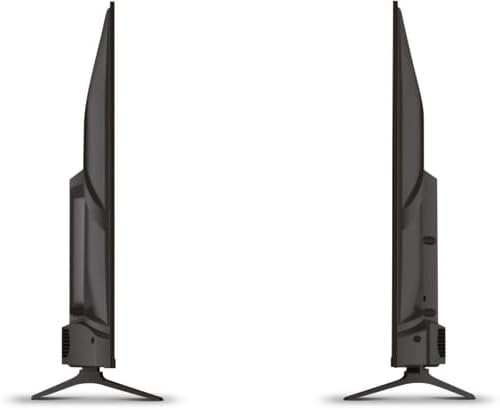
Imatge 4.1: Lateral view of the Schneider 43A1 TV, illustrating its profile for placement or wall mounting.
4.4 Connexió de dispositius externs
El televisor ofereix diverses opcions de connectivitat:
- HDMI: Connect up to three HDMI 2.0 devices (e.g., Blu-ray player, game console, set-top box) to the HDMI ports.
- USB: Two USB ports are available for connecting USB storage devices to play media.
- AV/Audio Input: For older devices requiring composite video and stereo audio.
- Sortida coaxial: Per connectar a un sistema d'àudio extern.
- Entrada d'antena/cable: Connect your antenna or cable TV signal for DVB-T/T2/C/S2 reception.
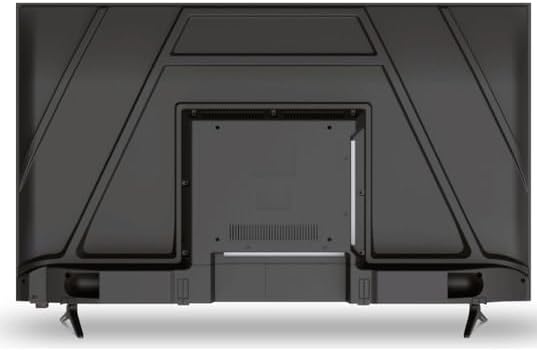
Imatge 4.2: posterior view of the Schneider 43A1 TV, highlighting connection ports.
4.5 Connexió de potència
Plug the power cable into the TV's power input, then into a suitable wall outlet.
4.6 Assistent de configuració inicial
Upon first power-on, the TV will guide you through an initial setup process. This includes selecting your language, connecting to a Wi-Fi network, and scanning for available channels (DVB-T/T2/C/S2).
5. Funcionament
5.1 Funcions de control remot
El comandament a distància us permet navegar per les funcions del televisor:
- Botó d'encesa: Encén o apaga el televisor.
- Pujar/baixar el volum: Ajusta el nivell de so.
- Canal amunt/avall: Canvia els canals de televisió.
- Entrada/Font: Selects the input source (HDMI, USB, TV Tuner).
- Botons de navegació: Per a la navegació pel menú.
- Botons de Smart TV: Direct access to popular apps like Netflix, Prime Video, YouTube.
5.2 Smart TV (VIDAA)
The integrated VIDAA Smart TV platform provides access to a variety of applications and streaming services. Connect your TV to the internet via Wi-Fi to enjoy features like Netflix, Prime Video, and YouTube. Bluetooth connectivity allows for wireless connection to compatible audio devices.

Imatge 5.1: Frontal inclinat view of the Schneider 43A1 TV, displaying the VIDAA Smart TV interface.
5.3 Selecció d'entrada
Press the 'Input' or 'Source' button on your remote control to switch between connected devices (HDMI 1, HDMI 2, HDMI 3, USB, AV, TV Tuner).
5.4 Configuració d'imatge i so
Access the TV's menu to adjust picture and sound settings. The 4K UHD resolution, QLED-LCD technology, and Direct LED backlighting ensure a high-quality visual experience. The TV also features upscaling to enhance lower-resolution content. Audio is delivered via 2 x 8 W RMS stereo speakers with Dolby Audio support.
5.5 PC Monitor Mode
The TV can be used as a PC monitor by connecting your computer via an HDMI cable. This mode optimizes the display for computer use.
6. Manteniment
6.1 Neteja del televisor
Before cleaning, ensure the TV is unplugged from the power outlet.
- Pantalla: Netegeu suaument la pantalla amb un drap suau i sense borrissol. Per a marques difícils, netegeu suaument.ampNetegeu el drap amb aigua o un netejador de pantalles especialitzat (no ruixeu directament sobre la pantalla).
- Exterior: Feu servir un drap suau i sec per netejar el televisor.asing. Eviteu netejadors o dissolvents abrasius.
6.2 Actualitzacions de programari
Your TV may receive software updates to improve performance and add new features. Ensure your TV is connected to the internet to receive these updates automatically or check for them manually through the settings menu.
7. Solució De Problemes
Si teniu problemes amb el televisor, consulteu els problemes i solucions més comuns següents:
- Sense energia:
- Comproveu si el cable d'alimentació està ben connectat al televisor i a la presa de corrent.
- Assegureu-vos que la presa de corrent funcioni (proveu-ho amb un altre dispositiu).
- Premeu el botó d'engegada del comandament a distància o del televisor mateix.
- Sense imatge/so:
- Verifiqueu que s'ha seleccionat la font d'entrada correcta (per exemple, HDMI 1, TV).
- Comproveu totes les connexions de cable entre el televisor i els dispositius externs.
- Assegureu-vos que el volum no estigui silenciat ni al mínim.
- Si feu servir una antena, comproveu la connexió de l'antena i feu una cerca de canals.
- El control remot no funciona:
- Substituïu les piles del comandament a distància.
- Assegureu-vos que no hi hagi obstacles entre el comandament a distància i el sensor d'infrarojos del televisor.
- Smart TV/Network Issues:
- Comproveu el vostre encaminador Wi-Fi i la connexió a Internet.
- Go to the TV's network settings to re-connect to your Wi-Fi network.
- Restart the TV and your router.
Si el problema persisteix després de provar aquestes solucions, poseu-vos en contacte amb l'atenció al client.
8. Especificacions
| Característica | Especificació |
|---|---|
| Model | Schneider 43A1 |
| Mida de la pantalla | 109 cm (43 polzades) |
| Resolució | 4K Ultra HD (3840 x 2160 píxels) |
| Tecnologia de visualització | QLED-LCD with Direct LED Backlight |
| Relació de contrast | 1100:1 |
| Brillantor | 200 cd/m² |
| Sortida d'àudio | 2 x 8 W RMS Stereo |
| Tecnologia d'àudio | Dolby Audio |
| Ports HDMI | 3 (HDMI 2.0) |
| Ports USB | 2 |
| Altres entrades | AV/Audio Input |
| Sortides | Sortida coaxial |
| Sintonitzador | DVB-T/T2/C/S2 |
| Plataforma Smart TV | VIDAA (Netflix, Prime Video, YouTube) |
| Connectivitat sense fil | Wi-Fi, Bluetooth |
| Compatibilitat VESA | 200 x 200 mm |
| Pes | 7.5 quilos |