
FUNYET DuetBook N5095
FUNYET 14-inch Laptop N5095
Manual d'usuari
Model: DuetBook N5095
Introducció
This manual provides essential information for setting up, operating, maintaining, and troubleshooting your FUNYET 14-inch Laptop N5095. Please read this guide thoroughly to ensure optimal performance and longevity of your device.

Imatge: Frontal view of the FUNYET 14-inch Laptop N5095, highlighting its key specifications on the screen.
1. Configuració inicial
1.1 Desembalatge i primera encesa
- Carefully remove the laptop and all accessories from the packaging. The box should contain the laptop, AC adapter, warranty card, and this instruction manual.
- Connect the AC adapter to the laptop's DC-in port and then to a power outlet.
- Obriu la tapa del portàtil. És possible que el portàtil s'encengui automàticament o que hàgiu de prémer el botó d'engegada que es troba al teclat.
1.2 Configuració del Windows 11 Pro
Upon first boot, you will be guided through the Windows 11 Pro setup process. Follow the on-screen instructions to:
- Seleccioneu la vostra regió i la disposició del teclat.
- Connecteu-vos a una xarxa Wi-Fi.
- Inicia la sessió amb el teu compte de Microsoft o crea'n un de nou.
- Configura un PIN per a un inici de sessió ràpid.
- Ajusta la configuració de privadesa.

Image: The Windows 11 Pro operating system interface shown on the laptop screen.
2. Com fer servir el portàtil
2.1 Teclat i touchpad
The laptop features a full-sized keyboard and a large, responsive touchpad for navigation. Refer to the image below for key layout.

Imatge: Detallada view del teclat i el touchpad de l'ordinador portàtil.
2.2 Connexió de perifèrics
El vostre portàtil està equipat amb diversos ports per connectar dispositius externs:
- Ports USB 3.0: Two ports for high-speed data transfer with USB devices.
- Port HDMI: Connecteu-vos a pantalles o projectors externs.
- Auriculars Jack: Per a la sortida d'àudio a auriculars o altaveus externs.
- Ranura per a targetes TF: Per ampliar l'emmagatzematge amb una targeta TF (MicroSD).
- DC-in Port: Per connectar l'adaptador de corrent altern.
Wireless connectivity includes Bluetooth and Wi-Fi (2.4G/5G) for connecting to networks and wireless accessories.
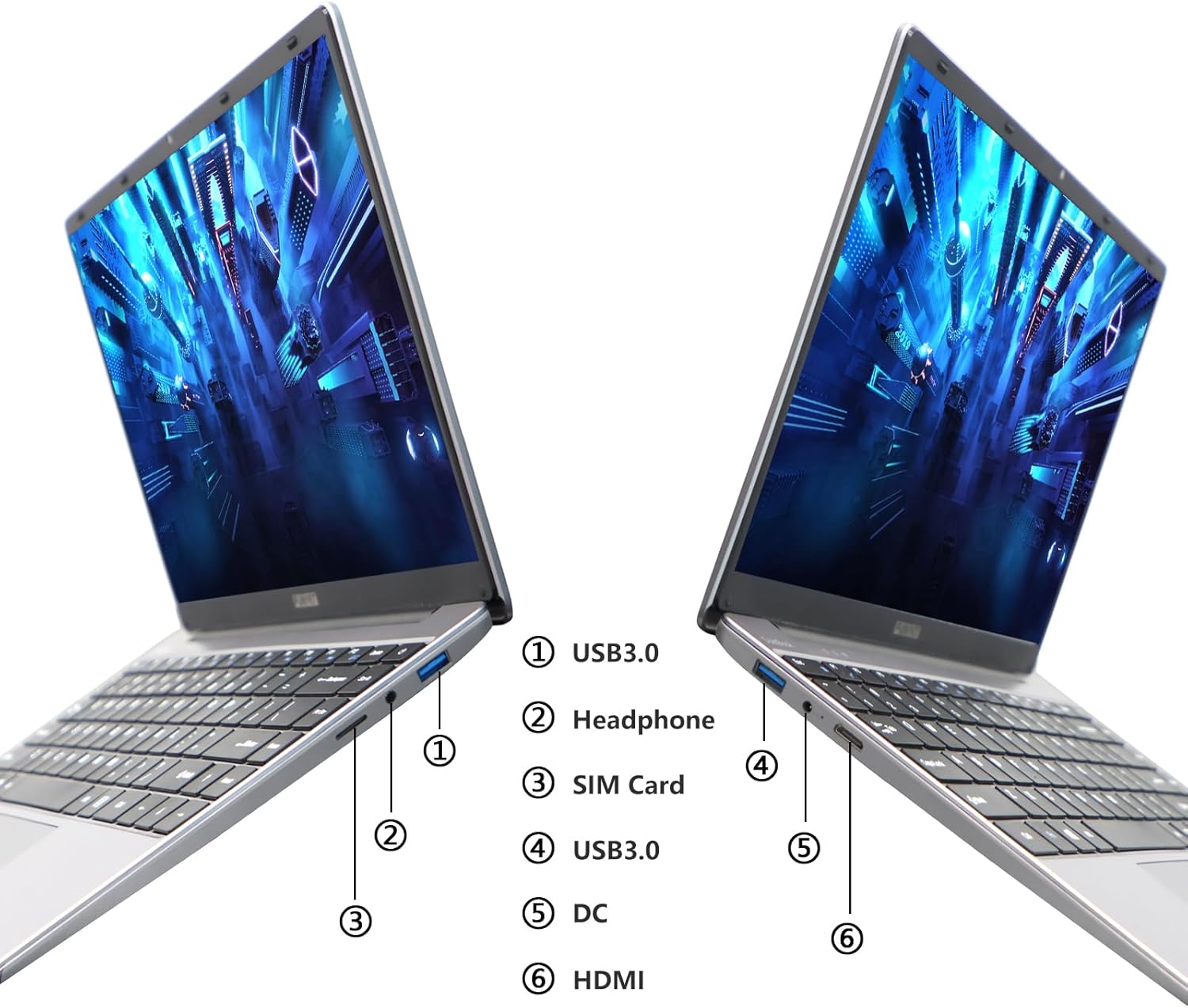
Image: Diagram illustrating the various ports on the sides of the laptop.
2.3 Característiques de visualització
The 14.1-inch FHD IPS display offers a 1920x1080 resolution. The laptop supports a 180-degree opening angle, allowing for flexible viewposant posicions.

Image: The laptop's screen fully opened to a 180-degree flat position.
2.4 Gestió de la bateria
The laptop is equipped with a 3800mAh (7.6V/5000mAh) battery. For optimal battery life, ensure the laptop is fully charged before first use. Unplug the AC adapter once the battery is fully charged to prevent overcharging. For extended storage, charge the battery to approximately 50% and store the device in a cool, dry place.

Image: Laptop screen showing a full battery charge indicator.
3. Manteniment
3.1 Atenció general
- Keep the laptop clean by wiping surfaces with a soft, dry cloth. Avoid liquid cleaners directly on the screen or keyboard.
- Ensure proper ventilation. Do not block the air vents to prevent overheating.
- Eviteu exposar el portàtil a temperatures extremes, llum solar directa o humitat elevada.
- Handle the laptop with care to prevent physical damage.
3.2 Expansió d'emmagatzematge
The laptop's storage can be expanded using a TF (MicroSD) card. Insert the TF card into the designated slot until it clicks into place. To remove, gently push the card in until it springs out.
4. Solució De Problemes
| Problema | Causa possible | Solució |
|---|---|---|
| El portàtil no s'encén. | Problema amb la bateria baixa o l'adaptador de corrent. | Ensure the AC adapter is securely connected and the power outlet is functional. Charge the laptop for at least 30 minutes before attempting to power on again. |
| Problemes de connexió Wi-Fi. | Incorrect Wi-Fi password, router issues, or Wi-Fi adapter disabled. | Verify the Wi-Fi password. Restart your router. Check Windows settings to ensure Wi-Fi is enabled. |
| Rendiment lent. | Too many applications running, low storage space, or outdated drivers. | Close unnecessary applications. Check available storage on the SSD. Update Windows and device drivers. |
| La pantalla està en blanc o parpelleja. | Display driver issue, external display conflict, or hardware problem. | Restart the laptop. If connected to an external monitor, disconnect it. Update graphics drivers. |
If you encounter issues not listed here or if the suggested solutions do not resolve the problem, please contact FUNYET support.
5. Especificacions tècniques
| Característica | Detall |
|---|---|
| Nom del model | DuetBook N5095 |
| Processador | Intel 11th Gen Celeron N5095 (up to 2.9 GHz, 4 Cores, 4 Threads) |
| Gràfics | Gràfics Intel UHD (integrats) |
| RAM | 16 GB DDR4 |
| Emmagatzematge | 512GB SSD (Expandable via TF card) |
| Mostra | 14.1-inch FHD IPS (1920 x 1080 pixels) |
| Sistema operatiu | Windows 11 Pro |
| Connectivitat sense fil | Wi-Fi (2.4G/5G), Bluetooth 4.2 |
| Ports | 2x USB 3.0, 1x HDMI, 1x Headphone Jack, 1x DC-in, 1x TF Card Slot |
| Bateria | 3800mAh (7.6V/5000mAh) Lithium Ion |
| Dimensions (LxWxH) | 12.7 x 8.3 x 0.8 polzades |
| Pes | 3 lliures |

Image: Visual summary of key laptop features and specifications.
6. Garantia i Suport
FUNYET provides comprehensive support for your laptop:
- Garantia: Garantia de 2 anys des de la data de compra.
- Devolucions/Canvis: 6 months of free replacement or return service.
- Assistència en línia: 24/7 online support with instant responses.
- Suport telefònic: Available every business day from 4 PM to 10 PM Pacific Time.
For assistance, please contact FUNYET support:
- Telèfon: +1 800-986-9631
- Correu electrònic: funyetstore@outlook.com
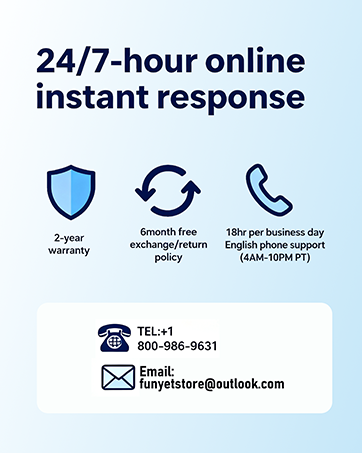
Image: FUNYET customer support and warranty details.
Ask a question about this manual
Ask about setup, troubleshooting, compatibility, parts, safety, or missing instructions. Manuals+ will review the question and use this page’s manual context to help answer it.