
plplaaoo S350H
plplaaoo XY S350H Bluetooth Power AmpManual d'usuari del tauler més viu
Model: S350H
Introducció
This manual provides detailed instructions for the installation, operation, and maintenance of your plplaaoo XY S350H Bluetooth Power Amplifier Board. Please read this manual thoroughly before using the product to ensure proper function and safety.
Informació important de seguretat
Per evitar descàrregues elèctriques, incendis o danys a la unitat, observeu les següents precaucions de seguretat:
- Assegureu-vos que la font d'alimentació voltage is within the specified range (DC 18V-38V).
- No exposar el amplifier board to moisture or extreme temperatures.
- Eviteu curtcircuitar els terminals de sortida.
- No intenteu desmuntar ni modificar la unitat. Encarregueu tot el manteniment a personal qualificat.
- Mantenir fora de l'abast dels nens.
- Assegureu-vos una ventilació adequada per evitar el sobreescalfament.
Producte acabatview
The plplaaoo XY S350H is a high-performance 2.1 channel Bluetooth power amplifier board featuring dual TPA3255 HiFi chips. It offers powerful audio output, versatile connectivity, and precise sound control for home theater systems and professional audio setups.
Components i característiques
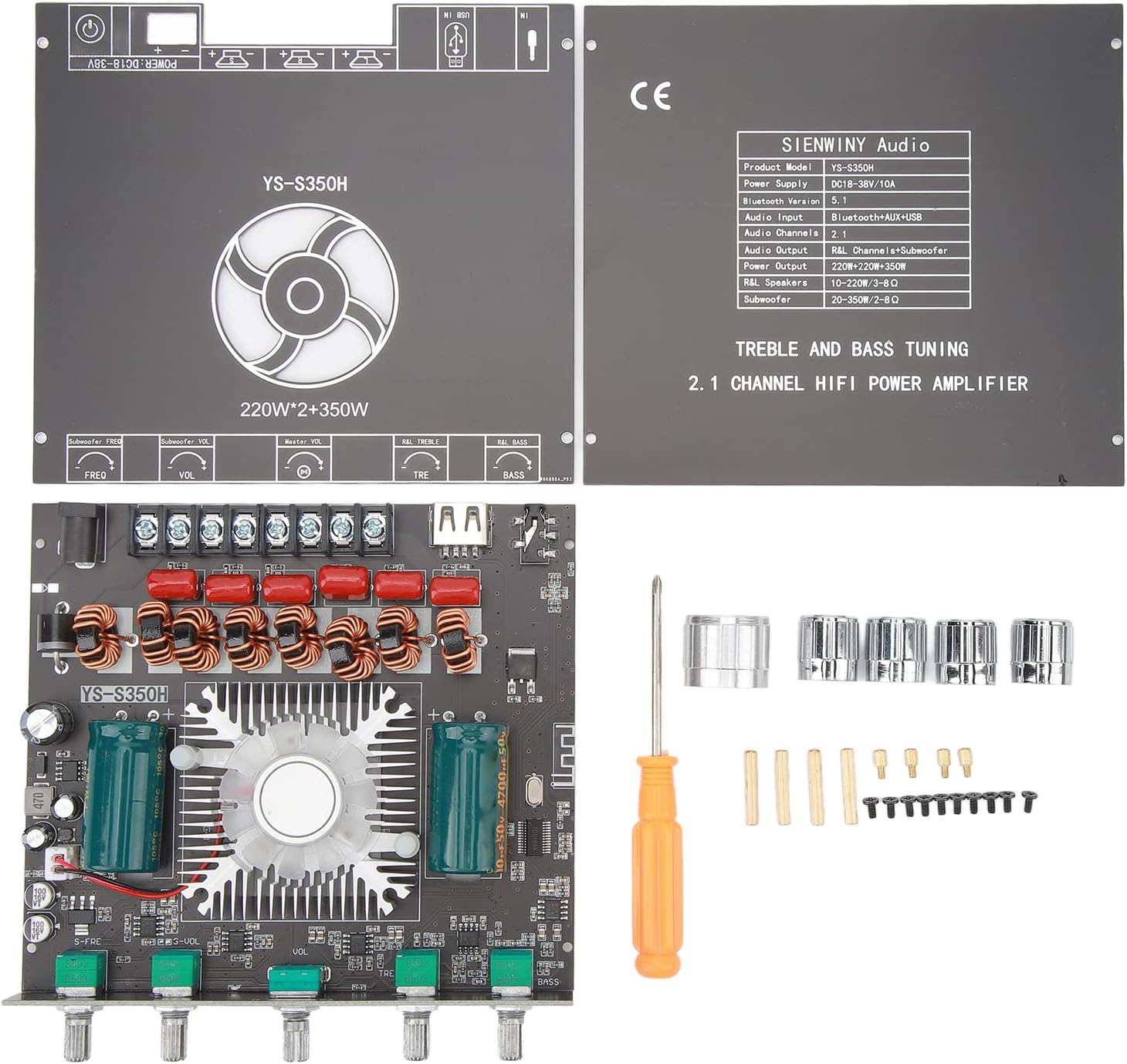

- Dual TPA3255 HiFi Chips: For high-fidelity audio performance.
- Potència de sortida: 220W x 2 (Left/Right channels) + 350W (Subwoofer).
- Vol. Amplitage Entrada: CC 18V-38V.
- Múltiples entrades d'àudio: Bluetooth 5.1, AUX, USB drive, USB sound card.
- Precise Sound Control: Independent high and low frequency adjustment knobs for treble and bass.
- Protecció integral: Curtcircuit, overvoltage, minvartage, clipping, and overheating protection.
- YS Audio APP Control: For convenient wireless control.
Especificacions
| Característica | Detall |
|---|---|
| Model de producte | YS-S350H |
| Font d'alimentació | DC 18 V-38 V/10 A |
| Versió Bluetooth | 5.1 |
| Entrada d'àudio | Bluetooth+AUX+USB |
| Canals d’àudio | 2.1 |
| Sortida d'àudio | R&L Channel + Subwoofer |
| R&L Channel Output Power | 220W x 2 |
| Potència de sortida del subwoofer | 350W |
| R&L Speakers Impedance | 10-220W / 3-8Ω |
| Impedància del subwoofer | 20-350W / 2-8Ω |
| Dimensions del paquet | 6.3 x 5.51 x 1.97 polzades |
| Pes de l'article | 13.5 unces |
| Fabricant | plplaaoo |
Instruccions de configuració
Follow these steps to correctly set up your XY S350H amptauler més viu.
1. Connexió d'alimentació
- Connect a DC power adapter (18V-38V, 10A recommended) to the DC 5.5mm x 2.1mm power input jack on the board.
- If using a power supply without a DC plug, connect the positive and negative wires directly to the corresponding screw terminals labeled "DC IN". Ensure correct polarity.
- Precaució: Ensure the power supply is off before connecting or disconnecting any wires.
2. Connexió d'altaveus
- Connect your left and right channel speakers to the "R&L Speakers" output terminals. Ensure the impedance of your speakers is between 3-8Ω and power rating is 10-220W.
- Connect your subwoofer to the "Subwoofer" output terminals. Ensure the impedance of your subwoofer is between 2-8Ω and power rating is 20-350W.
- Observeu la polaritat correcta (+ a + i - a -) per a totes les connexions d'altaveus.
3. Connexió d'entrada d'àudio

- Bluetooth 5.1: Enceneu el amplificador. L'indicador Bluetooth parpellejarà. Cerca "YS-S350H" on your device's Bluetooth settings and pair. The indicator will become solid blue upon successful connection.
- Entrada AUX: Connect an audio source (e.g., smartphone, CD player) to the AUX input jack using a 3.5mm audio cable.
- USB Drive Input: Inseriu una unitat USB que contingui àudio files al port USB. El amplifier will automatically detect and play audio.
- USB Sound Card Input: Connecteu el amplifier to a computer via the USB port. The computer should recognize it as an audio output device.
Instruccions de funcionament
Encès/Apagat
Once all connections are secure, connect the power adapter to a wall outlet. The amplifier will power on. Disconnect the power adapter to turn off the unit.
Selecció d'entrada
El amplifier automatically switches between inputs. When a new input source is connected (e.g., AUX cable inserted, USB drive connected), it will prioritize that input. Bluetooth will be the default if no other wired input is active.
Control de volum
Use the "Master Vol" knob to adjust the overall volume level. The "Subwoofer Vol" knob controls the volume specifically for the subwoofer output.
Ajust d'aguts i greus
- TRE (Treble) Knob: Rotate to increase or decrease high-frequency sounds.
- Pom BASS: Rotate to increase or decrease low-frequency sounds.
Subwoofer Frequency Adjustment
Use the "Subwoofer Freq" knob to adjust the crossover frequency for the subwoofer, allowing you to fine-tune how the subwoofer integrates with your main speakers.
YS Audio APP Control
For advanced control, download the YS Audio APP on your smartphone. Pair your phone with the amplifier via Bluetooth and use the app to manage settings wirelessly.
Manteniment
- Neteja: Feu servir un drap suau i sec per netejar la superfície del ampplaca de lificador. No utilitzeu netejadors líquids ni dissolvents.
- Ventilació: Ensure the cooling fan and heatsink are free from dust and obstructions to maintain optimal performance and prevent overheating.
- Emmagatzematge: Quan no s'utilitzi durant períodes prolongats, guardeu-lo amplifier in a cool, dry place away from direct sunlight and moisture.
Resolució de problemes
| Problema | Causa possible | Solució |
|---|---|---|
| Sense poder | Power adapter not connected or faulty; incorrect voltage. | Check power connections; ensure power supply is 18V-38V DC and functional. |
| Sense so | Incorrect input selected; speaker wires loose; volume too low; faulty audio source. | Verify input source; check speaker connections and polarity; increase volume; test with a different audio source. |
| So distorsionat | Volume too high; incorrect speaker impedance; faulty audio source or cable. | Reduce volume; ensure speakers match impedance requirements; try a different audio cable or source. |
| Bluetooth no connectat | Amplifier not in pairing mode; device too far; interference. | Assegureu-vos amplifier is powered on and indicator is flashing; bring device closer; restart both devices. |
| Sobreescalfament | Poor ventilation; excessive volume for extended periods. | Ensure adequate airflow around the board; reduce volume; check for obstructions on the heatsink/fan. |
Garantia i Suport
This product is covered by a standard manufacturer's warranty. For specific warranty terms and conditions, please refer to the documentation provided at the time of purchase or contact your retailer.
For technical support or inquiries, please contact plplaaoo customer service through the retailer's platform or their official website. Please have your product model (S350H) and purchase details ready.
Ask a question about this manual
Ask about setup, troubleshooting, compatibility, parts, safety, or missing instructions. Manuals+ will review the question and use this page’s manual context to help answer it.