
1. Introducció
Thank you for choosing the MageGee V550 Wireless Keyboard and Mouse Combo. This manual provides detailed instructions for setting up, operating, and maintaining your new peripheral set. Please read this manual thoroughly before use to ensure optimal performance and longevity of your product.

Un acabatview of the MageGee V550 wireless keyboard and mouse combo, featuring a full-sized keyboard with RGB backlighting and a matching white wireless mouse, alongside the USB receiver.
2. Contingut del paquet
Assegureu-vos que tots els elements estiguin presents al vostre paquet:
- MageGee V550 Wireless Keyboard
- MageGee V550 Wireless Mouse
- USB Receiver (located in the mouse's bottom slot)
- Cable de càrrega USB tipus C
- Manual d'usuari (aquest document)
3. Guia de configuració
- Localitza el receptor USB: The 2.4G USB receiver is stored in a dedicated slot on the bottom of the wireless mouse. Gently remove it.
- Connecteu el receptor: Plug the USB receiver into an available USB port on your computer (laptop or PC).
- Dispositius d'encesa: Locate the power switch on the bottom of both the keyboard and the mouse. Slide the switches to the 'ON' position.
- Connexió automàtica: The keyboard and mouse should automatically connect to your computer. No additional drivers are required.

Illustration demonstrating how the single USB receiver connects both the MageGee V550 wireless keyboard and mouse to a computer, highlighting the 2.4G wireless connection and 33ft range. The USB receiver is shown plugged into a laptop.

An image detailing the MageGee V550 mouse's features, including three tracking speed levels (1000-1200-1600 DPI), comfortable grip, and the location of the USB receiver within the mouse.
4. Operating Instructions - Keyboard
4.1 Control de retroiluminació RGB
The V550 keyboard features dynamic RGB backlighting with multiple customization options:
- Modes de llum: Cycle through 5 distinct light modes.
- Colors: Choose from 7 solid color backlights and 1 rainbow backlight.
- Brillantor: Adjust between 3 brightness levels.
- Velocitat: Modify the lighting effect speed with 4 available settings.
- Apagar: The backlight can be turned off at any time.
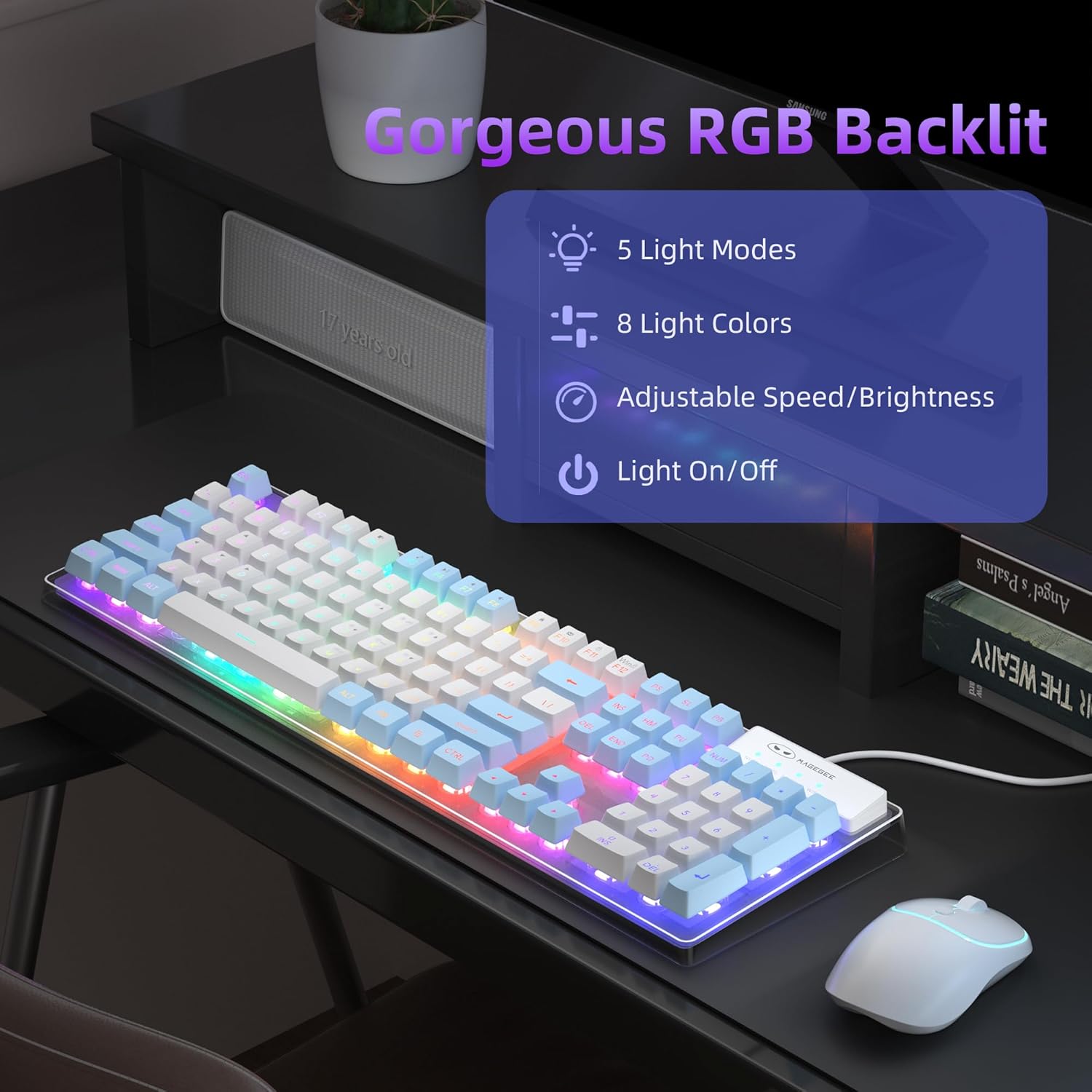
An image of the MageGee V550 keyboard displaying its RGB backlighting, with text indicating 5 light modes, 8 colors, adjustable speed/brightness, and light on/off functionality.

The MageGee V550 keyboard showcasing its switchable RGB backlighting with a spectrum of 7 light colors for varied visual experiences.
4.2 Dreceres multimèdia
The keyboard features 12 multimedia shortcuts for quick access to common functions. Refer to the keycap legends for specific functions (e.g., volume control, media playback).
4.3 Anti-ghosting
The V550 keyboard supports 19-key anti-ghosting, ensuring that multiple simultaneous key presses are registered accurately, which is beneficial for gaming and fast typing.

An image of the MageGee V550 keyboard highlighting its 19-key anti-ghosting capability, with visual cues indicating simultaneous key presses for gaming.
5. Operating Instructions - Mouse
5.1 Mouse Buttons and Functions
The wireless mouse features standard buttons and a tracking speed adjustment:
- Botó esquerre: Funció de clic principal.
- Botó dret: Funció de clic secundari (menú contextual).
- Roda de desplaçament: Per a desplaçament vertical.
- Tracking Speed Button: Adjusts the mouse's DPI (Dots Per Inch) sensitivity between 1000, 1200, and 1600 DPI. Press to cycle through settings.

Un detallat view of the MageGee V550 wireless mouse, labeling its four buttons: scroll wheel, right button, left button, and tracking speed button (1000-1200-1600 DPI). Also highlights ergonomic design and silent clicking.
5.2 Ergonomic Design and Silent Clicking
The mouse is designed for a comfortable grip during extended use. Its silent clicking mechanism reduces operational noise.
6. Charging and Power Management
6.1 Bateria recarregable
Both the keyboard and mouse are equipped with rechargeable batteries. Use the included USB Type-C cable to charge them. Connect the cable to the charging port on each device and a power source (e.g., computer USB port, USB wall adapter).

The MageGee V550 keyboard and mouse connected via USB-C cables for charging, illustrating the rechargeable feature that eliminates the need for frequent battery replacements.
6.2 Funció d'estalvi d'energia
To conserve battery life, both devices feature an auto-sleep mode. If inactive for a period, they will enter a low-power state. To wake them up, simply click any key on the keyboard or move/click the mouse.
6.3 Separate Power Switches
Each device (keyboard and mouse) has its own power switch. Turning off one device does not affect the other.

A diagram illustrating key components of the MageGee V550 keyboard and mouse, including anti-slip pads, on/off switches, charging ports, USB receiver location, and keyboard indicators (Win, Num, Caps).
7. Manteniment
To ensure the longevity and optimal performance of your MageGee V550 combo, follow these maintenance guidelines:
- Neteja: Feu servir un drap suau i sec per netejar les superfícies del teclat i el ratolí. Per a la brutícia persistent, netegeu lleugerament.ampNetegeu el drap amb aigua o una solució de neteja suau. Eviteu productes químics agressius.
- Eliminació de pols: Use compressed air to clear dust and debris from between the keycaps and around the mouse sensor.
- Emmagatzematge: When not in use for extended periods, turn off both devices and store them in a cool, dry place away from direct sunlight and extreme temperatures.
- Càrrega: Eviteu la sobrecàrrega. Desconnecteu el cable de càrrega un cop els dispositius estiguin completament carregats.
8. Solució De Problemes
If you encounter issues with your MageGee V550 combo, refer to the following common solutions:
| Problema | Possible solució |
|---|---|
| El teclat/ratolí no respon |
|
| La retroiluminació RGB no funciona |
|
| El cursor del ratolí és erràtic o no respon |
|
| Problemes de càrrega |
|
9. Especificacions
| Característica | Detall |
|---|---|
| Marca | MageGee |
| Model | V550 |
| Tecnologia de connectivitat | 2.4G sense fil |
| Disposició del teclat | Full-sized, 104-key |
| Il·luminació de fons del teclat | Dynamic RGB (5 modes, 7 solid colors, 1 rainbow, 3 brightness, 4 speeds) |
| Característiques especials del teclat | Backlit, Ergonomic, Rechargeable, Transparent Base, 12 Multimedia Shortcuts, 19-Key Anti-Ghosting |
| DPI del ratolí | 1000-1200-1600 (Ajustable) |
| Funcions del ratolí | Rechargeable, Quiet Cordless, RGB light strip, Ergonomic Design |
| Port de càrrega | USB tipus C |
| Dispositius compatibles | Ordinador portàtil, ordinador personal |
| Pes de l'article | 2.16 lliures (combinat) |
| Dimensions del paquet | 17.63 x 8.78 x 1.85 polzades |
10. Garantia i Suport
MageGee products are designed for reliability and performance. For warranty information, technical support, or any product-related inquiries, please refer to the contact information provided on the product packaging or visit the official MageGee weblloc web. Conserveu el rebut de compra com a comprovant de compra per a reclamacions de garantia.