
Introducció
Thank you for choosing the Earbay BT786CD Wireless Headset. This manual provides essential information for setting up, operating, and maintaining your headset to ensure optimal performance and longevity. Please read these instructions carefully before use.
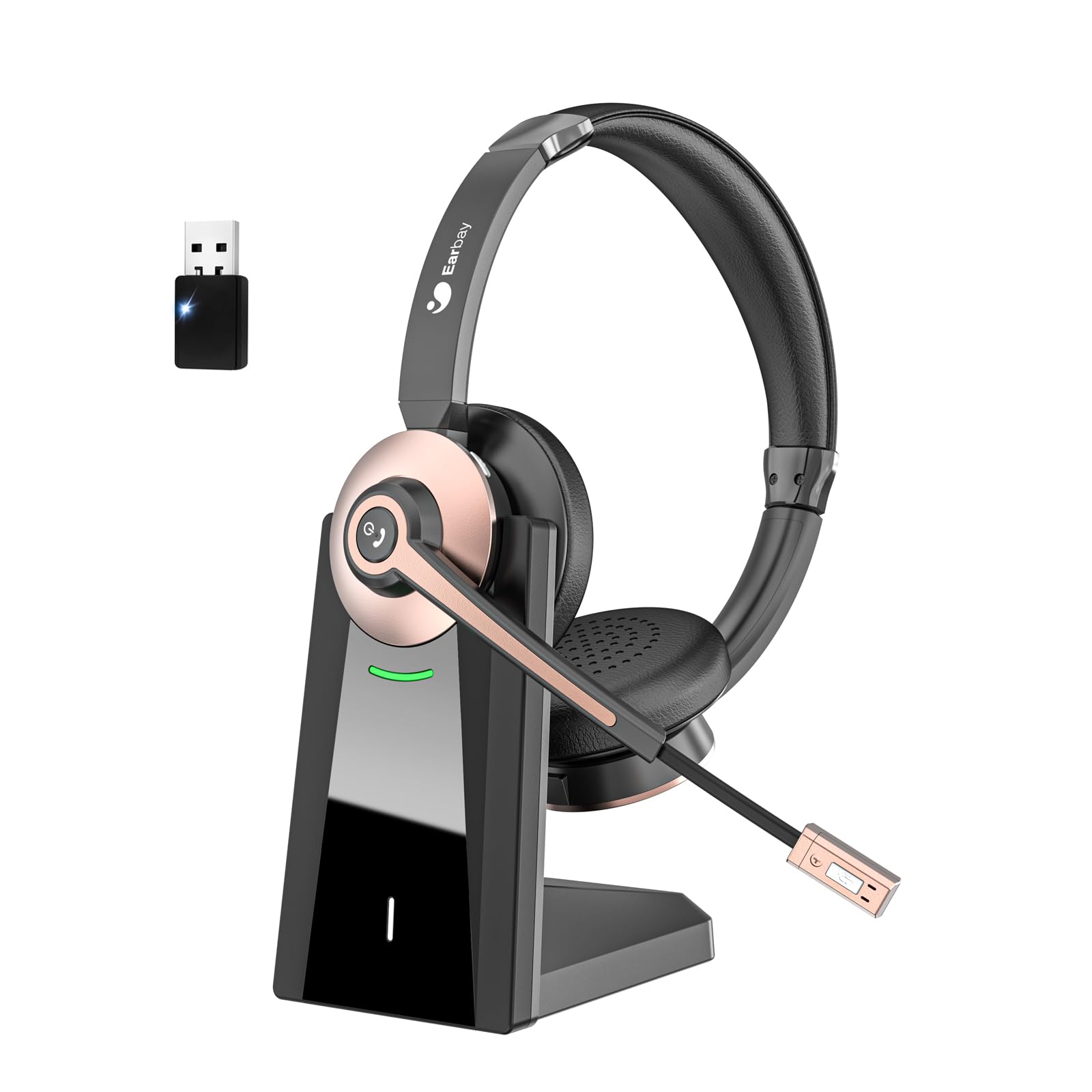
The Earbay BT786CD Wireless Headset is designed for comfort and clear communication during extended use.
Què hi ha a la caixa
- 1 × Wireless Headset with Mic
- 1 × USB Charging Cable (USB-C)
- 1 × USB Dongle
- 1 × Base de càrrega
- 1 × Manual d'usuari

The package includes the headset, charging base, USB dongle, and necessary cables for charging and connection.
Producte acabatview
Components i controls
Familiarize yourself with the key components and controls of your Earbay BT786CD headset:
- Diadema ajustable: Per a un ajustament còmode i segur.
- Soft Leather Ear Pads: Dissenyat per a una comoditat d'ús prolongada.
- Micròfon flexible: 270° rotatable with noise-cancelling technology.
- Control de volum: Integrated buttons for easy audio adjustment.
- Botó d'encesa: For turning the headset on/off.
- Botó multifunció (MFB): For call management and other functions.
- Botó de silenci: Located on the microphone for quick muting.
- Port de càrrega USB-C: Per a càrrega directa.

Detallada view of the headset's controls and adjustable microphone.

The headset features an adjustable headband and a flexible microphone for personalized comfort and clear audio.
Configuració i connexió
Bluetooth Connection (for Mobile Devices/Tablets)
- Assegureu-vos que els auriculars estiguin carregats i apagats.
- Press and hold the Power Button until the LED indicator flashes blue and red, indicating pairing mode.
- On your device (phone/tablet), go to Bluetooth settings and search for "BT786CD".
- Select "BT786CD" to connect. The LED will turn solid blue once connected.
USB Dongle Connection (for PC/Laptop)
- Plug the USB dongle into an available USB port on your PC/laptop.
- The dongle's LED indicator will flash blue.
- Power on your headset. It will automatically pair with the dongle. The LED on the dongle will turn solid blue once connected.
- On your PC, navigate to Sound Settings and set "BT786CD" as the default input and output device.

Visual guide for connecting the headset to a PC using either Bluetooth or the USB dongle.
Official Product Video: Setup and Features
This video from Earbay-Direct provides a visual guide to the headset's features and setup process, including Bluetooth connectivity.
Instruccions de funcionament
Encès/Apagat
- Encès: Press and hold the Power Button for 3 seconds until the LED indicator flashes blue.
- Apagar: Press and hold the Power Button for 3 seconds until the LED indicator flashes red and then turns off.
Control de volum
- Augmenta el volum: Premeu el botó Pujar volum.
- Disminueix el volum: Premeu el botó per baixar el volum.
Silenci del micròfon
- Press the Mute Button on the microphone to mute or unmute your voice during calls.

The microphone features a convenient one-key mute button for quick control during calls.
Carregant
Charge your headset using the provided USB-C cable and charging base:
- Connect the USB-C cable to the charging base and a power source.
- Place the headset on the charging base, ensuring the charging contacts align.
- Alternatively, plug the USB-C cable directly into the headset's charging port.
- L'indicador LED mostrarà l'estat de càrrega (per exemple, vermell per a la càrrega, blau per a la càrrega completa).
- Una càrrega completa triga aproximadament 2 hores.

The headset can be charged conveniently using the included charging base or directly via the USB-C cable.
Característiques i avantatges
- Comoditat durant tot el dia: Designed with soft leatherette ear cushions and an adjustable headband for comfortable wearing during intensive use.
- Cancel·lació de soroll per IA: Blocks out up to 99% of ambient noise on calls, ensuring crystal-clear communication.
- Connexió de dispositiu dual: Connects to two devices simultaneously for seamless switching between calls and media.
- Bateria de llarga durada: Offers up to 26 hours of talk time and 200 hours of standby time on a single 1.5-hour charge.
- Àmplia compatibilitat: Works with various devices including computers, PCs, laptops, mobile phones, tablets, VoIP, and desktops. Compatible with popular meeting apps like Zoom, Skype for Business, Unify, Microsoft Teams, Google Meet, Bluejeans, GoToMeeting, 3CX, FaceTime, WhatsApp, and Slack.
- Controls fàcils d'utilitzar: Intuitive volume control, power button, and microphone mute for convenient operation.

The headset is engineered for all-day comfort, making it ideal for prolonged use in various work environments.

AI Noise Cancellation ensures clear audio by blocking out ambient sounds, as depicted in the 'Before' and 'After' sound wave comparison.

Enjoy extended usage with up to 26 hours of talk time and 200 hours of standby time on a single charge.
Manteniment
- Netegeu els auriculars regularment amb un drap suau i sec.
- Eviteu exposar els auriculars a temperatures extremes, humitat o substàncies corrosives.
- Store the headset in its soft storage pouch when not in use to protect it from dust and damage.
- Do not attempt to disassemble or repair the headset yourself. Contact customer support for assistance.
Resolució de problemes
No Sound/Poor Audio Quality
- Ensure the headset is powered on and properly connected (Bluetooth or USB dongle).
- Comproveu els nivells de volum tant dels auriculars com del dispositiu connectat.
- Verify that the headset is selected as the default audio input/output device in your computer's sound settings.
- Move closer to your connected device to ensure you are within the 15-meter Bluetooth range.
- Si feu servir el dongle USB, proveu de connectar-lo a un port USB diferent.
El micròfon no funciona
- Ensure the microphone is not muted (check the mute button on the mic).
- Verify that the headset's microphone is selected as the default input device in your computer's sound settings or meeting application settings.
- Adjust the microphone's position closer to your mouth for better pickup.
Auriculars no s'emparellan
- Assegureu-vos que els auriculars estiguin en mode d'emparellament (el LED parpelleja en blau i vermell).
- Desactiva i activa el Bluetooth del dispositiu i, a continuació, intenta emparellar-lo de nou.
- If using a PC, ensure your Bluetooth drivers are up to date or use the provided USB dongle.
Especificacions
| Nom del model | BT786CD |
| Tecnologia de connectivitat | Sense fil (Bluetooth 6.0) |
| Interval Bluetooth | 15 metres |
| Control de soroll | Passive Noise Cancellation, Active Noise Control |
| Durada de la bateria (temps de conversa) | 26 hores |
| Temps de càrrega | 2 hores |
| Conector d'auriculars | USB-C |
| Forma de l'auricular | A l'orella |
| Material | Alumini |
| Pes de l'article | 1.06 lliures |
Garantia i suport
For warranty information or technical support, please refer to the contact details provided with your purchase or visit the official Earbay website. If you have any questions or concerns, please contact customer service for prompt assistance.