
1. Introducció
The AudioBox RXP-200 is a multi-functional emergency radio designed to provide essential information and utilities during power outages, emergencies, and outdoor activities. It features AM/FM/NOAA weather band reception, a built-in flashlight, a reading lamp, an SOS alarm, and multiple charging options including USB Type-C, hand crank, and solar panel. This manual provides instructions for safe and effective use of your device.
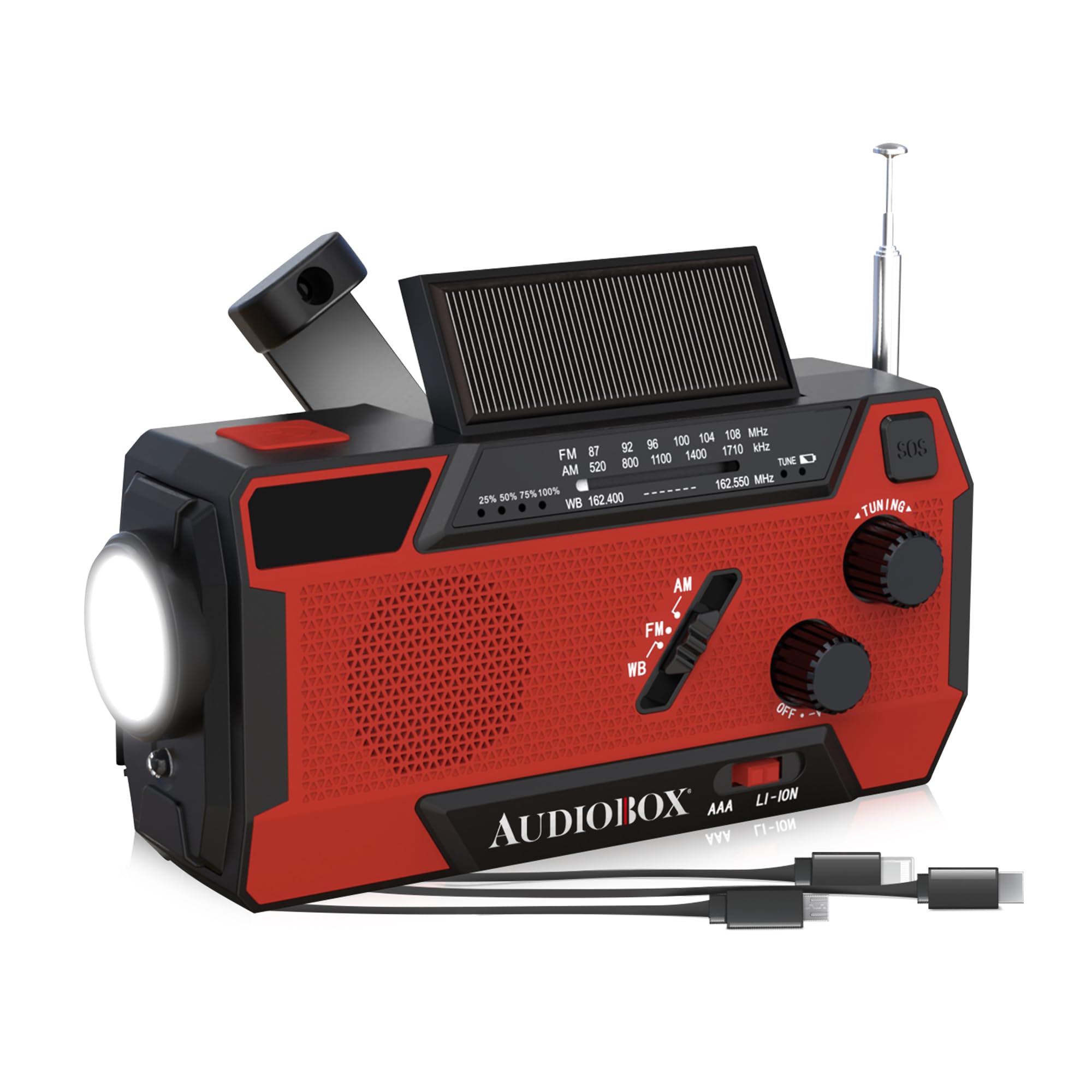
Image 1.1: The AudioBox RXP-200 Emergency NOAA Radio, showcasinel seu disseny compacte i les seves característiques principals.
2. Informació de seguretat
- No exposeu el dispositiu a temperatures extremes ni a la llum solar directa durant períodes prolongats.
- Eviteu deixar caure la ràdio ni sotmetre-la a impactes forts.
- Keep the device away from water and moisture. While it is IPX3 water-resistant, it is not waterproof and should not be submerged.
- Do not attempt to disassemble or modify the radio. This will void the warranty and may cause damage.
- Use only the specified charging methods.
- Mantenir fora de l'abast dels nens.
3. Contingut del paquet
Verifiqueu que tots els elements siguin presents al paquet:
- AudioBox RXP-200 Emergency NOAA Radio
- Cable de càrrega USB tipus C
- Quick Start Guide (This manual serves as a detailed guide)

Imatge 3.1: Frontal view of the AudioBox RXP-200 packaging, showing product features.

Imatge 3.2: Darrere view of the AudioBox RXP-200 packaging, highlighting additional information.

Imatge 3.3: Lateral view of the AudioBox RXP-200 packaging, detailing features like LED light and power mode switch.

Imatge 3.4: Lateral view of the AudioBox RXP-200 packaging, illustrating charging methods like hand crank and solar.
4. Producte acabatview i Components
Familiarize yourself with the various parts of your AudioBox RXP-200 radio:
- Antena telescòpica: For improved radio signal reception.
- Panell solar: For trickle charging the internal battery under direct sunlight.
- Manovella: For manual power generation.
- Llanterna LED: Main light source for illumination.
- Lectura de Lamp: Side-mounted light for broader illumination.
- SOS Alarm Button: Activa una sirena potent i una llum intermitent en cas d'emergència.
- Control de potència/volum: Encén/apaga la ràdio i ajusta el volum.
- Pom d'afinació: Selecciona les freqüències de ràdio.
- Interruptor selector de banda: Switches between AM, FM, and WB (Weather Band).
- USB Type-C Input Port: Per carregar la ràdio.
- Port de sortida USB-A: For charging external devices (e.g., smartphones).
- Llums indicadores de bateria: Mostra el nivell actual de la bateria.
5. Configuració
5.1 Càrrega inicial
Before first use, fully charge the radio using the USB Type-C cable. Connect the cable to the USB Type-C input port on the radio and to a standard USB power adapter (not included) or computer USB port. The battery indicator lights will show charging progress.
5.2 Ajust de l'antena
For optimal radio reception, extend the telescopic antenna fully and adjust its direction until the clearest signal is achieved.
6. Instruccions de funcionament
6.1 Engegada/Apagada i Volum
Gira el Control de potència/volum clockwise to turn the radio on and increase the volume. Rotate counter-clockwise to decrease volume and turn off the radio.
6.2 Radio Operation (AM/FM/WB)
- Turn on the radio using the Power/Volume Knob.
- Utilitza el Selector de banda to choose between AM, FM, or WB (Weather Band).
- Gira el Pom de sintonització to scan for stations. Adjust the telescopic antenna for better reception.
6.3 Alerta meteorològica de la NOAA
When the radio is set to the WB band, it can receive NOAA weather alerts. In some models, an alert function may automatically activate the radio when a weather alert is broadcast. Refer to the specific model's features for automatic alert functionality.
6.4 Funcionament de la llanterna
Premeu el botó Botó de la llanterna (location may vary, typically on the front or side) to turn the LED flashlight on or off.
6.5 Reading Lamp Funcionament
Open the solar panel or a designated flap (if applicable) to reveal the reading lamp. Premeu el botó Lectura de Lamp Botó (or a combined light button) to turn it on or off.
6.6 SOS Alarm Activation
En cas d'emergència, premeu i manteniu premut el botó Botó d'alarma SOS for a few seconds to activate a loud siren and flashing light. Press it again to deactivate.
6.7 Charging External Devices (Power Bank Function)
Connect your smartphone or other USB-powered device to the Port de sortida USB-A on the radio using your device's charging cable. The radio's internal 2000mAh battery will begin charging your external device.
7. Carregant la ràdio
The AudioBox RXP-200 offers multiple ways to recharge its internal 2000mAh lithium-ion battery:
7.1 Càrrega USB tipus C
Connect the provided USB Type-C cable to the radio's Port d'entrada USB tipus C and to a 5V USB power source (e.g., wall adapter, computer, power bank). This is the fastest charging method.
7.2 Hand Crank Charging
Gira el Manivela de mà clockwise or counter-clockwise at a steady pace (approximately 130-150 RPM) for 3-5 minutes to generate enough power for a short period of radio use or flashlight operation. Continuous cranking will charge the battery further.
7.3 Solar Panel Charging
Place the radio with the Panell solar facing direct sunlight. This method provides a slow, supplementary charge and is ideal for maintaining battery levels or for emergency trickle charging when other power sources are unavailable. It is not intended as the primary charging method.
8. Manteniment
8.1 Neteja
Netegeu la ràdio amb un suau, damp cloth. Do not use abrasive cleaners or solvents. Ensure all ports are dry before charging.
8.2 Emmagatzematge
Store the radio in a cool, dry place away from direct sunlight and extreme temperatures. If storing for extended periods, charge the battery at least once every three months to prolong its lifespan.
8.3 Cura de la bateria
The built-in lithium-ion battery is not user-replaceable. Do not attempt to remove or replace it. Dispose of the device according to local regulations for electronic waste.
9. Solució De Problemes
| Problema | Causa possible | Solució |
|---|---|---|
| La ràdio no s'encén. | La bateria està esgotada. | Charge the radio using USB Type-C, hand crank, or solar panel. |
| Mala recepció de ràdio. | Antena no estesa o zona amb senyal deficient. | Fully extend the telescopic antenna and adjust its position. Move to an open area. |
| Llanterna/Lectura lamp no funciona. | Battery is low or light is off. | Charge the radio. Ensure the light button is pressed correctly. |
| El dispositiu extern no es carrega. | Radio battery is too low or cable is faulty. | Assegureu-vos que la ràdio tingui prou càrrega. Proveu un altre cable USB. |
10. Especificacions
- Model: RXP-200
- Bandes de ràdio: AM, FM, WB (NOAA Weather Band)
- Bateria: 2000mAh Lithium-Ion (built-in)
- Mètodes de càrrega: USB Type-C, Hand Crank, Solar Panel
- Sortida: USB-A (for charging external devices)
- Flashlight Brightness: 140 lúmens
- Resistència a l'aigua: IPX3
- Dimensions: 7.8 cm de llargada x 2.46 cm d'amplada x 3.07 cm d'alçada
- Pes: 0.85 lliures
- Característiques especials: SOS Alarm, Reading Lamp
11. Garantia i Suport
For warranty information and customer support, please contact the seller or manufacturer directly. Refer to your purchase documentation for specific warranty terms and contact details.
Fabricant: General Sound Co
Marca: Caixa d'àudio
Per obtenir més ajuda, visiteu el Audiobox Store on Amazon.