
1. Introducció
This manual provides detailed instructions for the assembly, operation, and maintenance of your HLDIRECT 32-inch Computer Desk with Storage Bag. Please read this manual thoroughly before assembly and use to ensure proper function and longevity of your product.
The HLDIRECT 32-inch Computer Desk is designed for modern homes, offices, or small spaces. Measuring 32 inches in length and 20 inches in width, with a desktop height of 30 inches, it offers ample legroom and a spacious work surface for various daily needs, including work, study, or entertainment. Its minimalist design features clean lines and no unnecessary decorations.
This versatile desk can accommodate laptops, books, monitors, keyboards, and gaming setups. Its lightweight design allows for easy relocation, making it suitable for use as a coffee corner, craft table, or temporary dining table.
2. Informació de seguretat
- Always place the desk on a flat, stable surface.
- Use the adjustable footpads to level the desk and prevent wobbling.
- Avoid placing heavy items unevenly on the desk to maintain stability.
- Do not exceed the maximum load-bearing capacity of 50kg (110 lbs).
- Keep small parts and assembly tools away from children during assembly.
- Reviseu regularment tots els cargols i connexions per assegurar-vos que estiguin ben ajustats.
3. Contingut del paquet
Abans de començar el muntatge, verifiqueu que tots els components siguin presents i no estiguin danyats. Si hi ha alguna peça que falti o que estigui danyada, poseu-vos en contacte amb el servei d'atenció al client.
- Panell d'escriptori
- Desk Frame Components (Legs, Support Bars)
- Fabric Storage Bag
- Coixinets ajustables
- Maquinari de muntatge (cargols, clau Allen)
- Manual d'instruccions

Image: All required assembly tools and parts are included for convenience.
4. Instruccions de muntatge i instal·lació
Assembly of this desk is designed to be straightforward and can typically be completed within 30 minutes. All necessary tools are provided. Please follow these steps carefully:
- Step 1: Attach the Support Bars. Secure the support bars under the tabletop using the provided screws. Ensure they are aligned correctly.
- Step 2: Connect the Frame. Attach the desk frame components (legs) to the tabletop assembly. Make sure all connections are firm and stable.
- Step 3: Add the Side Fabric Bag. Install the fabric storage bag to the side of the desk. It can be installed on either the left or right side according to your preference.
- Step 4: Adjust Footpads. Once the desk is assembled, place it in its desired location. Adjust the footpads at the bottom of each leg to ensure the desk is level and stable on uneven floors.
Image: Assembly steps for the HLDIRECT computer desk.

Image: Adjustable footpads help keep the desk steady on uneven surfaces.
5. Instruccions de funcionament
5.1 Using the Storage Bag
The integrated fabric storage bag provides convenient access to your essentials, helping to keep your workspace organized. It features multiple pockets suitable for storing items such as notebooks, pens, tablets, headphones, and other small office supplies.

Image: The fabric storage bag keeps essentials within reach.

Image: Features of the side storage bag, including multiple pockets and flexible installation.
5.2 Ajustament per a l'estabilitat
The desk is equipped with adjustable footpads. To ensure maximum stability, especially on uneven floors, rotate the footpads clockwise or counter-clockwise until all four legs make firm contact with the ground and the desk no longer wobbles.
6. Manteniment
6.1 Neteja
The desk's thick particleboard surface is wear-resistant, scratch-proof, and stain-resistant, making it easy to clean. Use a soft, damp cloth with a mild detergent to wipe down the surface. Avoid abrasive cleaners or harsh chemicals that could damage the finish. Dry immediately with a clean cloth.

Image: The desk surface is water-resistant and easy to clean.
6.2 Atenció general
- Reviseu i estrenyeu periòdicament tots els cargols i perns per mantenir la integritat estructural.
- Avoid exposing the desk to direct sunlight or extreme temperature changes to prevent material degradation.
- Do not place hot items directly on the desktop without a protective coaster.
7. Solució De Problemes
7.1 Desk Wobbles After Assembly
- Check Footpads: Ensure all four adjustable footpads are properly extended and making firm contact with the floor. Adjust them individually until the desk is stable.
- Apretar els cargols: Verifiqueu que tots els cargols del muntatge estiguin completament apretats. Les connexions soltes poden causar inestabilitat.
- Distribució uniforme del pes: Ensure that heavy items are distributed evenly across the desktop.

Image: The triangular structure design provides extra stability.
7.2 Peces que falten o danyades
If you find any parts missing or damaged upon opening the package, please contact HLDIRECT customer support immediately for assistance. Do not attempt to assemble the desk with incomplete or damaged components.
8. Especificacions
| Característica | Detall |
|---|---|
| Marca | HLDIRECT |
| Número de model | 1 |
| Color | Blanc |
| Dimensions del producte | 50D x 80A x 74H centímetres (32 x 20 x 30 polzades) |
| Material | Wood (Thick Particleboard), Alloy Steel (Base) |
| Pes de l'article | 7 kg (15.4 lliures) |
| Característiques especials | Adjustable Footpads, Compact Design, Convertible (Multi-Scenario Use), Side Storage Bag |
| Disseny d'escriptori | Escriptori d'ordinador |
| Estil | Modern |
| Tipus d'acabat | Laminat |
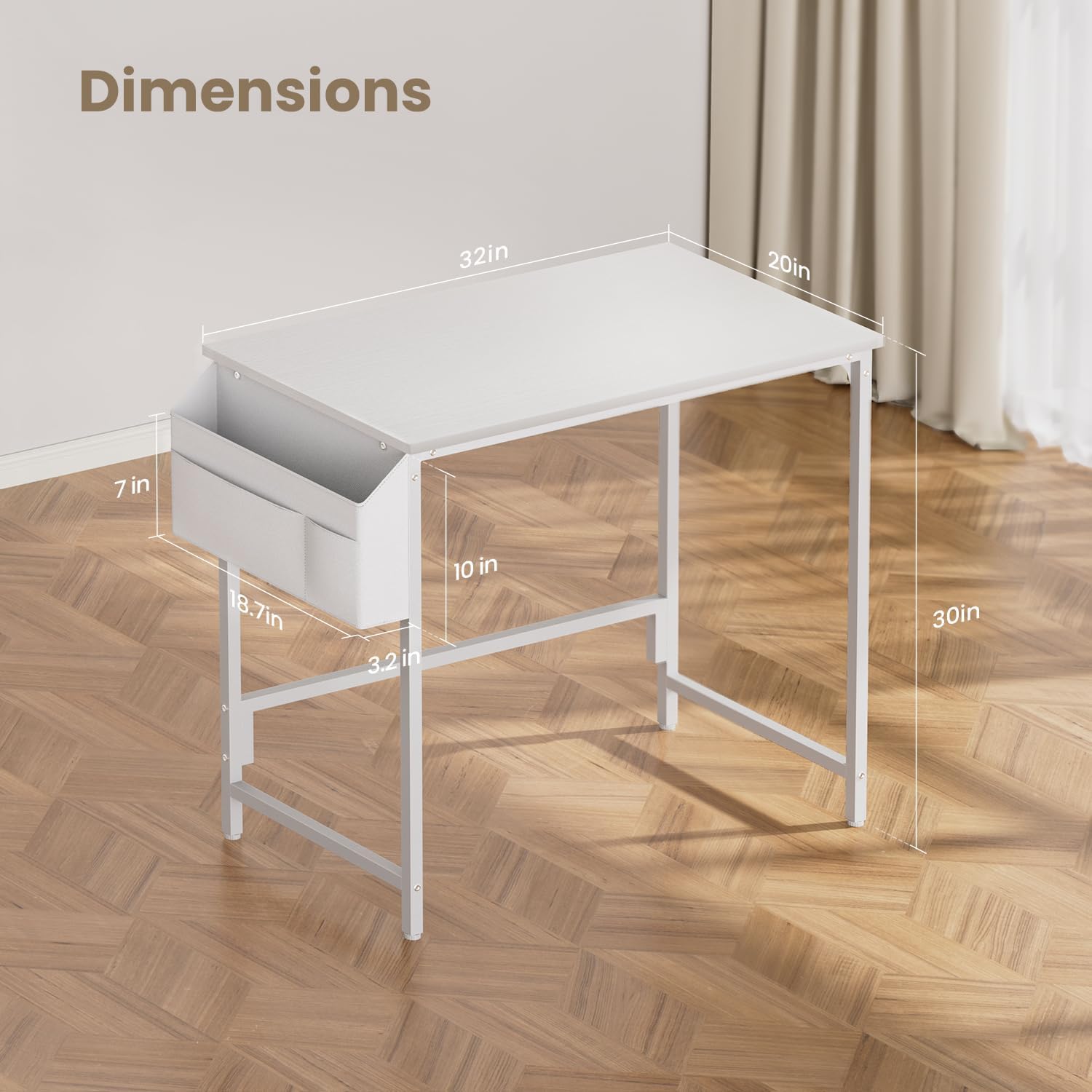
Image: Key dimensions of the HLDIRECT 32-inch computer desk.
9. Garantia i Suport
For warranty information or customer support, please refer to the product packaging or contact the retailer where the product was purchased. HLDIRECT is committed to providing quality products and assistance.