
1. Introducció
This manual provides comprehensive instructions for the installation, operation, maintenance, and troubleshooting of your Loddery 9.7 Inch Android 14 Car Radio. Please read this manual thoroughly before using the product to ensure proper functionality and safety. Keep this manual for future reference.
2. Configuració
2.1. Contingut del paquet
Verifiqueu que tots els elements siguin presents al paquet:
- Loddery 9.7 Inch Android 14 Car Radio Unit
- Arnès de potència
- Antena GPS
- Cables USB
- Cables RCA
- Micròfon extern
- posterior View Cable d'entrada de càmera
- Manual d'usuari (aquest document)
2.2. Instal·lació acabadaview
Installation of the car radio involves removing the factory unit, connecting the new unit's wiring harness, and securing the display. Professional installation is recommended to ensure correct wiring and vehicle compatibility.
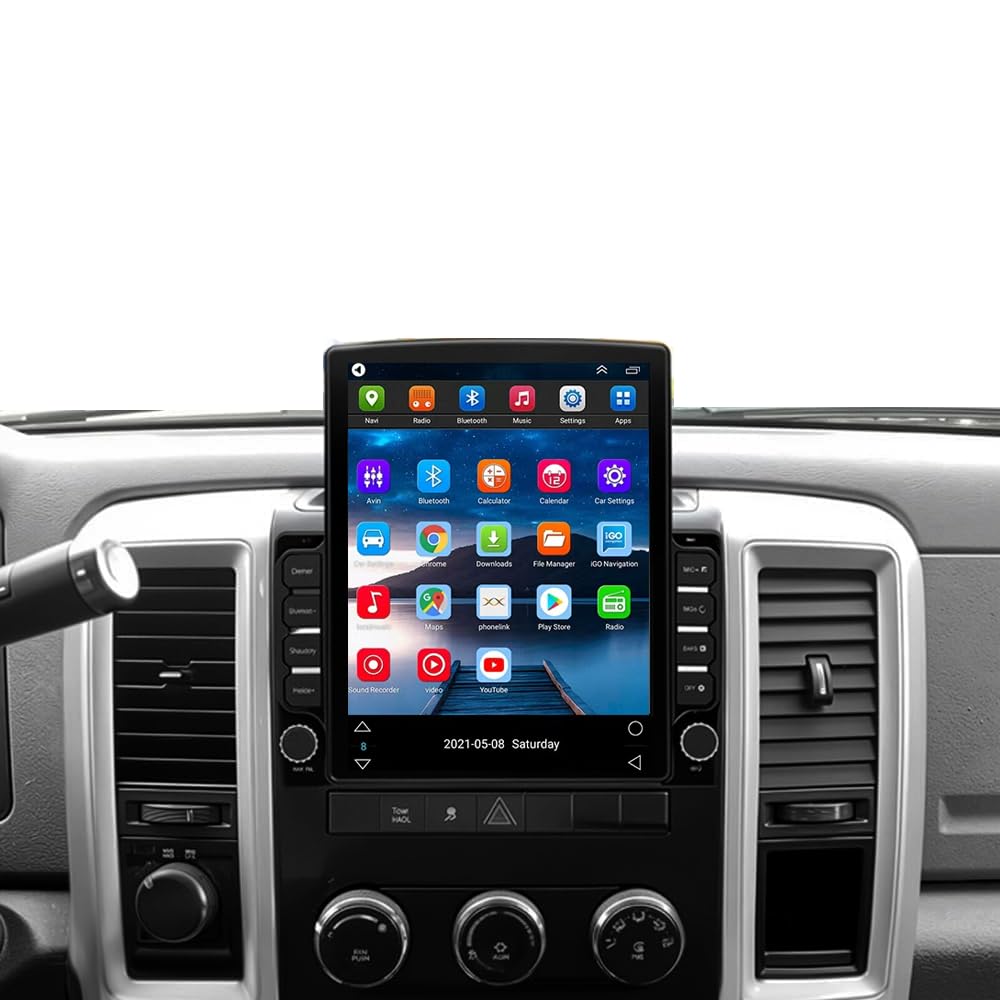
Image: The Loddery 9.7 Inch Android 14 Car Radio unit, showing its large touchscreen and physical buttons.
2.3. Connexions de cablejat
Connect the provided wiring harness to your vehicle's existing wiring. Ensure all connections are secure. The GPS antenna should be placed in a location with a clear view of the sky. Connect the rear view camera input cable if you plan to use a backup camera.
3. Instruccions de funcionament
3.1. Navegació per la interfície d'usuari
The unit features a responsive 9.7-inch IPS touchscreen. Swipe left or right to navigate between home screens. Tap on app icons to launch applications. The bottom bar provides quick access to essential functions like Home, Climate Control, and recent apps.
Video: Demonstration of the user interface, including climate control and app navigation on the Loddery car radio for Dodge RAM 2009-2012.
3.2. Wireless & Wired CarPlay / Android Auto
The unit supports both wireless and wired Apple CarPlay and Android Auto. Connect your compatible smartphone via Bluetooth for wireless connection or a USB cable for wired connection. This allows access to navigation, music, calls, and messages directly from the car radio display.

Image: The Apple CarPlay interface displayed on the car radio, showing navigation, media, and communication apps.

Image: The Android Auto interface displayed on the car radio, featuring navigation, music, and messaging applications.
Video: Instructions on how to connect wireless CarPlay and Android Auto to the car radio for Ram 2009-2012 models.
3.3. Navegació GPS
The unit supports both offline and online GPS navigation. Use the pre-installed navigation app or download your preferred navigation applications via Wi-Fi. Ensure the GPS antenna is properly connected for optimal signal reception.

Image: A GPS navigation map showing routes and points of interest on the car radio screen.
3.4. Connectivitat Bluetooth
Pair your mobile device via Bluetooth for hands-free calling and audio streaming. Access your phone's contacts and call history directly from the car radio. Ensure Bluetooth is enabled on both the car radio and your device.

Image: Bluetooth interface showing options for hands-free calls, audio streaming, and contact synchronization.
3.5. Radio (FM/RDS)
Tune into your favorite FM radio stations. The Radio Data System (RDS) feature provides additional information such as station name, program type, and traffic announcements where available.

Image: The FM/RDS radio interface displaying current frequency and additional information like real-time road conditions and news broadcasts.
3.6. Reproducció multimèdia
Reprodueix àudio i vídeo files from connected USB devices or internal storage. The unit supports various media formats for an enhanced entertainment experience.
3.7. Processador de so digital (DSP)
Utilize the built-in DSP to customize your audio experience. Adjust equalizer settings, balance, and fader to optimize sound quality for your vehicle's interior.

Image: The HIFI Audio and EQ settings interface, allowing for detailed sound customization within the car.
3.8. Control del volant
The unit supports steering wheel control functionality. Program your steering wheel buttons to control volume, track changes, answer calls, and more, enhancing driving convenience and safety.

Image: The steering wheel control settings interface, showing how to map vehicle controls to the car radio functions.
3.9. Darrera View Càmera
When a compatible rear view camera is connected, the display automatically switches to the camera feed when the vehicle is in reverse, aiding in safer parking and maneuvering.

Imatge: La part posterior view camera display, showing parking lines and a wide-angle view for reversing.
3.10. Funcionalitat de pantalla dividida
The split screen feature allows you to run two applications simultaneously on the display, such as navigation and music playback, for enhanced multitasking.
Video: Demonstration of how to use the split screen feature to display two applications concurrently on the car radio.
3.11. Personalització de la interfície d'usuari
Personalize your car radio's interface by changing UI themes and layouts through the settings menu. This allows you to select a visual style that best suits your preference.
Video: Guide on how to change the user interface (UI) theme and style on the Android car stereo for Dodge Ram.
4. Manteniment
4.1. Neteja de la pantalla
Feu servir un drap suau i sense borrissol per netejar suaument la pantalla tàctil. Per a taques difícils, fregueu lleugeramentampNetegeu el drap amb aigua o un netejador de pantalles. Eviteu materials abrasius o productes químics agressius.
4.2. Actualitzacions de programari
Periodically check for software updates to ensure optimal performance and access to new features. Updates can typically be performed via Wi-Fi through the system settings.
5. Solució De Problemes
5.1. Problemes comuns i solucions
- Sense energia: Comproveu totes les connexions d'alimentació i la caixa de fusibles del vehicle. Assegureu-vos que el contacte estigui posat.
- Sense so: Verify speaker connections, volume levels, and audio settings (DSP). Ensure the mute function is not active.
- Pèrdua de senyal GPS: Assegureu-vos que l'antena GPS tingui una visió clara view del cel i està connectat de manera segura.
- Problemes de connexió Bluetooth: Ensure Bluetooth is enabled on both devices. Try unpairing and re-pairing the device.
- Pantalla tàctil que no respon: Perform a system reset (refer to the system settings for the reset option).
- CarPlay/Android Auto no es connecta: Ensure your phone is compatible and the connection method (wired/wireless) is correctly configured. Check USB cable integrity for wired connections.
6. Especificacions
- Marca: Loddery
- Nom del model: 9.7 inch Car Radio Stereo for Dodge Ram 2009 2010 2011 2012
- Sistema operatiu: Android 14
- Mida de la pantalla: 9.7 polzades
- Tipus de visualització: Pantalla tàctil IPS
- Capacitat d'emmagatzematge de memòria: 32 GB
- Tecnologia de connectivitat: Bluetooth, Ethernet, USB, Wi-Fi
- Supported Satellite Navigation System: GPS
- Mètode de control: Toc, veu
- Tipus de servei de vehicles: Car (Dodge RAM 1500, 2500, 3500 2009-2012)
- Pes de l'article: 1875 grams
7. Garantia i Suport
This product comes with a manufacturer's warranty. For any questions or assistance, please contact the seller or manufacturer directly. Refer to your purchase documentation for specific warranty terms and contact information.
Fabricant: Loddery
Descripció de la garantia: If you have any questions please feel free to contact me