
1. Introducció
Thank you for choosing the THOMSON WS902DUO Cosy Bookshelf Speakers. These active stereo speakers deliver a powerful 150W audio experience with deep bass from two 10 cm woofers. They offer versatile connectivity options including Bluetooth 5.3, Optical, HDMI (ARC), RCA, and USB playback. The included remote control and side panel adjustments provide precise control over your audio. Please read this manual carefully before use to ensure proper operation and to maximize your listening experience.

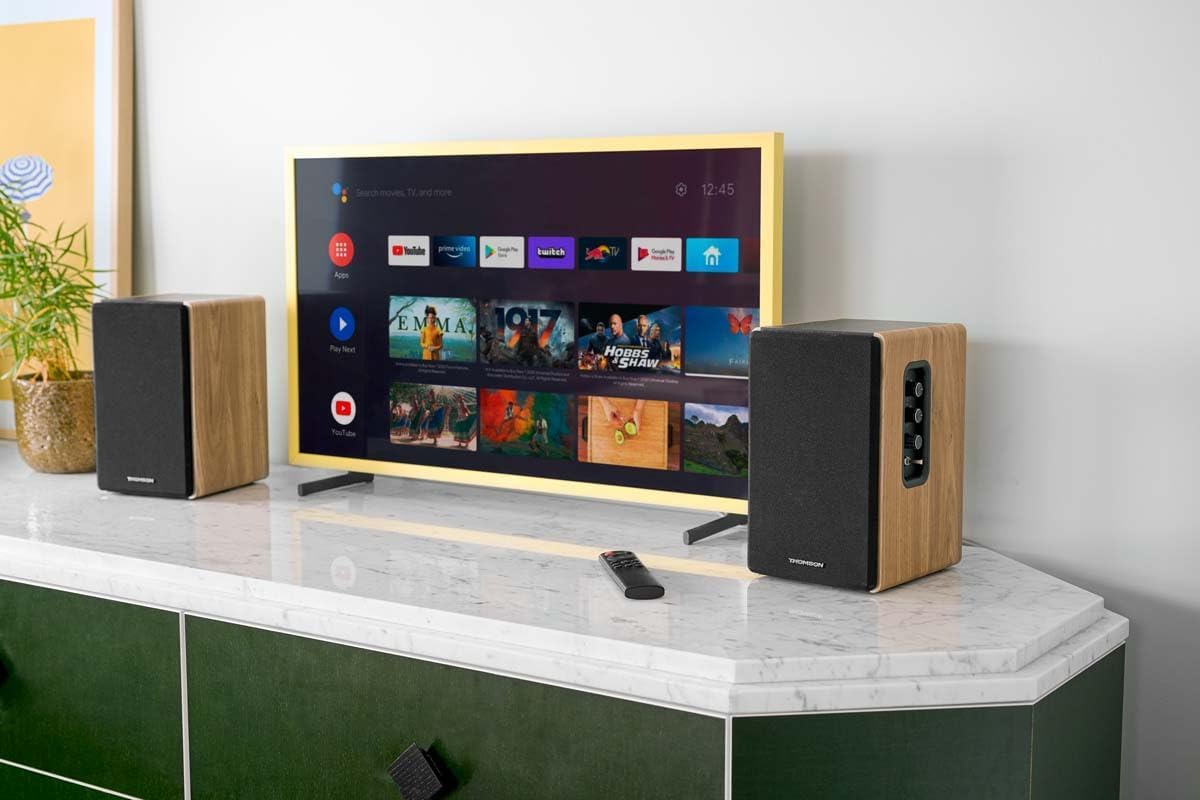
Image 1.1: THOMSON WS902DUO Bookshelf Speakers in a living space, showcasing their elegant wood finish.
2. Instruccions de seguretat importants
- Read these instructions thoroughly before operating the product.
- Conserveu aquestes instruccions per a referència futura.
- Tingueu en compte totes les advertències del producte i de les instruccions d'ús.
- Seguiu totes les instruccions.
- No utilitzeu aquest aparell prop de l'aigua.
- Netegeu només amb un drap sec.
- No bloquegeu cap obertura de ventilació. Instal·leu-ho d'acord amb les instruccions del fabricant.
- No instal·leu a prop de cap font de calor com ara radiadors, registres de calor, estufes o altres aparells (inclosos amplificadors) que produeixen calor.
- No anul·leu el propòsit de seguretat de l'endoll polaritzat o de connexió a terra. Un endoll polaritzat té dues fulles, una més ampla que l'altra. Un endoll de tipus posada a terra té dues fulles i una tercera punta de connexió a terra. La fulla ampla o la tercera punta es proporcionen per a la vostra seguretat. Si l'endoll proporcionat no encaixa a la vostra presa de corrent, consulteu un electricista per substituir la presa obsoleta.
- Eviteu que el cable d'alimentació sigui trepitjat o pessigat, especialment als endolls, els endolls i el punt on surten de l'aparell.
- Utilitzeu només accessoris/accessoris especificats pel fabricant.
- Utilitzeu només amb el carro, suport, trípode, suport o taula especificats pel fabricant o venuts amb l'aparell. Quan utilitzeu un carro, aneu amb compte en moure la combinació de carro/aparell per evitar lesions per bolcar.
- Desendolleu aquest aparell durant les tempestes amb llamps o quan no l'utilitzeu durant llargs períodes de temps.
- Demaneu tot el servei a personal de servei qualificat. El manteniment és necessari quan l'aparell s'ha fet malbé d'alguna manera, com ara el cable d'alimentació o l'endoll està danyat, s'ha vessat líquid o han caigut objectes a l'aparell, l'aparell ha estat exposat a la pluja o la humitat, no funciona amb normalitat. , o s'ha deixat caure.
3. Contingut del paquet
Si us plau, comproveu que tots els elements que s'enumeren a continuació estiguin inclosos al vostre paquet:
- THOMSON WS902DUO Bookshelf Speakers (2 units)
- Control remot
- Cable d'alimentació
- Cable de connexió de l'altaveu
- 3.5mm Jack to RCA Adapter Cable
- Manual d'usuari (aquest document)

Image 3.1: Packaging of the THOMSON WS902DUO Bookshelf Speakers.
4. Producte acabatview
4.1. Side Control Panel (Active Speaker)
The active speaker features a side control panel for easy access to essential functions.

Image 4.1: Side control panel.
- Control de baix: Ajusta la sortida de baixa freqüència.
- Control dels aguts: Ajusta la sortida d'alta freqüència.
- Control de volum: Ajusta el volum general del so.
- Interruptor d'alimentació: Encén o apaga els altaveus.
- Indicador LED: Shows the current status or selected input.
4.2. Rear Panel (Active Speaker)
The rear panel of the active speaker provides all necessary input and output connections.
Imatge 4.2: Connexions del panell posterior.
- Entrada òptica: For connecting digital audio sources like TVs, game consoles, or Blu-ray players.
- Entrada auxiliar (RCA): For connecting analog audio sources such as turntables, CD players, or PCs. A 3.5mm jack adapter is provided.
- TV Audio (HDMI ARC): For connecting to a TV's HDMI ARC port, allowing TV remote control of the speaker volume.
- Reproducció USB: Per reproduir MP3 files directament des d'una unitat flash USB.
- Sub Sortida: For connecting an external active subwoofer for enhanced bass.
- Sortida de l'altaveu: Es connecta a l'altaveu passiu.
- Entrada d'alimentació: Es connecta a la font d'alimentació principal.
4.3. Control remot
The remote control provides convenient access to all speaker functions from a distance.

Image 4.3: Remote control.
- Botó d'encesa: Turns the speakers on/off.
- Botó de silenci: Silencia/activa el so.
- Volum +/-: Ajusta el nivell de volum.
- Playback Controls (Play/Pause, Skip): For USB playback.
- Source Selection Buttons (OPT, BT, ARC, USB, LINE): Selecciona la font d'entrada d'àudio.
- EQ Mode Buttons (MOVIE, MUSIC, DIALOG): Selects preset equalization modes.
5. Configuració
5.1. Col·locació d'altaveus
Place the speakers on a stable, flat surface such as a bookshelf, desk, or speaker stands. For optimal stereo imaging, position the speakers equidistant from your listening position and at ear level. Ensure there is adequate space around the speakers for ventilation.
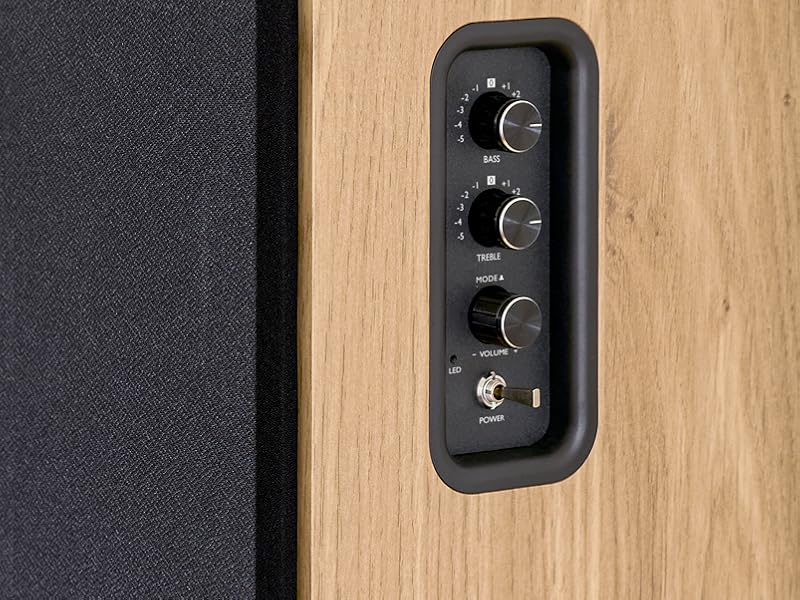
Image 5.1: Recommended speaker placement on a desk.
5.2. Connexió dels altaveus
- Identify the active speaker (with controls and inputs) and the passive speaker.
- Connect the included speaker cable from the speaker output terminals on the active speaker to the input terminals on the passive speaker. Ensure correct polarity (+ to + and - to -).
5.3. Connexió de fonts d'àudio
Connect your desired audio sources to the active speaker using the appropriate cables.
- Entrada òptica: Use an optical cable to connect your TV, game console, or Blu-ray player to the OPTICAL IN port.
- HDMI (ARC) Input: Use an HDMI cable to connect your TV's HDMI ARC port to the TV AUDIO (HDMI) port on the speaker. This allows your TV remote to control the speaker volume.
- RCA (AUX) Input: Use an RCA cable (or the provided 3.5mm jack to RCA adapter) to connect devices like a turntable, CD player, or PC to the AUX IN (RCA) ports.
- Entrada USB: Inseriu una unitat flash USB que contingui MP3 files into the USB PLAY port.

Image 5.2: Speakers connected to a television via HDMI ARC.
5.4. Emparellament Bluetooth
- Assegureu-vos que els altaveus estiguin encesos.
- Press the 'BT' button on the remote control or the side panel to select Bluetooth input. The LED indicator will flash, indicating pairing mode.
- Al telèfon intel·ligent, la tauleta o l'ordinador, activeu el Bluetooth i cerqueu els dispositius disponibles.
- Select "THOMSON WS902DUO" from the list of devices.
- Un cop emparellat, l'indicador LED deixarà de parpellejar i romandrà fix. Ara pots reproduir àudio sense fil.
5.5. Subwoofer Connection (Optional)
If you wish to enhance bass further, connect an active subwoofer to the 'Sub Out' port on the rear panel of the active speaker using an RCA cable.
6. Instruccions de funcionament
6.1. Encendre/apagar
Use the power switch on the side control panel or the power button on the remote control to turn the speakers on or off.
6.2. Selecció de la font
Press the corresponding source button on the remote control (OPT, BT, ARC, USB, LINE) to switch between connected audio inputs. The LED indicator will change to reflect the selected source.
6.3. Control de volum
Adjust the volume using the 'Volume' knob on the side control panel or the 'VOL+/-' buttons on the remote control.
6.4. Ajustaments d'àudio
Fine-tune the sound to your preference:
- Gravs/Aguts: Use the 'Bass' and 'Treble' knobs on the side control panel to adjust the low and high frequencies.
- Modes d'equalització: Press the 'MOVIE', 'MUSIC', or 'DIALOG' buttons on the remote control to select preset equalization settings optimized for different content types.
6.5. Reproducció USB
When a USB flash drive with MP3 files is inserted and USB source is selected, the speakers will automatically begin playing. Use the playback control buttons on the remote control (Play/Pause, Skip) to manage your music.
6.6. Funcionament Bluetooth
After successful pairing (see Section 5.4), you can stream audio from your Bluetooth device. Use your device's controls or the speaker's remote control for playback and volume adjustments.
7. Manteniment
Proper maintenance ensures the longevity and performance of your speakers.
- Neteja: Wipe the speaker surfaces with a soft, dry cloth. Do not use liquid cleaners or abrasive materials.
- Ventilació: Assegureu-vos que les obertures de ventilació no estiguin bloquejades per evitar el sobreescalfament.
- Emmagatzematge: Si guardeu els altaveus durant un període prolongat, desendolleu-los de la presa de corrent i guardeu-los en un lloc fresc i sec.
- Eviteu la humitat: Keep the speakers away from water and high humidity.
8. Solució De Problemes
Si trobeu algun problema, consulteu la següent guia de resolució de problemes:
| Problema | Causa possible | Solució |
|---|---|---|
| Sense poder | Power cable not connected; Power switch off; Wall outlet not working. | Ensure power cable is securely connected. Turn on the power switch. Test the wall outlet with another device. |
| Sense so | Incorrect input source selected; Volume too low; Mute function active; Audio cable not connected properly. | Select the correct input source. Increase volume. Press Mute button on remote. Check all audio cable connections. |
| L'aparellament de Bluetooth falla | Speakers not in pairing mode; Device too far; Bluetooth disabled on source device. | Ensure speakers are in Bluetooth pairing mode (flashing LED). Move device closer to speakers. Enable Bluetooth on your source device. |
| La reproducció USB no funciona | USB drive not formatted correctly; Files not MP3; USB drive not inserted properly. | Ensure USB drive is FAT32 formatted. Verify files are in MP3 format. Re-insert USB drive firmly. |
| Distorsió del so | Volume too high; Source audio quality poor; Bass/Treble settings too extreme. | Lower the volume. Test with a different audio source. Adjust Bass and Treble controls. |
9. Especificacions
| Característica | Especificació |
|---|---|
| Marca | THOMSON |
| Número de model | WS902DUO |
| Potència màxima de sortida de l'altaveu | 150 watts |
| Resposta de freqüència | 60 Hz |
| Tecnologia de connectivitat | Bluetooth, HDMI (ARC), Optical, RCA, USB |
| Versió Bluetooth | 5.3 |
| Mode de sortida d'àudio | Estèreo (2.0 canals) |
| Entrada Voltage | 230 volts (CA) |
| Tipus de muntatge | Muntatge de prestatge |
| Tipus d'altaveu | Multimedia Bookshelf |
| Característiques especials | Stereo Pairing, USB Port, Sub-Out, Remote Control, EQ Modes |
| Usos recomanats | Smartphone, Tablet, PC, TV, Game Console, DVD Player, Turntable |
| Color | Acabat de fusta natural |
| Mètode de control | Remote Control, Side Panel Knobs |
| Mida del woofer | 10 centímetres |
| Dimensions (A x A x P) | 28 cm x 24 cm x 47 cm (approximate, per speaker) |
| Pes | 5048 Grams (total for pair) |
| Nombre d'articles | 2 |
| País d'origen | Xina |
10. Informació de la garantia
This THOMSON WS902DUO product comes with a Garantia limitada d'1 any from the date of purchase. This warranty covers manufacturing defects and workmanship under normal use. It does not cover damage caused by misuse, accidents, unauthorized modifications, or normal wear and tear. Please retain your proof of purchase for warranty claims.
11. Atenció al client
For technical assistance, warranty claims, or any questions regarding your THOMSON WS902DUO speakers, please contact your retailer or visit the official THOMSON support website. Please have your model number (WS902DUO) and proof of purchase ready when contacting support.
Assistència en línia: www.thomsonconsumer.com (Si us plau, consulteu els contactes d'assistència regional)