
1. Introducció
Thank you for choosing the Kaiser KBB-5022BK Portable Bluetooth Speaker. This manual provides essential information for the safe and efficient operation of your device. Please read it thoroughly before use and retain it for future reference.
The KBB-5022BK is a versatile portable speaker featuring 22W RMS power, Bluetooth connectivity, IPX5 water resistance, LED lighting, FM radio, USB and Micro SD playback, and an auxiliary input. It is designed for various environments, including outdoor use.
2. Informació de seguretat
- No exposeu l'altaveu a temperatures extremes, llum solar directa ni humitat elevada.
- The speaker has an IPX5 water resistance rating, meaning it is protected against splashing water. Do not submerge the speaker in water.
- Mantingueu l'altaveu allunyat de fonts de calor i flames obertes.
- No intenteu desmuntar, reparar o modificar l'altaveu. Això anul·larà la garantia i pot causar danys o lesions.
- Feu servir només el cable de càrrega proporcionat o un equivalent certificat.
- Desfeu-vos de la bateria i l'altaveu d'acord amb la normativa local.
- Eviteu escoltar a nivells de volum elevats durant períodes prolongats per evitar danys auditius.
3. Contingut del paquet
Si us plau, comproveu que tots els elements siguin presents al paquet:
- Kaiser KBB-5022BK Portable Bluetooth Speaker
- Cable de càrrega USB-A a USB-C
- Micròfon sense fil
- Manual d'instruccions (aquest document)
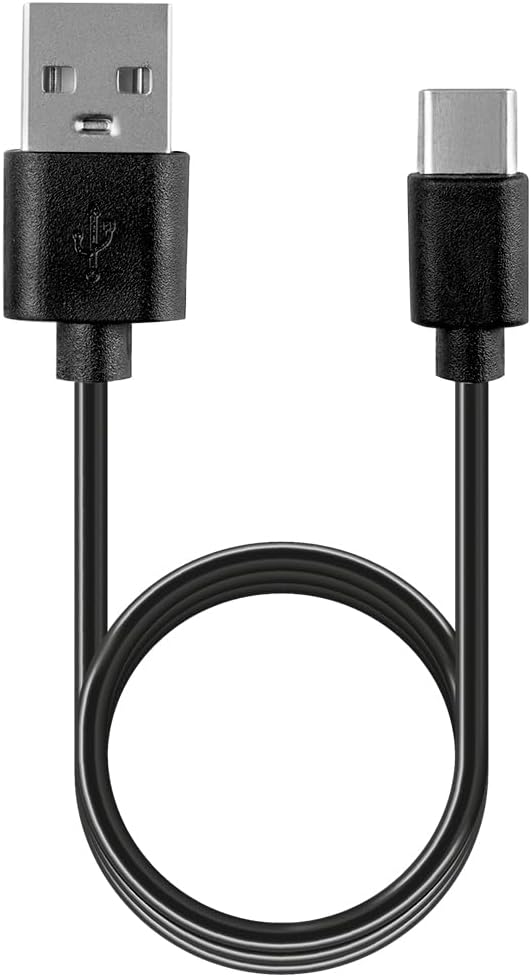
Figura 3.1: Cable de càrrega USB-A a USB-C.
This image shows the black USB-A to USB-C charging cable provided with the speaker, used for recharging the device's internal battery.
4. Producte acabatview i Controls
4.1 Davant View

Figura 4.1: Davant view de l'orador.
This image displays the front of the Kaiser KBB-5022BK speaker, featuring a black grille and the gold 'KAISER' logo prominently in the center.
4.2 Amunt View i botons de control
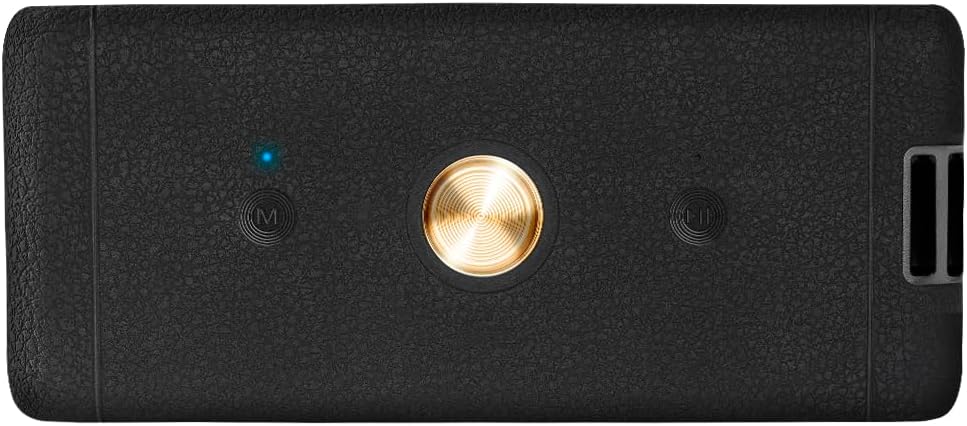
Figura 4.2: A dalt view amb botons de control.
The top panel of the speaker is shown, featuring a central circular button (likely Play/Pause/Power) and two 'M' buttons on either side (likely Mode and Microphone functions), along with an LED indicator.
- Botó d'engegada/reproducció/pausa: Premeu i manteniu premut per encendre/apagar. Premeu breument per reproduir o pausar l'àudio.
- Botó Mode (M): Press to switch between Bluetooth, FM Radio, USB, Micro SD, and AUX input modes. May also control LED light effects.
- Volume/Track Control Buttons: Press briefly to adjust volume. Press and hold to skip tracks (in playback modes) or change FM stations (in FM mode).
4.3 Darrera View i Ports

Figura 4.3: posterior view with input ports.
This image shows the rear panel of the speaker, revealing the USB port, Micro SD card slot, AUX input (3.5mm), and the DC 5V USB-C charging port.
- Port USB: Per a la reproducció des d'una unitat flaix USB.
- Micro SD Card Slot (TF): Per a la reproducció de targetes Micro SD.
- Entrada AUX: Jack de 3.5 mm per connectar dispositius d'àudio externs.
- DC 5V (USB-C) Port: Per carregar l'altaveu.
5. Configuració
5.1 Càrrega inicial
- Abans del primer ús, carregueu completament l'altaveu.
- Connect the USB-C end of the charging cable to the DC 5V port on the speaker.
- Connect the USB-A end to a USB power adapter (not included) or a computer USB port.
- El llum indicador de càrrega s'il·luminarà. S'apagarà o canviarà de color un cop estigui completament carregat.
5.2 Engegada/apagada
- To power on, press and hold the Power button (central circular button on top) for approximately 3 seconds.
- To power off, press and hold the Power button again for approximately 3 seconds.
6. Instruccions de funcionament
6.1 Mode Bluetooth
- Engegueu l'altaveu. Entrarà automàticament en mode d'emparellament Bluetooth, cosa que s'indicarà amb un llum LED intermitent.
- Activeu el Bluetooth al vostre telèfon intel·ligent, tauleta o altre dispositiu compatible amb Bluetooth.
- Cerca available devices and select "KBB-5022BK" from the list.
- Un cop emparellat, l'altaveu emetrà un to de confirmació i el llum LED deixarà de parpellejar.
- You can now play audio from your device through the speaker. Use the speaker's volume buttons or your device's controls to adjust the volume.
6.2 Mode de ràdio FM
- Premeu el botó Mode (M) button repeatedly until you hear static, indicating FM Radio mode.
- Premeu el botó Reproduir/Pausa button briefly to initiate an automatic scan for FM stations. The speaker will scan and save available stations.
- Un cop finalitzada l'escaneig, utilitzeu Volume/Track Control Buttons per navegar entre les estacions desades.
Reproducció amb USB 6.3 / Micro SD
- Inseriu una unitat flash USB o una targeta Micro SD (amb àudio files) into the corresponding port on the rear of the speaker.
- The speaker will automatically switch to USB or Micro SD mode and begin playing audio.
- Utilitza el Reproduir/Pausa botó per aturar o reprendre la reproducció.
- Utilitza el Volume/Track Control Buttons per saltar pistes.
6.4 Mode d'entrada AUX
- Connecteu un extrem d'un cable d'àudio de 3.5 mm (no inclòs) al port d'entrada AUX de l'altaveu.
- Connecteu l'altre extrem a la presa de sortida d'àudio del vostre dispositiu extern (per exemple, reproductor MP3, ordinador).
- L'altaveu canviarà automàticament al mode AUX.
- Control audio playback and volume directly from your connected external device.
6.5 Control de llum LED
The speaker features integrated LED lights. Press the Mode (M) button briefly to cycle through different light effects or to turn them off.
6.6 KSR Link Technology (True Wireless Stereo)
The KSR Link technology allows you to pair two KBB-5022BK speakers together for a true wireless stereo experience.

Figura 6.1: KSR Link, Bluetooth, and Battery Life.
This graphic highlights the speaker's KSR Link technology for stereo pairing, Bluetooth connectivity, and a rechargeable battery providing up to 4.5 hours of playback.
- Ensure both KBB-5022BK speakers are powered on and in Bluetooth mode, but not yet paired to any device.
- En un dels altaveus (aquest serà l'altaveu principal), premeu i manteniu premut el botó Mode (M) durant uns segons fins que sentiu un to d'emparellament.
- Els dos altaveus es connectaran automàticament entre si. Un cop connectats, el LED de l'altaveu principal parpellejarà, indicant que està llest per emparellar-se amb el dispositiu.
- Now, connect your Bluetooth device to the primary speaker as described in Section 6.1. Audio will play through both speakers in stereo.
7. Càrrega
When the battery is low, the speaker may emit an audible alert. Connect the speaker to a power source using the provided USB-C charging cable.
- A full charge provides up to 4.5 hours of playback time, depending on volume level and usage.
- El llum indicador de càrrega mostrarà l'estat de càrrega.

Figura 7.1: Speaker in use, highlighting battery life and charging port.
This image shows the speaker in an indoor setting, emphasizing its 4.5-hour battery life and providing a close-up of the rear input/charging ports.
8. Manteniment
- Neteja: Use a soft, dry cloth to clean the speaker's exterior. Do not use abrasive cleaners, alcohol, or other chemical solvents.
- Emmagatzematge: Quan no l'utilitzeu durant períodes prolongats, guardeu l'altaveu en un lloc fresc i sec, allunyat de la llum solar directa i de temperatures extremes.
- Cura de la bateria: Per allargar la durada de la bateria, carregueu l'altaveu almenys un cop cada tres mesos si no l'utilitzeu regularment.
9. Solució De Problemes
| Problema | Causa possible | Solució |
|---|---|---|
| L'altaveu no s'encén. | Bateria baixa. | Carregueu l'altaveu completament. |
| Sense so. | Volum massa baix; mode incorrecte; dispositiu no connectat. | Increase volume on speaker and source device. Ensure correct mode (Bluetooth, AUX, etc.). Reconnect device. |
| L'aparellament de Bluetooth falla. | L'altaveu no està en mode d'emparellament; el Bluetooth del dispositiu està desactivat; interferències. | Ensure speaker is in Bluetooth pairing mode. Turn Bluetooth on/off on your device. Move closer to the speaker. Clear previous pairings on your device. |
| Mala recepció de ràdio FM. | Senyal feble. | Reposicioneu l'altaveu per millorar la recepció del senyal. |
| L'USB/Micro SD no es reprodueix. | Sense suport file format; corromput files; mode incorrecte. | Assegureu-vos l'àudio files are in a supported format (e.g., MP3). Check if the storage device is properly inserted. Press the Mode button to switch to USB/Micro SD mode. |
10. Especificacions

Figura 10.1: Speaker dimensions.
This diagram illustrates the physical dimensions of the Kaiser KBB-5022BK speaker: 20.2 cm in length, 7.9 cm in width, and 7.8 cm in height.
| Característica | Especificació |
|---|---|
| Número de model | KBB-5022BK |
| Potència de sortida | 22W RMS |
| Connectivitat | Bluetooth, USB, Micro SD, AUX (3.5mm), FM Radio |
| Resistència a l'aigua | IPX5 (a prova d'esquitxades) |
| Durada de la bateria | Fins a 4.5 hores (a un volum moderat) |
| abast sense fils | Fins a 10 metres (33 peus) |
| Font d'alimentació | Rechargeable Battery (DC 5V via USB-C) |
| Dimensions (L x A x A) | 20.2 cm x 7.9 cm x 7.8 cm |
| Pes | 1000 grams (1 kg) |
| Material | Metall, plàstic |
| Mètode de control | Premeu el botó, toqueu |
| Característiques especials | LED Lights, KSR Link (TWS) |
11. Garantia i Suport
Kaiser products are designed and manufactured to the highest quality standards. For warranty information or technical support, please refer to the warranty card included with your product or contact Kaiser customer service through their official channels. Please have your model number (KBB-5022BK) and proof of purchase ready when contacting support.