
1. Producte acabatview
The GIGABYTE UD750GM PG5 V2 ICE is a 750W fully modular power supply designed for high-performance computing systems. It features 80 Plus Gold certification for efficiency, ATX 3.1 compliance, and native PCIe 5.1 support, ensuring stable and reliable power delivery for modern components.
Característiques clau
- 750W Capacity with Single +12V Rail
- Supports PCIe Gen 5.1 graphics cards (16 Pin)
- Intel ATX 3.1 Certified
- Certificat 80 PLUS Gold
- Factor de forma ATX
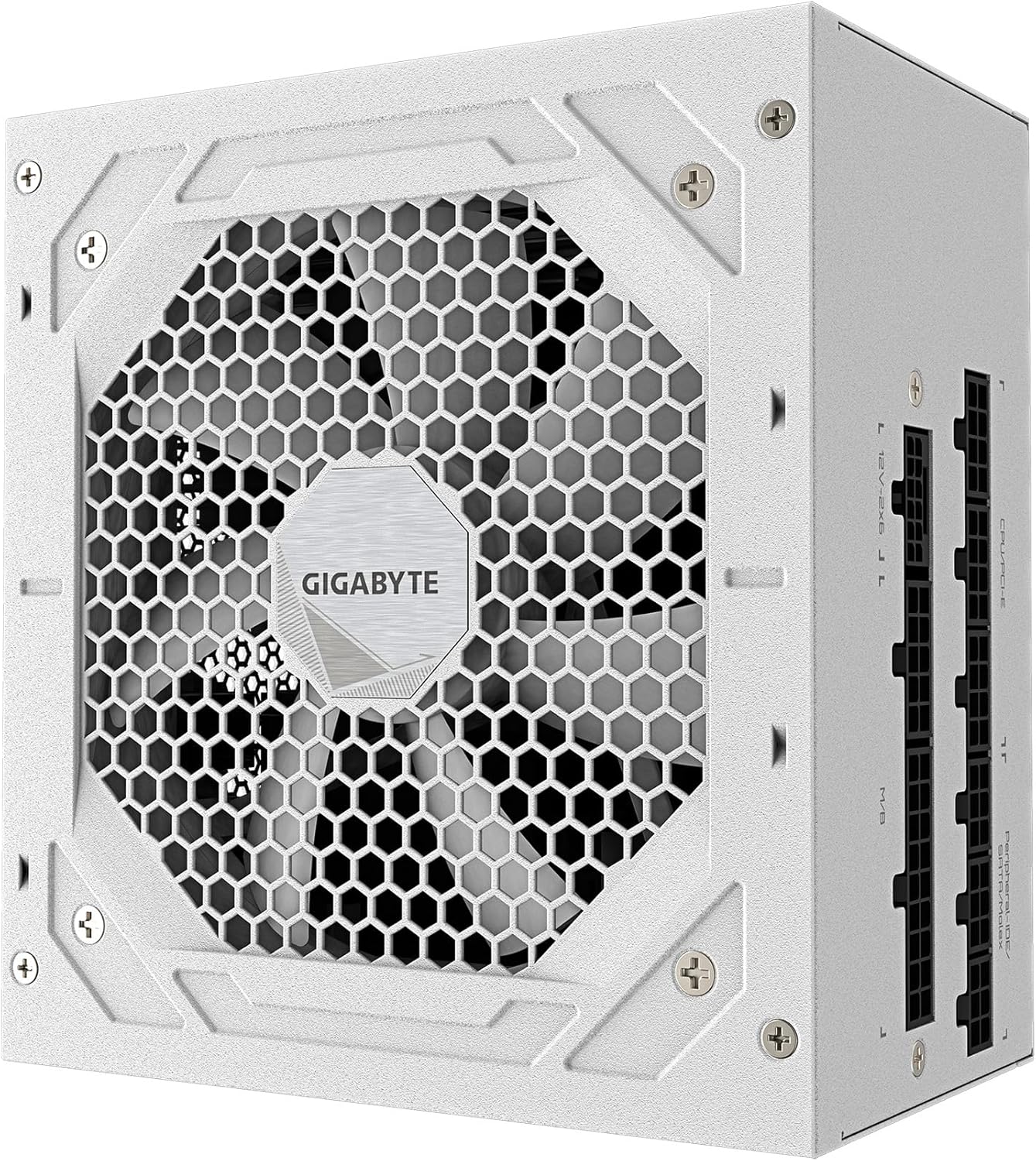
Imatge 1.1: Part superior view of the GIGABYTE UD750GM PG5 V2 ICE Power Supply, highlighting the fan grille.
2. Informació de seguretat
Please read and understand all safety instructions before installing or operating this power supply unit. Failure to follow these instructions may result in electric shock, fire, or damage to the product and connected components.
- No obriu la font d'alimentació casing. Vol. Alttage components are present inside, which can cause severe injury or death. There are no user-serviceable parts.
- Ensure the power supply is disconnected from the AC power outlet before installation, removal, or cleaning.
- Instal·leu la font d'alimentació en una zona ben ventilada, allunyada de fonts de calor, llum solar directa i humitat.
- Feu servir només els cables modulars que s'inclouen amb aquesta font d'alimentació. L'ús de cables incompatibles pot causar danys.
- Aquest producte està dissenyat només per a ús interior.
- Es recomana instal·lació professional.

Image 2.1: Rear panel of the power supply showing the AC input, power switch, and safety certification labels, including warning symbols.
3. Contingut del paquet
Verifiqueu que tots els elements siguin presents al paquet abans de continuar amb la instal·lació:
- GIGABYTE UD750GM PG5 V2 ICE Power Supply Unit
- Modular Cable Set (including 24-pin ATX, 8-pin CPU, 6+2-pin PCIe, 16-pin PCIe 5.1, SATA, and Molex cables)
- Cable d'alimentació CA
- Cargols de muntatge
- Manual d'usuari (aquest document)
4. Guia d'instal·lació
Follow these steps to properly install your GIGABYTE power supply into your computer system.
4.1. Prepareu el vostre sistema
- Turn off your computer and disconnect the AC power cord from the wall outlet.
- Open your computer case. Refer to your case manufacturer's manual for specific instructions.
- If replacing an existing power supply, disconnect all cables from the old PSU and remove it from the case.
4.2. Mount the Power Supply
- Carefully place the new GIGABYTE power supply into the designated PSU bay in your computer case.
- Align the screw holes on the power supply with those on the case.
- Assegureu la font d'alimentació amb els cargols de muntatge subministrats.
4.3. Connect Modular Cables
Identify the necessary cables for your system components and connect them to the corresponding ports on the power supply. Ensure each cable is firmly seated.
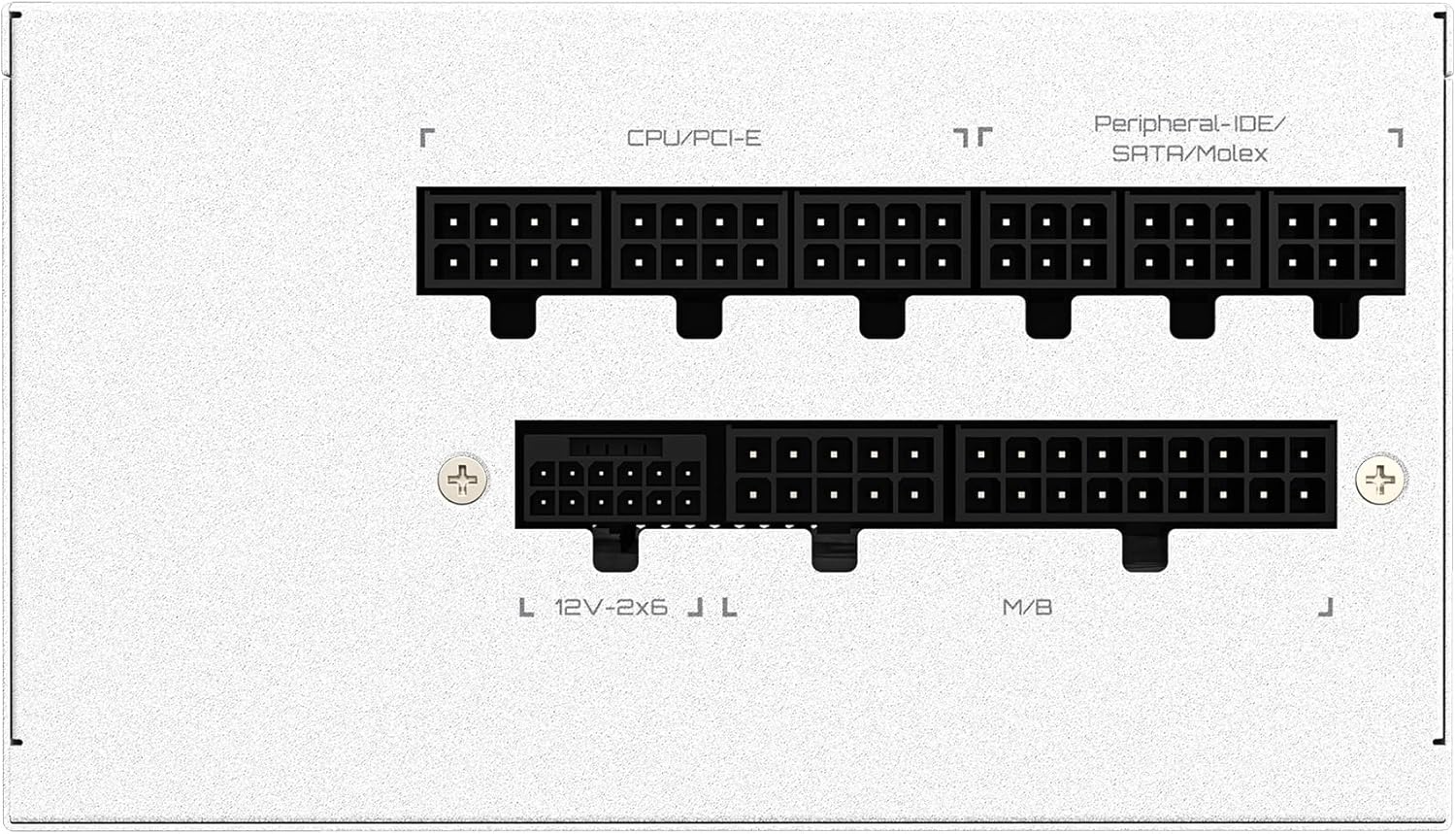
Image 4.1: Modular cable connection panel. Labels indicate ports for M/B (Motherboard), CPU/PCI-E, Peripheral-IDE/SATA/Molex, and 12V-2x6 (PCIe 5.1).
- M/B (Motherboard): Connecteu el cable ATX de 24 pins a la placa base.
- CPU/PCI-E: Connect the 8-pin (4+4) CPU cable to the motherboard's CPU power connector. Connect 6+2-pin PCIe cables to your graphics card(s) as needed.
- 12V-2x6: Connect the 16-pin PCIe 5.1 cable directly to compatible graphics cards.
- Peripheral-IDE/SATA/Molex: Connect SATA power cables to storage drives (HDDs, SSDs) and optical drives. Use Molex cables for other peripherals if required.
4.4. Connect to Components
Route the connected modular cables neatly within your case and connect them to their respective components (motherboard, CPU, graphics card, storage drives, etc.). Ensure all connections are secure.
4.5. Connect AC Power
- Ensure the power switch on the back of the power supply is in the 'OFF' (0) position.
- Connect the AC power cord to the power supply's AC inlet.
- Connecteu l'altre extrem del cable d'alimentació de CA a una presa de corrent amb connexió a terra o a un protector de sobretensió.
5. Funcionament
Once installation is complete, you can power on your system.
5.1. Encès / apagat
- Gireu l'interruptor d'alimentació de la part posterior de la font d'alimentació a la posició "ON" (I).
- Premeu el botó d'engegada de la caixa de l'ordinador.
- To turn off the system, shut down your operating system normally. For a complete power cycle, flip the power switch on the PSU to 'OFF' (0) after system shutdown.
6. Manteniment
Un manteniment adequat ajuda a garantir la longevitat i el rendiment òptim de la vostra font d'alimentació.
6.1. Neteja
- Periodically clean the exterior of the power supply and its fan grille to prevent dust buildup.
- Use compressed air to gently remove dust from the fan and vents.
- Desconnecteu sempre el cable d'alimentació de CA abans de netejar.
6.2. Fan Check
Ensure the power supply fan is operating correctly. If you notice unusual noises or the fan is not spinning under load, consult the troubleshooting section or contact support.
7. Solució De Problemes
If you encounter issues with your power supply, refer to the following common problems and solutions.
7.1. Sense poder
- Check AC Power: Ensure the AC power cord is securely connected to both the power supply and the wall outlet. Verify the wall outlet has power.
- PSU Switch: Confirm the power switch on the back of the PSU is in the 'ON' (I) position.
- Connexions de cable: Double-check all modular cable connections, especially the 24-pin ATX and 8-pin CPU cables, are firmly seated.
- Components del sistema: Disconnect non-essential components (e.g., extra drives, peripherals) to isolate if a faulty component is preventing the system from booting.
7.2. System Instability or Random Shutdowns
- Sobrecàrrega: Assegureu-vos que els requisits d'alimentació del vostre sistema no superin la capacitat de 750 W de la font d'alimentació.
- Ventilació: Check that the power supply and case have adequate airflow and are not obstructed by dust.
- Integritat del cable: Verify all power cables are in good condition and properly connected.
- Problemes amb els components: Test other components (RAM, GPU) if possible, as instability may not always be PSU-related.
8. Especificacions
Detailed technical specifications for the GIGABYTE UD750GM PG5 V2 ICE Power Supply.
| Característica | Especificació |
|---|---|
| Marca | GIGABYTE |
| Número de model | GP-UD750GM PG5 ICE |
| Potència màxima | 750 watts |
| Certificació 80 PLUS | Or |
| Versió ATX | ATX 3.1 |
| Suport PCIe | PCIe 5.1 (16 Pin) |
| Factor de forma | ATX |
| Entrada Voltage | 120 volts |
| Output Current (+12V) | 62.5 A |
| Output Current (+5V) | 20 A |
| Output Current (+3.3V) | 20 A |
| Dimensions (L x A x A) | 5.91 x 5.51 x 3.39 polzades |
| Color | Blanc |
| UPC | 810162143176 |
9. Garantia i Suport
9.1. Informació de la garantia
This GIGABYTE power supply is covered by a Garantia del fabricant de 10 anys. Please retain your proof of purchase for warranty claims. The warranty covers defects in materials and workmanship under normal use. It does not cover damage caused by misuse, accident, modification, or improper installation.
9.2. Suport tècnic
For technical assistance, troubleshooting, or warranty inquiries, please visit the official GIGABYTE support weblloc o poseu-vos en contacte amb el seu servei d'atenció al client.
GIGABYTE Official Store: https://www.amazon.com/stores/GIGABYTE/page/854232BB-540A-4979-BE5B-6F3F3A530F1E


