
1. Producte acabatview
The bmani T16 Wireless Earbuds are designed for active lifestyles, offering an ultra-long 80-hour playtime with their dual LED display charging case. They feature immersive stereo sound with 10mm dynamic drivers, clear calls with dual microphones, and seamless Bluetooth connectivity. The adjustable over-ear hooks ensure a secure and comfortable fit for various activities. Easy button controls provide intuitive management of music and calls.
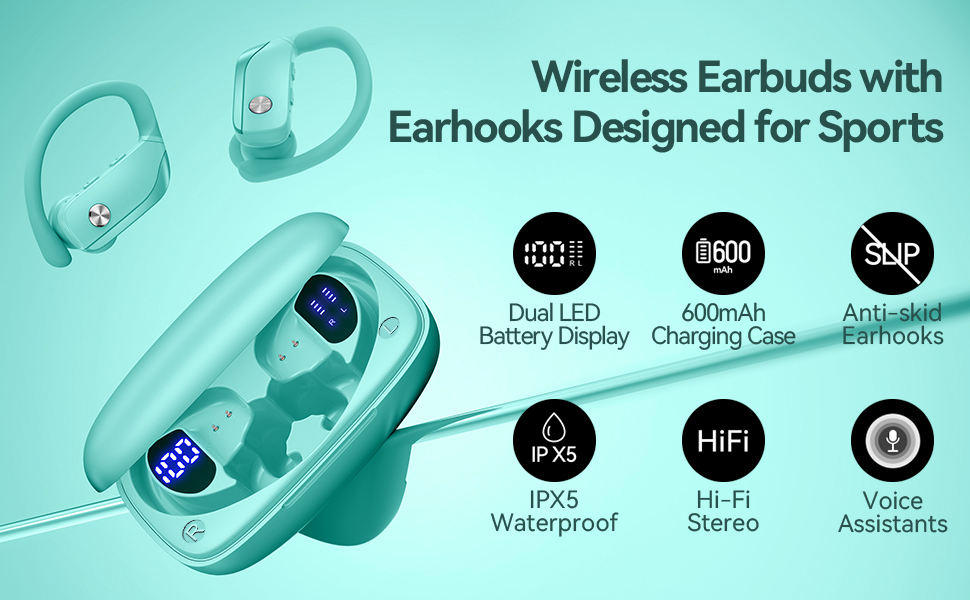
Image: bmani T16 Wireless Earbuds in their charging case, highlighting 80 hours of total playtime and the dual LED battery display.
2. Què hi ha a la caixa
- bmani T16 Wireless Earbuds (Left and Right)
- Caixa de càrrega amb pantalla LED
- Eartips (Small, Medium, Large sizes)
- Cable de càrrega tipus C.
- Manual d'usuari (aquest document)

Image: The bmani T16 Wireless Earbuds, charging case, and various eartip sizes.
3. Configuració i emparellament
The bmani T16 earbuds feature one-step pairing for quick and easy connection to your devices.
- Maridatge inicial: Obre l'estoig de càrrega. Els auriculars s'encendran automàticament i entraran en mode d'emparellament.
- Al telèfon intel·ligent, la tauleta o un altre dispositiu compatible amb Bluetooth, aneu a la configuració de Bluetooth.
- Cerca available devices and select "T16" from the list.
- Un cop connectat, sentireu un missatge de veu que confirma l'aparellament correcte.
- Reconnexió automàtica: After the initial pairing, the earbuds will automatically reconnect to the last paired device when removed from the charging case.

Image: Illustration of the one-step pairing process for the bmani T16 earbuds with a smartphone and other compatible devices.
Video: An official seller video demonstrating the features and pairing process of the bmani T16 Wireless Earbuds.
4. Instruccions d'ús
For optimal sound quality and a secure fit, follow these steps to wear your bmani T16 earbuds:
- Choose the correct eartip size (S, M, L) that best fits your ear canal.
- Place the flexible ear hook over the back of your ear.
- Introduïu suaument l'auricular al canal auditiu.
- Adjust the earbud and hook by twisting until you achieve a comfortable and secure fit. The ear hooks are designed to adapt to different ear shapes, minimizing slippage during movement.

Image: Visual guide demonstrating how to correctly position the bmani T16 earbuds with their flexible ear hooks for a secure fit.
5. Controls de funcionament
The bmani T16 earbuds feature intuitive physical buttons for easy control of your audio and calls.
- Reproduir/pausa: Feu clic una vegada a qualsevol dels auriculars.
- Pista següent: Quick double-click on the Right (R) earbud.
- Pista anterior: Quick double-click on the Left (L) earbud.
- Pujar el volum: Press the "+" button on the earbud.
- Baixar el volum: Press the "-" button on the earbud.
- Respondre/Finalitzar la trucada: Feu clic una vegada a qualsevol dels auriculars.
- Rebutja la trucada: Hold either earbud button.
- Activa l'assistent de veu (Siri/Assistent de Google): Quick triple-click on either earbud.
- Encès/apagat: Hold the button on either earbud.
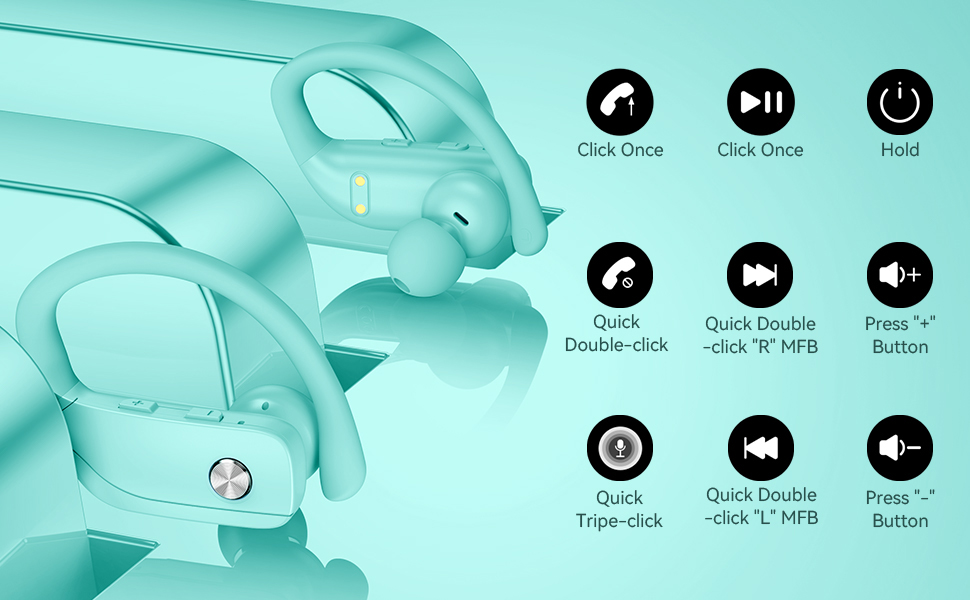
Image: Detailed diagram showing the various button controls on the bmani T16 earbuds for managing audio playback, calls, and voice assistant.
6. Càrrega
The bmani T16 earbuds and charging case provide an impressive 80 hours of total playtime.
- Càrrega dels auriculars: Place the earbuds back into the charging case. The LED indicators on the case will show the charging status of each earbud. Each earbud offers up to 8 hours of playtime per charge.
- Càrrega de la caixa: Connect the provided Type-C charging cable to the charging port on the case and to a USB power source. The digital display on the left side of the case will show the remaining power percentage de la caixa de càrrega.
- The charging case can recharge the earbuds multiple times, extending total usage to 80 hours.
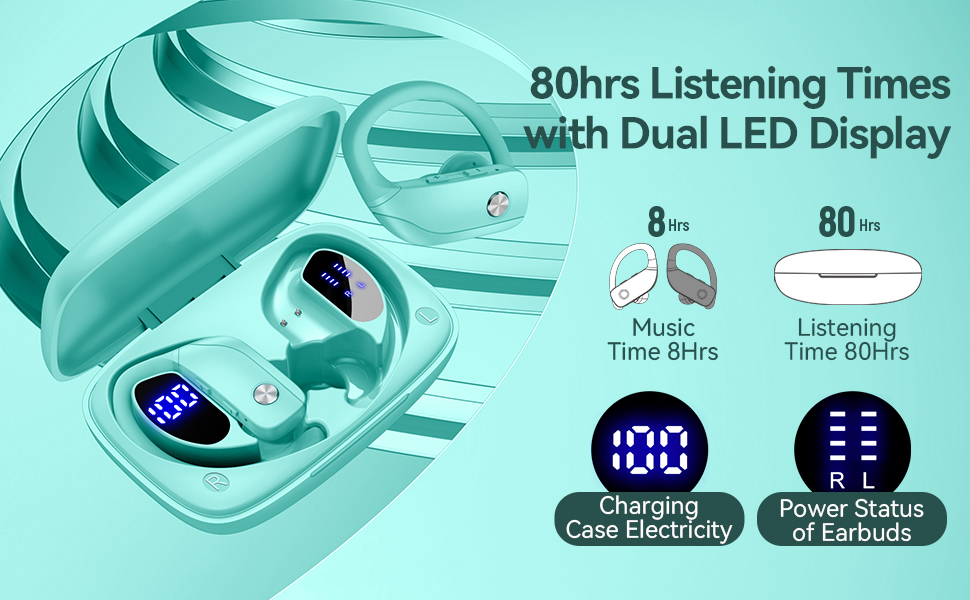
Image: The bmani T16 charging case with its dual LED digital display, indicating the battery percentage of the case and the charging status of each earbud.
Vídeo: Un vídeo oficial del venedorasing the 48-hour playback (note: product features state 80H) and LED display of the bmani T16 Sport Earphones.
7. Manteniment
- Regularly clean the earbuds and charging contacts with a soft, dry cloth to prevent dust and debris buildup.
- Avoid exposing the earbuds to extreme temperatures or direct sunlight for prolonged periods.
- Guarda els auriculars a la seva funda de càrrega quan no els facis servir per protegir-los i assegurar-te que es mantinguin carregats.
- The earbuds are sweat-resistant and dust-resistant, but avoid submerging them in water.
8. Solució De Problemes
- Auriculars que no s'emparellan: Ensure both earbuds are removed from the case and are powered on. Turn off Bluetooth on your device and turn it back on. If issues persist, try resetting the earbuds (refer to the full user manual for specific reset instructions).
- Sense so: Check the volume level on both your device and the earbuds. Ensure the earbuds are properly connected to your device via Bluetooth.
- Problemes de càrrega: Verifica que el cable de càrrega estigui connectat correctament tant a la funda com a la font d'alimentació. Assegura't que els contactes de càrrega dels auriculars i de l'interior de la funda estiguin nets i lliures de residus.
- Connexió inestable: Ensure your device is within the Bluetooth range (approximately 33 feet/10 meters) and there are no significant obstacles between the earbuds and your device.
9. Especificacions
| Nom del model | T16 |
| Tecnologia de connectivitat | Sense fil (Bluetooth 5.0) |
| Temps de joc (auriculars) | Fins a 8 hores per recàrrega |
| Temps de reproducció total (amb estoig) | Fins a 80 hores |
| Tipus de controlador d'àudio | Controlador dinàmic de 10 mm |
| Funcions de control de soroll | Noise Cancellation (Dual Mics) |
| Nivell de resistència a l'aigua | Sweat-resistant and Dust-resistant |
| Mètode de control | Controls de botons |
| Col·locació de l'orella | Sobre l'orella |
| Pes de l'article | 2 unces |
10. Garantia i Suport
bmani offers a lifetime warranty for permanent replacement of damaged, defective, upgraded, or lost products. Please refer to the warranty card included in your package for activation details and terms. For further assistance, please contact bmani customer support.