
1. Introducció
This manual provides essential information for the safe and efficient use of your KTC H32D6 32-inch WQHD 100Hz IPS Monitor. Please read these instructions thoroughly before operating the device and retain them for future reference.
2. Informació de seguretat
Observeu les següents precaucions de seguretat per evitar danys al monitor o lesions personals:
- No exposeu el monitor a la pluja, la humitat ni a temperatures extremes.
- Assegureu-vos una ventilació adequada al voltant del monitor.
- Use only the power adapter and cables provided by KTC.
- Eviteu col·locar objectes pesats al cable d'alimentació.
- No intenteu desmuntar ni reparar el monitor vosaltres mateixos. Poseu-vos en contacte amb personal de servei qualificat.
- Mantingueu el monitor allunyat de camps magnètics forts.
3. Contingut del paquet
Verifiqueu que tots els elements siguin presents al paquet:
- 1 x KTC H32D6 Monitor
- 1 x suport base
- 1 x cable d'alimentació
- 1 x cable HDMI
- 1 x adaptador de corrent
- 1 x Instruction Manual (Japanese version)
- 1 x Guia d'inici ràpid
- 1 x Targeta de garantia
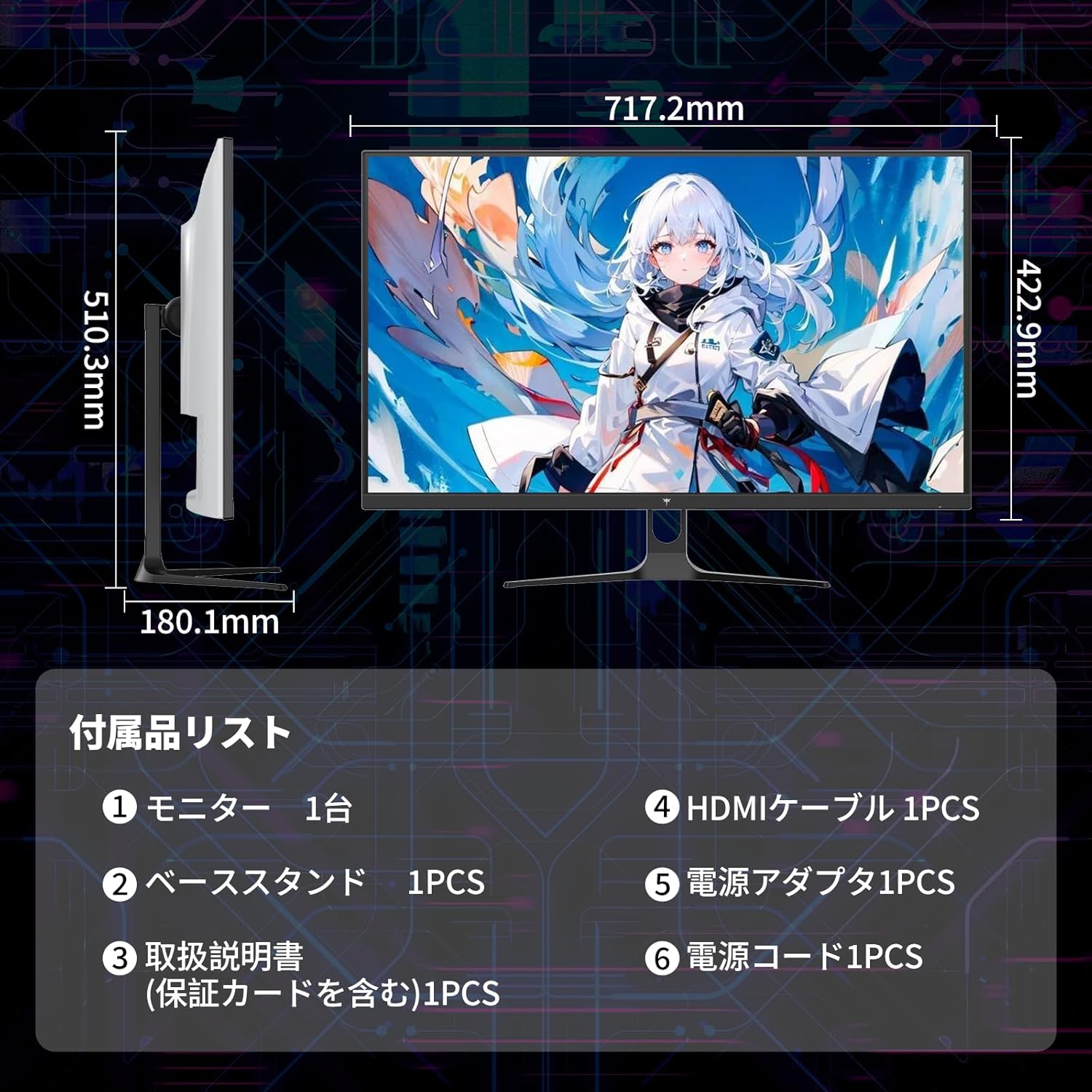
Figure 3.1: Included Accessories and Monitor Dimensions
4. Instruccions de configuració
4.1 Muntatge del suport
- Attach the base to the stand pillar.
- Secure the stand pillar to the back of the monitor using the provided screws.
4.2 Connexió del monitor
El monitor admet diverses opcions d'entrada:
- HDMI: Connect an HDMI cable from your PC or game console to one of the two HDMI 2.0 ports on the monitor.
- DisplayPort: Connect a DisplayPort 1.4 cable from your PC to the DisplayPort on the monitor.
- Potència: Connect the power adapter to the monitor's DC input and then plug it into a power outlet.

Figura 4.1: Ports de connectivitat del monitor
4.3 Muntatge VESA
The monitor is VESA mount compatible (100x100mm). This allows for easy installation with monitor arms or wall mounts (sold separately).

Figure 4.2: Tilt Adjustment and VESA Mount
5. Instruccions de funcionament
5.1 Encès/Apagat
Premeu el botó d'engegada que es troba al monitor per encendre'l o apagar-lo.
5.2 Menú de visualització en pantalla (OSD)
Use the control buttons on the monitor to navigate and adjust settings in the OSD menu. Common settings include:
- Brillantor/Contrast: Adjust image luminance.
- Configuració de color: Modify color temperature, gamma, and hue.
- Font d'entrada: Select between HDMI 1, HDMI 2, and DisplayPort.
- Mode d'imatge: Choose preset modes for different content (e.g., Standard, Game, Movie).
5.3 Característiques clau
- WQHD IPS Panel: Enjoy a 2560x1440 resolution with wide 178° viewing angles and accurate colors (109% sRGB, ΔE<2).
- 100Hz Refresh Rate (120Hz OC): Provides smooth visuals, reducing motion blur in fast-paced content. Overclocking to 120Hz is supported.
- Adaptive Sync (FreeSync Compatible): Synchronizes the monitor's refresh rate with your GPU to eliminate screen tearing and stuttering.
- Suport HDR10: Delivers enhanced contrast and color depth for a more immersive viewing experience with compatible content.
- Característiques de la cura dels ulls: Includes Non-glare coating, Flicker-Free technology, and a Low Blue Light mode to reduce eye strain during prolonged use.

Figure 5.1: KTC H32D6 Monitor Key Features Overview

Figure 5.2: Professional Visual Display Features
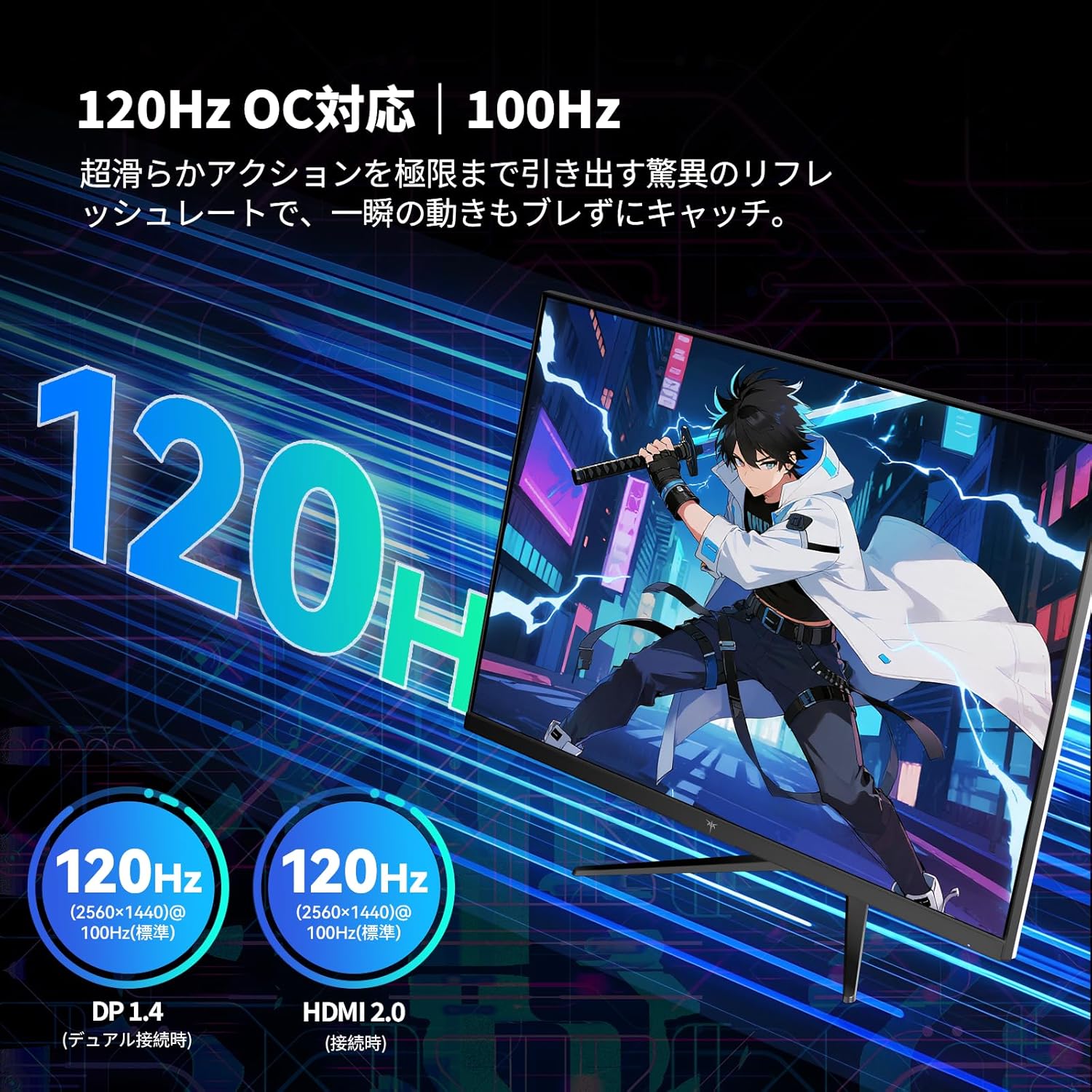
Figure 5.3: 120Hz Overclocking Capability

Figure 5.4: Eye Care Technology
6. Manteniment
Per garantir la longevitat i el rendiment òptim del vostre monitor:
- Neteja de la pantalla: Netegeu suaument la pantalla amb un drap suau i sense borrissol. Per a les marques difícils, utilitzeu una solució de neteja específica per al monitor aplicada al drap, no directament a la pantalla.
- Neteja de la Casing: Feu servir un drap suau i sec per netejar el monitor casing. Eviteu netejadors o dissolvents abrasius.
- Emmagatzematge: If storing the monitor for an extended period, disconnect it from power, pack it in its original packaging, and store it in a dry, cool place.
7. Solució De Problemes
| Problema | Causa possible | Solució |
|---|---|---|
| No hi ha imatge a la pantalla | Cable d'alimentació no connectat; Font d'entrada incorrecta seleccionada; Dispositiu no encès. | Ensure power cable is securely connected. Select the correct input source via the OSD menu. Power on the connected device. |
| La imatge és borrosa o distorsionada | Resolució incorrecta; cable de vídeo fluix. | Set the display resolution to 2560x1440. Ensure video cables are securely connected. |
| Pantalla parpellejant | Discrepància de freqüència d'actualització; Interferències externes. | Ensure Adaptive Sync is enabled on both the monitor and your graphics card. Check for nearby electronic devices causing interference. |
| No sound (if external speakers connected to monitor) | Volum massa baix; Sortida d'àudio incorrecta seleccionada. | Increase volume on monitor and connected speakers. Ensure monitor is selected as audio output device on your PC. |
8. Especificacions
| Característica | Detall |
|---|---|
| Marca | CTC |
| Número de model | H32D6 |
| Mida de la pantalla | 32 polzades |
| Resolució | WQHD (2560 x 1440 pixels) |
| Relació d'aspecte | 16:9 |
| Tipus de panell | IPS |
| Freqüència d'actualització | 100 Hz (120Hz Overclockable) |
| Temps de resposta | 7 ms |
| Brillantor | 350 cd/m² |
| Relació de contrast | 1000:1 |
| Gamma de colors | 109% sRGB Volume, 99% sRGB Coverage, ΔE<2 |
| Suport HDR | HDR10 |
| Sincronització adaptativa | FreeSync, G-Sync Compatible |
| Connectivitat | 2 x HDMI 2.0, 1 x DisplayPort 1.4 |
| Característiques de la cura dels ulls | Non-glare, Flicker-Free, Low Blue Light |
| Muntatge VESA | 100 x 100 mm |
| Ajustaments | Inclinació (de -5° a 15°) |
| Color | Blanc |
| Dimensions (P x A x A) | 6.1 x 42.3 x 71.7 cm (Monitor only) |
9. Garantia i Suport
KTC provides a 3-year manufacturer's warranty and a 12-month replacement service for this product. This warranty covers defects in materials and workmanship under normal use. Damage caused by misuse, accidents, or unauthorized modifications is not covered.
For any questions or issues, please contact KTC customer support:
- Telèfon: 072-275-5798
- Correu electrònic: support@ktcplay.com

Figure 9.1: Warranty Information and Contact Details
9.1 Customer Support Process
If you need assistance, follow these steps:
- Identify your product model (H32D6) and purchase date.
- Contact KTC support via phone or email with a detailed description of your issue.
- Follow the instructions provided by the support team for troubleshooting or replacement.

Figure 9.2: General Customer Support Steps (via Amazon)