
Introducció
This manual provides detailed instructions for the installation, operation, and maintenance of your ASAHOM AI Permanent Outdoor Lights S107D 200FT. These lights feature 144 RGBCW LED lights with dual output, offering over 30,000 lighting effect combinations. Designed with IP67 waterproofing, they are suitable for year-round outdoor decoration and lighting.
Què hi ha a la caixa
- 5m (12 LEDs) string section x 8
- 2.5m (6 LEDs) string section x 6
- 0.42m (1 LEDs) string section x 12
- 6ft Light string extension cord x 4
- 3ft Light string extension cord x 2
- 1ft Light string extension cord x 6
- Adaptador d'alimentació x 1
- 6ft Power extension cord x 1
- Caixa de control x 1
- T-splitter x 1
- Wire clips x 30
- Paquet de cargols x 15
- Adhesive backing x 12
- Waterproof junction box x 4
- Tapa final x 6
- Mounting ruler x 1
- Manual d'usuari x 1
Característiques clau
- Vibrant RGBCW Lighting: 144 upgraded RGBCW LEDs, 30,000 lighting effect combinations, dual output, extendable to max. 800ft, zone control, cuttable & splicable, 2700K-6500K adjustable color temperature, weekly timer, 92 scene modes.
- Next-Gen Intelligent AIGC Lighting: Input lighting preferences or voice prompts via the app to generate perfect lighting ambiance. Independently control each light, choose dynamic lighting modes, and control lighting speed via Pixel function.
- Durabilitat a l'aire lliure: IP67 waterproof rating for lights, control box, and adapter. Anti-UV material withstands wind, rain, and snow, operating in temperatures from -4°F to 113°F (-20°C-45°C).
- Smart APP & Voice Control: Pair with Alexa & Google Assistant for smart voice control. Use the ASAHOM App to independently control each light, set timers, cycle through effects, control speed, set light sequences, and run 23 music modes.
- Instal·lació flexible: Cuttable and splicable design with included waterproof junction boxes and wire connectors. T-splitter allows running two light strings in opposite directions from a single controller.
- Replacement Available: Long-term support with replacement modules and accessories available.
Especificacions
| Característica | Detall |
|---|---|
| Color | Negre |
| Forma | Ronda |
| Material | Plàstic |
| Tipus de font de llum | LED (RGBCW) |
| Font d'alimentació | Elèctric amb cable |
| Voltage | 120 volts (CA) |
| Brillantor | 4000 lumens |
| Temperatura de color | 2700K-6500K |
| Nombre de fonts de llum | 144 |
| Wattage | 72 watts |
| Pes de l'article | 11.48 lliures |
| Classificació impermeable | IP67 |
Configuració i instal·lació
Proper installation ensures optimal performance and longevity of your ASAHOM Permanent Outdoor Lights. Follow these steps carefully:
- Planifica el teu disseny: Determine the desired placement of the lights along your eaves or other outdoor structures. Use the included mounting ruler to ensure consistent spacing.
- Prepara la superfície: Clean the mounting surface thoroughly to ensure the adhesive backing adheres properly.
- Adjuntar llums: Each light puck has an adhesive backing. Peel the protective film and firmly press the light onto the cleaned surface. For added security and long-term use, especially in varying weather conditions, use the included screws in the pre-drilled holes of each light strand.
- Connecta les seccions: Use the waterproof junction boxes and wire connectors to splice light sections as needed. If your power outlet is centrally located, utilize the T-splitter to run two light strings in opposite directions from a single control box.
- Cablejat segur: Use the provided wire clips to neatly secure any loose wiring against the mounting surface.
- Connexió d'alimentació: Connect the light strings to the control box, and then connect the control box to the power adapter. Ensure all connections are secure and waterproof.

Figure 1: Illustration of Dual Output, Cuttable, T-Splitter, and Extendable features for flexible installation.

Figure 2: Screw clips and end caps for secure and waterproof installation.
Connecting to the ASAHOM App
To unlock the full potential of your lights, connect them to the ASAHOM App:
- Download the ASAHOM App from your device's app store.
- Ensure your phone's Bluetooth and location services are enabled.
- Open the ASAHOM App and tap the '+' icon to add a new device. The app will search for nearby devices.
- If your device doesn't appear, press and hold the power button on the control box for over 5 seconds until the blue indicator light flashes, indicating pairing mode. Then retry the connection.
- Select your 2.4GHz Wi-Fi network and input the password to complete the pairing process.
Video 1: Step-by-step guide on how to connect your ASAHOM lights to the ASAHOM App for smart control.
Instruccions de funcionament
Once connected, you can control your ASAHOM lights via the app or voice commands:
- Control de l'aplicació: Use the ASAHOM App to access a wide range of features including color selection (RGBCW), brightness adjustment, dynamic lighting modes, 92 scene modes (e.g., Halloween, Christmas), 23 music modes, and setting weekly timers. The Pixel function allows independent control of each light.
- AIGC Lighting: Utilize the Next-Gen Intelligent AIGC Lighting feature by inputting your preferences or voice prompts into the app to generate custom lighting ambiances instantly.
- Control de veu: Pair your lights with Alexa or Google Assistant for convenient voice commands. You can turn lights on/off, change colors, adjust brightness, and activate scenes using your voice.
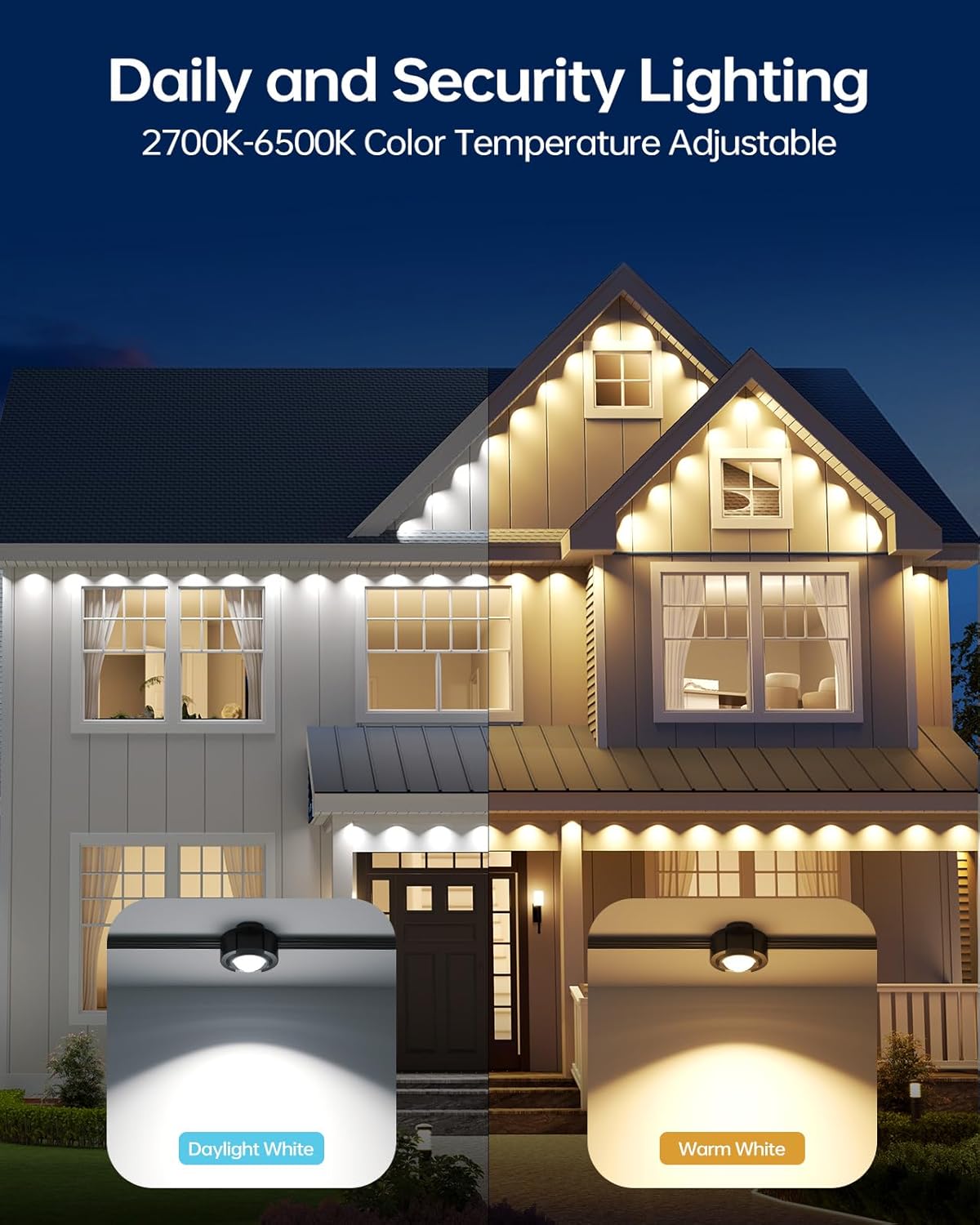
Figure 3: AI Lighting Effects can be created with simple commands via the app.

Figure 4: Over 30,000 lighting effect combinations are available through the ASAHOM app.
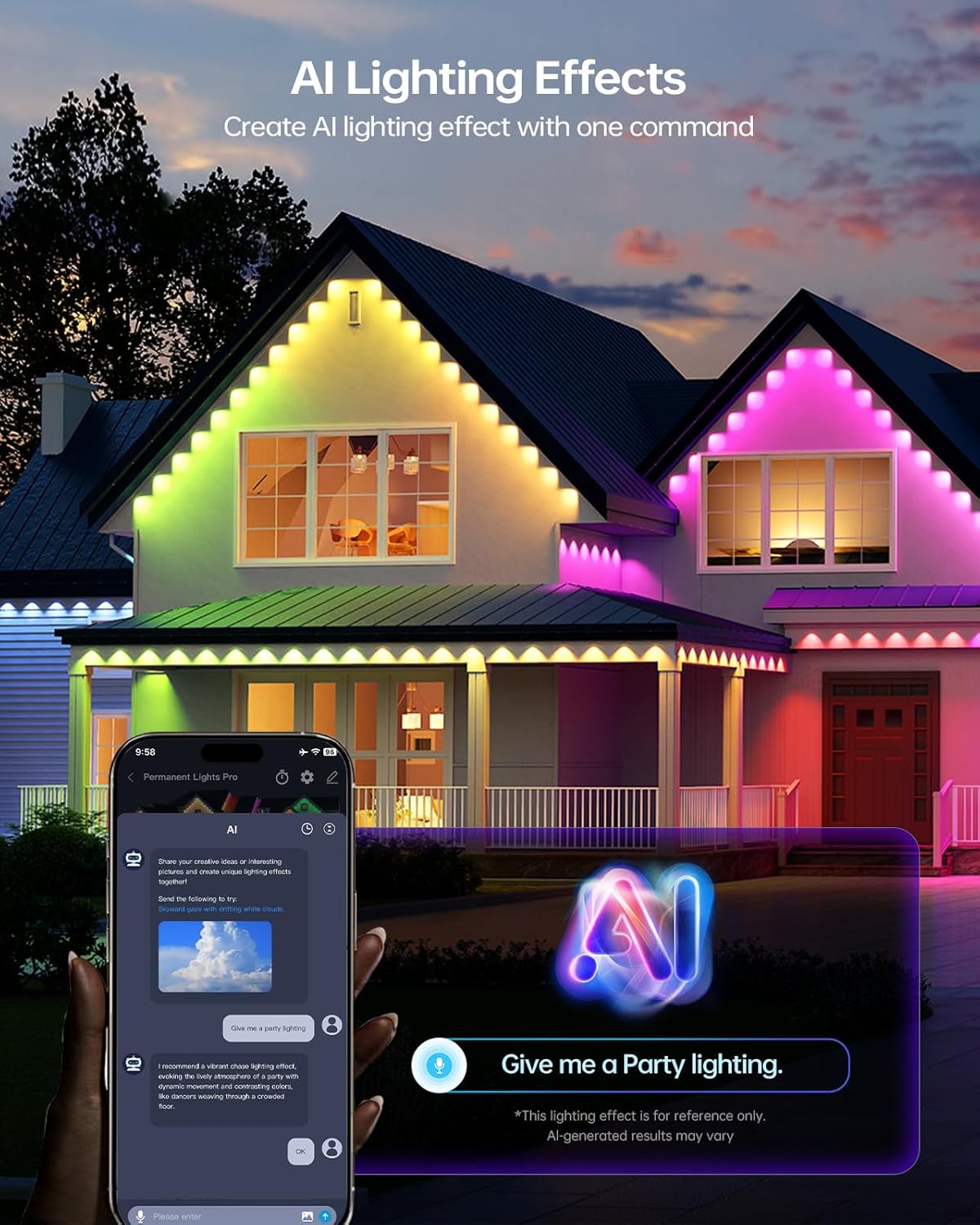
Figure 5: Adjustable 2700K-6500K color temperature for daily and security lighting.
Holiday and Daily Lighting Examples
Video 2: Demonstrates various holiday lighting effects, including Halloween themes, using ASAHOM AI RGBCW Permanent Outdoor Lights.
Video 3: Showcases Christmas lighting effects and other holiday themes with ASAHOM S1070 AI RGBCW Permanent Lights.
Video 4: Features various holiday lighting displays using ASAHOM S1070 RGBCW Permanent Holiday Lighting.
Video 5: Highlights the dual output feature of ASAHOM RGBCW Permanent Christmas Lights, showing diverse lighting patterns.
Manteniment
Your ASAHOM Permanent Outdoor Lights are designed for durability and long-term performance. Minimal maintenance is required:
- Durabilitat: The lights are built with Anti-UV material and have an IP67 waterproof rating, ensuring resistance to wind, rain, and snow.
- Neteja: Periodically wipe down the light pucks and cables with a soft, damp drap per eliminar la brutícia i els residus. Eviteu els productes químics durs.
- Substitució de components: ASAHOM offers long-term support. Every module and accessory has a replacement version available, ensuring your lighting system can be maintained and stay like new for years.

Figure 6: All parts of the ASAHOM lighting system are replaceable, with matching replacement kits available.

Figure 7: IP67 waterproof rating ensures durability in various outdoor conditions.
Resolució de problemes
If you encounter any issues with your ASAHOM Permanent Outdoor Lights, refer to the following common solutions:
- Mal funcionament del temporitzador: If the timer function is not working correctly, clear your app cache. Go into the ASAHOM App, click "ME", click the "setting icon", then click "clear cache". Reopen the control panel to get the latest version and reconfigure your timer settings.
- Llums que no responen: Ensure the control box is properly connected to the power adapter and the light strings. Check your Wi-Fi connection and ensure your phone is within Bluetooth range during initial setup.
- Problemes d'aparellament: If the device does not appear during the "Add Device" process, press and hold the power button on the control box for over 5 seconds until the blue indicator light flashes. This indicates the device has entered pairing mode, then retry the connection.
Garantia i Suport
ASAHOM is committed to providing high-quality products and customer satisfaction. For warranty information, technical support, or any inquiries not covered in this manual, please refer to the contact information provided in your product packaging or visit the official ASAHOM weblloc.