
1. Introducció
This manual provides detailed instructions for the installation, operation, and maintenance of your PGST QEK-A105F-F Home Alarm System. This system offers comprehensive security for your home or business, featuring WiFi and 4G GSM connectivity, a 2.4-inch display, and compatibility with the Tuya Smart Life app, Alexa, and Google Assistant. Please read this manual thoroughly before using the product to ensure proper function and safety.
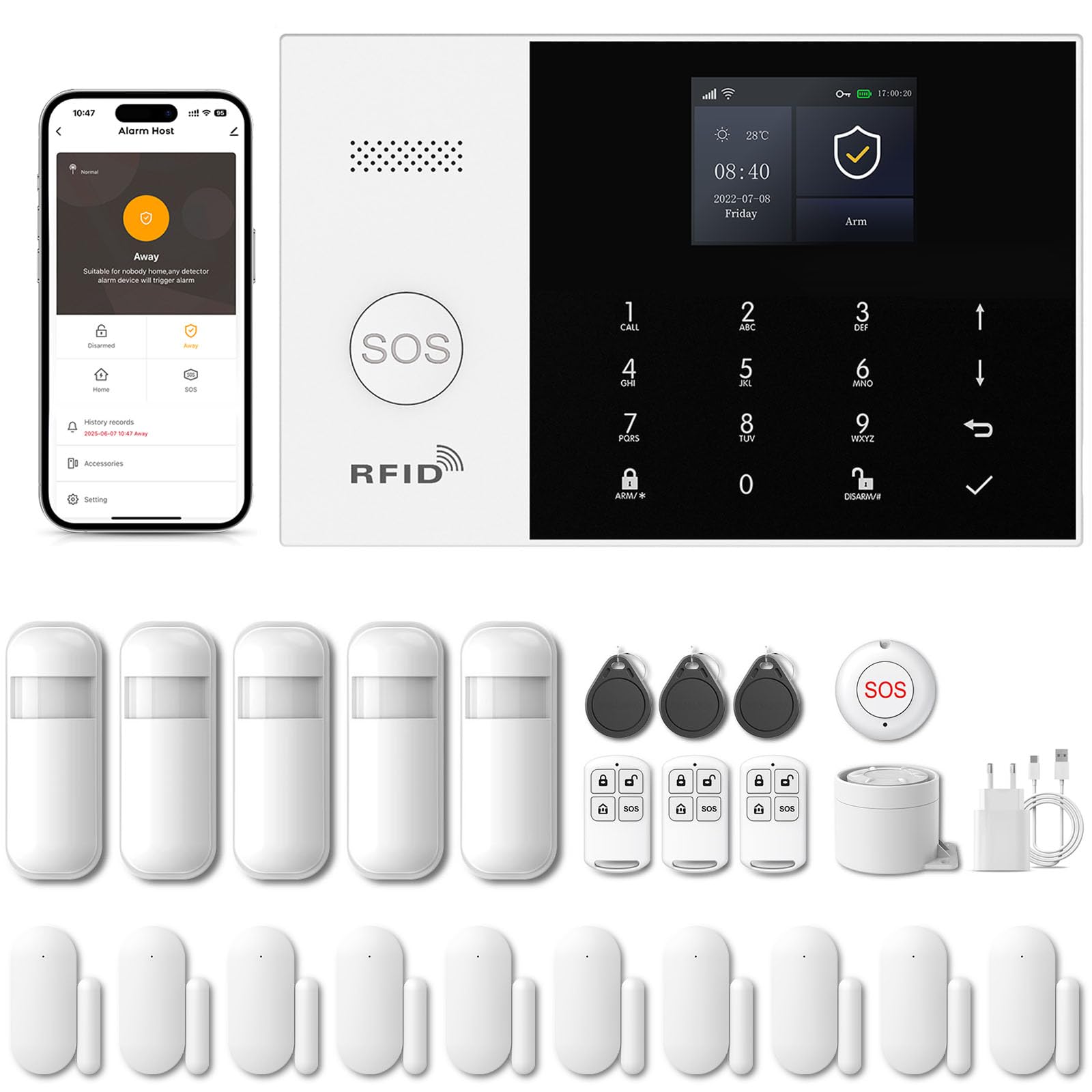
Image 1.1: PGST Home Alarm System main unit and included accessories.
2. Informació de seguretat
- No exposeu el dispositiu a temperatures extremes, humitat o llum solar directa.
- Assegureu-vos que l'adaptador de corrent sigui compatible amb el vostre volum localtage i corrent.
- Mantingueu el dispositiu allunyat de l'aigua i altres líquids.
- No intenteu desmuntar o reparar el dispositiu vosaltres mateixos. Contacteu amb l'assistència al client per obtenir assistència.
- Utilitzeu només accessoris i peces de recanvi autoritzats.
3. Contingut del paquet
Verifiqueu que tots els elements siguin presents al vostre paquet:
- PGST Alarm Host Panel (QEK-A105F-F)
- Adaptador d'alimentació
- Comandaments a distància
- Sensors de portes/finestres
- Detector de moviment PIR
- RFID Tags
- Cargols i adhesius de muntatge
- Manual d'usuari

Imatge 3.1: Ex.ample of included components in the alarm kit.
4. Producte acabatview
4.1. Alarm Host Panel Layout

Imatge 4.1: Davant i darrere view of the alarm host panel with labeled components.
- Ponent: For alarm sounds and voice prompts.
- Botó SOS: Press for emergency alarm.
- RFID Card Sensing Area: For disarming with RFID tags.
- Pantalla de visualització TFT: 2.4-inch screen for status and settings.
- Up/Down Function Buttons: Per a la navegació.
- Botó Enrere/Cancel·la: To go back or cancel an action.
- Botó de confirmació: Per confirmar les seleccions.
- Dialing Buttons (0-9): For entering numbers or codes.
- Away Arming Key: Activates full arming mode.
- Home Arming Key: Activates home arming mode.
- Disarming Button: Deactivates the alarm system.
- Anti-prying switch: Triggers alarm if panel is tamperigit amb.
- 3.5mm Siren Interface: For connecting an external wired siren.
- Wired Arming Area Interface: For connecting wired sensors.
- Ranura per a targeta SIM: For 2G/3G/4G GSM SIM card.
- Interruptor ON / OFF: Interruptor d'alimentació principal.
- Micro USB 110/220V AC to 5V: Port d'entrada d'alimentació.
4.2. Dimensions
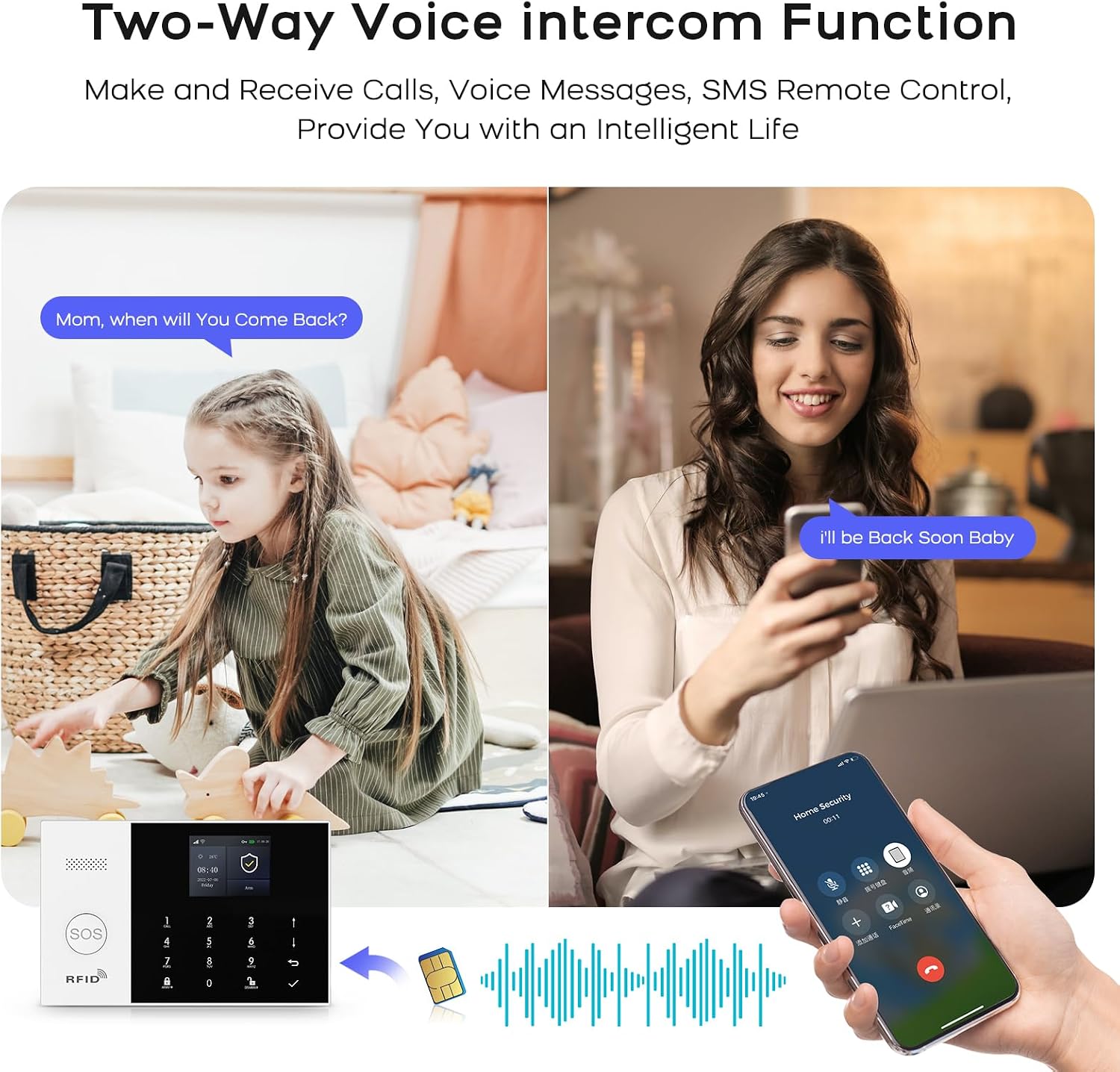
Image 4.2: Physical dimensions of the alarm host panel.
5. Configuració i instal·lació
5.1. Powering the Host Panel
- Connect the power adapter to the Micro USB port on the host panel.
- Connecteu l'adaptador a una presa de corrent estàndard.
- Flip the ON/OFF switch to the 'ON' position. The panel will power on.
5.2. SIM Card Installation (Optional for 4G GSM Functionality)
- Ensure the host panel is powered off.
- Locate the SIM card slot on the rear of the panel.
- Insert a 2G/3G/4G GSM SIM card into the slot, ensuring correct orientation.
- Power on the host panel. The system will attempt to register with the cellular network.
5.3. Instal·lació de l'aplicació i connexió Wi-Fi
The system uses the 'Smart Life' or 'Tuya Smart' app for remote control and configuration.
- Download the 'Smart Life' or 'Tuya Smart' app from your smartphone's app store (Google Play for Android, App Store for iOS).
- Registreu-vos o inicieu sessió al vostre compte.
- On the alarm host panel, navigate to Menu > Wi-Fi > Soft AP Configuration.
- In the app, tap '+' to add a device. Select 'Sensors' > 'Alarm' > 'Wi-Fi Flashing'.
- Follow the on-screen instructions in the app to connect the alarm host to your 2.4GHz Wi-Fi network. (5GHz Wi-Fi is not supported).

Image 5.1: Steps for Wi-Fi configuration via the Smart Life app.
5.4. Adding Wireless Accessories (Sensors, Remotes)
The system supports up to 100 wireless storage locations for accessories.
- On the host panel, enter the pairing mode (refer to the panel's menu for 'Add Sensor' or 'Add Remote').
- Activate the accessory (e.g., trigger a motion sensor, separate a door sensor, press a button on the remote).
- The host panel will confirm successful pairing.
- Repeat for all desired accessories.

Imatge 5.2: Ex.ample of sensor placement within a home environment.
6. Funcionament del sistema
6.1. Armament i desarmament
- Braç lluny: Premeu el botó Away Arming Key on the panel, use the remote control, or arm via the Smart Life app. All sensors will be active.
- Armar a casa: Premeu el botó Home Arming Key on the panel, use the remote control, or arm via the Smart Life app. Typically, perimeter sensors (doors/windows) are active, while internal motion sensors are inactive.
- Desarma: Enter your PIN on the panel, use the disarm button on the remote, use an RFID tag, or disarm via the Smart Life app.
6.2. SOS Emergency Function
En cas d'emergència, premeu el botó Botó SOS on the host panel or the remote control. The system will immediately trigger the alarm and send notifications to pre-set emergency contacts.

Image 6.1: Remote control with SOS button for emergency alerts.
6.3. Intercomunicador de veu bidireccional
The alarm host supports two-way voice communication through the integrated speaker and microphone, allowing you to communicate with someone at the alarm panel via the app or a phone call.

Image 6.2: Two-way voice intercom function in use.
6.4. Timer Function (Scheduled Arm/Disarm)
You can set schedules for automatic arming and disarming of the system through the Smart Life app.

Imatge 6.3: Ex.ample of scheduled arming and disarming times.
6.5. Entry/Exit Delay
Configure custom entry and exit delays to allow time to leave or enter your property without triggering the alarm immediately. This can be set in the app.

Image 6.4: Customizing entry and exit delays via the app.
6.6. Control per veu (Alexa i Assistent de Google)
Integrate your alarm system with Amazon Alexa or Google Assistant for convenient voice control commands such as arming or disarming the system.

Image 6.5: Using Alexa for voice control of the alarm system.
6.7. Notificacions d'alarma
Upon alarm trigger, the system will:
- Sound the internal siren (up to 120dB) and any connected external sirens.
- Send instant push notifications to your smartphone via the Smart Life app.
- Send SMS messages to up to 5 pre-set phone numbers (if a SIM card is installed).
- Make phone calls to up to 5 pre-set phone numbers (if a SIM card is installed).

Image 6.6: Five preset alarm call numbers for notifications.
7. Manteniment
7.1. Gestió de la bateria
The host panel has a built-in 1000 mAh backup battery, providing approximately 5.5 hours of operation during a power outage. Wireless sensors are battery-powered and will send low battery alerts to the host panel and your app when replacement is needed.
Image 7.1: Low battery alerts for wireless sensors.
7.2. Neteja
Wipe the host panel and sensors with a soft, dry cloth. Do not use liquid cleaners or abrasive materials.
7.3. Anti-Tampering Protecció
The alarm host is equipped with an anti-tampering switch. If the main unit is forcibly removed from its mounting, an alarm will be triggered immediately, regardless of its armed status.

Image 7.2: Anti-tampering protection feature.
8. Solució De Problemes
| Problema | Causa possible | Solució |
|---|---|---|
| Host panel not powering on. | Power adapter disconnected; ON/OFF switch off; faulty adapter. | Check power connection; ensure switch is ON; try a different adapter. |
| No es pot connectar a la Wi-Fi. | Incorrect Wi-Fi password; 5GHz network used; host too far from router. | Verify password; ensure 2.4GHz network; move host closer to router. |
| Els sensors no activen l'alarma. | Sensor battery low; sensor not paired; system disarmed. | Replace sensor battery; re-pair sensor; ensure system is armed. |
| No SMS/Call notifications. | No SIM card; SIM card not active; poor cellular signal; incorrect emergency numbers. | Install/activate SIM card; check signal strength; verify emergency numbers in settings. |
9. Especificacions
- Marca: PGST
- Número de model: QEK-A105F-F
- Tecnologia de connectivitat: Wireless (Wi-Fi 2.4GHz, GSM/3G/4G)
- Font d'alimentació: Battery (1000 mAh Lithium Polymer) / AC Adapter
- Dimensions del producte (L x A x A): 18 x 12 x 3 cm (7.09 x 4.72 x 1.18 polzades)
- Visualització: Pantalla TFT de 2.4 polzades
- Mètode de control: Application (Tuya Smart Life), Keypad, Remote Control, Voice Control (Alexa, Google Assistant)
- Interval sense fil màxim: 100 metres (zona oberta)
- Tipus d'alarma: Àudio i moviment
- Tipus d'instal·lació: Self-adhesive / Wall-mounted
10. Garantia i Suport
Your PGST Home Alarm System comes with a standard manufacturer's warranty. Please refer to the warranty card included in your package for specific terms and conditions. For technical support, troubleshooting assistance, or warranty claims, please contact PGST customer service through the contact information provided on the official PGST weblloc web o la vostra plataforma de compra.


