1. Producte acabatview
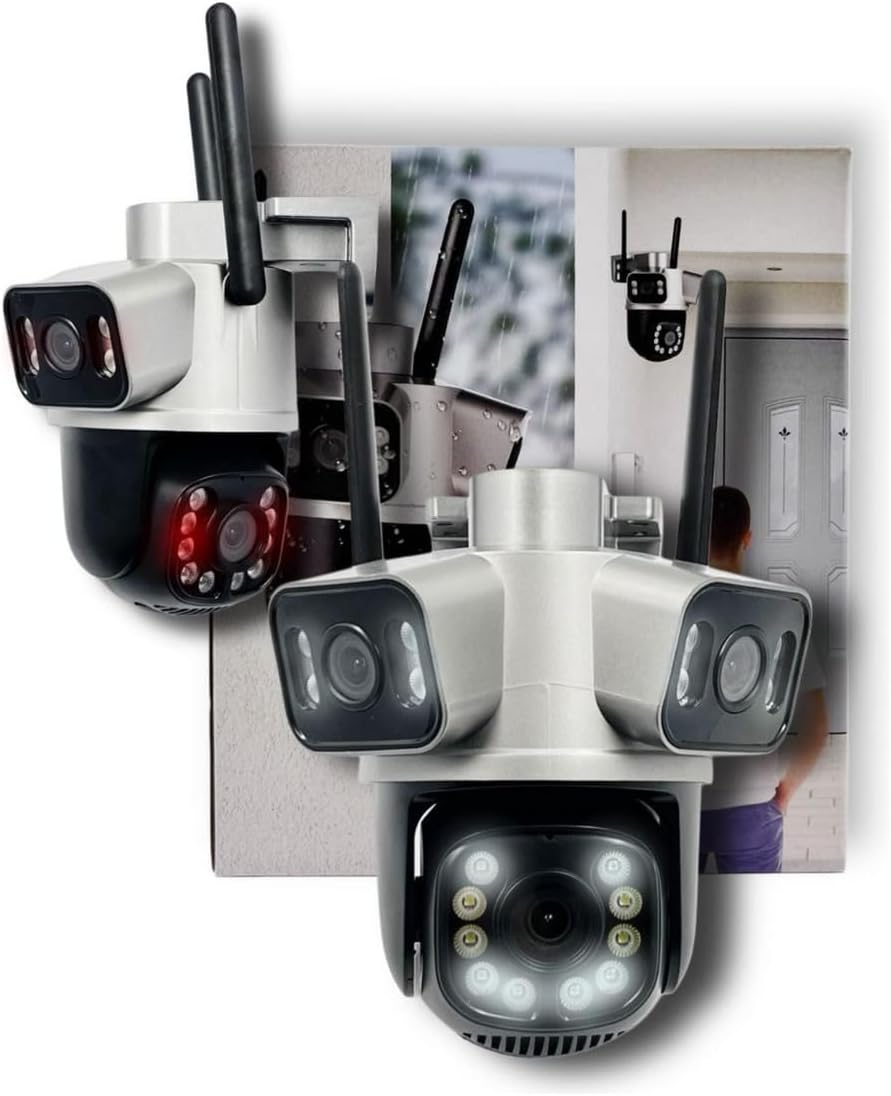
The FL A53 IP Wi-Fi Security Camera features an innovative 3-in-1 design, incorporating three lenses: two fixed and one mobile with Pan-Tilt-Zoom (PTZ) rotation. This configuration allows for simultaneous viewing of three distinct angles directly through the ICSee application. Designed for versatility, this camera is suitable for both indoor and outdoor surveillance. It comes equipped with a pre-installed 128GB Sandisk memory card, providing ampemmagatzematge per a música gravadatage.
Característiques principals:
- Three cameras in one unit: two fixed lenses and one rotatable PTZ lens.
- Simultània viewing of all three camera feeds within the ICSee app.
- High-Definition (HD) image quality.
- Recording options: continuous or motion detection activated.
- Micro SD card slot, supporting up to 256GB.
- Includes a 128GB Sandisk Micro SD card.
- Connectivity via 2.4GHz Wi-Fi and RJ45 Ethernet port.
- Infrared night vision for low-light conditions.
- Two-way audio communication (listen and speak).
- Local recording and remote access via the ICSee application.
2. Contingut del paquet
Si us plau, verifiqueu que tots els elements que s'enumeren a continuació estiguin inclosos al vostre paquet:
- 1x FL A53 IP Wi-Fi Security Camera
- 1x Sandisk 128GB Micro SD Card (pre-installed)
- 1x Font d'alimentació de 12 V
- 1x Screw Installation Kit
- 1 x manual d'instruccions
3. Configuració i instal·lació
Follow these steps for quick installation and initial setup using the ICSee app:
- Connectar l'alimentació: Connect the camera to the provided 12V power supply and plug it into an electrical outlet.
- Restableix la càmera: Locate the reset button on the camera. Press and hold it until you hear an audible alert, indicating the camera is resetting.
- Wait for Restart: Allow the camera to complete its restart sequence.
- Prepare Mobile Device: On your mobile phone, ensure that 2.4GHz Wi-Fi is enabled and GPS/Location services are activated.
- Open ICSee App: Download and open the ICSee application (available for Android and iOS).
- Afegeix una càmera: In the app, tap the "+" icon to add a new device, then select "Wi-Fi Camera".
- Configuració de la xarxa: Choose your 2.4GHz Wi-Fi network from the list and enter the correct password.
- Escaneja el codi QR: The app will generate a QR code. Point your mobile phone screen with the QR code towards the camera lens. The camera will scan the code to establish a connection.
- Finalitza la configuració: Once connected, create a password for your camera, name the device, and complete the setup process within the app.
Notes importants:
- The camera is not compatible with 5GHz Wi-Fi networks. Ensure your mobile device and camera are connected to a 2.4GHz network during setup.
- The power supply is water-resistant, but it is recommended to protect it from direct and prolonged exposure to rain. For outdoor installations, consider using a hermetic box for the power supply connections to ensure maximum durability and safety.
4. Instruccions de funcionament
After successful installation, you can operate your FL A53 camera using the ICSee app:
- Viu View: Open the ICSee app and select your camera to view viu footage from all three lenses simultaneously.
- Control PTZ: Use the on-screen controls in the app to pan (horizontal rotation) and tilt (vertical movement) the mobile lens.
- Àudio bidireccional: Utilize the microphone and speaker icons in the app to listen to the camera's surroundings and speak through the camera.
- Gravació: Accés gravat footage stored on the 128GB Micro SD card. Configure recording settings (continuous or motion-activated) within the app.
- Visió nocturna: The camera automatically switches to infrared night vision in low-light conditions, providing clear black and white images up to 25 meters.
- Detecció de moviment: Enable motion detection alerts in the app to receive notifications on your mobile device when movement is detected.
- Accés remot: View live feeds and access recordings from anywhere with an internet connection via the ICSee app.
5. Manteniment
To ensure optimal performance and longevity of your FL A53 camera, follow these maintenance guidelines:
- Neteja: Gently clean the camera lenses and housing with a soft, damp cloth. Avoid using harsh chemicals or abrasive materials that could scratch the lenses.
- Protecció de la font d'alimentació: As mentioned, for outdoor use, ensure the power supply and its connections are adequately protected from direct weather exposure, ideally within a waterproof enclosure.
- Actualitzacions de firmware: Periodically check the ICSee app for any available firmware updates for your camera. Keeping the firmware updated ensures the latest features and security patches.
- Gestió de la targeta SD: While the 128GB card offers significant storage, regularly review i fer una còpia de seguretat dels aliments importantstage. The camera will typically overwrite the oldest recordings when the card is full.
- Consideracions ambientals: Although designed for outdoor use, extreme weather conditions (e.g., severe storms, extreme temperatures) can affect performance. Consider additional protective measures if installed in such environments.
6. Solució De Problemes
If you encounter issues with your FL A53 camera, refer to the following common problems and solutions:
- La càmera no es connecta a la Wi-Fi:
- Assegureu-vos que la vostra xarxa Wi-Fi sigui de 2.4 GHz. La càmera no admet Wi-Fi de 5 GHz.
- Verify the Wi-Fi password is entered correctly in the ICSee app.
- Make sure the camera is within range of your Wi-Fi router.
- Try resetting the camera by pressing the reset button until an audible alert is heard.
- No Image/Black Screen in App:
- Comproveu si la càmera està correctament engegada.
- Assegureu-vos que el vostre dispositiu mòbil tingui una connexió a Internet estable.
- Restart the ICSee app or your mobile device.
- La detecció de moviment no funciona:
- Verify that motion detection is enabled in the ICSee app settings for your camera.
- Ajusteu la configuració de sensibilitat de detecció de moviment.
- Assegureu-vos que no hi hagi obstacles que bloquegin la càmera view.
- Mala visió nocturna:
- Ensure there are no reflective surfaces close to the camera that could interfere with the infrared LEDs.
- Check if the camera lenses are clean.
- Problemes d'àudio (sense so/so distorsionat):
- Check the volume settings on your mobile device and within the ICSee app.
- Ensure there are no physical obstructions covering the camera's microphone or speaker.
7. Especificacions
| Model | A53 |
| Fabricant | FL |
| Connectivitat | Wi-Fi (2.4GHz), Wired (RJ45) |
| Resolució de vídeo | 1080p HD |
| Lents | 3 (2 fixed, 1 PTZ rotatable) |
| PTZ Viewangle ing | 355 Degrees (horizontal rotation) |
| Gamma de visió nocturna | Fins a 25 metres |
| Emmagatzematge | Micro SD card (up to 256GB), 128GB Sandisk card included |
| Àudio | Àudio bidireccional |
| Font d'alimentació | AC/DC 12V (Bivolt) |
| Entorn de funcionament | Interior / Exterior |
| Tipus de controlador | Android, Apple (via ICSee app) |
| Tipus de muntatge | Wall Mount (screwed installation) |
| Dimensions (L x A x A) | 15 x 15 x 15 cm |
| Color | Gris fosc |
8. Imatges del producte


9. Garantia i Suport
Garantia: Specific warranty details for the FL A53 camera should be obtained directly from the seller or retailer at the time of purchase. Extended warranty plans may be available for purchase separately.
Suport: For technical assistance or inquiries regarding your FL A53 camera, 24/7 support is available. Please refer to the contact information provided by your seller or within the ICSee application for support channels.


