
1. Introducció
This manual provides essential information for the safe and efficient use of your DOOGEE U13 Android 16 Tablet. Please read this manual thoroughly before operating the device and retain it for future reference.
The DOOGEE U13 is a high-performance tablet designed for various tasks, from productivity to entertainment, featuring a large display, powerful processor, and extended battery life.

Image 1.1: DOOGEE U13 Tablet highlighting its main features.
2. Contingut del paquet
En obrir el paquet, comproveu que tots els elements hi siguin presents i que estiguin en bon estat:
- Tauleta DOOGEE U13
- Cable de càrrega USB-C
- Adaptador d'alimentació
- Eina d'expulsió de la SIM (si escau)
- Guia d'inici ràpid
- Targeta de garantia
3. Disseny del dispositiu
Familiarize yourself with the physical components of your DOOGEE U13 tablet.

Imatge 3.1: acabatview of DOOGEE U13 Tablet features and design.
3.1 Ports i botons
- Botó d'encesa: Situat al lateral, s'utilitza per encendre/apagar o activar/reposar el dispositiu.
- Botons de volum: Adjust media and notification volume.
- Port USB-C: Per a càrrega i transferència de dades.
- Presa d'auriculars de 3.5 mm: Per a sortida d'àudio amb cable.
- Ranura per a targeta MicroSD: For expandable storage (up to 2TB).
3.2 Càmeres
- Càmera posterior: 13MP main camera for capturing photos and videos.
- Càmera frontal: Càmera de 5MP per a videotrucades i selfies.
4. Configuració
4.1 Encès inicial
- Press and hold the Power Button until the DOOGEE logo appears.
- Segueix les instruccions que apareixen a la pantalla per seleccionar l'idioma i la regió i connectar-te a una xarxa Wi-Fi.
- Inicia la sessió amb el teu compte de Google o crea'n un de nou per accedir a Google Play Store i altres serveis.
4.2 Càrrega de la bateria
Before first use, fully charge the tablet. Connect the USB-C cable to the tablet's charging port and the power adapter to a wall outlet. The charging indicator will show the battery status.

Image 4.1: Battery specifications and charging capabilities.
4.3 Inserció d'una targeta MicroSD
- Localitzeu la ranura de la targeta al lateral de la tauleta.
- Feu servir l'eina d'expulsió de la SIM proporcionada per obrir la safata.
- Place the MicroSD card into the designated slot on the tray.
- Torneu a inserir la safata a la tauleta amb cura.
5. Instruccions de funcionament
5.1 Navegació bàsica
- Toca: Toca una icona per obrir una aplicació o seleccionar un element.
- Llisca: Move your finger across the screen to scroll through content or switch screens.
- Pessiga per fer zoom: Feu servir dos dits per ampliar o reduir les imatges i web pàgines.
5.2 Configuració de la pantalla
Your tablet features a 13-inch FHD+ 90Hz display for a smooth visual experience.
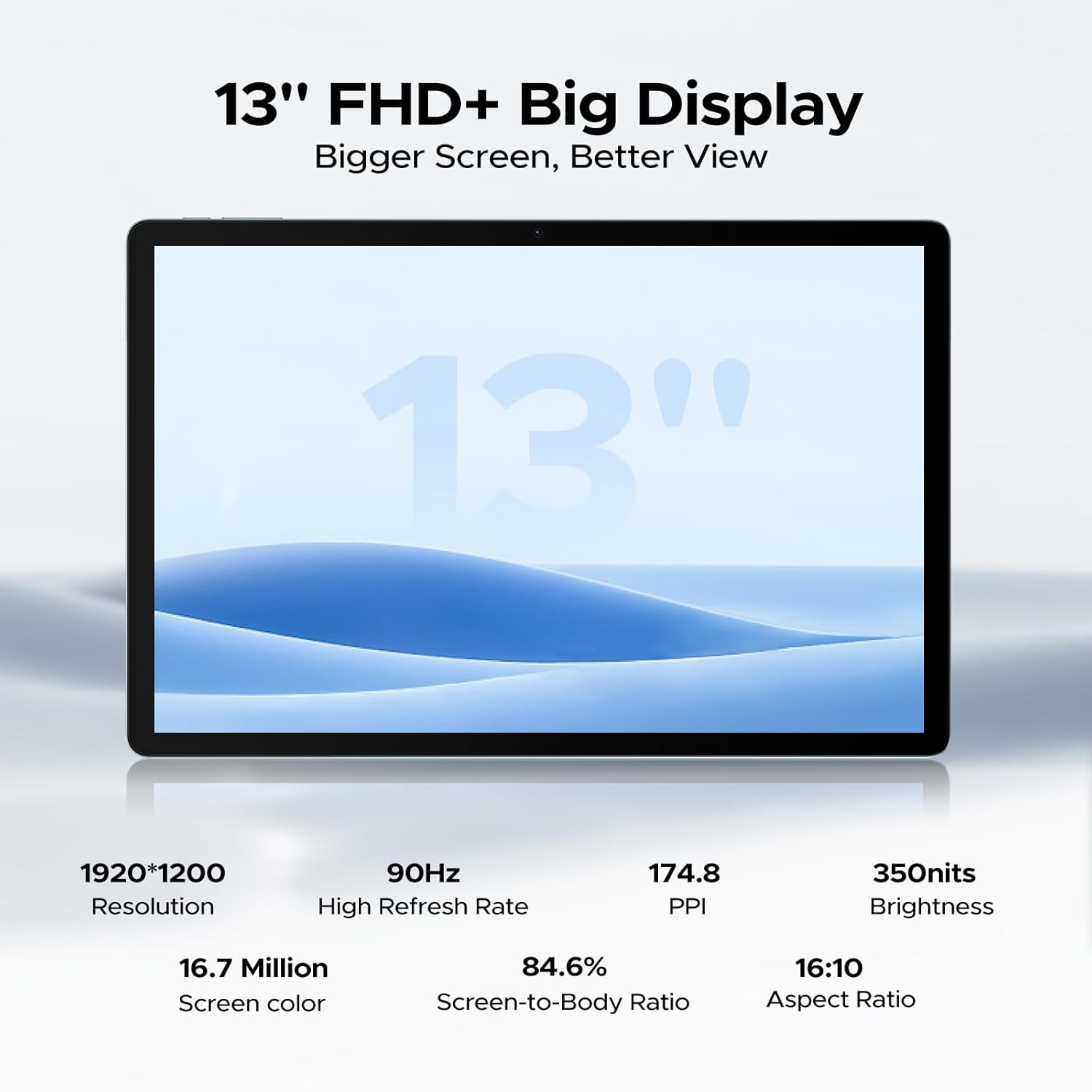
Image 5.1: Detailed specifications of the tablet's display.
Access display settings via Configuració > Pantalla to adjust brightness, dark mode, eye comfort mode, and refresh rate.
5.3 Àudio
The tablet is equipped with quad speakers for immersive sound and supports a 3.5mm headphone jack.
5.4 Ús de la càmera
Open the Camera app to capture photos and videos. The 13MP main camera offers various modes, while the 5MP front camera is ideal for video calls.

Image 5.2: Features of the 13MP main camera.

Image 5.3: The 5MP front camera in use for video calls.
5.5 Android 16 and Gemini AI
The DOOGEE U13 runs on Android 16, offering enhanced features and security. It integrates Gemini AI for intelligent task optimization and improved performance.

Image 5.4: Android 16 OS interface.

Image 5.5: Diverse Android 16 OS functions.

Image 5.6: Gemini AI capabilities.
6. Gestió de la bateria
The DOOGEE U13 is equipped with an 11000mAh battery. To maximize battery life:
- Ajusteu la brillantor de la pantalla a un nivell còmode.
- Tanca les aplicacions que no s'utilitzen i que s'executen en segon pla.
- Desactiva la Wi-Fi, el Bluetooth i el GPS quan no estiguis en ús.
- Utilize battery saver modes available in Android settings.
The tablet supports 18W fast charging and 5W reverse charging.
7. Gestió de l'emmagatzematge
Your tablet comes with 256GB of internal storage and 32GB of RAM (6GB base + 26GB expansion). Storage can be expanded up to 2TB using a MicroSD card (purchased separately).

Image 7.1: RAM and ROM specifications.
Per gestionar l'emmagatzematge, aneu a Configuració > Emmagatzematge. Aquí pots view storage usage, free up space, and format your MicroSD card.
8. Connectivitat
8.1 connexions Wi-Fi
The tablet supports 2.4G/5G dual-band Wi-Fi for fast and stable internet connections. To connect, go to Configuració > Xarxa i Internet > Wi-Fi, select your network, and enter the password.
Bluetooth 8.2
Activa el Bluetooth a Configuració > Dispositius connectats > Bluetooth to pair with wireless headphones, speakers, or other Bluetooth accessories.
8.3 Mirall de pantalla
Use the wireless screen mirroring feature to cast your tablet's display to compatible larger screens. This option is typically found in Settings > Connected devices > Connection preferences > Cast.
9. Característiques de seguretat
9.1 Desbloqueig facial
The DOOGEE U13 supports face unlock for quick and secure access to your device. Set up face unlock in Settings > Security & privacy > Device unlock > Face unlock.

Image 9.1: Security and connectivity features.
10. Manteniment
10.1 Neteja
Feu servir un drap suau i sense borrissol per netejar la pantalla i el cos de la tauleta. Eviteu utilitzar productes químics agressius o materials abrasius.
10.2 Actualitzacions de programari
Comproveu i instal·leu regularment si hi ha actualitzacions de programari per assegurar-vos que la tauleta tingui les darreres funcions, pegats de seguretat i millores de rendiment. Aneu a Configuració > Sistema > Actualització del sistema.
11. Solució De Problemes
- La tauleta no s'encén: Assegureu-vos que la bateria estigui carregada. Connecteu-la al carregador durant almenys 30 minuts abans d'intentar tornar-la a encendre.
- La pantalla no respon: Try restarting the tablet by holding the Power Button for about 10-15 seconds.
- Problemes de connexió Wi-Fi: Reinicia el router Wi-Fi i la tauleta. Oblida't de la xarxa a la configuració del Wi-Fi i torna a connectar-te.
- Les aplicacions es bloquegen: Esborra la memòria cau de l'aplicació problemàtica (Configuració > Aplicacions > [Nom de l'aplicació] > Emmagatzematge i memòria cau > Esborra la memòria cau). Si el problema persisteix, reinstal·leu l'aplicació.
- Rendiment lent: Tanqueu les aplicacions en segon pla que no necessiteu, esborreu la memòria cau i assegureu-vos que hi hagi prou espai d'emmagatzematge. Considereu un restabliment de fàbrica com a últim recurs (feu una còpia de seguretat de les vostres dades primer).
12. Especificacions
Below are the key technical specifications for the DOOGEE U13 Tablet:
| Característica | Especificació |
|---|---|
| Model | U13 |
| Sistema operatiu | Android 16 |
| Processador | UNISOC T7280 Octa-Core (up to 2.2GHz) |
| GPU | Mali-G57 |
| RAM | 32 GB (6 GB físic + 26 GB virtual) |
| Emmagatzematge intern | 256 GB |
| Emmagatzematge ampliable | Fins a 2 TB mitjançant targeta MicroSD |
| Mida de la pantalla | 13 polzades |
| Tipus de visualització | FHD+ IPS |
| Resolució | 1920 x 1200 píxels |
| Freqüència d'actualització | 90 Hz |
| Brillantor | 350 nits |
| Càmera posterior | 13MP |
| Càmera frontal | 5MP |
| Capacitat de la bateria | 11000 mAh |
| Carregant | 18W USB-PD Fast Charging, 5W Reverse Charging |
| Connectivitat | Wi-Fi 5 (802.11ac), Bluetooth 5.0 |
| Navegació | A-GPS, GPS, BeiDou, GLONASS, Galileo |
| Dimensions | 11.88 x 7.76 x 0.29 inches (7.5mm ultra-thin) |
| Pes | 1.48 lliures (670 g) |

Image 12.1: DOOGEE U-series tablet comparison, highlighting U13 specifications.
13. Garantia i Suport
Your DOOGEE U13 Tablet comes with a standard warranty. Please refer to the included warranty card for specific terms and conditions.
For technical support, troubleshooting assistance, or warranty claims, please contact DOOGEE customer service through their official weblloc web o la informació de contacte que es proporciona a l'embalatge del producte.

Image 13.1: DOOGEE customer service and warranty information.