
1. Introducció
Gràcies per la compraasing the Surge Wireless Pro Controller. This controller is designed for multi-platform compatibility, offering an enhanced gaming experience across various devices. Please read this manual carefully before use to ensure proper operation and to maximize your gaming enjoyment.
Característiques principals:
- Multi-Platform Compatibility: Nintendo Switch/Switch 2 (Note: No C Button/Audio Port support for Switch 2), Windows PC, Steam Deck, Android, and iOS devices.
- Hall Effect Thumb Sticks & Triggers: Provides precise control and reduces the likelihood of stick drift.
- Turbo Functionality: Offers three adjustable turbo levels for rapid-fire control.
- Vibration Feedback: Four adjustable vibration levels for customizable haptic feedback.
- Motion Controls: Supports motion sensing in compatible games.
- Console Wake Up: Ability to wake the Nintendo Switch console from sleep mode (Nintendo Switch only).
- Rechargeable Battery: Built-in 600mAh Li-polymer battery provides up to 10 hours of play.
- USB-C Charging: Includes a 1-meter USB-C charging cable.
2. Contingut del paquet
- 1 x Surge Wireless Pro Controller
- 1 x cable de càrrega USB-C (1 metre)
- 1 x manual d'instruccions
3. Disseny del controlador
Familiaritzeu-vos amb els botons i les funcions del vostre controlador Surge Wireless Pro.
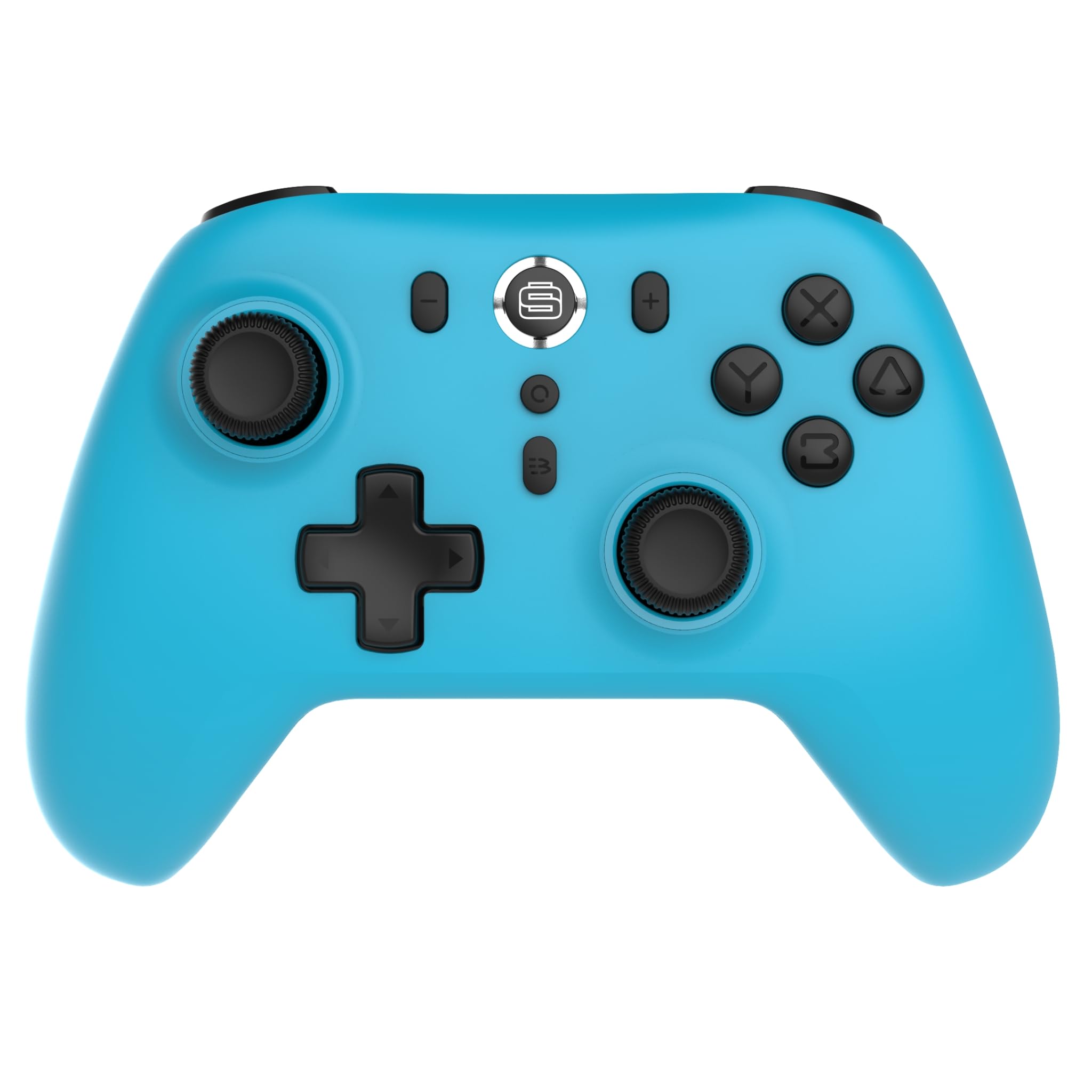
Davant view of the Surge Wireless Pro Controller, showing the D-pad, left and right analog sticks, A/B/X/Y buttons, Home button, Capture button, Plus and Minus buttons, and the Surge logo button.

Enrere view of the Surge Wireless Pro Controller, showing the textured grips and the charging port.
4. Configuració i emparellament
The Surge Wireless Pro Controller supports multiple connection methods depending on your device.

This image displays the various platforms compatible with the Surge Wireless Pro Controller, including Nintendo Switch, Nintendo Switch 2, Windows PC, Android, and iOS.
4.1. Pairing with Nintendo Switch / Switch 2
- Al menú INICI, seleccioneu Controladors > Canvia d'adherència/ordre.
- Al controlador, premeu i manteniu premut Botó d'inici for 3-5 seconds until the indicator lights begin to flash rapidly.
- Once paired, the indicator light(s) on the controller will remain solid.
- To wake the console from sleep mode, press the Botó d'inici al controlador.
4.2. Pairing with Windows PC
- Assegureu-vos que el vostre ordinador tingui el Bluetooth habilitat.
- Vés a Bluetooth & other devices settings al teu ordinador.
- Seleccioneu Afegeix Bluetooth o un altre dispositiu > Bluetooth.
- Al controlador, premeu i manteniu premut Botó d'inici for 3-5 seconds until the indicator lights begin to flash rapidly.
- Select the controller from the list of available devices on your PC.
- Once paired, the indicator light(s) on the controller will remain solid.
4.3. Pairing with Android / iOS Devices
- Activeu el Bluetooth al vostre dispositiu Android o iOS.
- Aneu al menú de configuració de Bluetooth del dispositiu.
- Al controlador, premeu i manteniu premut Botó d'inici for 3-5 seconds until the indicator lights begin to flash rapidly.
- Select the controller from the list of available devices.
- Once paired, the indicator light(s) on the controller will remain solid.
5. Característiques operatives
5.1. Hall Effect Thumb Sticks & Triggers
The controller is equipped with Hall Effect technology for its thumb sticks and triggers. This technology uses magnets and electrical conductors to detect position, providing enhanced precision and significantly reducing the risk of stick drift over time compared to traditional potentiometers.

This image highlights the Hall Effect thumbsticks and triggers, emphasizing their role in providing precise inputs and preventing stick drift.
5.2. Funció Turbo
The Turbo function allows for rapid, repeated input of a button press. This controller features 3 adjustable turbo levels.
- Per activar Turbo: Manteniu premut el botó Botó Turbo, then press the desired action button (A/B/X/Y, L1/R1, L2/R2, D-pad directions). The button will now rapidly repeat its input when held.
- Per ajustar la velocitat turbo: With Turbo active on a button, press and hold the Botó Turbo i moure el Stick analògic dret amunt o avall to cycle through the 3 speed levels.
- Per desactivar Turbo: Manteniu premut el botó Botó Turboi, a continuació, torneu a prémer el mateix botó d'acció.
5.3. Retroalimentació de vibració
The controller provides haptic feedback through vibration. You can choose from 4 vibration levels.
- To adjust Vibration level: Manteniu premut el botó Botó de vibració (if present, or a designated button combination, refer to specific button mapping if available) and move the Stick analògic esquerre amunt o avall to cycle through the 4 levels (Off, Low, Medium, High).
5.4. Controls de moviment
The controller supports motion controls for compatible games, particularly on Nintendo Switch/Switch 2. This allows for intuitive gameplay where physical movement of the controller translates into in-game actions.

This image visually represents the controller's advanced features, including Turbo Function, Motion Controls, and Rumble Vibration, enhancing the gaming experience.
6. Càrrega
The controller is equipped with a built-in 600mAh Li-polymer battery, providing up to 10 hours of gameplay on a single charge.

This image shows the controller being held, emphasizing its internal rechargeable battery for extended play sessions.
- Connect the included USB-C charging cable to the controller's USB-C port.
- Connect the other end of the cable to a USB power source (e.g., console, PC, USB wall adapter).
- The indicator lights on the controller will show charging status (e.g., blinking while charging, solid when fully charged).
- Una càrrega completa sol trigar aproximadament 2-3 hores.
7. Manteniment
Per garantir la longevitat i el rendiment òptim del controlador, seguiu aquestes pautes de manteniment:
- Neteja: Feu servir un drap suau i sec per netejar el controlador. Per a la brutícia persistent, fregueu lleugerament.ampRenta el drap amb aigua. Evita utilitzar productes químics agressius o netejadors abrasius.
- Emmagatzematge: Guardeu el controlador en un lloc fresc i sec, allunyat de la llum solar directa i de temperatures extremes.
- Eviteu les gotes: Protegiu el controlador de caigudes i impactes, que poden danyar els components interns.
- Exposició líquida: No exposeu el controlador a l'aigua ni a altres líquids.
8. Solució De Problemes
If you encounter issues with your Surge Wireless Pro Controller, please refer to the following common solutions:
| Problema | Solució |
|---|---|
| El controlador no s'encén. | Assegura't que el comandament estigui carregat. Connecta'l a una font d'alimentació amb el cable USB-C. |
| Controller does not pair. | Ensure the controller is in pairing mode (indicator lights flashing rapidly). Check that Bluetooth is enabled on your device. Try restarting both the controller and the device. |
| Input lag or disconnection. | Ensure the controller is within range of the device. Reduce interference from other wireless devices. Ensure the controller is fully charged. |
| Els botons o les paletes no responen. | Try resetting the controller (if a reset button is available, typically a small pinhole on the back). Ensure no debris is obstructing the buttons. |
| La vibració no funciona. | Check the vibration settings on the controller and in the game. Ensure the vibration level is not set to 'Off'. |
9. Especificacions
| Característica | Detall |
|---|---|
| Número de model | SG60095 |
| Tipus de bateria | 1 Nonstandard Battery (Li-polymer, 600mAh) |
| Durada de la bateria | Fins a 10 hores (aprox.) |
| Port de càrrega | USB-C |
| Dimensions | 20.5 x 14 x 6.6 cm |
| Pes | 320 g |
| País d'origen | Xina |
10. Garantia i Suport
For warranty information and customer support, please refer to the documentation included with your purchase or visit the official Surge weblloc web. Conserveu el comprovant de compra per a reclamacions de garantia.