
1. Introducció
This manual provides detailed instructions for the setup, operation, maintenance, and troubleshooting of your MeLE Cyber X1 N150 Fanless Mini PC. Please read this manual thoroughly before using the device to ensure optimal performance and longevity.

Figure 1.1: MeLE Cyber X1 N150 Fanless Mini PC Overview
2. Característiques del producte
- 12th Gen Alder Lake-N150 Processor: Equipped with a 4-core, 4-thread processor, boosting speeds up to 3.4GHz for enhanced performance and low 8W TDP.
- High-Speed Performance and Expandable Storage: Features 8GB RAM and 128GB eMMC storage. Expandable via Micro SD card slot (up to 2TB) and M.2 2280 SSD slot (up to 4TB, supporting NVMe and SATA M.2 SSD).
- Triple 4K Display and Full-Function USB-C: Supports simultaneous triple 4K@60Hz displays via two HDMI ports and one full-function USB-C port. The USB-C PD3.0 port also supports data transfer and power input.
- Wi-Fi 5 i Bluetooth 5.1: Provides reliable dual-band (2.4GHz/5GHz) Wi-Fi 5 (802.11ac) and Bluetooth 5.1 connectivity.
- Elegant Fanless Cooling Design: Passive cooling system ensures silent operation, dust resistance, and stable 24/7 performance. Note: Surface temperatures may reach 55°C to 70°C, which is normal for fanless designs and within safety standards.

Figure 2.1: 12th Gen Alder Lake-N150 Processor Performance
3. Què hi ha a la caixa
Verifiqueu que tots els elements siguin presents al paquet:
- 1 x Cyber X1 Mini PC
- 1 x adaptador d'alimentació (12V/2A)
- 1 x UL Plug
- 1 x Manual d'usuari (aquest document)
- 1 x Muntatge VESA

Figura 3.1: Components inclosos
4. Maquinari acabatview
Familiarize yourself with the ports and physical layout of the MeLE Cyber X1 N150 Mini PC.

Figure 4.1: Front and Rear Ports of the Cyber X1 N150
Panell frontal:
- Botó d'encesa: Premeu per encendre/apagar el dispositiu.
- USB 3.2 (5Gbps) Ports: Per connectar dispositius USB d'alta velocitat.
- USB 3.2 (10Gbps) Port: For connecting ultra-high-speed USB devices.
- USB 2.0 (480Mbps) Port: Per connectar dispositius USB estàndard.
- Ranura de bloqueig Kensington: Per a la seguretat física.
Panell posterior:
- USB-C (Full-Function): Supports Power Input (PD3.0), USB 10Gbps data transfer, and DisplayPort (DP) video output.
- Micro-SD (TF) Slot: For expandable storage (up to 2TB).
- Φ3.5mm Earphone & Mic Jack: Per a l'entrada/sortida d'àudio.
- Reset (CMOS/BIOS) Button: Per reiniciar el sistema.
- Ports HDMI 2.0 (x2): Supports 4K@60Hz video output.
- Entrada d'alimentació (12V/2A): Entrada d'alimentació de CC.
- Port Gigabit Ethernet: Per a la connexió de xarxa amb cable.
5. Configuració
- Connecta la pantalla: Connect your monitor(s) to the Mini PC using the HDMI ports or the full-function USB-C port. The device supports up to three 4K@60Hz displays simultaneously.
- Connecteu els perifèrics: Plug in your keyboard, mouse, and other USB devices into the available USB ports.
- Connectar la xarxa: For a wired connection, plug an Ethernet cable into the Gigabit Ethernet port. For wireless, ensure your Wi-Fi network is available during OS setup.
- Connectar l'alimentació: Connect the provided power adapter to the 12V/2A power input port on the Mini PC and then to a power outlet.
- Encès: Press the power button on the front panel to start the Mini PC.
6. Operating System Installation/Configuration
The MeLE Cyber X1 N150 supports various operating systems, including Windows 11 Pro, Ubuntu, Debian, CentOS, and Fedora. The device typically comes with Windows 11 Pro pre-installed.
For Pre-installed Windows 11 Pro:
Follow the on-screen instructions for the initial Windows setup, including language, region, network connection, and user account creation.
For Linux Distributions (Ubuntu, Debian, etc.):
To install a Linux distribution, you will typically need to create a bootable USB drive with your chosen OS image. Access the BIOS/UEFI settings (usually by pressing 'Delete' or 'F7' during startup) to configure the boot order to prioritize the USB drive.

Figura 6.1: Sistemes operatius compatibles
Official Product Video: MeLE Cyber N150 Mini PC
Vídeo 6.1: Aquest vídeo ofereix una visió generalview of the MeLE Cyber N150 Mini PC, showcasing its features and design. It can be helpful for understanding the physical aspects and basic functionality.
7. Performance and Cooling
The Cyber X1 N150 features an elegant fanless cooling design, utilizing a passive cooling system to prevent overheating. This design ensures a quiet and stable computing environment, suitable for 24/7 operation. Its unique construction also provides dust resistance.
Due to its fanless nature, the surface temperature of the mini PC may range from 55°C to 70°C under load. This is normal for fanless devices and complies with the safety standards of the International Electrotechnical IEC62368-1:2018.

Figure 7.1: Fanless Cooling System for Silent Operation
8. Connectivitat
- Sense fil: Integrated Wi-Fi 5 (802.11ac) for 2.4GHz and 5GHz bands, and Bluetooth 5.1 for connecting wireless peripherals.
- Amb cable: Gigabit Ethernet port for stable and fast wired network connections.
- Ports USB: Múltiples ports USB 3.2 i USB 2.0 per a diversos dispositius.
- Sortides de visualització: Two HDMI 2.0 ports and one full-function USB-C port for connecting up to three displays simultaneously, supporting 4K@60Hz resolution.

Figure 8.1: Triple Display Connectivity
9. Ampliació d'emmagatzematge
The MeLE Cyber X1 N150 offers flexible storage expansion options:
- Ranura per a targetes Micro SD: Supports Micro SD cards up to 2TB for additional storage.
- M.2 2280 SSD Slot: An internal slot is available for M.2 2280 SSDs, supporting both NVMe and SATA M.2 SSDs up to 4TB. This allows for significant storage upgrades and faster data access.
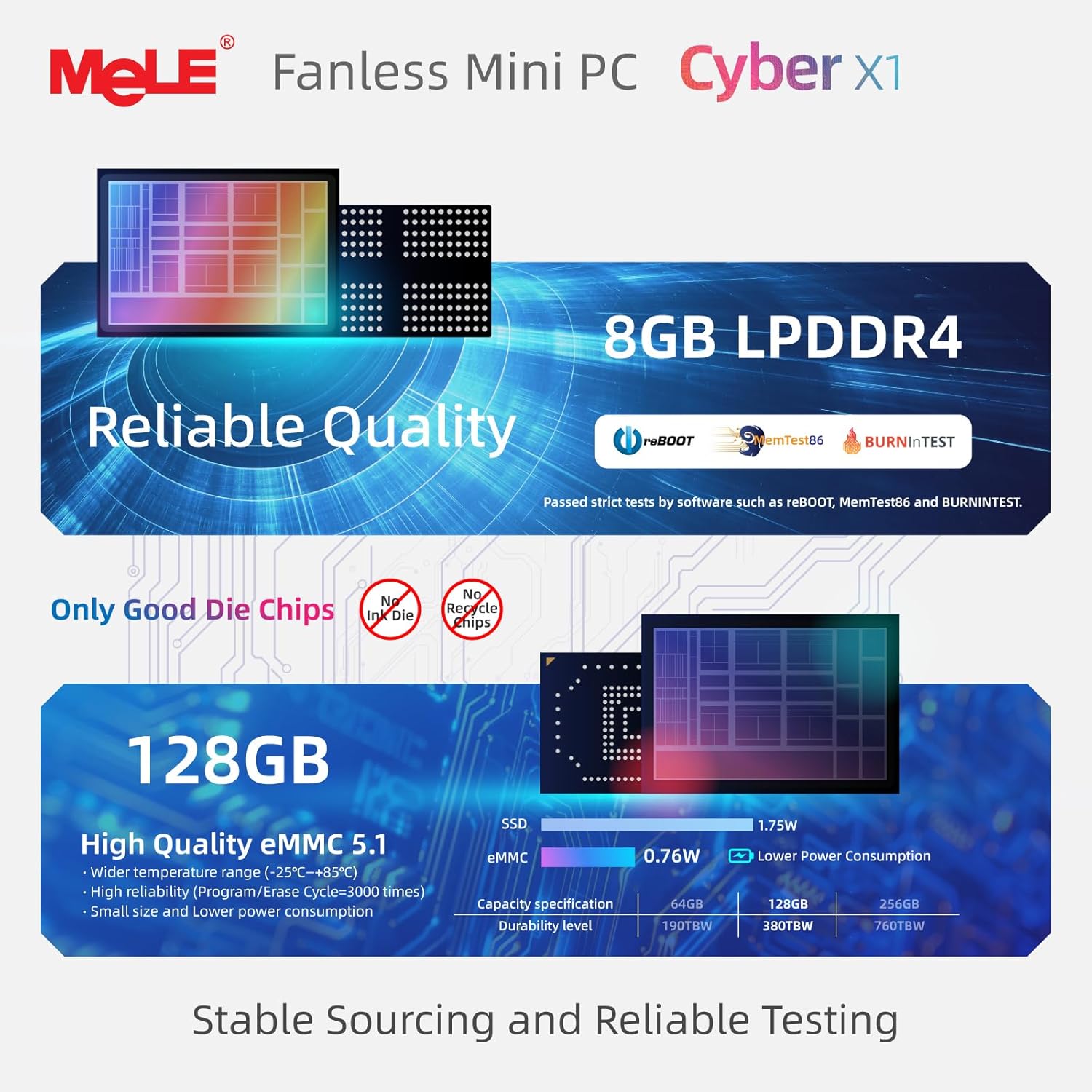
Figure 9.1: Internal Layout showing M.2 SSD slot
10. Aplicacions i casos d'ús
The MeLE Cyber X1 N150 is a versatile mini PC suitable for a wide range of applications:
- Ús domèstic: Ideal for home entertainment, smart home management, and personal computing.
- Ús d'oficina: Efficient for light office work, business applications, and multi-display setups.
- Educació: Suitable for school education and learning environments.
- Industrial/Commercial: Can be used for digital signage, IoT applications, and industrial control systems.
- Specialized Hobbies: Powerful enough for tasks like astrophotography.

Figure 10.1: Diverse Applications of the Mini PC
11. Manteniment
To ensure the longevity and optimal performance of your MeLE Cyber X1 N150 Mini PC, follow these maintenance guidelines:
- Neteja: Regularly clean the exterior of the device with a soft, dry cloth. Avoid using liquid cleaners or abrasive materials.
- Ventilació: Although fanless, ensure the device is placed in a well-ventilated area to allow for proper heat dissipation. Do not block the heat sink fins.
- Actualitzacions de programari: Mantingueu el sistema operatiu i els controladors actualitzats per garantir l'estabilitat i la seguretat.
- Font d'alimentació: Use only the provided power adapter. Using incompatible power supplies may damage the device.
12. Solució De Problemes
If you encounter issues with your MeLE Cyber X1 N150, refer to the following common troubleshooting steps:
- Sense energia:
- Assegureu-vos que l'adaptador de corrent estigui connectat correctament tant al Mini PC com a una presa de corrent que funcioni.
- Proveu una presa de corrent diferent.
- Sense pantalla:
- Check all display cable connections (HDMI, USB-C).
- Assegureu-vos que el monitor estigui configurat a la font d'entrada correcta.
- Try connecting to a different display or using a different port.
- Sense connexió a Internet:
- Per a la connexió per cable, comproveu l'estat del cable Ethernet i del router.
- For Wi-Fi, ensure Wi-Fi is enabled in your operating system and you are connected to the correct network with the right password.
- Device Overheating (Surface Temperature):
- As a fanless device, elevated surface temperatures (55°C-70°C) are normal under load.
- Ensure adequate airflow around the device and that the heat sink fins are not obstructed.
13. Especificacions
| Característica | Especificació |
|---|---|
| Marca | MeLE |
| Nom del model | Cyber X1 |
| CPU Model Number | N150 (12th Gen Alder Lake) |
| Recompte de processadors | 4 nuclis, 4 fils |
| Velocitat de la CPU | Fins a 3.4 GHz |
| Mida instal·lada de la memòria RAM | 8 GB LPDDR5 |
| Capacitat d'emmagatzematge de memòria | eMMC de 128 GB |
| Emmagatzematge ampliable | Micro SD (up to 2TB), M.2 2280 SSD (NVMe/SATA, up to 4TB) |
| Sistema operatiu | OS-P (Supports Windows 11 Pro, Ubuntu, Debian, Linux) |
| Interfície de la targeta gràfica | Integrated (Supports 4K@60Hz) |
| Sortides de visualització | 2 x HDMI 2.0, 1 x Full-Function USB-C (DP) |
| Ports USB | 3 x USB 3.2, 1 x USB 2.0, 1 x Full-Function USB-C |
| Treball en xarxa | Wi-Fi 5 (802.11ac, 2.4/5G), Bluetooth 5.1, Gigabit Ethernet |
| Àudio | Φ3.5mm Earphone & Mic Jack |
| Entrada de potència | 12V/2A DC, USB-C PD3.0 (12V-20V, min 36W) |
| Refrigeració | Refrigeració passiva sense ventilador |
| Pes de l'article | 0.5 quilos |
14. Garantia i Suport
MeLE is committed to providing high-quality products and excellent customer service.
- Garantia: Your MeLE Cyber X1 N150 Mini PC comes with a 12-month warranty.
- Servei de per vida: MeLE offers lifetime technical support for its products.
- Contacte amb l'assistència: If you have any questions or require assistance, please contact MeLE customer service.
Informació d'atenció al client:
- Correu electrònic: service@mele.cn
- Telèfon: +86-0755-8636 3200
For further assistance, you can also log in to your Amazon account, navigate to 'Your Account' -> 'Your Orders', and select 'Ask Product Question' for your MeLE Mini PC purchase.