
1. Introducció
This manual provides detailed instructions for the setup, operation, maintenance, and troubleshooting of your SOLAKAKA KI99 Pro Wireless Mechanical Keyboard and SM600 Tri-Mode Gaming Mouse Combo. Please read this manual thoroughly before using the product to ensure optimal performance and longevity.
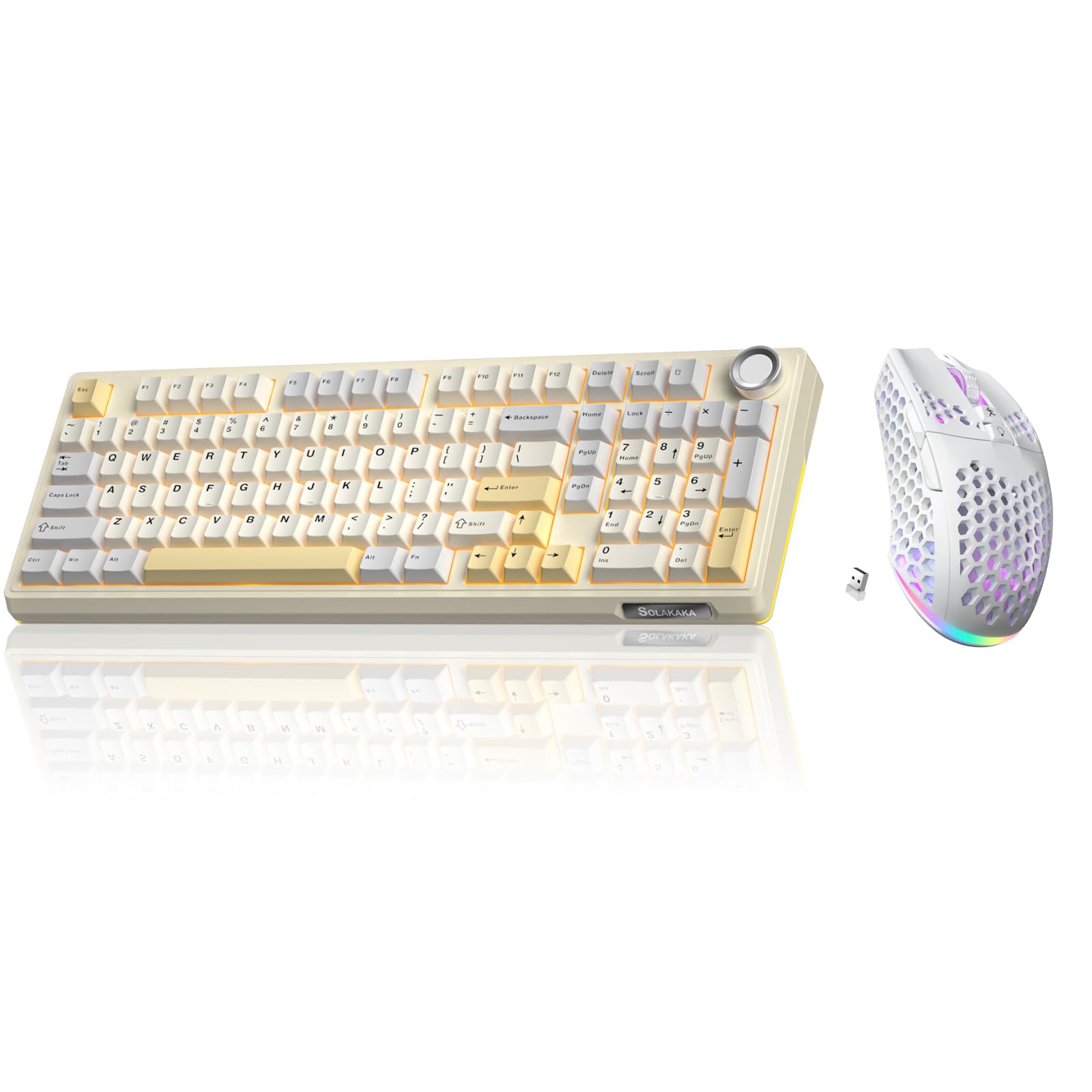
Image 1.1: The SOLAKAKA KI99 Pro Keyboard and SM600 Mouse Combo, showcasing both devices together.
2. Producte acabatview
2.1. KI99 Pro Wireless Mechanical Keyboard
The KI99 Pro keyboard features a 96% layout, offering a balance between compactness and full functionality. It supports triple-mode connectivity and includes a multifunctional knob for enhanced control.
- Triple-mode Connectivity: Bluetooth 5.0, 2.4GHz Wireless, Type-C Wired.
- Bateria de llarga durada: Equipped with a 10,000mAh high-capacity battery.
- Disseny del 96%: Integrates most functional keys of a traditional full-size keyboard.
- Pom multifuncional: Easily adjust volume, switch media playback, and regulate light brightness.
- Gasket Structure & Five-layer Noise Reduction: Provides a solid and pure typing experience.
- Intercanviable en calent: Supports 3/5-pin switches without soldering for personalized tactile customization.
- Tecles PBT: Dual-color injection molded for excellent wear and fade resistance.
- LEOBOG Flower Switches: Pre-lubricated mechanical switches.
- Compatibilitat: Supports Windows and macOS systems.

Image 2.1: The KI99 Pro keyboard highlighting its tri-mode connectivity options: 2.4GHz Wireless, BT5.0, and Type-C Wired.

Imatge 2.2: Un primer pla view of the KI99 Pro keyboard, demonstrating its hot-swappable switch design and durable two-color PBT keycaps.
LEOBOG Flower Switch Specifications:
| Paràmetre | Valor |
|---|---|
| Total Key Stroke | 3.8 ± 0.3 mm |
| Pressió inicial | 29 gf Min |
| Carrera de conducció | 1.5 ± 0.3 mm |
| Conduction Pressure | 33 ± 3 gf |
| Pressió inferior | 45 ± 3 gf |
| Vida mecànica | Aproximadament 60,000,000 vegades |

Image 2.3: Diagram illustrating the internal structure and specifications of the LEOBOG Flower mechanical switch.
2.2. SM600 Tri-Mode Gaming Mouse
The SM600 mouse is designed for gaming, offering tri-mode connectivity, adjustable DPI, and customizable features within a lightweight honeycomb shell.
- Connexió trimodal: 2.4GHz Wireless, 2x Bluetooth 5.1, Type-C Wired.
- Suport multidispositiu: Save up to 4 device profiles.
- DPI ajustable: 6 levels, up to 8000 DPI.
- Custom Macro: Programmable buttons for personalized commands.
- Retroil·luminació RGB: 14 customizable RGB lighting modes.
- Disseny lleuger: Honeycomb shell for reduced weight.
- Durabilitat: Rated for 5 million clicks.
- Bateria recarregable: Bateria recarregable incorporada.

Image 2.4: The SM600 mouse illustrating its three connection modes: 2.4GHz wireless, Bluetooth, and Type-C wired.

Imatge 2.5: Un sobreview of the SM600 mouse highlighting its key features such as tri-mode connection, custom macros, adjustable DPI, RGB backlight, lightweight design, honeycomb shell, and rechargeable battery.
3. Instruccions de configuració
3.1. KI99 Pro Keyboard Setup
- Connexió per cable: Connect the provided Type-C USB cable to the keyboard and your computer's USB port. The keyboard will automatically switch to wired mode and begin charging.
- Connexió sense fil de 2.4 GHz:
- Locate the 2.4GHz USB receiver (usually stored in a compartment on the keyboard or mouse).
- Connecteu el receptor a un port USB disponible de l'ordinador.
- Switch the keyboard's mode selector to 2.4G mode. The keyboard should connect automatically.
- Connexió Bluetooth:
- Switch the keyboard's mode selector to BT mode.
- A l'ordinador o dispositiu, obriu la configuració de Bluetooth i cerqueu dispositius nous.
- Select "KI99 Pro" from the list of available devices to pair.
- The keyboard supports up to three Bluetooth devices. Use specific key combinations (e.g., Fn + 1, Fn + 2, Fn + 3) to switch between paired devices. Refer to the keyboard's specific function key guide for details.
3.2. SM600 Mouse Setup
- Connexió per cable: Connect the provided Type-C USB cable to the mouse and your computer's USB port. The mouse will automatically switch to wired mode and begin charging.
- Connexió sense fil de 2.4 GHz:
- Ensure the 2.4GHz USB receiver is plugged into your computer.
- Switch the mouse's mode selector to 2.4G mode. The mouse should connect automatically.
- Connexió Bluetooth:
- Switch the mouse's mode selector to BT mode. The mouse supports two Bluetooth channels (BT1, BT2).
- A l'ordinador o dispositiu, obriu la configuració de Bluetooth i cerqueu dispositius nous.
- Select "SM600 BT1" or "SM600 BT2" from the list of available devices to pair.
- To switch between BT1 and BT2, use the dedicated button on the mouse (refer to the mouse diagram for location).
4. Instruccions de funcionament
4.1. KI99 Pro Keyboard Operation
- Canvi de mode: Use the physical switch on the keyboard to select between Wired, 2.4G, and BT modes.
- Bluetooth Device Switching: Premeu Fn + 1, Fn + 2, o Fn + 3 to switch between the three paired Bluetooth devices.
- Pom multifuncional:
- Girar: Adjust volume (clockwise to increase, counter-clockwise to decrease).
- Premsa: Reproducció/pausa multimèdia.
- Premsa llarga: Switch RGB lighting effects (if applicable, refer to specific keyboard documentation for advanced lighting controls).
- Windows/Mac Mode: Use the dedicated switch or key combination (e.g., Fn+A per a Windows, Fn + S for Mac) to switch between operating system layouts.
- Càrrega: Connect the Type-C cable to charge the keyboard. The indicator light will show charging status.
4.2. SM600 Mouse Operation
- Canvi de mode: Use the physical switch on the mouse to select between Wired, 2.4G, and BT modes.
- Ajust de DPI: Press the DPI button (usually located behind the scroll wheel) to cycle through 6 adjustable DPI levels. The current DPI setting may be indicated by an LED color change. Maximum DPI is 8000.

Image 4.1: The SM600 mouse demonstrating its 6 adjustable DPI levels, with a maximum of 8000 DPI, configurable via a dedicated button.
- Control d'il·luminació RGB: Use the dedicated RGB button or software to cycle through 14 RGB backlight modes.
- Programari de personalització: The SM600 mouse features dedicated software for Windows systems (2.4GHz wireless and wired modes only). This software allows for custom lighting, button function remapping, and macro programming.

Image 4.2: Screenshot of the SM600 mouse customization software interface, showing options for button remapping, DPI settings, and macro programming. Note: Software supports Windows only, for 2.4GHz wireless and wired modes.
Kindly Reminder: SM600 software only supports Windows system and only supports 2.4GHz wireless and wired mode. Bluetooth mode is not available for software customization.
5. Manteniment
- Neteja: Use a soft, dry cloth to wipe down the keyboard and mouse. For deeper cleaning, use a slightly damp cloth with mild soap, ensuring no liquid enters the devices. Avoid harsh chemicals.
- Keycap Removal (KI99 Pro): Use the provided keycap puller to carefully remove keycaps for cleaning or switch replacement. Pull vertically to avoid damaging the switch.
- Switch Replacement (KI99 Pro): Use the provided switch puller to carefully remove hot-swappable switches. Align new 3-pin or 5-pin switches correctly before pressing them into place. Do not force switches.
- Cura de la bateria: To prolong battery life, avoid fully discharging the devices frequently. Charge them when the low battery indicator appears. Store in a cool, dry place if not used for extended periods.
- Emmagatzematge: Store the keyboard and mouse in a clean, dust-free environment when not in use.
6. Solució De Problemes
- El dispositiu no es connecta:
- Ensure the device is powered on and the correct connection mode (2.4G, BT, Wired) is selected.
- Per a 2.4G, assegureu-vos que el receptor USB estigui ben connectat. Proveu un altre port USB.
- For Bluetooth, ensure Bluetooth is enabled on your host device and the device is in pairing mode. Remove previous pairings and try pairing again.
- Try connecting via wired mode to confirm basic functionality.
- Les tecles/botons no responen:
- Check battery level and charge the device if low.
- For keyboard, ensure no debris is under the keycap or switch. If hot-swappable, try reseating the switch.
- Restart your computer and the device.
- Lag or Disconnections:
- Ensure the device is within the effective range (up to 10M for 2.4G/BT).
- Minimize interference from other wireless devices (e.g., Wi-Fi routers, other 2.4GHz devices).
- Ensure the USB receiver is not blocked by metal objects.
- La il·luminació RGB no funciona:
- Check if the lighting is turned off or set to a very dim level.
- Refer to the specific key combinations for lighting control in the operating instructions.
- Assegureu-vos que el dispositiu estigui prou carregat.
- Mouse DPI Not Changing:
- Assegureu-vos que esteu prement el botó d'ajust de DPI correcte.
- If using the software, ensure settings are applied and the mouse is in a compatible mode (2.4G or Wired).
7. Especificacions
7.1. KI99 Pro Keyboard
- Connectivitat: Bluetooth 5.0, 2.4GHz Wireless, Type-C Wired
- Disseny: 96%
- Capacitat de la bateria: 10,000 mAh
- Interruptors: LEOBOG Flower Mechanical (Hot-swappable 3/5-pin)
- Tecles de tecles: PBT Dual-color Injection Molded
- Estructura: Gasket Mount, Five-layer Noise Reduction
- Il·luminació de fons: RGB
- Compatibilitat: Windows, macOS
7.2. SM600 Mouse
- Connectivitat: 2.4GHz Wireless, 2x Bluetooth 5.1, Type-C Wired
- DPI: Up to 8000 (6 adjustable levels)
- Botons: Programmable, Custom Macro Support
- Feu clic a Vida: 5 milions de clics
- Disseny: Lightweight Honeycomb Shell
- Il·luminació de fons: 14 modes RGB
- Bateria: Recarregable
- Compatibilitat del programari: Windows (2.4GHz/Wired modes only)
8. Garantia i Suport
SOLAKAKA products are designed for reliability and performance. For warranty information, technical support, or customer service inquiries, please refer to the warranty card included with your product or visit the official SOLAKAKA weblloc web. Si us plau, conserveu el comprovant de compra per a qualsevol reclamació de garantia.