
1. Introducció
The WatchGuard Firebox T125 is a tabletop firewall designed to provide high-speed security for small sites, branch offices, and remote locations. It combines advanced threat protection with SD-WAN compatibility, offering enterprise-level networking in a compact form factor. This device is equipped with dual-band SMA antennas for wireless flexibility and 2.5 Gbps-capable interfaces for high-speed connectivity. It includes comprehensive logging and reporting features, providing access to over 100 dashboards and reports, including those compliant with PCI and HIPAA standards.
The Firebox T125 is engineered for modern networks, supporting both hybrid and cloud-native setups, and delivers advanced AI-driven threat detection for quicker deployment and enhanced performance.

Imatge 1.1: Davant i darrere view of the WatchGuard Firebox T125, highlighting its network interfaces and key security features.
2. Característiques clau
- Enterprise-Grade Protection: Designed for branch offices and remote sites, offering robust security.
- Connectivitat d'alta velocitat: Features 1x 2.5Gb and 4x 1Gb Ethernet ports for fast throughput and simplified network segmentation.
- Advanced Threat Detection: Includes IntelligentAV for advanced malware detection and AI-driven threat blocking.
- SD-WAN Compatibility: Supports Software-Defined Wide Area Networking for optimized network performance and resilience.
- Comprehensive Security Suites: Compatible with Basic or Total Security Suites to activate IPS, gateway antivirus, and web filtració.
- Gestió flexible: Can be managed locally or through WatchGuard Cloud for centralized control.
- Disseny compacte i durador: Housed in a sturdy metal case, suitable for various deployment environments.
- Detailed Reporting: Provides access to over 100 dashboards and reports, including PCI and HIPAA standards, at no additional cost.

Image 2.1: The compact design of the Firebox T125, suitable for tabletop deployment.
3. Guia de configuració
3.1 Desembalatge i inspecció inicial
Carefully remove the Firebox T125 from its packaging. Inspect the device for any signs of damage. Ensure all components listed in the packing slip are present.
3.2 Connexió del dispositiu
- Connexió d'alimentació: Connect the provided power adapter to the 12VDC input on the rear panel of the Firebox T125 and then to a power outlet.
- Connexions de xarxa:
- Connecteu el mòdem o encaminador del vostre proveïdor de serveis d'Internet al 0/WAN 1/LAN port (2.5GbE) using an Ethernet cable.
- Connect your internal network devices (switches, computers) to the Ports LAN 1-4 (1GbE) as required.
- Ports USB: The device includes USB 3.2 ports for future expansion or connecting compatible peripherals.

Image 3.1: Rear panel connections of the Firebox T125, including power, USB, and Ethernet ports.
3.3 Configuració inicial
The Firebox T125 supports zero-touch deployment, allowing for simplified setup and configuration through the WatchGuard Cloud. Alternatively, local management via a web user interface is available for initial setup and detailed configuration.
Video 3.1: WatchGuard T125 Product Overview. This video provides a visual guide to the device's features and deployment options, including zero-touch deployment and management via WatchGuard Cloud.
4. Funcionament
4.1 Engegada i indicadors LED
Once connected to power, the device will automatically power on. Observe the LED indicators on the front panel to monitor the device's status. Refer to the official WatchGuard documentation for a detailed explanation of each LED's behavior.
- LED d'estat: Indicates the overall operational status of the device.
- Atenció al LED: S'il·lumina per indicar un esdeveniment o error que requereix atenció.
- LED de mode: Mostra el mode de funcionament actual.
- Interface LEDs: Indicate activity and link status for each network port.
4.2 Gestió de la xarxa
The Firebox T125 can be managed through its local web interface or via the WatchGuard Cloud. WatchGuard Cloud offers centralized management, monitoring, and reporting capabilities, ideal for managing multiple devices or remote deployments.
Key operational aspects include:
- Firewall Policies: Configure rules to control network traffic flow.
- VPN Configuration: Set up Virtual Private Networks for secure remote access or site-to-site connectivity.
- Serveis de seguretat: Activate and configure services like Intrusion Prevention System (IPS), Gateway Antivirus, Web Blocker, and Application Control.
- SD-WAN: Utilize SD-WAN features for intelligent traffic steering and network optimization.
5. Manteniment
Regular maintenance ensures optimal performance and security of your WatchGuard Firebox T125.
- Actualitzacions de programari: Regularly check for and apply the latest Fireware OS updates to ensure you have the most current security features and bug fixes. Standard Support includes software updates.
- Còpies de seguretat de configuració: Periodically back up your device configuration. This allows for quick restoration in case of unexpected issues or hardware replacement.
- Monitoring Logs and Reports: Review system logs and reports regularly through WatchGuard Cloud or the local interface to identify potential security threats or performance issues.
- Inspecció física: Ensure the device is in a well-ventilated area, free from dust and obstructions. Check cable connections for security.
- Security Service Review: Periòdicament review and adjust your security policies and services to adapt to evolving threat landscapes and network requirements.
6. Solució De Problemes
This section provides basic troubleshooting steps for common issues. For more complex problems, refer to the WatchGuard knowledge base or contact technical support.
- Sense energia:
- Verify the power adapter is securely connected to the device and a working power outlet.
- Check the power LED on the front panel.
- Sense connectivitat de xarxa:
- Ensure Ethernet cables are properly connected to the correct ports (WAN for internet, LAN for internal network).
- Check the link/activity LEDs on the Ethernet ports.
- Verify your internet modem/router is functioning correctly.
- Confirm network settings and firewall policies are correctly configured.
- Rendiment lent:
- Review network traffic and security service logs for high utilization or blocked connections.
- Assegureu-vos que el firmware del dispositiu estigui actualitzat.
- Check for any active threats or malware on the network.
- Accedint Web IU:
- Ensure your computer is connected to a LAN port of the Firebox.
- Verify the correct IP address for the Firebox's management interface.
7. Especificacions
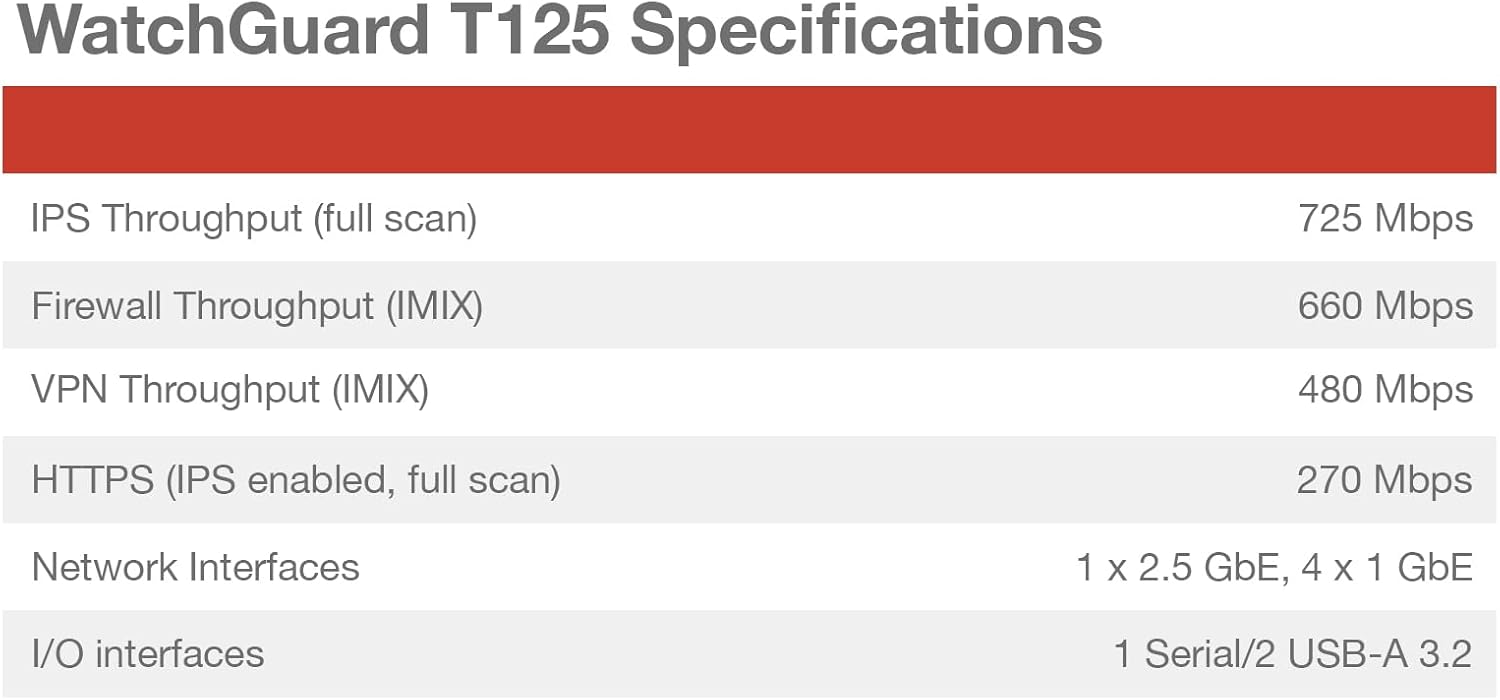
Image 7.1: WatchGuard T125 Performance Specifications.
| Característica | Detall |
|---|---|
| Marca | WatchGuard |
| Nom del model | WatchGuard Firebox T125 |
| Número de model | T125 (WGT125000+WGT1250063) |
| Tecnologia de connectivitat | Ethernet, Wi-Fi (if Wi-Fi model) |
| Interfícies de xarxa | 1x 2.5GbE, 4x 1GbE Ports |
| Velocitat de transferència de dades | Up to 510 Mbps (UTM with inspection on) |
| LAN Port Bandwidth | 1000 Mbps |
| Sistema operatiu | Fireware |
| Protocol de seguretat | WPA2-PSK, WPA3 |
| Característiques especials | Internet Security, Remote Access, SD-WAN |
| Pes de l'article | 4.52 lliures |
| UPC | 654522301734 |
| Router Firewall Security Level | Avançat |
| Has Internet Connectivity | Sí |
8. Garantia i Suport
The WatchGuard Firebox T125 typically comes with a Suport estàndard license, which includes:
- Actualitzacions de programari: Access to the latest Fireware OS updates and security patches.
- Assistència tècnica: 24x7 emergency support for critical issues and business-hours support for routine inquiries.
For enhanced security features, consider adding a Basic Security Suite or Total Security Suite. These suites activate additional services such as IPS, gateway antivirus, web filtering, application control, spamBlocker, reputation enabled defense, network discovery, APT Blocker, DNSWatch, IntelligentAV, ThreatSync (XDR), and EDR Core.
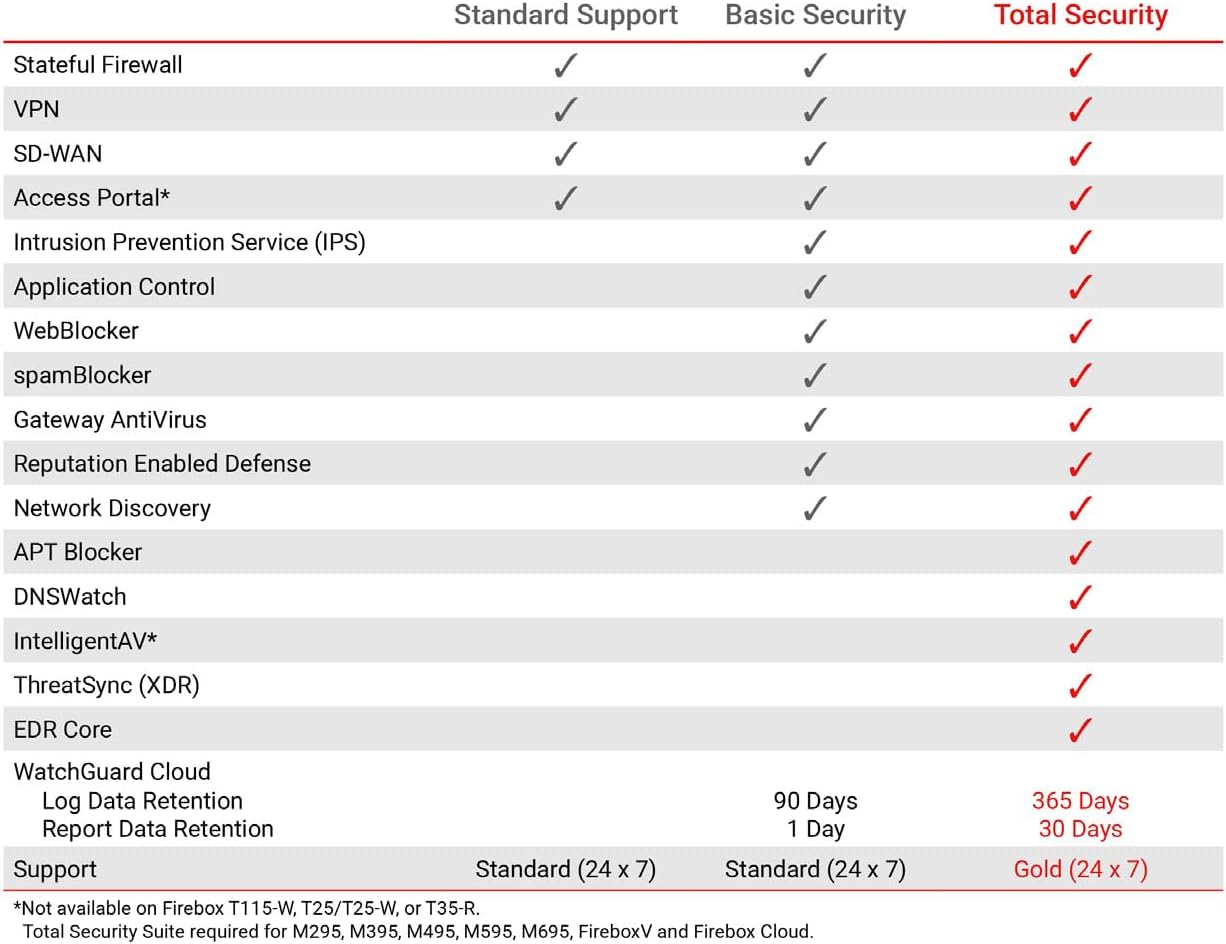
Image 8.1: Comparison of features across WatchGuard's support and security suites.
For detailed warranty terms, support contacts, and to register your product, please visit the official WatchGuard website or refer to the documentation included with your device.