
Introducció
This manual provides detailed instructions for the EasySMX S10 Wireless Controller. It covers setup, operation, maintenance, and troubleshooting to ensure optimal performance and user experience across various platforms including Nintendo Switch, PC, iOS, and Android devices.
Característiques del producte
- One-Tap Wake Up: Seamlessly wake up your Nintendo Switch console with a single button press.
- TMR Anti-Drift Joysticks: Combines Hall Effect durability with carbon-film precision for zero-drift and ultra-smooth analog input.
- Full Mechanical Buttons: Micro-switch buttons with 0.3mm actuation and a lifespan of over 5 million clicks, providing tactile feedback.
- HD Vibration: Equipped with ALPS Linear HD Rumble motors for multi-layered haptic feedback.
- Bateria de llarga durada: Built-in 1200mAh battery offers up to 17 hours of playtime with lights and vibration, or up to 26 hours without.
- Interchangeable D-pad & Custom Faceplate: Allows swapping between disc and cross-style D-pads and magnetic removable faceplates for personalization.
- Característiques addicionals: Customizable RGB lighting, 2 programmable back buttons, 6-axis gyroscope for motion sensing, and NFC function.
Configuració
Contingut del paquet
- EasySMX S10 Wireless Controller
- Cable de càrrega USB-C
- Interchangeable D-pads (if included)
- Customizable Faceplates (if included)
- Manual d'usuari
Disseny del controlador
The EasySMX S10 controller features standard gaming buttons, including A/B/X/Y buttons, directional pad, left and right analog sticks, shoulder buttons (L/R), and triggers (ZL/ZR). Additionally, it includes a HOME button, a Capture button, and two programmable back buttons (GR/GL).
Carregant el controlador
Connect the provided USB-C cable to the controller's charging port and the other end to a USB power source (e.g., a computer, wall adapter). The LED indicators on the controller will show charging status and turn off when fully charged. A full charge typically takes approximately 3 hours.
Instruccions de funcionament
Connecting to Nintendo Switch / Switch 2
- Set the mode toggle switch on the back of the controller to the "S" mode.
- Press and hold the HOME button on the controller for 3 seconds until the LED indicators flash rapidly.
- On your Nintendo Switch console, navigate to Controladors > Canvia d'adherència/ordre.
- When the LED on the controller becomes solid and you feel a short vibration, pairing is complete.
- (First-time connection only) Within 20 seconds after pairing, remove and reattach the Joy-Con controllers from the console. This action activates the wireless wake-up function for future use.
- For future reconnections, simply short-press the HOME button to automatically reconnect and wake the console.
Video: Instructions on how to connect the EasySMX S10 controller to a Nintendo Switch or Switch 2 console for the first time and for subsequent reconnections.
Connexió al PC
- Set the mode toggle switch on the back of the controller to the "X" mode.
- Connect the controller to your PC via the provided Type-C cable. The controller will be recognized as an Xbox Wireless Controller.
- For wireless connection, ensure Bluetooth is enabled on your PC. Cerca "Xbox Wireless Controller" in your Bluetooth settings and select it to pair.
Video: Tutorial on connecting the EasySMX S10 controller to a PC, including both wired and wireless (Bluetooth) methods.
Connecting to Mobile (iOS & Android)
- Set the mode toggle switch on the back of the controller to the "X" mode.
- Activa el Bluetooth al teu telèfon mòbil.
- Cerca "Xbox Wireless Controller" in your phone's Bluetooth settings and select it to pair.
- When the LED on the controller becomes steady with a short vibration, pairing is confirmed.
Video: Guide on how to connect the EasySMX S10 controller to both iOS and Android mobile devices via Bluetooth.
Personalització de la il·luminació RGB
The controller features customizable RGB lighting. Refer to the quick start guide included in the packaging for specific button combinations to change lighting modes, colors, or to turn the lighting off.
Programació dels botons Enrere
The two back buttons (GR and GL) can be programmed to perform specific actions or combos. Consult the quick start guide for detailed instructions on how to map functions to these buttons.
Swapping D-Pads and Faceplates
The S10 controller allows for easy customization. The D-pad can be swapped between a classic cross-style and a smooth circular control. The magnetic faceplates can also be removed and replaced to personalize the controller's appearance.

Image: The EasySMX S10 controller highlighting the swappable D-pads, allowing users to choose between a classic cross-style or a smooth circular control.
Manteniment
- Mantingueu el controlador net netejant-lo amb un drap suau i sec.
- Eviteu exposar el controlador a temperatures extremes, humitat o llum solar directa.
- No intenteu desmuntar el controlador, ja que això podria anul·lar la garantia.
- Guardeu el controlador en un lloc segur quan no l'utilitzeu per evitar danys.
Resolució de problemes
El controlador no es connecta/s'emparella
- Assegureu-vos que el controlador estigui prou carregat.
- Verify the mode toggle switch on the back is set to the correct platform (S for Switch, X for PC/Mobile).
- Restart the console/device and the controller, then attempt the pairing process again.
- If connecting to Switch for the first time and wake-up function doesn't activate, repeat the pairing process and ensure Joy-Cons are removed and reattached within 20 seconds after initial pairing.
Video: A guide explaining why the S10 controller might not wake up the Switch 2 and how to fix it.
NFC Function Not Working
- Ensure the NFC function is enabled on your console/device settings.
- Place the Amiibo or NFC tag directly over the NFC sensor area on the controller.
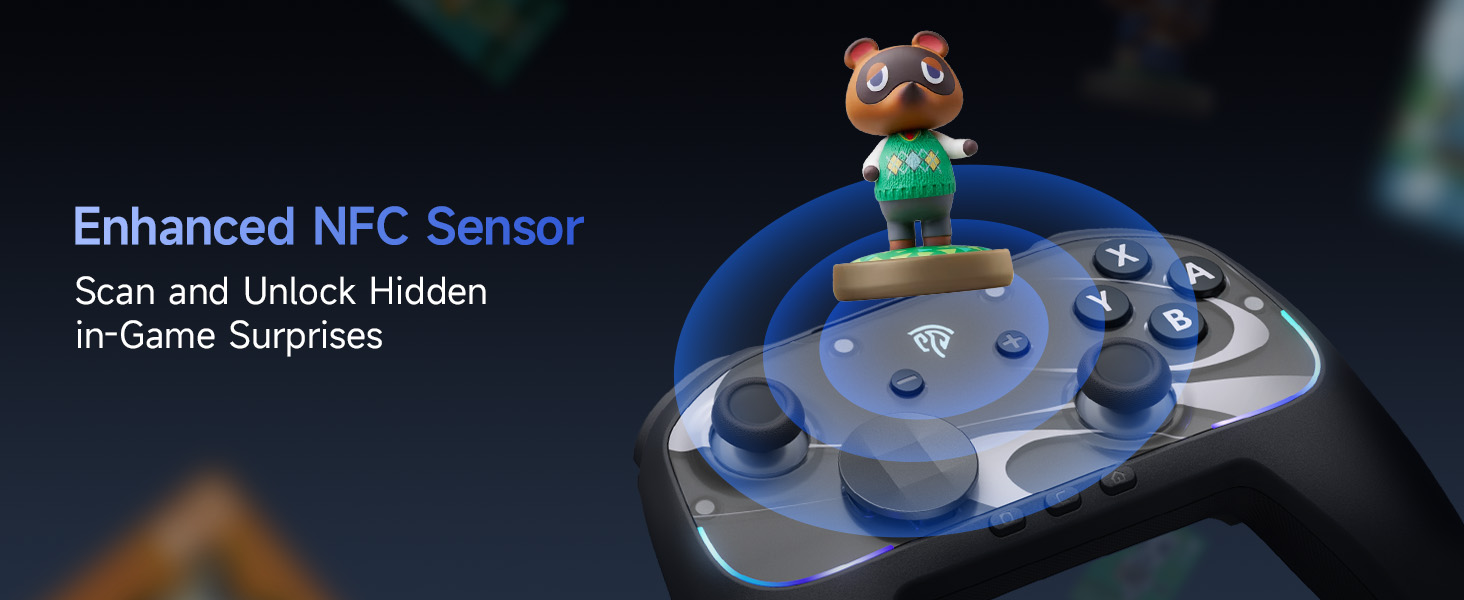
Image: The EasySMX S10 controller demonstrating its NFC function, allowing for scanning and unlocking in-game surprises.
Especificacions
| Model | EasySMX S10 |
| Connectivitat | Bluetooth, USB-C (amb cable) |
| Compatibilitat | Nintendo Switch / Switch 2, PC (Windows), iOS (13.0 and above), Android (8.0 and above) |
| Tipus de palanca de control | TMR Anti-Drift Joysticks |
| Tipus de botó | Full Mechanical Micro-Switch Buttons |
| Vibració | HD Rumble (ALPS Linear HD Rumble Motors) |
| Detecció de moviment | Giroscopi de 6 eixos |
| Capacitat de la bateria | 1200 mAh |
| Hora de joc | Up to 17 hours (with lights/vibration), up to 26 hours (without) |
| Temps de càrrega | Aprox. 3 hores |
| Pes | 1.17 lliures |
| Dimensions | 7.32 x 5.79 x 2.91 polzades |
Garantia i Suport
EasySMX products typically come with a manufacturer's warranty. Please refer to the warranty card included in your product packaging or visit the official EasySMX weblloc per obtenir informació detallada sobre la garantia i els termes.
For technical support, troubleshooting assistance, or any product-related inquiries, please contact EasySMX customer service through their official weblloc web o la informació de contacte que es proporciona a la documentació del producte. També podeu visitar el EasySMX Store on Amazon per obtenir més informació i recursos de suport.