
1. Introducció
Thank you for choosing the Havit Gamenote MS966SE Wireless Gaming Mouse. This manual provides detailed instructions for setting up, operating, and maintaining your new gaming mouse. Please read this manual carefully before use to ensure optimal performance and longevity of your device.
2. Producte acabatview
The Havit Gamenote MS966SE is a versatile gaming mouse designed for performance and flexibility, featuring multiple connectivity options, adjustable DPI, and customizable RGB lighting.
Característiques principals:
- Adjustable DPI: 800-1600-2400-3200-6000-10000DPI for precise control.
- 7 Programmable Buttons for enhanced gaming.
- PMW3325 Gaming Chip for high-performance tracking.
- Triple Mode Connectivity: 2.4Ghz Wireless, Bluetooth V5.2, and Wired (USB/Type-C).
- Lightweight Design: Weighs only 68 grams for comfortable extended use.
- Built-in 500mAh Rechargeable Battery.
- Dynamic RGB Lighting.
Components del ratolí:
- Botó de clic esquerre
- Botó de clic dret
- Roda de desplaçament
- Botó de cicle DPI
- Forward Button (Side)
- Backward Button (Side)
- Connectivity Mode Switch (Underside)
- USB-C Charging/Wired Connection Port (Front)
- Tira de llum RGB
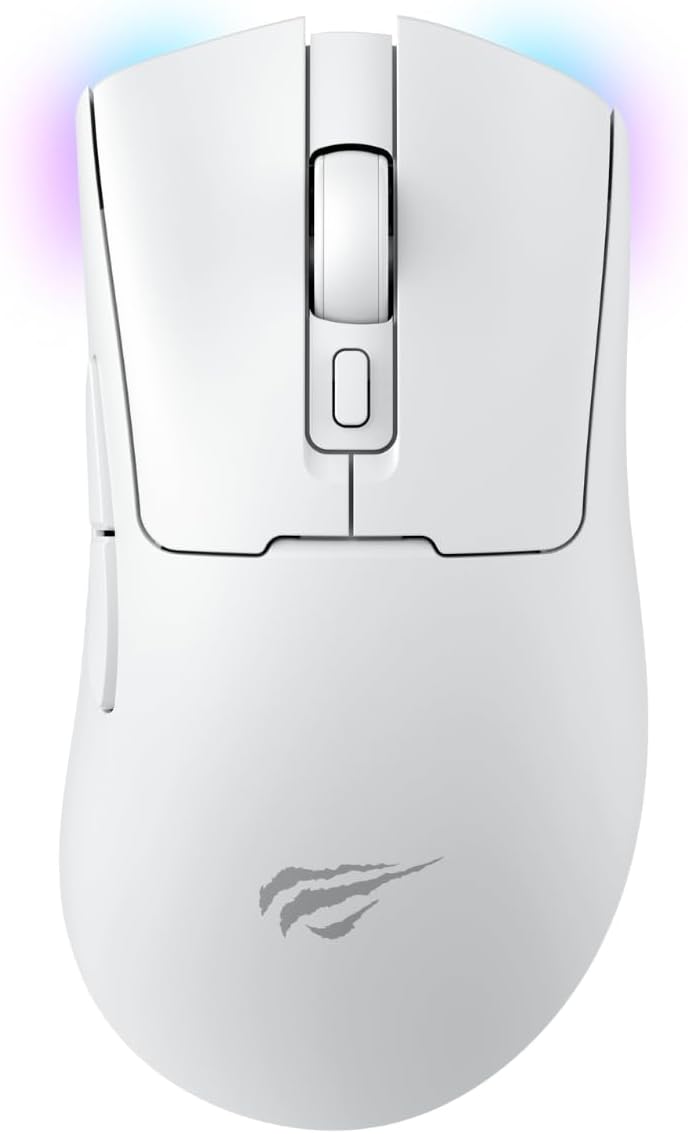
Figura 2.1: superior view of the Havit Gamenote MS966SE Wireless Gaming Mouse. This image displays the mouse from a top-down perspective, highlighting the main left and right click buttons, the central scroll wheel, and the DPI adjustment button located behind the scroll wheel. The Havit logo is visible towards the bottom of the mouse body.

Figura 2.2: Costat esquerre view of the Havit Gamenote MS966SE Wireless Gaming Mouse. This image shows the ergonomic contour of the mouse from the left side, featuring two prominent thumb buttons (Forward and Backward) designed for quick access during gaming. A subtle RGB light strip is visible along the bottom edge of the mouse.
3. Configuració i connectivitat
The MS966SE offers three connection modes: 2.4GHz Wireless, Bluetooth, and Wired USB-C. Choose the mode that best suits your needs.
3.1 Càrrega del ratolí
Before first use, it is recommended to fully charge the mouse. Connect the included USB-C cable to the mouse's front port and the other end to a USB power source (e.g., computer USB port, wall adapter). The RGB lighting may indicate charging status.

Figure 3.1: Havit Gamenote MS966SE mouse connected via USB-C cable. This image illustrates the mouse with its USB-C cable plugged into the front port, demonstrating how to charge the device or use it in wired mode.
Connexió sense fil 3.2 de 2.4 GHz
- Locate the USB receiver (dongle) usually stored in a compartment on the underside of the mouse.
- Connecteu el receptor USB a un port USB disponible de l'ordinador.
- Turn on the mouse and set the connectivity switch on the underside to the "2.4G" position.
- El ratolí s'hauria de connectar automàticament a l'ordinador.
3.3 Bluetooth Connection (BT V5.2)
- Turn on the mouse and set the connectivity switch on the underside to the "BT" position.
- A l'ordinador, obriu la configuració de Bluetooth i cerqueu dispositius nous.
- Select "Havit MS966SE" (or similar name) from the list of available devices to pair.
- Un cop emparellat, el ratolí està llest per al seu ús.
3.4 Connexió per cable
- Connect the included USB-C cable to the mouse's front port.
- Connecteu l'altre extrem del cable USB-C a un port USB disponible de l'ordinador.
- The mouse will function as a wired mouse and will also charge its internal battery.
4. Instruccions de funcionament
4.1 Ajust de DPI
The mouse features a dedicated DPI button located behind the scroll wheel. Press this button to cycle through the available DPI settings:
- 800 DPI
- 1600 DPI
- 2400 DPI
- 3200 DPI
- 6000 DPI
- 10000 DPI
The RGB lighting may change color to indicate the current DPI setting.
4.2 Funcions dels botons
The MS966SE has 7 buttons. The primary functions are:
- Clic esquerre: Acció primària.
- Clic dret: Menú contextual/d'acció secundària.
- Roda de desplaçament: Desplaça't amunt/avall, fes clic amb el botó central.
- Botó DPI: Passa ciclísticament pels paràmetres de DPI.
- Botó Endavant (lateral): Navega cap endavant web navegadors o aplicacions.
- Botó enrere (lateral): Navega cap enrere web navegadors o aplicacions.
Some buttons may be programmable via software (if available from Havit).
Il·luminació RGB 4.3
The mouse features dynamic RGB lighting. Specific controls for RGB modes or colors may be available through dedicated software or by pressing a combination of buttons (refer to Havit's official website for software availability).
5. Manteniment
5.1 Neteja
Per netejar el ratolí, feu servir un drap suau i sec. Per a la brutícia persistent, fregueu-lo lleugerament.ampen the cloth with water or a mild cleaning solution. Avoid using harsh chemicals or abrasive materials, as these can damage the surface.
5.2 Cura de la bateria
The mouse contains a built-in rechargeable 500mAh battery. To prolong battery life:
- Eviteu descarregar completament la bateria amb freqüència.
- Charge the mouse when the battery indicator (if present) shows low power.
- Guardeu el ratolí en un lloc fresc i sec quan no l'utilitzeu durant períodes prolongats.
6. Solució De Problemes
If you encounter issues with your Havit Gamenote MS966SE mouse, please refer to the following common solutions:
| Problema | Possible solució |
|---|---|
| El ratolí no respon (sense fil) |
|
| Connexió amb retard o intermitent |
|
| Els DPI no canvien |
|
| El ratolí no es carrega |
|
7. Especificacions
| Característica | Detall |
|---|---|
| Marca | Havit |
| Nom del model | MS966SE |
| Color | Blanc |
| Configuració de DPI | 800-1600-2400-3200-6000-10000DPI |
| Nombre de botons | 7 |
| Sensor | PMW3325 Gaming Chip |
| Connectivitat | 2.4Ghz Wireless, Bluetooth V5.2, Wired (USB/Type-C) |
| Pes | 68 grams |
| Capacitat de la bateria | 500 mAh (recarregable) |
| Dispositius compatibles | Ordinador d'escriptori |
8. Garantia i Suport
The Havit Gamenote MS966SE Wireless Gaming Mouse comes with a Garantia del distribuïdor de 2 anysSi us plau, conserveu el comprovant de compra per a reclamacions de garantia.
For further assistance, technical support, or to inquire about software for button customization, please visit the official Havit store or contact their customer service: