
TOPUTURE TP2
TOPUTURE TP2 2-in-1 Foldable Walking Pad Treadmill User Manual
Model: TP2
1. Introducció
Thank you for choosing the TOPUTURE TP2 2-in-1 Foldable Walking Pad Treadmill. This manual provides essential information for the safe and effective use, setup, operation, and maintenance of your new fitness equipment. Please read this manual thoroughly before initial use and retain it for future reference.
The TOPUTURE TP2 is designed for both walking and light running, featuring a foldable handle for versatile use as an under-desk walking pad or a traditional treadmill. It includes an incline feature, app connectivity, and a compact design for home or office environments.
2. Instruccions de seguretat importants
To reduce the risk of serious injury, read all instructions before using this equipment. The manufacturer is not responsible for personal injury or property damage sustained by or through the use of this product.
- Col·loqueu sempre la cinta de córrer sobre una superfície plana i estable.
- Ensure adequate clearance around the treadmill (at least 2 feet on sides and rear).
- Mantingueu els nens i les mascotes lluny de la cinta de córrer durant el funcionament.
- Porteu calçat esportiu adequat.
- Use the safety key at all times. Attach the clip to your clothing.
- No feu servir la cinta de córrer si està danyada o no funciona correctament.
- Consulteu un metge abans de començar qualsevol programa d'exercici.
- Maximum user weight capacity: 300 lbs.
3. Configuració
3.1 Desembalatge i col·locació
The TOPUTURE TP2 treadmill comes pre-assembled. Carefully remove all packaging materials. Place the treadmill on a firm, level surface. Ensure the power cord is accessible and not obstructed.
3.2 Handle Bar Configuration
The treadmill can be used in two modes: with the handle bar up for running/walking, or folded down for under-desk walking.
- To raise the handle bar: Lift the handle bar until it locks securely into the upright position. Ensure both locking mechanisms are engaged.
- To lower the handle bar: Release the locking mechanisms (refer to the quick release handle image below) and gently lower the handle bar until it rests flat against the treadmill deck.

Image: The TOPUTURE TP2 treadmill shown with the handle bar raised for traditional use and lowered for under-desk operation.

Imatge: Detallada view of the device holder, magnetic remote control, safety key, quick release handle for folding, and built-in transport wheels.
3.3 Power Connection and Safety Key
Connect the power cord to a grounded electrical outlet. Insert the safety key into its designated slot on the console. The treadmill will not operate without the safety key properly inserted.
4. Instruccions de funcionament
4.1 Console and LED Display
The integrated LED display shows key workout metrics:
- Hora: Durada del teu entrenament.
- Velocitat: Velocitat actual en MPH.
- Distància: Distància total recorreguda.
- Calories: Calories cremades estimades.

Image: The LED display on the treadmill console, illustrating the various metrics displayed during operation.
4.2 Starting and Stopping the Treadmill
- Assegureu-vos que la clau de seguretat estigui al seu lloc.
- Puja als rails laterals de la cinta de córrer.
- Premeu el botó COMENÇA button on the remote control or console. The treadmill will begin at a low speed.
- Per aturar-se, premeu el botó STOP button on the remote or console, or pull the safety key.
4.3 Ajust de velocitat
Adjust the speed using the remote control or the console buttons.
- Comandament a distància: Feu servir els botons '+' i '-' per augmentar o disminuir la velocitat.
- Console Buttons: Use the speed adjustment buttons on the console.
The speed range is 0.6 to 7.5 MPH.

Image: The treadmill console with speed controls and the remote control, highlighting two ways to adjust speed.
4.4 Incline Feature
The TOPUTURE TP2 features a fixed 7% incline, designed to simulate uphill walking and increase calorie expenditure compared to flat treadmills.

Image: Visual comparison demonstrating the 7% incline of the TOPUTURE TP2 treadmill and its effect on calorie burn versus a flat treadmill.
4.5 2-in-1 Functionality (Walking Pad / Treadmill)
- Walking Pad Mode (Handle Bar Down): When the handle bar is folded down, the treadmill operates as a walking pad, ideal for use under a standing desk. The speed range in this mode is typically 0.6-4 MPH.
- Treadmill Mode (Handle Bar Up): With the handle bar raised and secured, the treadmill functions as a traditional treadmill, allowing for speeds up to 7.5 MPH.

Image: Two individuals illustrating the two operational modes: walking pad mode (handle bar down) and treadmill mode (handle bar up).

Image: A woman using the TOPUTURE TP2 treadmill in its under-desk walking pad configuration while working at a standing desk.
4.6 Smart App Integration
The treadmill can connect to a sports application via Bluetooth for enhanced tracking and control.
- Download the recommended Sport APP (e.g., FitShow, Zwift, Kinomap) from your device's app store.
- Activa el Bluetooth al teu dispositiu mòbil.
- Open the Sport APP and follow the on-screen instructions to pair with your TOPUTURE TP2 treadmill.
- The app allows you to record exercise data, set goals, and access various workout programs.
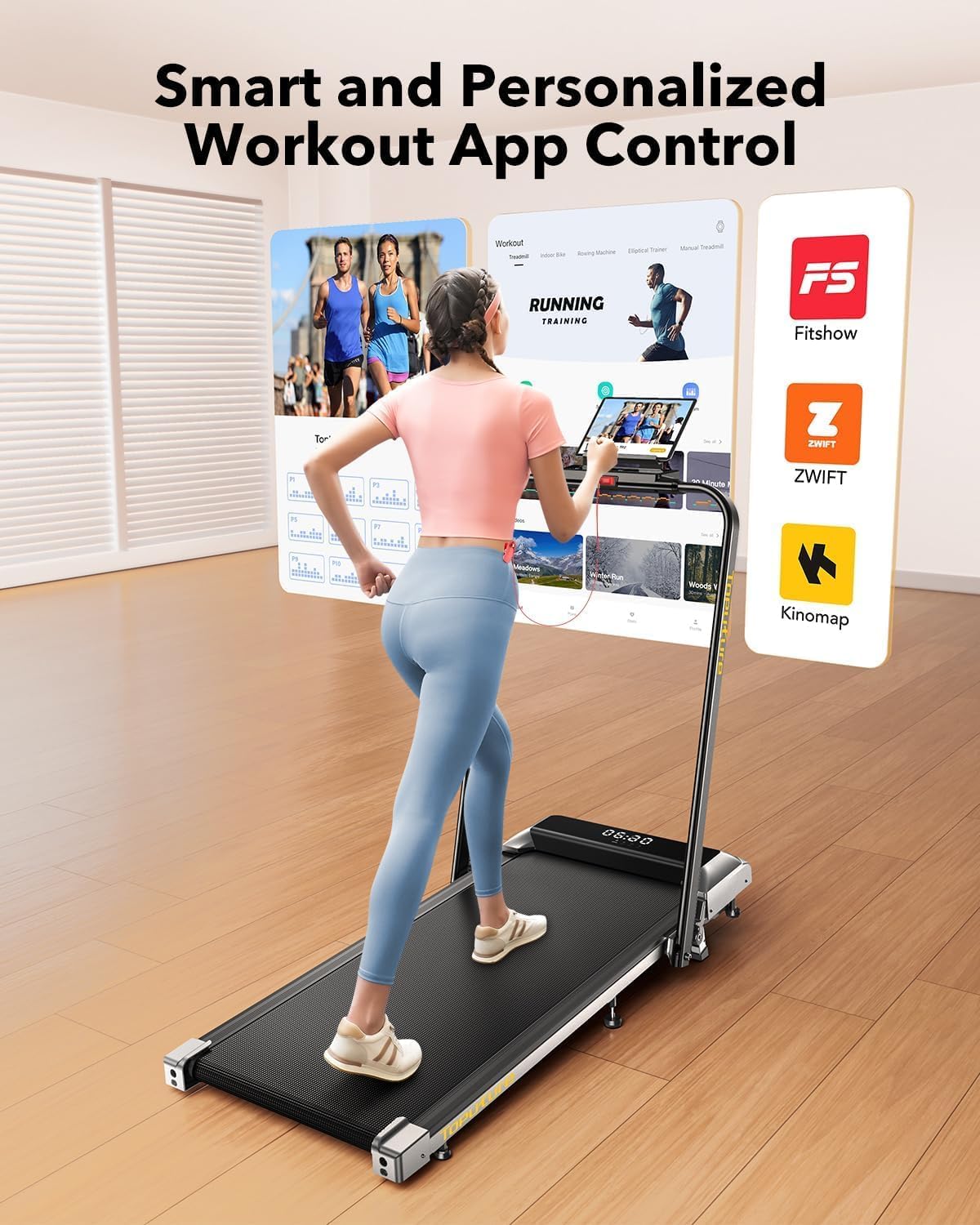
Image: A user interacting with a fitness application on a tablet, demonstrating the smart app integration feature of the treadmill.
4.7 Suport del dispositiu
The treadmill features a device holder on the console, allowing you to place your phone or tablet for entertainment or app viewdurant el teu entrenament.
5. Manteniment
5.1 Neteja
Regular cleaning helps maintain the treadmill's performance and appearance.
- Desendolla sempre la cinta de córrer abans de netejar-la.
- Netegeu la consola i les superfícies exteriors amb un drap suau i sec.amp tela. Eviteu els netejadors abrasius.
- Periodically vacuum under the treadmill to prevent dust buildup.
5.2 Lubricació de la corretja de funcionament
The running belt may require lubrication after extended use to ensure smooth operation and prolong its lifespan. Refer to the included user manual for specific lubrication instructions and recommended lubricant type.
5.3 Ajust del cinturó de carrera
If the running belt becomes off-center or slips, it may need adjustment. Consult the detailed instructions in the full user manual for proper belt centering and tensioning procedures.
5.4 Emmagatzematge
The TOPUTURE TP2 is designed for easy storage due to its foldable design and transport wheels.
- Assegureu-vos que la cinta de córrer estigui apagada i desendollada.
- Lower the handle bar as described in Section 3.2.
- Utilize the built-in transport wheels to move the treadmill to a desired storage location. It can be stored flat under furniture or upright against a wall.

Image: A woman demonstrating the ease of moving and storing the folded TOPUTURE TP2 treadmill using its flexible wheels.
6. Solució De Problemes
Si teniu problemes amb la cinta de córrer, consulteu els següents problemes i solucions habituals:
| Problema | Causa possible | Solució |
|---|---|---|
| La cinta de córrer no s'encén. | Cable d'alimentació no connectat; clau de seguretat no inserida. | Assegureu-vos que el cable d'alimentació estigui ben connectat; introduïu completament la clau de seguretat. |
| La cinta de córrer rellisca o dubta. | Tensió de la corretja massa fluixa; la corretja necessita lubricació. | Adjust belt tension (refer to full manual); Lubricate the running belt. |
| Soroll inusual durant el funcionament. | Components solts; Problema amb el motor; Fricció de la corretja. | Check for loose screws; Lubricate belt; Contact customer support if noise persists. |
| Problemes de connexió de l'aplicació. | Bluetooth off; App not updated; Incorrect pairing. | Ensure Bluetooth is on; Update app; Re-attempt pairing process. |
For issues not listed here, please contact TOPUTURE customer support.
7. Especificacions
The following table outlines the key specifications for the TOPUTURE TP2 Walking Pad Treadmill:
| Característica | Detall |
|---|---|
| Marca | TOPUTURA |
| Nom del model | TP2 |
| Dimensions del producte (LxWxH) | 51.1" x 22" x 5.1" |
| Mida plegada | 51.2" x 22" x 5.3" |
| Pes de l'article | 50 lliures |
| Material | Acer d'aliatge |
| Velocitat màxima | 7.5 milles per hora |
| Percentatge d'inclinació màximatage | 7% (fix) |
| Potència màxima | 2.5 CV |
| Recomanació de pes màxim | 300 lliures |
| Àrea de córrer | 40 cm x 16 cm |
| Tecnologia de connectivitat | Bluetooth |
| Components inclosos | Cable d'alimentació, comandament a distància, clau de seguretat, manual d'usuari |

Image: Illustration detailing the 2.5 HP motor, low noise level (45db), speed range (0.6-7.5 MPH), and 300 lbs weight capacity.

Image: Cross-section diagram illustrating the five layers of the anti-slip, shock-absorbing running belt, including anti-slip, enhanced, absorbing, supporting, and fabric knitted layers.
8. Garantia i Suport
8.1 Informació de la garantia
The TOPUTURE TP2 Walking Pad Treadmill comes with a one-year warranty from the date of purchase. This warranty covers manufacturing defects under normal use. It does not cover damage caused by misuse, accidents, unauthorized modifications, or improper maintenance.
8.2 Atenció al client
For warranty claims, technical assistance, or any questions regarding your TOPUTURE TP2 treadmill, please contact TOPUTURE customer support. Refer to the contact information provided in the packaging or on the official TOPUTURE weblloc.
Ask a question about this manual
Ask about setup, troubleshooting, compatibility, parts, safety, or missing instructions. Manuals+ will review the question and use this page’s manual context to help answer it.