1. Introducció
This manual provides essential information for the safe and correct installation, operation, and maintenance of the Generic CEM859A Power Supply Board. This board is designed as a replacement part for specific television models, including Orion SLED2468W and Sansui SLED2490. Please read this manual thoroughly before attempting any installation or repair to ensure safety and proper functionality.
2. Informació important de seguretat
WARNING: Risk of electric shock and fire. Installation and service should only be performed by qualified personnel.
- DANGER! MAINS VOLTAGE: This power supply board operates with high voltage. Always disconnect the television from the main power source before beginning any work. Failure to do so can result in severe injury or death.
- RISC D'INCEND: Ensure all connections are secure and correct. Using incorrect parts or improper installation can lead to overheating and fire. Replace components only as marked and specified.
- Wear appropriate personal protective equipment, including insulated gloves, when handling electronic components.
- Avoid touching components unnecessarily, as static electricity can damage sensitive parts.
- Mantenir la zona de treball neta i seca.
3. Producte acabatview
The CEM859A is a power supply board designed to provide the necessary power to various components within compatible television sets. It features multiple connectors and components for power regulation and distribution.
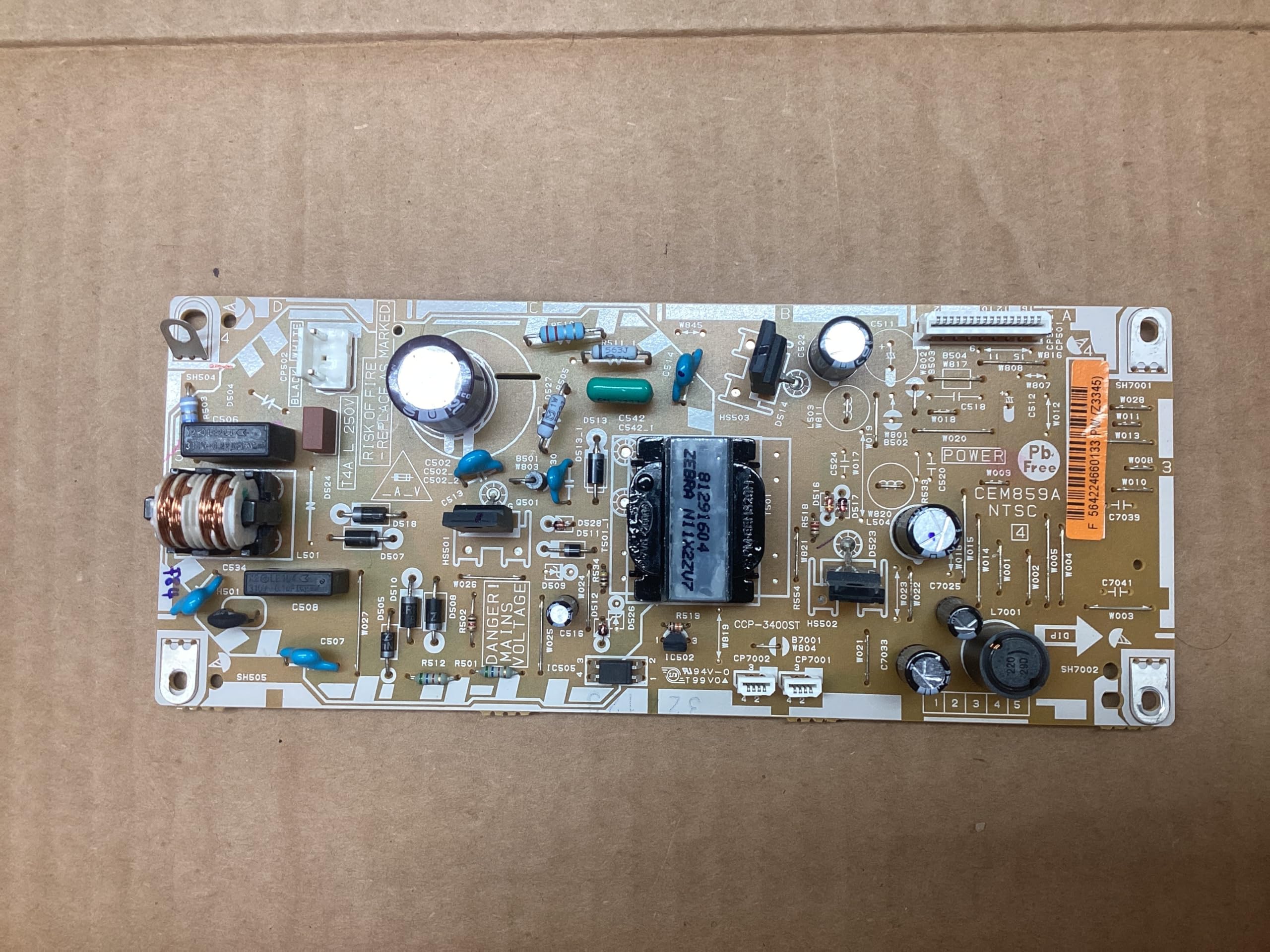
Figura 1: superior view of the CEM859A Power Supply Board. This image displays the layout of various electronic components including capacitors, inductors, transformers, and connectors. Key markings such as "POWER", "CEM859A NTSC", "DANGER! MAINS VOLTAGE", and "RISK OF FIRE" are visible. The board also features a unique identifier: F 564224660133 PW (Z3345).
Característiques principals:
- Part Type: Power Board
- Part Number: CEM859A
- Compatibility: Orion SLED2468W, Sansui SLED2490
4. Configuració i instal·lació
This section outlines the general procedure for installing the CEM859A Power Supply Board. Specific disassembly and reassembly steps for your television model may vary. Refer to your TV's service manual for detailed instructions.
4.1 Llista de comprovació prèvia a la instal·lació:
- Ensure the television is completely unplugged from the power outlet.
- Gather necessary tools (e.g., screwdrivers, anti-static wrist strap).
- Confirm the replacement board (CEM859A) matches the original board in your TV.
- Treballeu sobre una superfície neta i sense electricitat estàtica.
4.2 Passos d'instal·lació:
- Carefully remove the back cover of the television, following the manufacturer's instructions.
- Locate the existing power supply board.
- Disconnect all cables and connectors attached to the old power supply board. Note their positions for reassembly.
- Unscrew and remove the old power supply board.
- Position the new CEM859A board in place, ensuring it aligns with the mounting holes.
- Secure the new board with the appropriate screws. Do not overtighten.
- Reconnect all cables and connectors to the new board. Double-check each connection for proper seating and orientation.
- Before replacing the back cover, perform a preliminary test (see Section 5).
- If the test is successful, carefully replace the television's back cover.
5. Operating and Initial Test
After installation, perform an initial test to confirm the power supply board is functioning correctly.
- With the new power board installed and all connections secured (but before replacing the back cover), plug the television into a power outlet.
- Observe for any immediate signs of malfunction, such as smoke, unusual odors, or sparks. If any occur, immediately unplug the TV.
- Attempt to power on the television. Check if the standby light illuminates and if the screen displays an image or menu.
- If the TV powers on and functions as expected, proceed to reassemble the TV. If not, refer to the Troubleshooting section.
6. Manteniment
The CEM859A Power Supply Board is designed for long-term reliability and generally requires no routine maintenance. However, to ensure its longevity and optimal performance:
- Keep the television's ventilation openings clear to prevent overheating of internal components, including the power board.
- Eviteu exposar el televisor a un excés de pols, humitat o temperatures extremes.
- If the television is opened for any reason, gently clean any accumulated dust from the board using compressed air or a soft brush. Ensure the TV is unplugged before cleaning.
7. Solució De Problemes
If you encounter issues after installing the CEM859A Power Supply Board, consider the following common troubleshooting steps:
| Problema | Causa possible | Solució |
|---|---|---|
| TV does not power on. | Connexió del cable d'alimentació fluixa. Incorrect board installation. Other faulty TV components. | Check power cable. Re-verify all connections to the power board. Ensure the board is correctly seated. If problem persists, other components (e.g., main board) may be faulty. |
| TV powers on but no picture/sound. | Connexions de cable incorrectes. Faulty main board or T-con board. | Check all ribbon cables and power cables connected to other boards. This issue is less likely to be solely the power board if it powers on. |
| Unusual noises or smells from TV. | Curtcircuit. Component danyat. | Immediately unplug the TV. Do not attempt to operate. Seek professional assistance. |
If troubleshooting steps do not resolve the issue, it is recommended to consult a qualified technician or the television manufacturer's support.
8. Especificacions
- Número de peça: CEM859A
- Tipus de part: Junta de potència
- Compatibilitat: Orion SLED2468W, Sansui SLED2490
- Fabricant: dd (as per product data)
- ASIN: B0FMHRP7X4
- Board Identifier: F 564224660133 PW (Z3345) (as seen on board)
9. Garantia i Suport
This CEM859A Power Supply Board is described as a previously used item, thoroughly tested and fully operational. As a used part, it may show signs of scratches or cosmetic wear. Please refer to the seller's return policy for any issues encountered post-purchase.
For technical support related to your specific television model, please contact the television manufacturer directly.