
1. Producte acabatview
The Kaiser KSB-4008 is a versatile portable Bluetooth speaker designed for powerful audio output and dynamic lighting effects. It features an 8-inch woofer, 2.5-inch tweeter, and mid-range drivers, delivering 40W RMS of balanced sound. Integrated RGB LED lighting enhances the atmosphere for various events. With KSR-Link technology, you can wirelessly connect another compatible speaker for an expanded sound experience. The speaker includes a rechargeable battery, Bluetooth connectivity, and supports USB and Micro SD inputs for diverse music playback options. Its robust and portable design makes it suitable for both indoor and outdoor use.
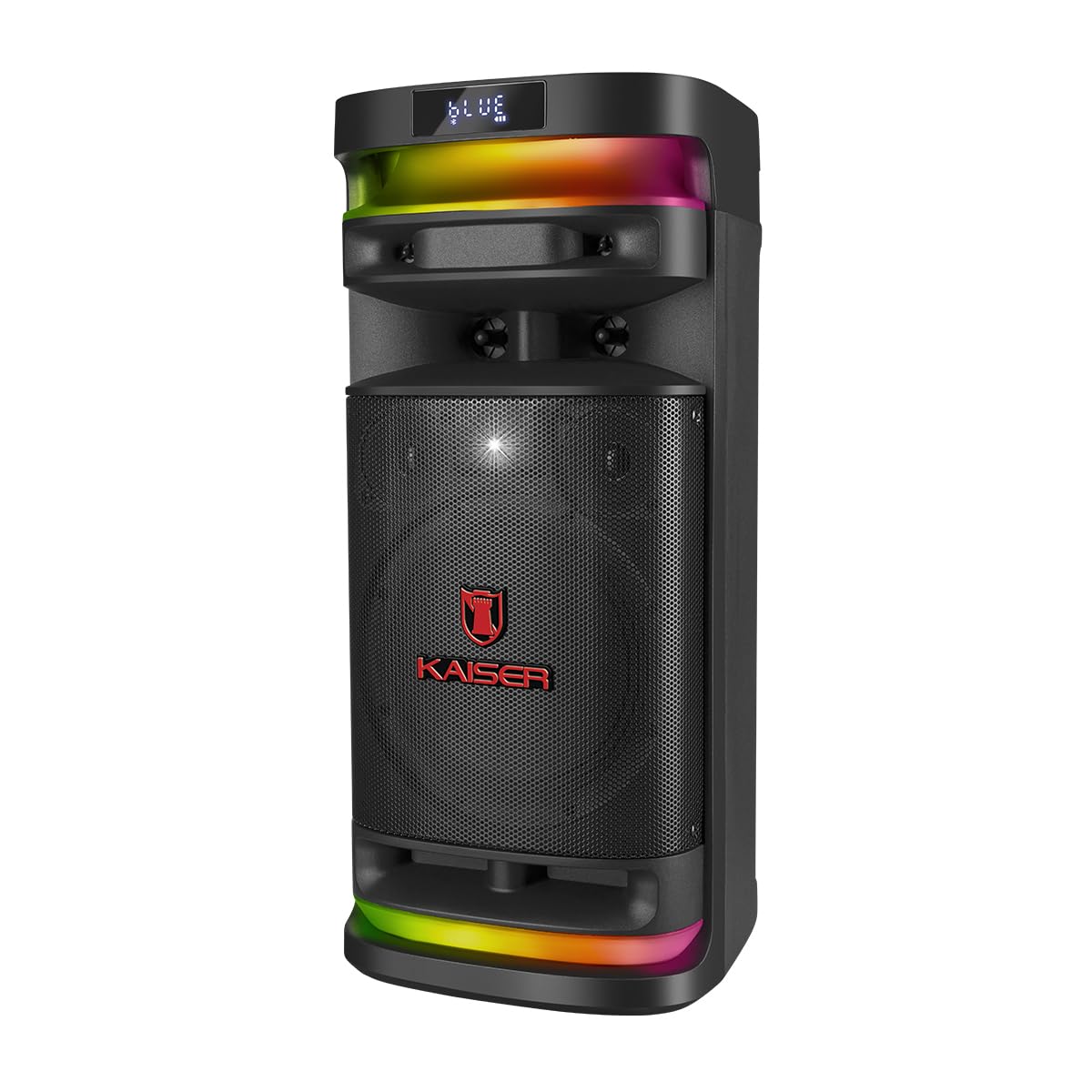
Figura 1.1: Davant view of the Kaiser KSB-4008 Portable Bluetooth Speaker, showcasing its speaker grille and RGB LED light strips.
Característiques principals:
- Potència RMS de 40 W: Provides powerful and balanced audio output.
- Full Speaker Configuration: Includes an 8-inch woofer, 2.5-inch tweeter, and mid-range for comprehensive sound reproduction.
- RGB LED Light Effect: Multi-color lighting creates a vibrant atmosphere.
- KSR-Link Technology: Allows wireless connection to another compatible speaker for ampso lificat.
- Connectivitat versàtil: Supports Bluetooth, USB, and Micro SD for various audio sources.
- Bateria recarregable: Enables extended use without constant power connection.
- Portable and Sturdy Design: Easy to transport for indoor or outdoor events.
2. Contingut del paquet
Marqueu la casella per als elements següents:
- Kaiser KSB-4008 Portable Bluetooth Speaker
- Micròfon sense fil
- Charging Cable (for microphone)
- Manual d'usuari (aquest document)

Figura 2.1: Included wireless microphone and its USB charging cable.
3. Instruccions de seguretat
Per garantir un funcionament segur i evitar danys, llegiu i seguiu aquestes pautes de seguretat:
- No exposeu l'altaveu a l'aigua, la humitat ni a temperatures extremes.
- Eviteu col·locar l'altaveu a prop de fonts de calor o sota la llum solar directa durant períodes prolongats.
- Assegureu-vos que la ventilació sigui adequada; no obstruïu cap obertura de ventilació.
- Feu servir només els cables de càrrega i els adaptadors de corrent especificats.
- Do not attempt to open, modify, or repair the speaker yourself. Refer all servicing to qualified personnel.
- Mantingueu l'altaveu lluny dels nens i de les mascotes.
- Operate the speaker within its specified voltage i límits de corrent.
- Eviteu escoltar a volums excessivament alts durant períodes prolongats per evitar danys auditius.
4. Components i controls del producte
Familiarize yourself with the various parts and controls of your KSB-4008 speaker.
Figura 4.1: Top Control Panel Layout.
Funcions del tauler de control:
- Interruptor d'alimentació: Encén/apaga l'altaveu.
- CARGA (Charge) Indicator: Lights up when charging.
- Entrada AUX: Presa de 3.5 mm per a dispositius d'àudio externs.
- Port USB: Per a unitats flaix USB.
- Ranura Micro SD: For Micro SD cards.
- Entrada MIC: 6.35mm jack for wired microphone (if used).
- GUIT Input: 6.35mm jack for guitar (if used).
- VOL MIC (Microphone Volume): Adjusts the volume of the microphone.
- VOLUMEN (Master Volume): Ajusta el volum general de l'altaveu.
- Botó LED: Controls the RGB LED light effects.
- GRAB Button: For recording audio (functionality may vary).
- MIC PRIO (Microphone Priority): Prioritza l'àudio del micròfon per sobre de la música.
- REPETIR (Repeat) Button: Repeteix la pista o la llista de reproducció actual.
- Previous Track / Rewind Button: Skips to previous track or rewinds.
- Botó Reproduir/Pausa: Reprodueix o posa en pausa la reproducció d'àudio.
- Next Track / Fast Forward Button: Skips to next track or fast forwards.
- MODO BT (Mode/Bluetooth) Button: Switches between input modes (Bluetooth, USB, Micro SD, AUX) and initiates Bluetooth pairing.
5. Configuració i ús inicial
5.1 Càrrega de l'altaveu
- Connect the speaker to a power outlet using a compatible charging cable (not explicitly listed but implied).
- The 'CARGA' indicator light on the control panel will illuminate during charging.
- Un cop completament carregat, l'indicador lluminós pot canviar de color o apagar-se. Desconnecteu l'altaveu de la font d'alimentació.
5.2 Engegada/apagada
- To turn ON the speaker, toggle the PODER interruptor a la posició 'ON'.
- To turn OFF the speaker, toggle the PODER switch to the 'OFF' position.
5.3 Configuració del micròfon sense fil
- Ensure the wireless microphone is charged. Use the provided USB charging cable if necessary.
- Turn on the microphone using its power button.
- The microphone should automatically pair with the speaker. If not, refer to the microphone's specific instructions for pairing.
- Ajusteu el volum del micròfon amb el botó VOL MIC knob on the speaker's control panel.
6. Instruccions de funcionament
6.1 Connexió Bluetooth
- Enceneu l'altaveu.
- Premeu el botó MODO BT button repeatedly until 'BLUE' or 'BT' appears on the display, indicating Bluetooth mode. The speaker will enter pairing mode.
- Al dispositiu mòbil, activeu el Bluetooth i cerqueu els dispositius disponibles.
- Select 'Kaiser KSB-4008' (or similar name) from the list.
- Once connected, the speaker will confirm with an audible prompt, and the display will show a stable Bluetooth icon.
Reproducció amb USB 6.2 / Micro SD
- Insert a USB flash drive or Micro SD card into the respective port/slot.
- The speaker should automatically switch to USB or Micro SD mode and begin playing audio files. Si no, premeu la tecla MODO BT button to select the correct input mode.
- Feu servir els botons Reprodueix/Pausa, Pista anterior i Pista següent per controlar la reproducció.
6.3 Entrada AUX
- Connecteu un dispositiu d'àudio extern (per exemple, un telèfon intel·ligent o un reproductor MP3) al AUX input using a 3.5mm audio cable.
- Premeu el botó MODO BT button to select AUX input mode.
- Controla la reproducció des del dispositiu connectat.
6.4 KSR-Link Technology (True Wireless Stereo)
KSR-Link allows you to connect two KSB-4008 speakers wirelessly for a stereo sound experience.
- Ensure both KSB-4008 speakers are powered on and in Bluetooth mode, but not connected to any device.
- En un dels altaveus (aquest serà l'altaveu principal), premeu i manteniu premut el botó MODO BT button for a few seconds until you hear a confirmation tone, indicating KSR-Link pairing mode.
- Els dos altaveus es connectaran automàticament entre si. Un cop connectats, sentireu un altre to de confirmació.
- Ara, connecteu el dispositiu mòbil a l'altaveu principal mitjançant Bluetooth tal com es descriu a la secció 6.1.
- L'àudio ara es reproduirà en estèreo pels dos altaveus.
6.5 RGB LED Light Control
- Premeu el botó LED button on the control panel to cycle through different light modes or to turn the lights off.
6.6 Ajust de volum
- Adjust the overall speaker volume using the VOLUMEN perilla.
- Adjust the wireless microphone volume using the VOL MIC perilla.
7. Manteniment
7.1 Neteja
- Always turn off the speaker and disconnect it from power before cleaning.
- Feu servir un drap suau i sec per netejar les superfícies exteriors.
- No utilitzeu netejadors abrasius, ceres o dissolvents, ja que poden danyar l'acabat.
- Eviteu que entri humitat a cap obertura.
7.2 Emmagatzematge
- Guardeu l'altaveu en un lloc fresc i sec, allunyat de la llum solar directa i de temperatures extremes.
- Si l'emmagatzemeu durant un període prolongat, carregueu la bateria aproximadament al 50% cada pocs mesos per mantenir-la en bon estat.
8. Solució De Problemes
If you encounter issues with your KSB-4008 speaker, refer to the following common problems and solutions:
| Problema | Causa possible | Solució |
|---|---|---|
| L'altaveu no s'encén. | La bateria està esgotada. L'interruptor d'alimentació està apagat. | Charge the speaker. Ensure the POWER switch is in the 'ON' position. |
| Sense sortida de so. | El volum és massa baix. Mode d'entrada incorrecte. El dispositiu no està connectat correctament. | Augmentar el VOLUMEN knob. Press MODO BT to select the correct input. Reconnect your audio source. |
| El dispositiu Bluetooth no es pot emparellar. | L'altaveu no està en mode d'emparellament. El dispositiu és massa lluny. Interferències. | Ensure speaker is in Bluetooth pairing mode (display shows 'BLUE' or 'BT'). Move device closer to speaker. Turn off other Bluetooth devices. |
| Wireless microphone not working. | Microphone battery low. Microphone not turned on. VOL MIC is low. | Charge the microphone. Turn on the microphone. Increase the VOL MIC perilla. |
| KSR-Link connection fails. | Speakers already connected to a device. Incorrect pairing procedure. | Ensure both speakers are not connected to any Bluetooth device. Follow KSR-Link pairing steps carefully. |
9. Especificacions
Technical specifications for the Kaiser KSB-4008 Portable Bluetooth Speaker:

Figura 9.1: Kaiser KSB-4008 Speaker Dimensions.
| Característica | Especificació |
|---|---|
| Marca | Kaiser |
| Model | KSB-4008 |
| Tipus d'altaveu | Atmosfèric |
| Peak Power Handling (RMS) | 40 watts |
| Mida del woofer | 8 polzades |
| Mida del tuit | 2.5 polzades |
| Connectivitat | Bluetooth, USB, Micro SD, AUX |
| Característiques especials | RGB LED Light, KSR-Link Technology, Rechargeable Battery |
| Dimensions del producte (LxWxH) | 37.4 x 36.2 x 80 cm (Note: Image shows 56.7 x 26.5 x 25 cm, please verify actual dimensions) |
| Pes de l'article | 500 g |
| Components inclosos | Micròfon sense fil |
Note: Product dimensions from specifications (37.4 x 36.2 x 80 cm) differ from the provided image (56.7 x 26.5 x 25 cm). Please refer to the product packaging for the most accurate dimensions.
10. Garantia i Suport
For warranty information and technical support, please refer to the warranty card included with your product or visit the official Kaiser weblloc web. Conserveu el rebut de compra com a comprovant de compra per a qualsevol reclamació de garantia.