
1. Acabatview
The Kaiser KSB-4226 Professional Speaker System is designed to deliver powerful and high-quality sound for various events, presentations, and parties. This system features three 12-inch speakers and a 2-inch tweeter, providing deep bass and clear audio with a maximum output of 40,000 W PMPO (170W RMS). Its robust construction and professional design make it suitable for both indoor and outdoor use, ensuring durability and consistent performance.
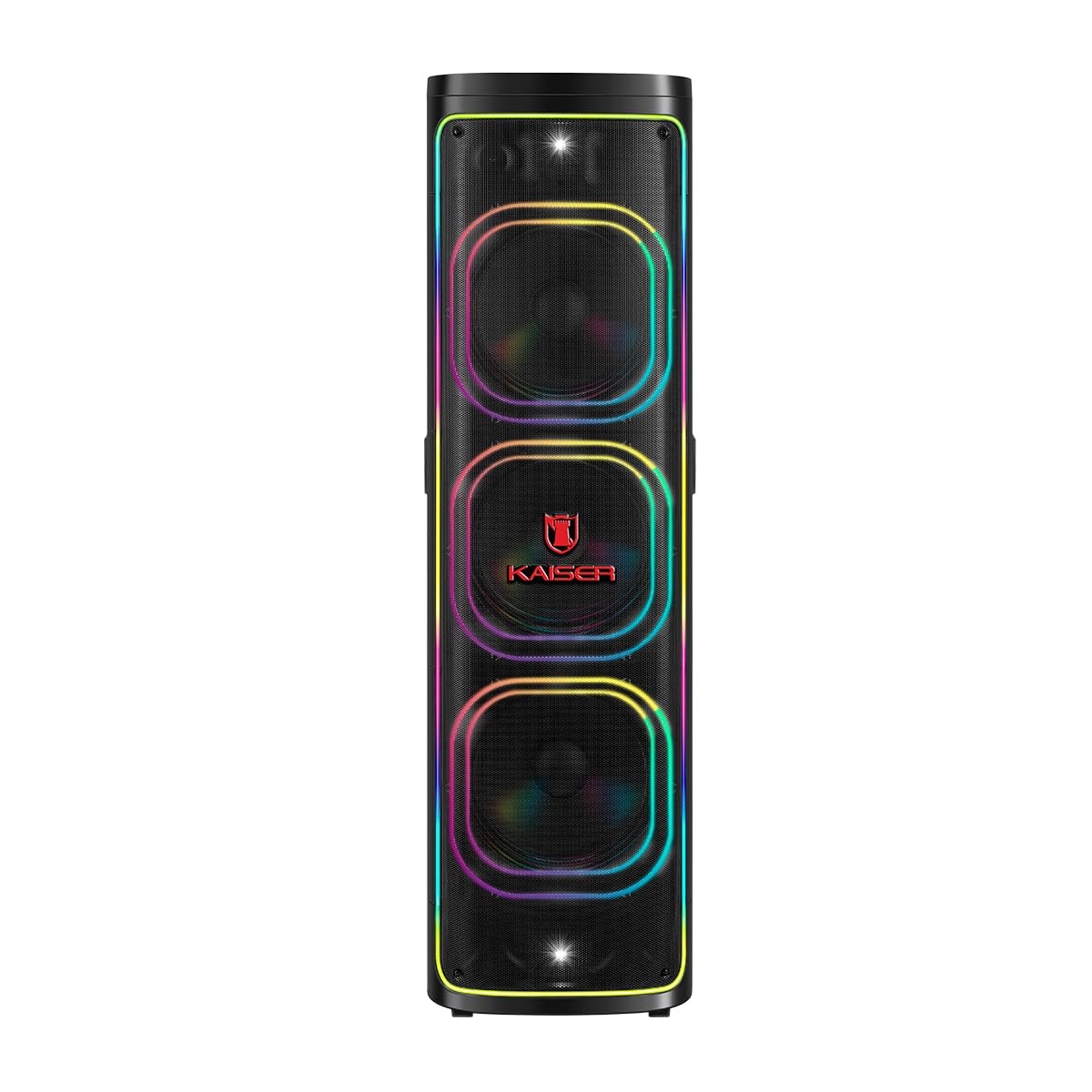
Figura 1: Frontal view of the Kaiser KSB-4226 Professional Speaker System.
2. Informació de seguretat
- Font d'alimentació: Ensure the speaker is connected to a power source that matches the voltagS'ha especificat al dispositiu.
- Ventilació: Do not block ventilation openings. Allow adequate space around the speaker for proper airflow.
- Aigua i humitat: Keep the speaker away from water, rain, and excessive moisture. This unit is IPX4 splashproof, but not waterproof.
- Calor: Do not place the speaker near heat sources such as radiators, heat registers, stoves, or other heat-producing appliances.
- Neteja: Unplug the speaker from the power outlet before cleaning. Use a dry cloth for cleaning.
- Manteniment: No intenteu atendre aquest producte vosaltres mateixos. Consulteu tots els serveis a personal de servei qualificat.
- Col·locació: Col·loqueu l'altaveu sobre una superfície estable i plana per evitar que caigui.
3. Contingut del paquet
Verifiqueu que tots els elements siguin presents al paquet:
- Kaiser KSB-4226 Professional Speaker System
- Micròfon sense fil
- Cable d'alimentació
- Control remot
- Manual d'usuari (aquest document)

Figure 2: Included accessories: remote control and power cable.
4. Característiques del producte
- High-Performance Sound: Equipped with three 12-inch speakers and a 2-inch tweeter for powerful bass and clear, crisp audio.
- Sortida d'alta potència: 40,000 W PMPO (170W RMS) ideal for large events, presentations, meetings, and parties.
- Efectes de so integrats: Customize your musical experience with various ambient and style effects.
- Robust and Durable Design: High-quality construction for long-lasting and reliable use.
- Ús versàtil: Perfect for indoor and outdoor settings, from family gatherings to professional events.
- Powerful and Clear Audio: Capable of filling large spaces with uniform, high-quality sound.
- Fàcil integració: Compatible with various audio sources for enhanced practicality.
- Connectivitat Bluetooth: Transmissió d'àudio sense fils sense interrupcions.
- KSR-Link Technology: For connecting multiple compatible Kaiser speakers.
- Square Light: Integrated LED lighting for dynamic visual effects.
5. Configuració
- Desembalar: Carefully remove the speaker system and all accessories from the packaging.
- Col·locació: Position the speaker on a stable, flat surface. Ensure there is enough space around the unit for proper ventilation.
- Connexió d'alimentació: Connect the power cable to the speaker's power input and then to a suitable electrical outlet.
- Encès: Locate the power switch on the control panel (refer to Figure 3) and turn the unit ON. The display should light up.
6. Instruccions de funcionament
6.1. Connexió Bluetooth
- Enceneu el sistema d'altaveus.
- Premeu el botó MODE button on the control panel until "BLUE" appears on the display, indicating Bluetooth mode.
- Al dispositiu mòbil (telèfon intel·ligent, tauleta, etc.), activeu el Bluetooth i cerqueu els dispositius disponibles.
- Select "KSB-4226" (or similar model name) from the list of devices to pair.
- Once connected, you will hear a confirmation tone, and the display will show "Connected".
- You can now play audio from your device through the speaker system.
6.2. Reproducció de targetes USB/TF
- Insert a USB flash drive or TF (Micro SD) card into the corresponding port on the control panel.
- The speaker system should automatically switch to USB/TF mode and begin playing audio files. Si no, premeu la tecla MODE botó per seleccionar l'entrada correcta.
- Use the playback controls (Play/Pause, Previous, Next) on the control panel or remote control to manage your music.
6.3. Entrada AUX
- Connecteu un dispositiu d'àudio extern (per exemple, un reproductor MP3, un ordinador portàtil) al port AUX IN amb un cable d'àudio de 3.5 mm.
- Premeu el botó MODE botó fins que aparegui "AUX" a la pantalla.
- Reprodueix àudio des del dispositiu connectat.
6.4. Ús del micròfon
- Connect the wireless microphone (or a wired microphone to MIC 1/MIC 2 input).
- Adjust the microphone volume using the dedicated VOL MIC knob on the control panel.
- Adjust echo effects using the ECO knob for karaoke or vocal performances.
6.5. KSR-Link (True Wireless Stereo)
To connect two KSB-4226 units for a stereo experience:
- Ensure both KSB-4226 speakers are powered on and in Bluetooth mode, but not yet paired with any device.
- On one speaker (this will be the master unit), press and hold the KSR-LINK button. You will hear a tone.
- The master unit will search for the second speaker. Once connected, you will hear another confirmation tone, and the display will indicate TWS mode.
- Now, connect your mobile device to the master KSB-4226 via Bluetooth as described in section 6.1.
- Audio will now play in true stereo across both speakers.
7. Controls i connexions
7.1. Tauler de control superior

Figura 3: Panell de control superior.
- Interruptor d'alimentació: Encén/apaga la unitat.
- Botó de VOLUM: Ajusta el nivell de volum principal.
- Botó MODE: Switches between input sources (Bluetooth, USB, TF Card, AUX).
- Botó REPRODUCIR/PAUSA: Reprodueix o posa en pausa la reproducció d'àudio.
- Botons ANTERIOR/SEGÜENT: Salta a la pista anterior o següent.
- Botó LED: Controls the LED lighting effects.
- Botó EQ: Selecciona els preajustos de l'equalitzador.
- Botó MUTE: Silencia la sortida d'àudio.
- Botó X-BASS: Millora la sortida de greus.
- VOL MIC Knob: Ajusta el volum del micròfon.
- Botó ECO: Ajusta l'efecte d'eco del micròfon.
- GRAVES (Bass) Knob: Ajusta els nivells de greus.
- AGUDOS (Treble) Knob: Ajusta els nivells d'aguts.
- MIC 1.IN / MIC 2.IN: Entrades de 6.3 mm per a micròfons amb cable.
- AUX IN: Entrada de 3.5 mm per a dispositius d'àudio externs.
- TF CARD Slot: Per a la reproducció de targetes Micro SD.
- Port USB: Per a la reproducció des d'una unitat flaix USB.
- DC IN: Power input for charging/operation.
7.2. Connexions del panell posterior

Figura 4: Panell posterior.
- Entrada d'alimentació de CA: Es connecta a la font d'alimentació principal.
- Sortida d'àudio (RCA): For connecting to other audio systems or recording devices.
- Sortida de l'altaveu: For connecting passive speakers (if applicable, refer to specific model details).
8. Manteniment
- Neteja: Feu servir un drap suau i sec per netejar l'exterior de l'altaveu. No utilitzeu productes de neteja abrasius ni dissolvents.
- Emmagatzematge: Quan no l'utilitzeu durant períodes prolongats, guardeu l'altaveu en un lloc fresc i sec, allunyat de la llum solar directa i de temperatures extremes.
- Cura de la bateria: If the speaker has an internal rechargeable battery, ensure it is fully charged before long-term storage to maintain battery health.
9. Solució De Problemes
| Problema | Causa possible | Solució |
|---|---|---|
| Sense poder | Power cable not connected; Power switch OFF; No power from outlet. | Check power cable connection; Turn power switch ON; Test outlet with another device. |
| Sense so | Volume too low; Incorrect input mode; Device not connected properly. | Increase volume; Press MODE to select correct input; Reconnect audio source. |
| Bluetooth no connectat | Speaker not in Bluetooth mode; Device Bluetooth OFF; Too far from speaker. | Press MODE to select Bluetooth; Enable Bluetooth on device; Move device closer (within 10m). |
| El micròfon no funciona | Microphone volume too low; Microphone OFF; Incorrect input. | Increase VOL MIC; Ensure microphone is ON; Check if wired mic is in MIC 1/2. |
10. Especificacions
- Marca: Kaiser
- Model: KSB-4226
- Configuració dels altaveus: 3 x 12-inch speakers + 2-inch tweeter
- Potència RMS: 170W
- Peak Music Power Output (PMPO): 40,000 watts
- Tecnologia de connectivitat: Bluetooth (2.4 GHz frequency response)
- Mode de sortida d'àudio: Envoltant
- Tipus d'altaveu: Atmosfèric
- Mètode de control: Toca
- Font d'alimentació: Cable elèctric
- Dimensions (PxAxA): 45 x 45 x 151.6 cm (aproximadament 17.7 x 17.7 x 59.7 polzades)
- Accessoris inclosos: Wireless microphone, remote control, power cable.

Figure 5: Kaiser KSB-4226 dimensions.
11. Garantia i Suport
This Kaiser KSB-4226 Professional Speaker System comes with a Garantia del fabricant de 90 dies des de la data de compra. Aquesta garantia cobreix els defectes de fabricació en condicions d'ús normal. No cobreix els danys causats per un mal ús, accidents, modificacions no autoritzades o desgast normal.
For technical support, warranty claims, or service inquiries, please contact your retailer or visit the official Kaiser weblloc web per a informació d'atenció al client.
12. Product Demonstration (Related Model)
The following video demonstrates features and lighting effects of a similar Kaiser speaker model (KDS-1202). While the model number differs, many operational aspects and visual features are comparable to the KSB-4226.
Video: Demonstration of a Kaiser speaker system (KDS-1202) showcasing features like LED lighting and controls.