
1. Introducció
Gràcies per la compraasing the Kaiser One Body KSB-4010 Portable Speaker. This manual provides essential information for the safe and efficient operation of your device. Please read it thoroughly before use and retain it for future reference.
Informació de seguretat
- No exposeu l'altaveu a l'aigua, la humitat ni a temperatures extremes.
- Eviteu col·locar l'altaveu a prop de fonts de calor o sota la llum solar directa.
- No intenteu desmuntar ni modificar l'altaveu. Encarregueu tot el manteniment a personal qualificat.
- Feu servir només el cable de càrrega i l'adaptador de corrent especificats.
- Mantingueu l'altaveu lluny dels nens i de les mascotes.
2. Contingut del paquet
Si us plau, comproveu el paquet per veure si hi ha els elements següents:
- Kaiser KSB-4010 Portable Speaker
- Micròfon sense fil
- Cable de càrrega USB
- Manual d'usuari (aquest document)

Image: Wireless microphone and USB charging cable included with the speaker.
3. Producte acabatview
Familiarize yourself with the main components and controls of your KSB-4010 speaker.
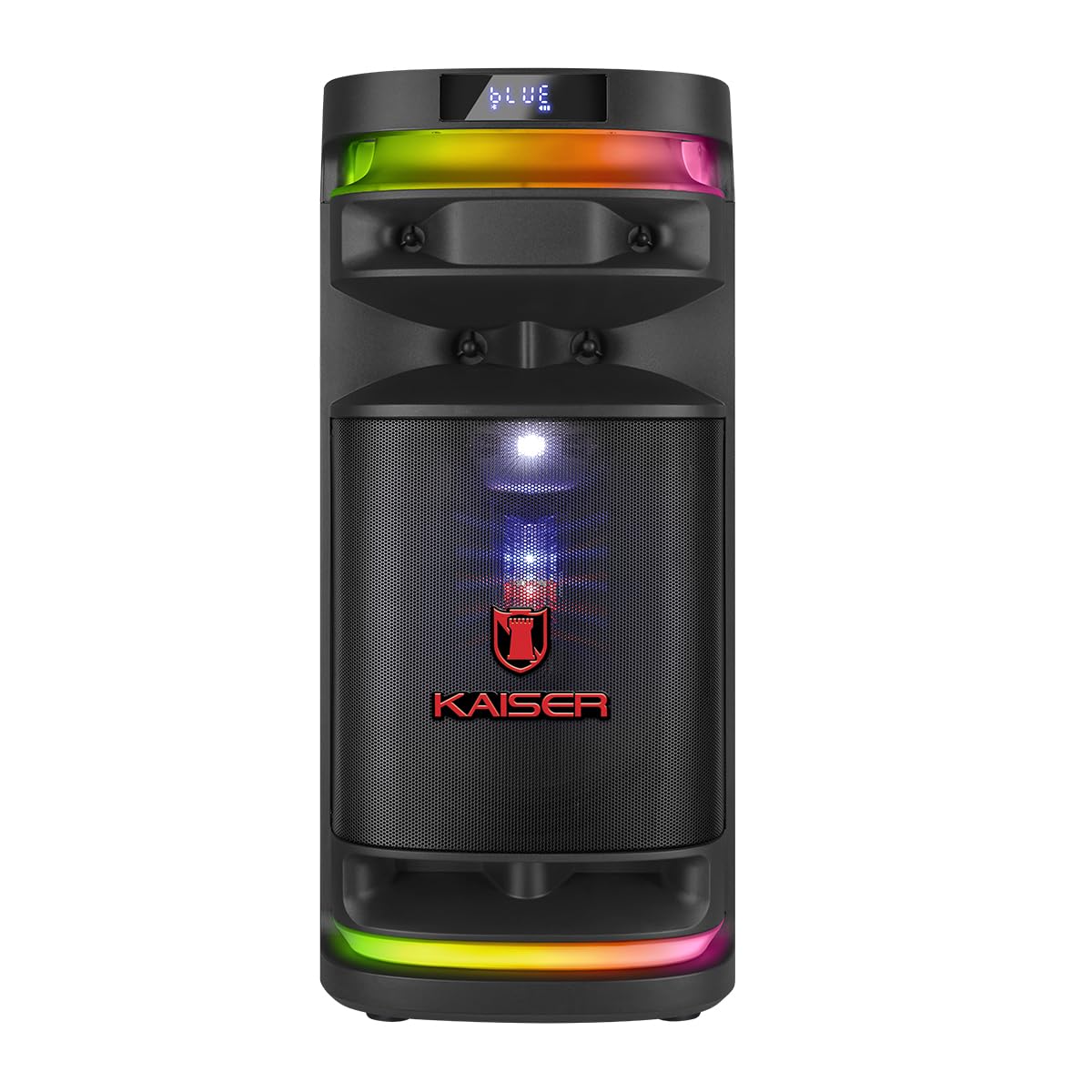
Imatge: Frontal view of the Kaiser KSB-4010 portable speaker, showcasing the 10-inch woofer, tweeter, midrange, and RGB LED lighting.
Tauler de control

Imatge: Superior view of the speaker's control panel, showing various input ports, volume knobs, and function buttons.
The control panel located on the top of the speaker includes:
- Interruptor d'alimentació (ON/OFF): Per encendre o apagar l'altaveu.
- Charging Indicator (CARGA): Lights up when charging.
- Power Input (ALIMENTACIÓN): Per connectar l'adaptador de corrent.
- Ranura Micro SD: Per reproduir música des d'una targeta Micro SD.
- Port USB: Per reproduir música des d'una unitat USB.
- Entrada AUX: Per connectar dispositius d'àudio externs mitjançant un cable de 3.5 mm.
- GUIT Input: For connecting a guitar.
- MIC 1 / MIC 2 Inputs: Per connectar micròfons amb cable.
- VOL MIC: Botó de control de volum del micròfon.
- VOLUM: Control de volum principal.
- Botó LED: To cycle through or turn off LED light modes.
- GRAB Button: For recording audio (e.g., microphone input).
- MIC PRIO Button: Microphone priority function.
- REPETIR Button: Mode de reproducció repetida.
- Botons de pista anterior/següent: For navigation during media playback.
- Botó Reproduir/Pausa: Per al control de la reproducció multimèdia.
- KSR-LINK Button: For connecting two KSR-Link compatible speakers.
- MODO BT Button: To switch between input modes (Bluetooth, USB, Micro SD, AUX).
4. Configuració
Càrrega inicial
- Connect the USB charging cable to the speaker's ALIMENTACIÓN port.
- Connecteu l'altre extrem del cable USB a un adaptador de corrent compatible (no inclòs) i endolleu-lo a una presa de corrent.
- The CARGA indicator light will illuminate, indicating that the speaker is charging.
- Allow the speaker to charge fully before first use (approximately 4-6 hours). The indicator light may change or turn off when fully charged.
Encès/Apagat
- To turn on the speaker, slide the POWER switch to the ON posició.
- To turn off the speaker, slide the POWER switch to the OFF posició.
5. Instruccions de funcionament
Emparellament Bluetooth
- Turn on the KSB-4010 speaker.
- Premeu el botó MODO BT button repeatedly until the display shows "BLUE" or "BT" and a pairing indicator flashes.
- Activa el Bluetooth al teu dispositiu mòbil (telèfon intel·ligent, tauleta, etc.).
- Cerca available Bluetooth devices and select "KSB-4010" from the list.
- Once connected, the speaker will emit a confirmation sound, and the Bluetooth indicator will stop flashing.
Reproducció USB/Micro SD
- Insert a USB drive or Micro SD card (pre-loaded with MP3 audio files) al port respectiu.
- The speaker will automatically switch to USB or Micro SD mode and begin playback. If not, press the MODO BT botó per seleccionar l'entrada correcta.
- Feu servir els botons Reprodueix/Pausa, Anterior i Següent per controlar la reproducció.
Entrada AUX
- Connecteu un extrem d'un cable d'àudio de 3.5 mm (no inclòs) al port d'entrada AUX de l'altaveu.
- Connect the other end to the audio output of your external device (e.g., MP3 player, laptop).
- Premeu el botó MODO BT button to select AUX input mode.
- Controla la reproducció i el volum des del teu dispositiu extern.
Microphone and Guitar Use
- For the wireless microphone, ensure it is charged and powered on. It should automatically connect to the speaker.
- For wired microphones, connect them to the MIC 1 or MIC 2 ports d'entrada.
- Connecteu una guitarra al GUIT port d'entrada.
- Ajusteu el volum del micròfon amb el botó VOL MIC perilla.
- Utilitza el MIC PRIO button to enable microphone priority, which lowers music volume when the microphone is in use.
KSR-Link Function (True Wireless Stereo)
To connect two KSB-4010 speakers for a stereo sound experience:
- Ensure both KSB-4010 speakers are powered on and in Bluetooth mode, but not connected to any device.
- En un altaveu (aquest serà l'altaveu principal), premeu i manteniu premut el botó KSR-LINK button. It will emit a sound indicating it's searching.
- Al segon altaveu, premeu el botó KSR-LINK botó breument.
- The two speakers will connect automatically. A confirmation sound will indicate successful pairing.
- Ara, connecta el dispositiu mòbil a l'altaveu principal mitjançant Bluetooth tal com s'ha descrit anteriorment. L'àudio es reproduirà a través dels dos altaveus en estèreo.
Control de llum LED
Premeu el botó LED button on the control panel to cycle through different RGB lighting modes or to turn the lights off.
6. Manteniment
Neteja
- Always turn off and unplug the speaker before cleaning.
- Feu servir un drap suau i sec per netejar les superfícies exteriors.
- No utilitzeu netejadors abrasius, ceres ni dissolvents.
Emmagatzematge
- Guardeu l'altaveu en un lloc fresc i sec, allunyat de la llum solar directa i de temperatures extremes.
- If storing for an extended period, charge the battery periodically (e.g., every 3 months) to maintain battery health.
7. Solució De Problemes
| Problema | Causa possible | Solució |
|---|---|---|
| L'altaveu no s'encén | Low battery; Power switch off; Faulty power adapter/cable | Charge the speaker; Ensure power switch is ON; Try a different power source or cable. |
| Sense so | Volume too low; Incorrect input mode; Device not connected; Muted source device | Increase speaker and source device volume; Press MODO BT to select correct input; Re-pair Bluetooth or re-connect cable; Unmute source device. |
| La connexió Bluetooth falla | Speaker not in pairing mode; Device too far; Interference; Already connected to another device | Ensure speaker is in Bluetooth pairing mode; Move device closer; Avoid obstacles; Disconnect from other devices and try again. |
| El micròfon no funciona | Microphone off; Low microphone volume; Incorrect input | Ensure microphone is powered on; Adjust VOL MIC knob; Check if wired microphone is fully inserted. |
| KSR-Link not connecting | Speakers not in pairing mode; Too far apart; Already connected to a device | Ensure both speakers are in KSR-Link pairing mode (not connected to phone); Place speakers closer; Disconnect any Bluetooth devices before KSR-Link pairing. |
8. Especificacions
Technical specifications for the Kaiser KSB-4010 Portable Speaker:
| Característica | Especificació |
|---|---|
| Nom del model | KSB-4010 |
| Tipus d'altaveu | Portable One Body Speaker |
| Configuració dels altaveus | 10" Woofer, 2" Tweeter, 3" Midrange |
| Potència de sortida RMS | 70W |
| Tecnologia de connectivitat | Bluetooth, USB, Micro SD, AUX, Guitar, Mic |
| Comunicació sense fils | Bluetooth |
| Característiques especials | RGB LED Lights, KSR-Link (TWS), Rechargeable Battery |
| Mètode de control | Tactile Buttons |
| Components inclosos | Micròfon sense fil |
| Font d'alimentació | Bateria |
| Dimensions (A x A x P) | 71.5 cm x 32 cm x 33.5 cm |

Image: Diagram showing the approximate dimensions of the Kaiser KSB-4010 speaker.
9. Garantia i Suport
Garantia limitada
This Kaiser KSB-4010 speaker comes with a limited warranty. Please refer to the warranty card included in your package or contact Kaiser customer support for specific terms and conditions.
Atenció al client
For technical assistance, troubleshooting beyond this manual, or warranty inquiries, please contact Kaiser customer support through their official weblloc web o la informació de contacte proporcionada amb la documentació del producte.