
1. Introducció
This manual provides detailed instructions for the setup, operation, maintenance, and troubleshooting of your E-Yooso X51 Wired Gaming Mouse. Please read this manual carefully to ensure optimal performance and longevity of your device.
The E-Yooso X51 is a high-performance wired gaming mouse designed for precision and comfort. It features an advanced optical sensor, adjustable DPI settings, programmable buttons, and a high polling rate, making it suitable for both intensive gaming and daily office tasks.
2. Producte acabatview
2.1 Característiques clau
- Precise Optical Sensor: Offers accurate tracking with adjustable DPI up to 4000.
- Nivells de DPI ajustables: Five preset DPI settings (400/800/1600/2400/4000) to match your needs.
- Botons programables: Five customizable buttons for personalized functions, shortcuts, or macros.
- Alta taxa de votació: Up to 1000Hz for smooth, lag-free response.
- Disseny ergonòmic: Engineered for comfort during extended use, reducing hand fatigue.
- Construcció duradora: Built to last with a click life of over 20 million actuations.
- Connexió USB amb cable: Ensures stable and continuous connectivity without delays.
- Àmplia compatibilitat: Supports Windows and Mac operating systems, compatible with desktop PCs and notebooks.
- Disseny lleuger: Weighs approximately 54 grams for quick and agile movements.
2.2 Contingut del paquet
- E-Yooso X51 Wired Gaming Mouse
- Manual d'usuari (aquest document)
2.3 Diagrama del ratolí

The E-Yooso X51 mouse features a silicone scroll wheel for precise control, dedicated forward and backward buttons for navigation, and a non-slip design for a secure grip during use.
3. Instruccions de configuració
- Connecteu el ratolí: Insert the USB connector of the E-Yooso X51 mouse into an available USB port on your computer (PC or Mac).
- Instal·lació automàtica del controlador: Your operating system will typically detect the mouse and install the necessary drivers automatically. This process may take a few moments.
- Verificació de la funcionalitat: Once installed, the mouse should be immediately functional for basic operations.
- Install Customization Software (Optional): For advanced features such as programmable buttons and detailed DPI settings, download the official E-Yooso X51 driver software. The download link is usually provided on the product's official support page or can be found by searching for "E-Yooso X51 Driver".

4. Instruccions de funcionament
4.1 Adjusting DPI (Dots Per Inch)
The E-Yooso X51 mouse features five adjustable DPI levels, allowing you to change cursor sensitivity on the fly. This is crucial for different tasks, from precise aiming in games to fast navigation on your desktop.
- Configuració de DPI per defecte: The mouse comes with preset DPI levels: 400 (Red), 800 (Blue), 1600 (Green), 2400 (Violet), and 4000 (Yellow).
- Canvi de DPI: Press the dedicated DPI button (usually located behind the scroll wheel) to cycle through the available DPI settings. An indicator light (if present) or the software interface will show the current DPI level.
- Customizing DPI: Use the E-Yooso X51 driver software to fine-tune DPI values and assign specific colors to each level.

4.2 Programming Buttons
The E-Yooso X51 features five programmable buttons that can be customized to execute specific commands, macros, or shortcuts, enhancing your efficiency in games and applications.
- Instal·lar programari: Ensure the E-Yooso X51 driver software is installed on your computer.
- Programari de llançament: Open the E-Yooso X51 driver application.
- Assignació de botons: Within the software interface, you will find options to assign functions to each of the five buttons (Left Click, Right Click, Middle Button, Forward, Back, DPI Loop).
- Editor de macros: The software also includes a macro editor to create complex sequences of commands.
- Desa Profiles: You can save multiple profiles with different button configurations for various games or applications.
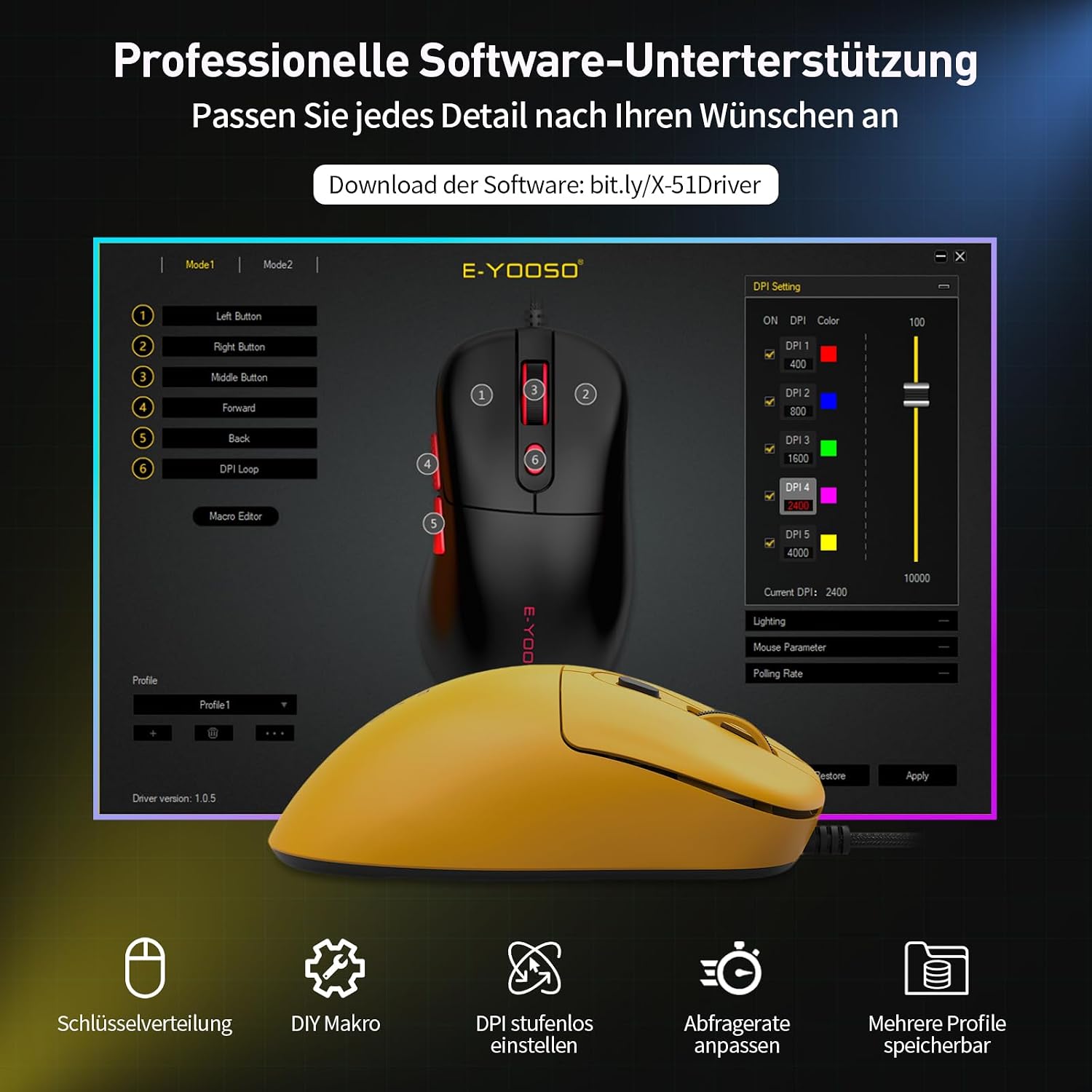
Descarrega el programari des de: bit.ly/X-51Driver
4.3 Adjusting Polling Rate
The polling rate determines how often the mouse reports its position to the computer. A higher polling rate results in smoother and more responsive cursor movement.
- Available Polling Rates: The X51 supports 125Hz (Office), 250Hz (Daily), 500Hz (Gaming), and 1000Hz (Pro-Level).
- Canvi de la taxa de votació: The polling rate can be adjusted via the E-Yooso X51 driver software. Select your desired rate based on your activity.

5. Manteniment
Proper maintenance ensures the longevity and optimal performance of your E-Yooso X51 mouse.
- Neteja:
- Feu servir un drap suau i sec per netejar la superfície del ratolí.
- Per a la brutícia persistent, lleugerament dampNetegeu el drap amb aigua o una solució de neteja suau. Eviteu productes químics agressius.
- Feu servir un bastonet de cotó o aire comprimit per netejar la roda de desplaçament i la zona del sensor.
- Cura del cable:
- Eviteu doblegar o doblegar bruscament el cable USB per evitar danys interns.
- No estireu el ratolí pel cable. Agafeu sempre el connector USB quan el connecteu o el desconnecteu.
- Emmagatzematge: Guardeu el ratolí en un entorn net i sec, allunyat de temperatures extremes i de la llum solar directa.
6. Solució De Problemes
If you encounter issues with your E-Yooso X51 mouse, please refer to the following common solutions:
| Problema | Causa possible | Solució |
|---|---|---|
| El ratolí no respon | Connexió USB fluixa, port USB defectuós, problema amb el controlador. |
|
| Els DPI no canvien | DPI button malfunction, software conflict. |
|
| Els botons programables no funcionen | Software not installed, incorrect button assignment, software conflict. |
|
| El moviment del cursor és erràtic o brusc | Dirty sensor, unsuitable surface, software issue. |
|
7. Especificacions

| Característica | Detall |
|---|---|
| Marca | E-Yooso |
| Nom del model | X-51 |
| Tecnologia de connectivitat | Amb cable (USB) |
| Tecnologia de detecció de moviment | Òptic |
| Sensibilitat DPI | 400 / 800 / 1600 / 2400 / 4000 (Ajustable) |
| Taxa de votació | 125Hz / 250Hz / 500Hz / 1000Hz (Adjustable) |
| Nombre de botons | 5 (programable) |
| Orientació de la mà | D'acord |
| Dispositius compatibles | Ordinador personal (Windows, Mac) |
| Durabilitat | 20 milions de clics |
| Pes de l'article | Aprox. 54 grams |
| Dimensions (L x A x A) | 12.4 cm x 6.9 cm x 3.8 cm |
| Tipus de cable | Braided USB with EMI Noise Reduction |
| Color | groc |
8. Garantia i Suport
E-Yooso is committed to providing high-quality products and excellent customer service.
- Garantia del fabricant: The E-Yooso X51 Wired Gaming Mouse comes with a 12-month manufacturer's warranty from the date of purchase. This warranty covers defects in materials and workmanship under normal use.
- Suport tècnic: For any questions, technical assistance, or warranty claims, please contact our professional customer support team.
- Informació de contacte: Please refer to the E-Yooso official website or your purchase documentation for the most up-to-date contact details for customer support.
We are dedicated to ensuring your satisfaction and will assist you as quickly as possible.