1. Informació important de seguretat
Si us plau, llegiu atentament totes les instruccions abans d'utilitzar el dispositiu. Conserveu aquest manual per a futures consultes.
- Do not use if you have a pacemaker, artificial joints, or electronic medical devices.
- Consult a physician before use if you have any pre-existing medical conditions, skin sensitivities, or are pregnant.
- Do not use on open wounds, swollen areas, or areas with skin irritation.
- Mantenir fora de l'abast dels nens.
- Do not immerse the device in water or use it in excessively humid environments.
- Feu servir només el cable de càrrega i l'adaptador de corrent proporcionats.
- Deixeu d'utilitzar-lo immediatament si experimenteu alguna molèstia o dolor.
2. Producte acabatview
The HX-601/603 Wireless Knee Massager is designed to provide therapeutic massage and integrated heating for your knees. Its ergonomic and portable design allows for comfortable use at home, in the office, or during travel.
2.1 Components
- Main Massager Unit with Control Panel
- Corretges ajustables
- Magnetic Battery Compartment
- Cable de càrrega USB
2.2 Característiques
- Funcionament sense fil: Enjoy massage without tangled cords.
- Integrated Heating: Therapeutic heat to improve circulation and relax muscles.
- 3 nivells d'intensitat: Customize your massage experience.
- Temporitzador de 15 minuts: Automatic shut-off for safety and optimal session duration.
- Panell de control digital: Easy adjustment of settings with LED display.
- Disseny ergonòmic: Conforms to the knee for maximum comfort and effectiveness.
- Comfortable Fabrics: Made with breathable materials for extended use.

The image displays the wireless knee massager worn on a knee, illustrating the integrated heating function with red arrows indicating heat flow.
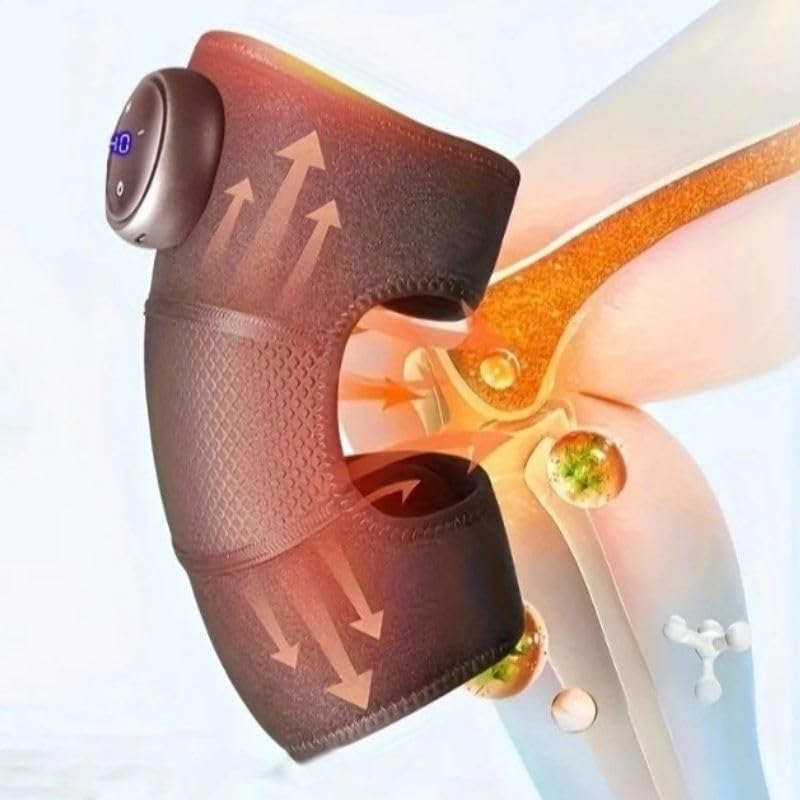
This image highlights the device's control panel with a digital display and buttons, along with the magnetic battery compartment for wireless operation.

Un detallat view of the massager's fabric, emphasizing its comfortable, breathable, and non-stuffy texture.
3. Configuració
3.1 Càrrega del dispositiu
- Locate the charging port on the massager unit.
- Connect the USB charging cable to the device and to a compatible USB power adapter (not included) or computer USB port.
- The LED indicator on the control panel will show charging status. A full charge typically takes several hours.
- Assegureu-vos que el dispositiu estigui completament carregat abans del primer ús per a una durada òptima de la bateria.
3.2 Attaching to the Knee
- Unfold the knee massager.
- Position the main unit over your knee, ensuring the massage elements are centered.
- Secure the massager using the adjustable straps, ensuring a snug but comfortable fit. Do not overtighten.
4. Instruccions de funcionament
4.1 Encès/Apagat
- To turn on: Press and hold the Power button (usually marked with a circle or power symbol) on the control panel for 2-3 seconds. The LED display will illuminate.
- To turn off: Press and hold the Power button again for 2-3 seconds. The display will turn off.
4.2 Ajust de la intensitat del massatge
- Once powered on, press the Intensity button (usually marked with '+' or '-') to cycle through the 3 available intensity levels.
- The current intensity level will be indicated on the LED display.
4.3 Activating Heating Function
- Press the Heat button (usually marked with a wave or heat symbol) to activate or deactivate the integrated heating function.
- The heating indicator on the display will light up when active.
4.4 Temporitzador automàtic
The device is equipped with an automatic 15-minute timer. After 15 minutes of continuous operation, the massager will automatically shut off. You can restart the device for another session if desired, but it is recommended to take breaks between sessions.
5. Manteniment
5.1 Neteja
- Assegureu-vos que el dispositiu estigui apagat i desconnectat abans de netejar-lo.
- Netegeu la superfície del massatjador amb un drap suau iamp tela.
- No utilitzeu netejadors abrasius, dissolvents ni productes químics agressius.
- No submergiu el dispositiu en aigua.
5.2 Emmagatzematge
- Guardeu el dispositiu en un lloc fresc i sec, allunyat de la llum solar directa i de temperatures extremes.
- Keep it away from sharp objects that could damage the fabric or internal components.
6. Solució De Problemes
| Problema | Causa possible | Solució |
|---|---|---|
| El dispositiu no s’encén. | Bateria baixa o dispositiu no carregat. | Carregueu el dispositiu completament. Assegureu-vos que el botó d'engegada estigui premut durant 2 o 3 segons. |
| Sense calor o calor feble. | Heating function not activated or low battery. | Ensure the heat button is pressed. Charge the device. |
| La intensitat del massatge és massa feble/forta. | Ajust d'intensitat incorrecte. | Adjust the intensity using the '+' or '-' buttons. |
| El dispositiu s'atura inesperadament. | Automatic 15-minute timer activated or low battery. | This is normal operation due to the timer. Recharge the device if the battery is low. |
7. Especificacions
| Número de model | HX-601/603 |
| Marca | Genèric |
| Font d'alimentació | Funciona amb bateria |
| Voltage | 5V |
| Poder | 7W |
| Dimensions del producte | 25 x 14 x 8 cm |
| Pes del producte | 100 grams |
| Material | Electronic Components, Plastic, Fabric |
| Temporitzador | 15 minuts (apagada automàtica) |
| Nivells d'intensitat | 3 |
| País d'origen | Brasil |
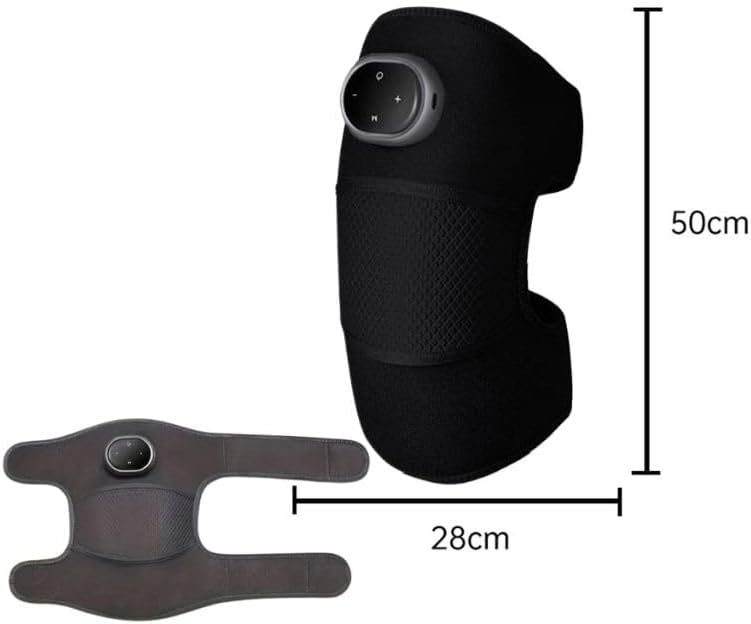
This image provides the physical dimensions of the knee massager, indicating a length of 50cm and a width of 28cm when laid flat.
8. Garantia i Suport
This product is manufactured by Knee. For warranty information or technical support, please contact your retailer or the manufacturer directly. Please retain your proof of purchase.
Nota: Els termes de garantia específics poden variar segons la regió i el distribuïdor.


