
1. Introducció
The SHARMEAL TM16K is a versatile and powerful portable jump starter designed to provide emergency starting power for vehicles with 12V batteries. It also features an integrated air compressor for tire inflation, an LED flashlight, and acts as a portable power bank for charging electronic devices. This manual provides essential information for the safe and effective use of your device.
2. Informació de seguretat
Si us plau, llegiu tots els avisos i instruccions de seguretat abans d'utilitzar aquest producte. Si no seguiu aquestes instruccions, podeu patir descàrregues elèctriques, incendis o lesions greus.
- Feu servir sempre protecció ocular quan arrenqueu una bateria amb ajuda d'un cable.
- No feu curtcircuits al cl d'arrencador de botons.amps. Eviteu connectar el cl vermell i negreamps junts.
- Mantingueu el dispositiu lluny dels nens.
- Do not disassemble the jump starter. Refer all servicing to qualified personnel.
- Operate and store the device within the specified temperature range.
- Ensure proper ventilation during use. Do not cover the device.
- Do not use the jump starter if it is damaged or if the cables/clamps are compromised.
- Disconnect the jump starter from the vehicle battery immediately after starting the engine.
3. Contingut del paquet
Verifiqueu que tots els elements siguin presents al paquet:
- SHARMEAL TM16K Jump Starter Unit
- Smart Jump Cables with Clamps
- Cable de càrrega USB-C
- Air Nozzles (various types)
- Bossa d'emmagatzematge
- Maletí de transport dur
- Manual d'usuari

Image showing the SHARMEAL TM16K Jump Starter and its included accessories: smart jump cables, USB-C charging cable, various air nozzles, storage bag, and hard case.
4. Producte acabatview
Familiarize yourself with the components of your SHARMEAL TM16K Jump Starter:
- Pantalla digital: Shows battery level, pressure readings, and operational status.
- Botons de control: Power, mode selection, and pressure adjustment.
- Port d'arrencada ràpida: For connecting the smart jump cables.
- Air Compressor Hose Port: For connecting the air inflation hose.
- Llanterna LED: Multi-mode illumination.
- Port de sortida USB: Per carregar dispositius electrònics externs.
- Port d'entrada tipus C: Per carregar la unitat d'arrencada.

Davant view of the SHARMEAL TM16K Jump Starter, highlighting the digital display, control buttons, and jump start port.
5. Configuració
5.1 Càrrega de l'arrencador de bateria
Before first use, fully charge the SHARMEAL TM16K. Connect the provided USB-C charging cable to the Type-C input port on the jump starter and to a suitable USB power adapter (not included). The digital display will indicate the charging status. A full charge is recommended every 3-6 months to maintain battery health, even when not in use.

The SHARMEAL TM16K Jump Starter connected via its Type-C port, demonstrating its fast charging capability for external devices, which also applies to charging the unit itself.
6. Instruccions de funcionament
6.1 Arrencada amb salt d'un vehicle
- Assegureu-vos que l'arrencador estigui prou carregat (es recomana almenys un 50%).
- Connect the smart jump cables to the jump start port on the unit.
- Connecteu el cl vermell (+).amp al terminal positiu (+) de la bateria del vehicle.
- Connecteu el negre (-) clamp al terminal negatiu (-) de la bateria del vehicle.
- Once connected, the smart cable indicator light will show readiness. If the indicator is green, proceed to start the vehicle.
- Start the vehicle's engine. If the engine does not start on the first attempt, wait at least 30 seconds before trying again.
- Un cop arrencat el vehicle, retireu immediatament el clau negre (-).amp, aleshores el cl vermell (+)amp de la bateria del vehicle.
- Disconnect the smart jump cables from the jump starter unit.
Forced Start Function
If the jump starter does not detect the vehicle battery (e.g., if the battery voltage is extremely low), the smart cable indicator may not turn green. In this case, you can use the Forced Start function:
- Ensure all connections are correct (red to positive, black to negative).
- Press and hold the 'FORCED-START' button on the smart clamp for 3-5 seconds until the indicator light turns green.
- Engegueu el vehicle en 30 segons.
- Retireu immediatament el cl.amps després que el vehicle arrenqui.

Illustration of pressing the 'FORCED-START' button on the smart clamp when the jump starter does not detect a low-voltage battery, enabling manual activation of the jump start function.
6.2 Ús del compressor d'aire
The integrated air compressor can inflate tires and other inflatables.
- Connect the air hose to the air compressor port on the jump starter.
- Attach the appropriate nozzle to the air hose and connect it to the item you wish to inflate (e.g., tire valve).
- Turn on the jump starter and select the inflation mode.
- Use the control buttons to set the desired pressure (PSI, Bar, Kpa, Kg/cm²).
- Press the start button to begin inflation. The compressor will automatically stop when the preset pressure is reached.
- Desconnecteu la mànega d'aire i guardeu-la correctament.
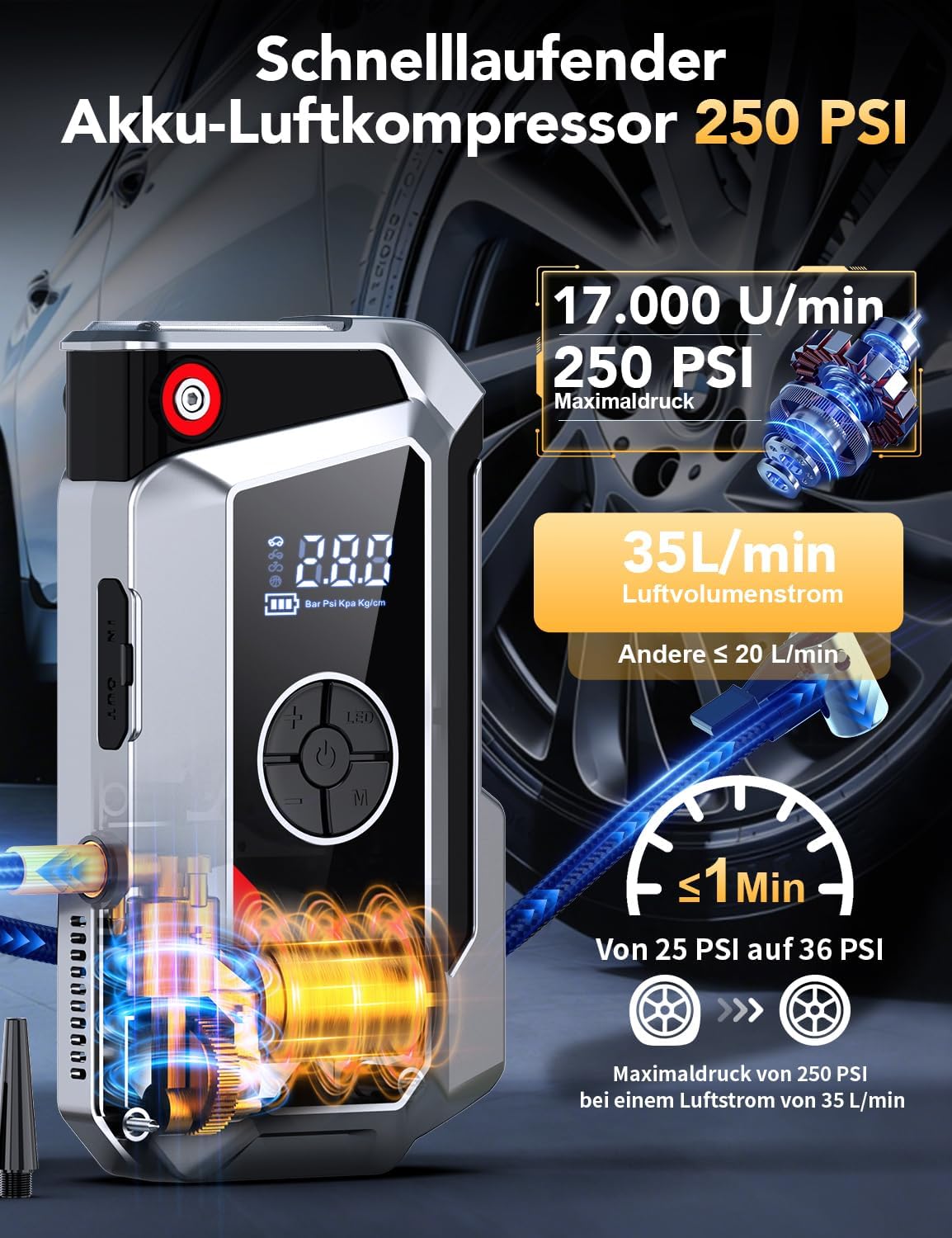
The SHARMEAL TM16K Jump Starter's integrated air compressor, showing its 250 PSI maximum pressure and 35 L/min airflow, capable of inflating a tire from 25 to 36 PSI in under 1 minute.
6.3 Ús de la llanterna LED
The built-in LED flashlight offers multiple lighting modes for various situations.
- Press the flashlight button to turn on the light.
- Press the button again to cycle through modes: Constant On, SOS Signal, Strobe Light.
- Premeu i manteniu premut el botó per apagar la llanterna.

The 800-Lumen LED flashlight feature of the SHARMEAL TM16K Jump Starter, demonstrating its use for general illumination, SOS signaling, and strobe light functions.
6.4 Ús com a bateria externa portàtil
The jump starter can charge your electronic devices via its USB output port.
- Connecteu el cable de càrrega USB del dispositiu al port de sortida USB de l'arrencador de bateria.
- L'arrencador començarà a carregar el dispositiu automàticament.
- Desconnecta el dispositiu un cop finalitzada la càrrega.

The SHARMEAL TM16K Jump Starter functioning as a portable power bank, illustrating its USB output and Type-C input for charging various electronic devices.
7. Manteniment
- Càrrega: Recharge the unit every 3-6 months to maintain optimal battery performance, even if not used.
- Neteja: Netegeu la unitat amb un drap sec i suau. No utilitzeu productes químics agressius ni netejadors abrasius.
- Emmagatzematge: Store the jump starter in a cool, dry place, away from direct sunlight and extreme temperatures. Keep it in its protective case when not in use.
8. Solució De Problemes
- La unitat no s'encén: Ensure the unit is charged. If not, connect it to a power source using the USB-C cable.
- Vehicle does not start: Comproveu que el claviller intel·ligentamps are correctly connected to the battery terminals (red to positive, black to negative). Ensure the jump starter has sufficient charge. If the battery is extremely low, use the Forced Start function.
- El compressor d'aire no funciona: Check that the air hose is securely connected. Ensure the unit is turned on and in inflation mode. Verify the desired pressure is set.
- Smart clamp indicator shows an error: Refer to the specific error codes in the full user manual (if provided) or ensure connections are clean and secure.
9. Especificacions
| Número de model | TM16K |
| Marca | Farina de xampinyons |
| Corrent màxima | 5000 A |
| Voltage | 12 Volts |
| Tipus de bateria | Ió de liti |
| Dimensions (L x A x A) | 20.6 x 5.5 x 11 cm |
| Pes | 800 grams |
| Pressió màxima del compressor d'aire | 250 PSI |
| Sortida de llum LED | 800 lúmens |
10. Garantia i Suport
For warranty information or technical support, please refer to the documentation included with your purchase or contact the seller directly. Keep your proof of purchase for warranty claims.