
Introducció
The ATK Edge 75 HE is a high-performance 75% compact keyboard designed for esports and general use. It features an 82-key layout, a gasket-mount structure with Ball-Catch rapid assembly, and adjustable Rapid Trigger (RT) actuation. This manual provides instructions for setting up, operating, maintaining, and troubleshooting your keyboard.
Configuració
1. Desembalatge i contingut del paquet
Carefully unpack all components from the box. Verify that all items are present.

Imatge: Contingut del paquet. This image displays the items included in the ATK Edge 75 HE keyboard package: 1. Outer Packaging, 2. Product Warranty Card, 3. Digital User Manual, 4. Switch & Keycap Puller, 5. Keyboard Cable, 6. Keyboard, 7. ATK Brand Sticker, 8. Extra Keycaps.
- Embalatge exterior
- Targeta de garantia del producte
- Manual d'usuari digital
- Extractor d'interruptors i tecles
- Keyboard Cable (USB-C)
- ATK Edge 75 HE Keyboard
- ATK Brand Sticker
- Tecles addicionals
2. Connexió del teclat
Connect the provided USB-C cable to the USB-C port on the keyboard and the other end to an available USB port on your computer. The keyboard is USB-powered and will automatically power on.
Instruccions de funcionament
1. Keyboard Layout and Key Functions
The ATK Edge 75 HE features a 75% compact layout with 82 keys, designed to save desktop space while retaining essential keys for gaming and productivity.

Image: Gasket Structure and 75% Layout. This image illustrates the internal gasket-mounted structure of the keyboard, including the 5-sided dye-sub keycaps, aluminum top case, TTC RGB Magneto switches, silicone pin, aluminum positioning plate, PCB, and various foam layers. It also shows the compact 75% layout in a typical desktop setup.
2. Rapid Trigger (RT) Actuation
The Rapid Trigger feature allows for adjustable actuation points from 0.005 mm to 3.3 mm, with ultra-fine 0.005 mm steps. This enables precise control over key sensitivity for different gaming scenarios or typing preferences. Adjustments are typically made via the dedicated software.
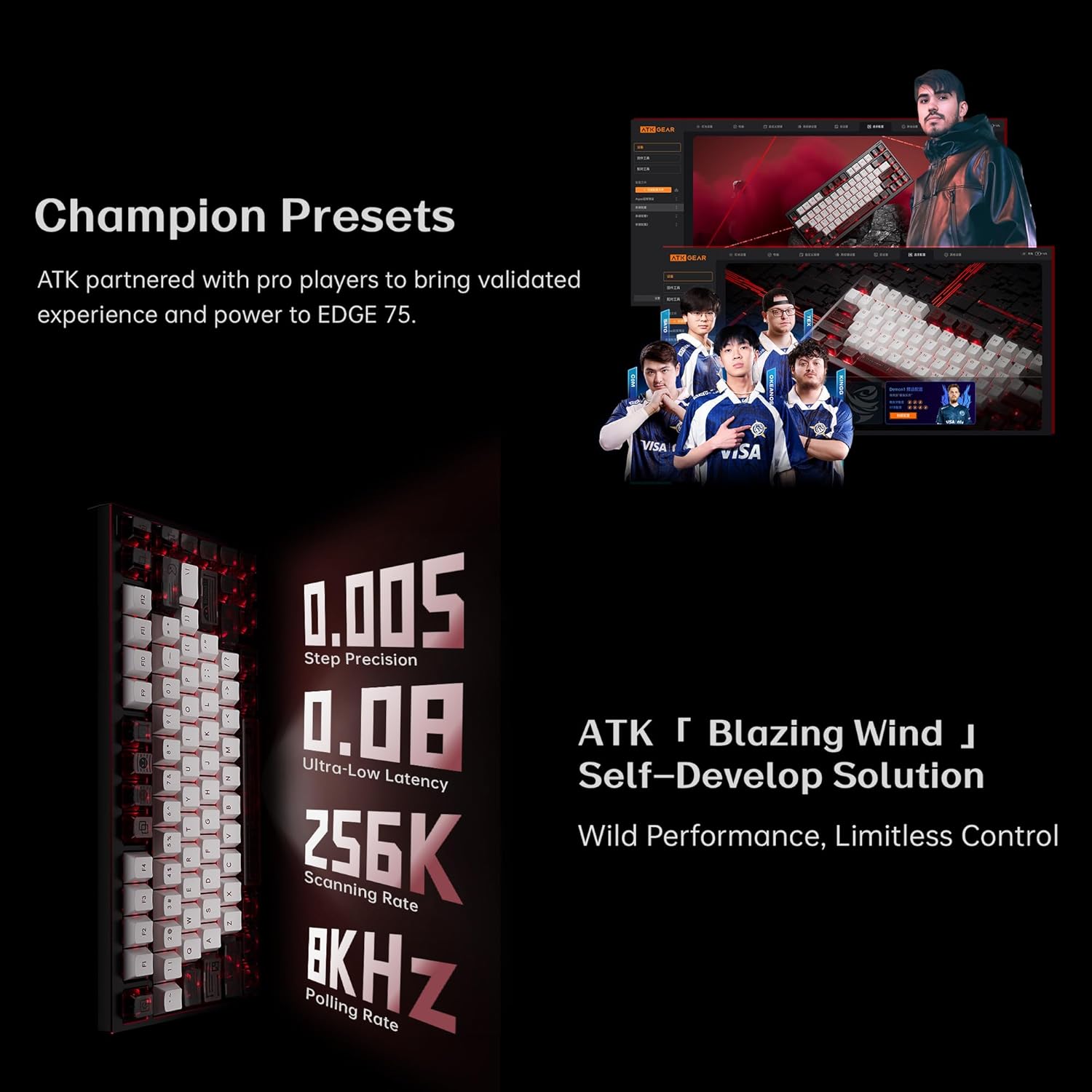
Image: Precision and Performance. This image highlights the keyboard's performance metrics: 0.005 mm step precision for Rapid Trigger, 0.08 ms ultra-low input latency, 256 kHz scanning rate, and 8 kHz polling rate. It also mentions "Champion Presets" developed with pro players.
3. High-Speed Electronics
- Taxa de votació: 8 kHz for rapid communication with your computer.
- Velocitat d'escaneig: 32 kHz full-key scanning and 256 kHz single-key scanning for quick input detection.
- Latència: Ultra-low input latency of approximately 0.08 ms.
4. Retroil·luminació RGB
The keyboard supports vivid RGB backlighting. Lighting effects and colors can be customized using the ATK software.

Image: RGB Lighting and Key Features. This image highlights the keyboard's RGB lighting, 75% layout, TTC RGB Magneto Switches, and the Ball-Catch rapid assembly mechanism.
5. Tecles programables
All keys are programmable. Use the ATK software to remap keys, create macros, and customize functions to suit your workflow or gaming style.
Manteniment
1. Neteja del teclat
To clean the keyboard, disconnect it from your computer. Use a soft, dry cloth to wipe the surface. For deeper cleaning, use a can of compressed air to remove dust and debris from between the keycaps. For stubborn stains, a slightly damp cloth with a mild cleaning solution can be used, ensuring no liquid enters the keyboard.
2. Commutadors intercanviables en calent
The ATK Edge 75 HE features hot-swappable switches, allowing you to change switches without soldering. Use the included switch puller to carefully remove switches. Align new switches with the sockets and press firmly until they click into place. Ensure the pins are not bent during installation.
3. Ball-Catch Rapid Assembly
The keyboard's Ball-Catch system allows for easy disassembly and reassembly of the case. To detach, grip both sides of the keyboard and gently lift to separate the top and bottom sections. To reassemble, align the sections and press them together until the ball-catch mechanisms engage.

Image: Ball-Catch System. This image demonstrates the "Lift to Detach" mechanism of the Ball-Catch system, allowing for quick and easy disassembly of the keyboard case by gripping both sides and lifting.
Resolució de problemes
- El teclat no respon: Assegureu-vos que el cable USB-C estigui connectat correctament tant al teclat com a l'ordinador. Proveu un port o cable USB diferent.
- Claus que no es registren: If specific keys are not working, ensure the switches are properly seated. If hot-swappable, try reseating or replacing the switch.
- La il·luminació RGB no funciona/s'està personalitzant: Ensure the ATK software is installed and running. Check software settings for lighting effects and brightness.
- El programari no detecta el teclat: Reinstall the ATK software. Ensure your operating system is up to date.
Especificacions

Image: Keyboard Specifications. This image presents a detailed table of the ATK Edge 75 HE keyboard's technical specifications.
| Nom del producte | ATK EDGE 75 HE Esports Magnetic Keyboard |
| Color | Skyline White (also available in Obsidian Black) |
| Cas | CNC Aluminum with High Gloss Chamfers |
| Tipus de canvi | TTC RGB Magneto Switch (Mechanical) |
| Gamma RT | 0.005 mm - 3.3 mm |
| Step Precision | 0.001mm (for RT adjustment) |
| Latència | 0.08 ms |
| Taxa d'escaneig | N-Key 32KHz, Single-Key 256KHz |
| Connexió | Cablejat (USB-C) |
| Tipus de tecla | 5 Sided Dye-Sub Keycaps |
| Encoixinat intern | Poron Foam, Poron Switch Foam, Poron Bottom Foam |
| Placa de posició | Alumini |
| Taxa de votació | 8000Hz (8KHz) |
| Sistemes compatibles | Windows/MacOS/Linux |
| Nombre de claus | 82 |
| Material | Alumini |
| Pes de l'article | 3.74 lliures |
Garantia i Suport
Informació de la garantia
The ATK Edge 75 HE Esports Magnetic Keyboard comes with a 6 mesos de garantia des de la data de compra. Conserveu el comprovant de compra per a reclamacions de garantia. La garantia cobreix els defectes de fabricació i els mals funcionaments en condicions d'ús normal. No cobreix els danys causats per un mal ús, accidents, modificacions no autoritzades o desgast normal.
Atenció al client
For further assistance, technical support, or warranty inquiries, please visit the official ATK weblloc: www.atkgear.com. You may also refer to the digital user manual included in your package for additional details.