
Introducció
Thank you for choosing the voijump K301 Portable Karaoke Machine. This device combines a powerful Bluetooth speaker with two wireless microphones, offering a versatile audio experience for various occasions. Designed for ease of use and portability, the K301 features multiple connectivity options, dynamic LED lighting, and robust sound quality. Please read this manual thoroughly to ensure proper setup, operation, and maintenance of your new karaoke machine.
Què hi ha a la caixa
- 1 x voijump K301 Karaoke Machine
- 2 x micròfons sense fil
- 1 x comandament a distància
- 1 x cable de càrrega USB
- 1 x AUX-in Cable
- 1 x adaptador de corrent
- 1 x corretja d'espatlla
- Batteries (4 x AA for microphones, 2 x AAA for remote)
- 1 x Manual d'usuari (aquest document)

Image: All components included with the voijump K301 Portable Karaoke Machine.
Configuració
1. Charging the Karaoke Machine
- Connect the provided power adapter to the 'POWER 5V-1A' port on the machine.
- Connecteu l'adaptador a una presa de corrent estàndard.
- The charging indicator light will illuminate. Charge the unit fully before first use (approximately 4-5 hours). A full charge provides 6-8 hours of continuous playtime or 72 hours of standby time.
2. Instal·lació de les piles del micròfon
- Unscrew the bottom cap of each wireless microphone.
- Insert two AA batteries into each microphone, ensuring correct polarity (+/-).
- Replace the bottom caps.
3. Fixació de la corretja de l'espatlla (opcional)
- Locate the metal rings on the sides of the karaoke machine.
- Attach the clips of the shoulder strap to these rings for easy portability.

Image: The karaoke machine with its adjustable shoulder strap, highlighting its lightweight and portable design.
Instruccions de funcionament
1. Encendre/apagar
- To power on the machine, toggle the 'ON/OFF' switch located on the control panel.
- The display will light up, indicating the current mode.
2. Selecció de mode
- Press the 'M' (Mode) button on the control panel or remote control to cycle through available modes: Bluetooth (BLU), USB, TF Card, FM Radio, and AUX.
3. Connectivitat Bluetooth
- Select 'BLU' mode. The machine will enter pairing mode, indicated by a flashing 'BLU' on the display.
- On your smartphone, tablet, or other Bluetooth device, search for 'K301' in the Bluetooth settings.
- Select 'K301' to pair. A confirmation tone will sound upon successful connection.
- You can now play audio from your device through the karaoke machine.
4. Reproducció de targetes USB/TF
- Insert a USB flash drive or TF card (with MP3 audio files) into the respective slot.
- The machine will automatically switch to USB or TF mode and begin playing. If not, select the mode manually using the 'M' button.
- Use the playback controls (play/pause, next/previous track) on the machine or remote.
5. Ràdio FM
- Select 'FM' mode.
- Extend the antenna for better reception.
- Press and hold the 'Play/Pause' button to auto-scan and save available stations.
- Use the 'Next/Previous' buttons to navigate through saved stations.
6. Connexió d'entrada AUX
- Connect an external audio device (e.g., TV, computer) to the 'AUX IN' port using the provided AUX cable.
- Select 'AUX' mode. Audio from the connected device will play through the speaker.
Image: The top control panel of the karaoke machine, detailing ports for USB, TF card, AUX in, and microphone inputs, along with volume and effect knobs.
7. Using Wireless Microphones
- Turn on the karaoke machine.
- Press the power button on each wireless microphone. They will automatically pair with the machine.
- Adjust microphone volume using the 'MIC.VOL' knob on the machine.
- Adjust echo effect using the 'ECHO' knob.
- The microphones feature noise reduction and anti-interference technology for clear sound.

Image: The karaoke machine paired with two wireless microphones, emphasizing their automatic connection and anti-noise capabilities for clear vocal performance.
8. Adjusting Sound (Bass/Treble)
- Feu servir els botons "BASS" i "TREBLE" del tauler de control per ajustar la sortida d'àudio segons les vostres preferències.
9. Llums LED
- Toggle the 'LED ON/OFF' switch to activate or deactivate the colorful disco LED lights.
- The lights can sync to the music's rhythm, offering an immersive visual experience.

Image: The karaoke machine's dynamic LED lights in action, creating a festive atmosphere during a family karaoke session.
10. Mode TWS (True Wireless Stereo)
- To activate TWS mode, you need two identical voijump K301 karaoke machines.
- Ensure both machines are powered on and not connected to any Bluetooth device.
- On one machine, press and hold the 'TWS' button. It will search for the other machine.
- Once connected, a confirmation tone will sound, and both speakers will play synchronized stereo audio.

Image: A visual representation of two karaoke machines linked in True Wireless Stereo (TWS) mode, providing an immersive surround sound experience.
11. Recording Function (REC)
- Insert a TF card or USB drive into the respective slot.
- Press the 'REC' button on the control panel. The machine will begin recording audio from the microphone.
- Press 'REC' again to stop recording. The recording will be saved to the inserted storage device.
12. Ús del control remot
- El comandament a distància permet un funcionament còmode des de la distància.
- Functions include power on/off, mode selection, volume control, track skipping, play/pause, and LED light control.
Video: An official demonstration of the voijump K301 Karaoke Machine, showcasing its features and ease of use with two wireless microphones.
Vídeo: Un funcionari ha acabatview of the voijump Karaoke Machine, highlighting its suitability for both adults and kids, and various entertainment options.
Manteniment
Neteja
- Wipe the exterior of the machine and microphones with a soft, dry cloth.
- No utilitzeu netejadors abrasius, ceres ni dissolvents.
Emmagatzematge
- Store the karaoke machine and accessories in a cool, dry place away from direct sunlight and extreme temperatures.
- Remove batteries from microphones and the remote control if storing for extended periods to prevent leakage.
Resolució de problemes
| Problema | Causa possible | Solució |
|---|---|---|
| Sense poder | Bateria esgotada; interruptor apagat | Charge the machine; Ensure power switch is ON |
| No hi ha so de l'altaveu | Volum massa baix; Mode incorrecte seleccionat; Dispositiu no connectat | Increase master volume; Select correct mode; Reconnect Bluetooth/AUX device |
| El micròfon no funciona | Microphone batteries low/dead; Microphone not paired; Mic volume too low | Replace microphone batteries; Power cycle microphone to re-pair; Increase 'MIC.VOL' |
| Connexió Bluetooth inestable | Dispositiu massa lluny; Interferència | Move device closer to machine (within 10m); Avoid obstacles; Disconnect other Bluetooth devices |
| Mala recepció FM | Antena no estesa; Senyal feble | Fully extend the antenna; Try repositioning the machine |
Especificacions
- Marca: voijump
- Model: K301
- Tipus de muntatge: Taula
- Font d'alimentació: Battery Powered (Built-in 3.7V/5200mAh Lithium-ion)
- Tecnologia de connectivitat: AUX, Bluetooth 5.3
- Entrada d'àudio: Wireless Microphones, USB, TF Card, AUX-in
- Configuració dels altaveus: 5.25-inch Subwoofer, 2-inch Tweeter
- Nombre de canals: 4
- Pes de l'article: 6.3 lliures (2.86 kg)
- Dimensions del producte (L x A x A): 12.6 x 5 x 10 polzades (32 x 12.7 x 25.4 cm)
- Material: Solid Wood, Leather, Metal
- Característiques especials: LED Lights (4 lighting effects), TWS Mode, Remote Control, Recording Function, FM Radio, Phone/Tablet Groove
- UPC: 768534580176
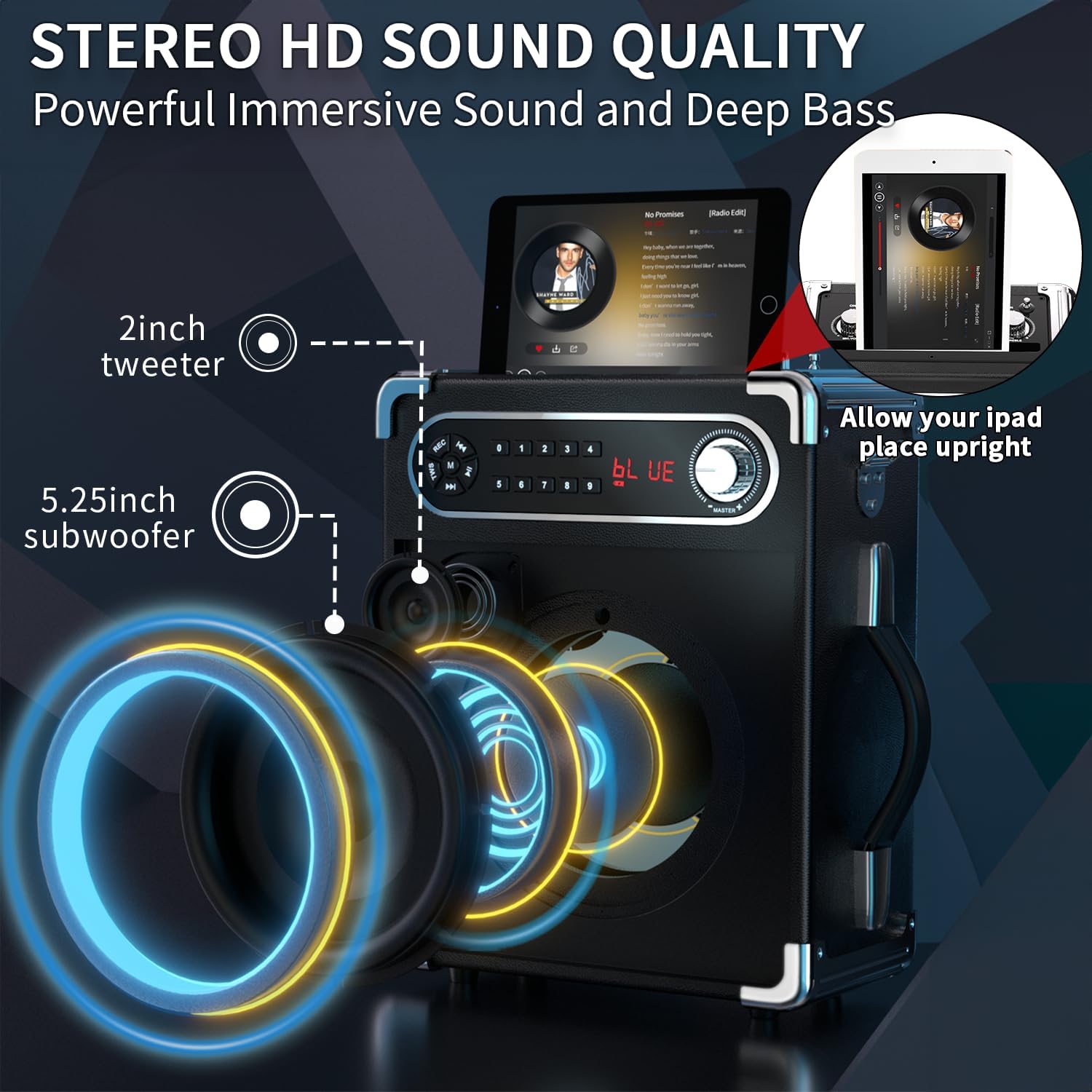
Imatge: Detallada view of the speaker's internal components, including the 5.25-inch subwoofer and 2-inch tweeter, designed for high-definition stereo sound.
Garantia i Suport
voijump is committed to providing high-quality products and customer satisfaction. This product comes with a Garantia del dia 365. For any technical assistance, troubleshooting, or warranty claims, please contact voijump customer support. We also offer Suport tècnic de per vida i Substitució gratuïta for eligible issues.
For further assistance, please refer to the contact information provided on the product packaging or visit the official voijump weblloc.