
ACEMAGICIAN V1
ACEMAGICIAN Vista Mini V1 PC Instruction Manual
Model: V1
Marca: ACEMAGICIAN
1. Introducció
This manual provides essential information for setting up, operating, and maintaining your ACEMAGICIAN Vista Mini V1 PC. The Vista Mini V1 is a compact and efficient mini computer designed for home and office use, powered by the 12th Gen Intel N97 processor and pre-installed with Windows 11 Pro.
2. Contingut del paquet
Verifiqueu que tots els elements que s'enumeren a continuació s'inclouen al vostre paquet:
- ACEMAGICIAN Vista Mini V1 PC
- Adaptador d'alimentació
- Cable HDMI
- VESA Mount Plate with Screws
- Manual d'usuari

Figure 2.1: Included items in the ACEMAGICIAN Vista Mini V1 PC package.
3. Sobrecàrrega físicaview
Familiarize yourself with the ports and features of your Vista Mini V1 PC:
- Panell frontal: Power Button, Power Light, 2x USB 3.2 ports, 3.5mm Audio Jack.
- Panell posterior: LAN Port (1000Mbps Ethernet), HDMI 2.0 port, DP 1.4 port, 2x USB 2.0 ports, Power Interface.
- Laterals: Ventilation grilles for optimized airflow.

Figure 3.1: Front and rear port layout of the Vista Mini V1 PC.
4. Configuració
Follow these steps to set up your ACEMAGICIAN Vista Mini V1 PC:
- Connecta la pantalla: Connect your monitor(s) to the PC using the HDMI 2.0 or DP 1.4 ports. The PC supports dual 4K displays.
- Connecteu els perifèrics: Connecteu el teclat i el ratolí USB als ports USB 3.2 o USB 2.0 disponibles.
- Connectar l'alimentació: Connect the power adapter to the PC's power interface and then plug it into a power outlet.
- Encès: Press the power button on the front panel. The power light will illuminate, and the PC will begin to boot.
5. Operating System Initial Configuration
Upon first boot, the pre-installed Windows 11 Pro will guide you through the initial setup process:
- Idioma i regió: Seleccioneu el vostre idioma i regió preferits.
- Connexió de xarxa: Connect to your network via Wi-Fi or by plugging an Ethernet cable into the LAN port. It is recommended to connect to the internet for updates during setup.
- Actualitzacions: The system may check for and install updates. This process may require a reboot.
- Acord de llicència: Review and accept the Windows 11 Pro license agreement.
- Compte d'usuari: Create a user account and set up your preferences.
6. Especificacions
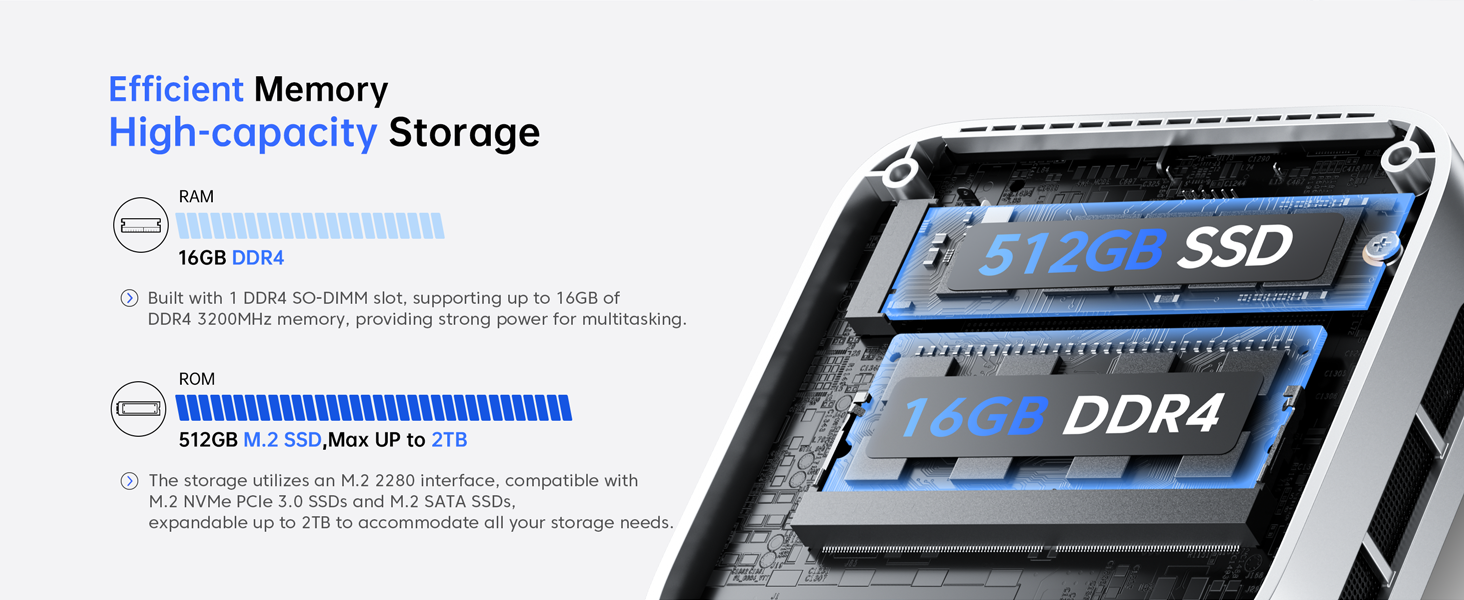
Figure 6.1: Key features of the Vista Mini V1 PC.
| Característica | Descripció |
|---|---|
| Processador | 12th Gen Intel Alder Lake N97 (4 cores/4 threads, up to 3.6GHz, 6MB cache) |
| RAM | 16 GB DDR4 |
| Emmagatzematge | 512GB M.2 2280 SSD (Expandable up to 2TB M.2 NVMe/SATA SSD) |
| Gràfics | Intel UHD Graphics (24 EUs, 1.20GHz max frequency) |
| Sortida de visualització | HDMI 2.0, DP 1.4 (Supports Dual 4K Displays) |
| Sistema operatiu | Windows 11 Pro (preinstal·lat) |
| Connectivitat | 1000Mbps Ethernet, Wi-Fi, Bluetooth |
| Ports | 2x USB 3.2, 2x USB 2.0, 3.5mm Audio Jack |
| Dimensions | 3.9 x 3.9 x 1.3 polzades |
| Pes | 1.3 lliures |
| Sistema de refrigeració | 2300rpm Silent Fan + Optimized Airflow |
7. Manteniment
To ensure optimal performance and longevity of your Mini PC, consider the following maintenance tips:
- Mantingueu les ventilacions clares: Ensure that the ventilation grilles on the sides of the PC are not obstructed to allow for proper airflow and prevent overheating.
- Actualitzacions de programari: Regularly check for and install operating system and driver updates to maintain system stability and security.
- Neteja: Use a soft, dry cloth to clean the exterior of the PC. Avoid using liquid cleaners directly on the device.
- Gestió d'emmagatzematge: Periòdicament review and manage your storage to free up space and improve performance. Consider upgrading the SSD if more space is needed.
8. Solució De Problemes
If you encounter issues with your Vista Mini V1 PC, refer to the following common problems and solutions:
- Sense pantalla:
- Ensure the monitor is powered on and the video cables (HDMI/DP) are securely connected to both the PC and the monitor.
- Prova un altre cable de vídeo o monitor si en tens.
- L'ordinador no s'encén:
- Verify that the power adapter is correctly connected to the PC and a working power outlet.
- Comproveu si la presa de corrent funciona connectant-hi un altre dispositiu.
- Rendiment lent:
- Tanca les aplicacions innecessàries que s'executen en segon pla.
- Check Task Manager (Ctrl+Shift+Esc) for high CPU, memory, or disk usage.
- Ensure there is sufficient free space on the SSD.
- Problemes de connectivitat de xarxa:
- For Wi-Fi, ensure the Wi-Fi adapter is enabled and you are connected to the correct network with the right password.
- For Ethernet, check the cable connection and ensure your router/modem is working correctly.
- Reinicieu el vostre encaminador/mòdem i el mini PC.
9. Garantia i Suport
Your ACEMAGICIAN Vista Mini V1 PC comes with a 1-year warranty and 2-year quality assurance. For any technical assistance or support, please contact ACEMAGICIAN customer service. 24-hour support is available to address your queries and concerns.
For further assistance, please refer to the contact information provided in the included User Manual or visit the official ACEMAGICIAN weblloc.
Ask a question about this manual
Ask about setup, troubleshooting, compatibility, parts, safety, or missing instructions. Manuals+ will review the question and use this page’s manual context to help answer it.