
1. Introducció
This manual provides detailed instructions for the setup, operation, and maintenance of your POLONO PM220S Label Maker Machine. Please read this manual thoroughly before using the device to ensure proper function and longevity.
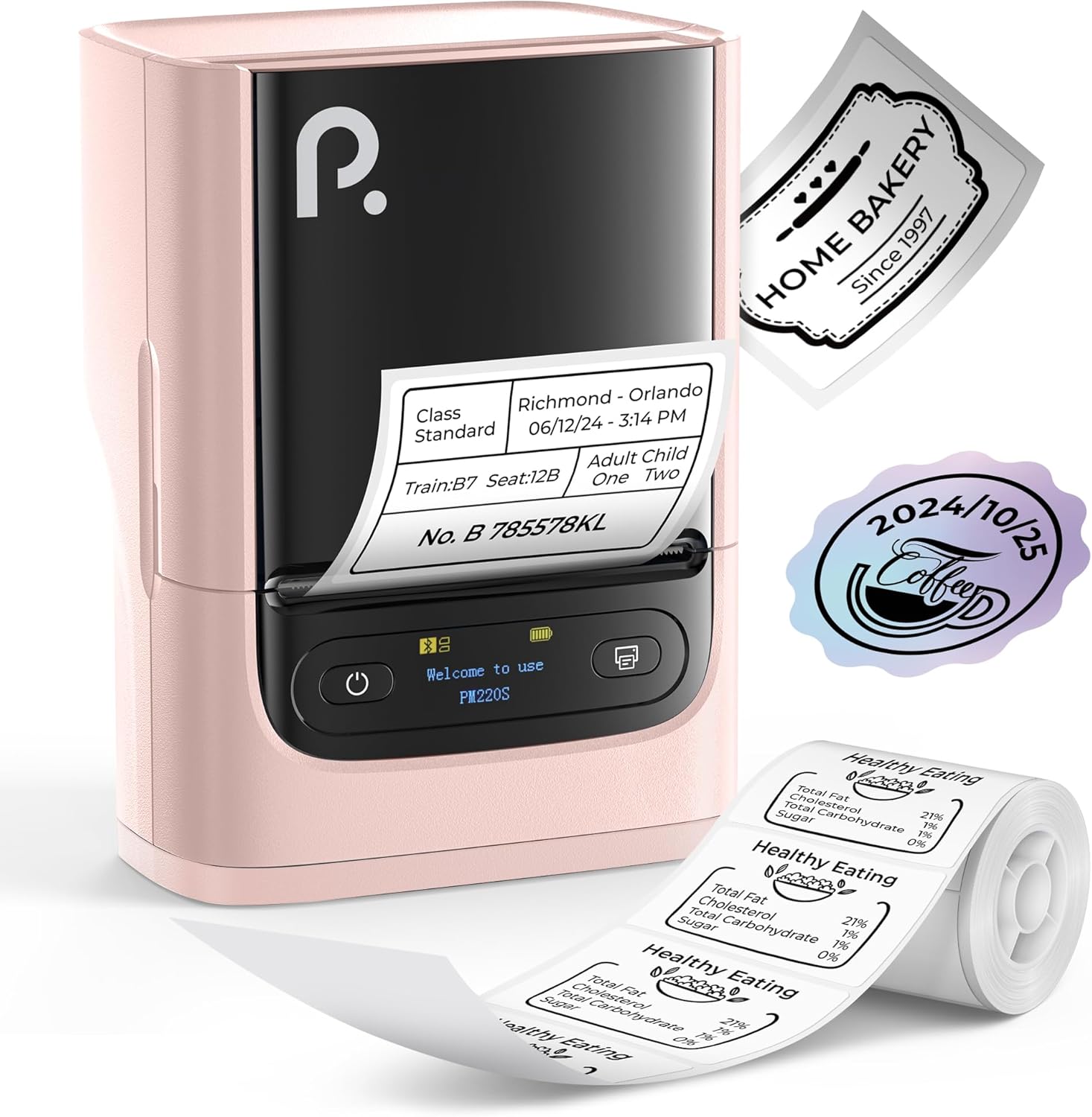
Figure 1: POLONO PM220S Label Maker Machine with samples etiquetes.
2. Producte acabatview
2.1 Components inclosos
- POLONO PM220S Label Maker Machine
- Label Tape (50x30mm, pre-installed or included)
- Cable de càrrega USB
- Manual d'usuari (aquest document)
2.2 Característiques clau
- Connectivitat Bluetooth: Seamless connection with iOS, Android, and PC devices.
- Intuitive LED Screen: Displays battery level, Bluetooth connection status, and alerts for paper shortages or timed shutdowns.
- Feature-Rich "Labelnize" App: Offers label templates, supports QR codes, barcodes, tables, text, icons, 90+ fonts, 14+ languages, and 450+ material presets.
- Premium Thermal Printing: BPA-Free Direct Thermal Technology with 203 DPI for high-definition, inkless printing.
- Compatibilitat àmplia d'etiquetes: Supports label widths from 23-54mm (0.91"-2.12").
- Disseny portàtil: Compact and lightweight for easy transport and use in various environments.
3. Instruccions de configuració
3.1 Càrrega del dispositiu
Before first use, fully charge the label maker using the provided USB cable. The LED screen will indicate charging status.
3.2 App Installation and Driver Download
For mobile devices (iOS/Android), download the "Labelnize" app from your respective app store. For PC users, visit polono.com to download the necessary driver and application.

Figure 2: Universal compatibility with smartphones and laptops for app and driver installation.
3.3 Connexió mitjançant Bluetooth
- Ensure the PM220S is powered on.
- On your mobile device, open the "Labelnize" app.
- Within the app, search for and connect to the PM220S via Bluetooth. Do not connect directly via your device's Bluetooth settings for mobile devices.
- For PC, ensure the driver is installed, then connect through the downloaded application.
3.4 Càrrega de la cinta d'etiquetes
- Obriu la tapa del compartiment d'etiquetes.
- Insert the label roll with the printing surface facing upwards.
- Adjust the paper slot guides to secure the tape according to its width (23-54mm) for precise alignment.
- Tanqueu la coberta.

Figure 3: Proper loading of label tape into the PM220S.
4. Instruccions de funcionament
4.1 Using the "Labelnize" App
- Open the "Labelnize" app on your connected device.
- Select from various pre-designed templates or create your own custom labels.
- The app allows you to add text, barcodes, QR codes, tables, icons, and more.
- Customize labels using a selection of over 90 fonts and 14 languages.
- Utilize the 450+ material presets for different label applications.
- Important: For optimal results, use specialized POLONO labels. Avoid tearing the green back sticker to prevent printing issues.
4.2 Understanding the LED Screen Display
The integrated LED screen provides real-time feedback on the printer's status:
- Nivell de bateria: Indicates the current charge of the device.
- Connexió Bluetooth: Shows if the device is successfully connected via Bluetooth.
- Paper Shortage Alerta: Notifies when the label roll is low or empty.
- Apagada cronometrada: Displays countdown for automatic power-off to conserve battery.

Figure 4: LED screen display functions for real-time status monitoring.
4.3 Imprimir una etiqueta
- Design your label within the "Labelnize" app.
- Review the label preview to ensure accuracy.
- Tap the "Print" button in the app.
- The label maker will print the label using thermal technology.
- Carefully tear off the printed label.
5. Manteniment
5.1 Atenció general
- Mantingueu el dispositiu net i lliure de pols i residus.
- Eviteu exposar el dispositiu a temperatures extremes o a la llum solar directa.
- Guardeu el dispositiu en un lloc sec quan no l'utilitzeu.
5.2 Neteja del capçal d'impressió
If print quality degrades, the thermal print head may need cleaning:
- Apagueu l'etiquetadora i desconnecteu-la de qualsevol font d'alimentació.
- Obriu el compartiment de l'etiqueta.
- Netegeu suaument el capçal d'impressió tèrmica amb un bastonet de cotóampamb alcohol isopropílic.
- Allow the print head to dry completely before closing the cover and resuming use.
6. Solució De Problemes
| Problema | Causa possible | Solució |
|---|---|---|
| El dispositiu no s'encén | Problema de bateria baixa o energia. | Charge the device fully. Ensure the power button is pressed correctly. |
| No es pot connectar mitjançant Bluetooth | Incorrect connection method or app issue. | Ensure you are connecting through the "Labelnize" app, not directly via phone settings. Restart both the device and the app. For PC, verify driver installation. |
| Poor print quality / Faint printing | Dirty print head, incorrect label type, or low battery. | Clean the print head (see Section 5.2). Ensure you are using thermal labels. Charge the device. |
| Labels are misaligned or jammed | Improper label loading or paper slot adjustment. | Open the cover, remove any jammed labels, and reload the tape ensuring the paper slot guides are adjusted correctly for the label width. Avoid tearing the green back sticker. |
| "Paper Shortage" alert | Label roll is empty or incorrectly loaded. | Replace the label roll or re-seat it correctly. |
7. Especificacions
| Marca | POLONO |
| Nom del model | PM220S |
| Tecnologia de connectivitat | Bluetooth |
| Tecnologia d'impressió | Tèrmica |
| Resolució màxima d'impressió | 203 DPI |
| Velocitat màxima d'impressió (monocrom) | 45.0 mm/s |
| Mides de suports admesos | 23-54mm (0.91"-2.12") width, 50x30mm included |
| Dimensions del producte | 3.3" de profunditat x 4.4" d'amplada x 2.5" d'alçada (8.4 x 11.2 x 6.4 cm) |
| Pes de l'article | 13.4 unces (380 g) |
| Característica especial | Portable, Inkless Printing, LED Display |
8. Garantia i Suport
For warranty information, technical support, or to purchase accessories and replacement labels, please visit the official POLONO weblloc a polono.com or contact POLONO customer service directly.
Conserveu el vostre comprovant de compra per a reclamacions de garantia.