
1. Introducció
Thank you for choosing the Temtop W100 Lite Professional Weather Station. This device provides real-time monitoring of indoor and outdoor temperature and humidity, atmospheric pressure, weather forecasts, moon phases, and includes an alarm clock function. This manual will guide you through the setup, operation, and maintenance of your weather station to ensure optimal performance.
2. Contingut del paquet
Si us plau, comproveu el contingut del paquet en desempaquetar-lo:
- Unitat principal de l'estació meteorològica
- Sensor exterior
- Adaptador d'alimentació
- Manual d'usuari

Image: Contents of the Temtop W100 Lite package, showing the main weather station unit, the outdoor sensor, and the power adapter.
3. Producte acabatview
Familiarize yourself with the main components and display features of your Temtop W100 Lite Weather Station.
3.1 Pantalla de la unitat principal

Imatge: Frontal view of the Temtop W100 Lite Weather Station, displaying various weather parameters and time information.
The main unit features a clear color display that shows the following information:
- Temperatura i humitat exterior
- Temperatura interior i humitat
- Weather Forecast (Sunny, Partially Sunny, Cloudy, Rainy, Snowy)
- Hora i data
- Fase lunar
- Pressió atmosfèrica
- Comfort Level Indicator (Wet, Comfort, Dry)
- Sunrise and Sunset Times (for selected city)
3.2 Main Unit Buttons and Outdoor Sensor

Imatge: Detallada view of the weather station display with labels indicating each data field.
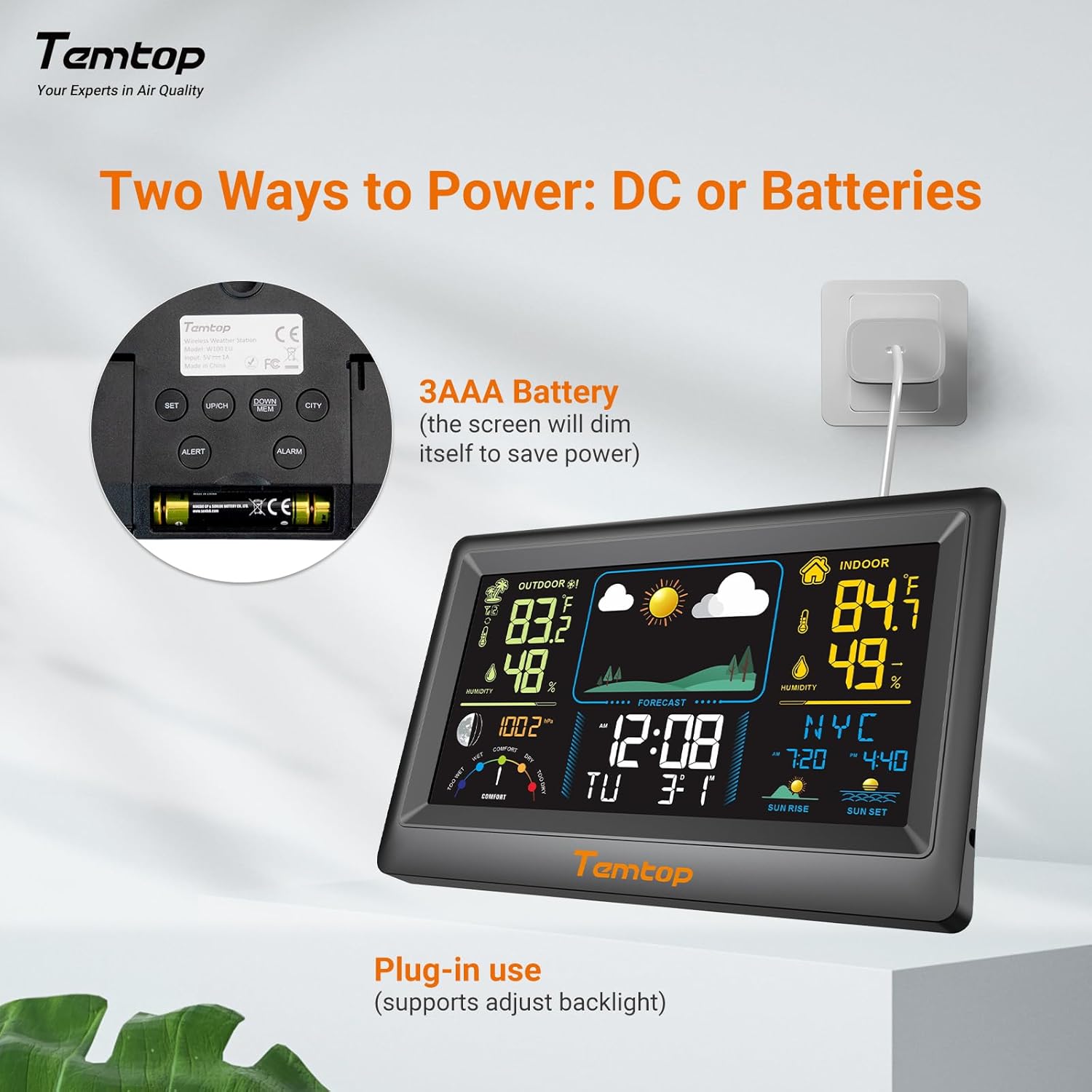
Imatge: Part posterior view of the weather station, highlighting the battery compartment, power input, and control buttons.
The main unit features several control buttons on the back for settings adjustment:
- Botó SET: Enters/confirms settings.
- Botó AMUNT/CH: Adjusts values upwards, changes channels.
- DOWN/MEM Button: Adjusts values downwards, accesses min/max memory.
- ALERT Button: Sets temperature alerts.
- Botó ALARMA: Sets alarm time.
- CITY Button: Selects city for sunrise/sunset times.
The outdoor sensor transmits temperature and humidity data wirelessly to the main unit.
4. Configuració
4.1 Alimentació del dispositiu
The weather station can be powered by either the included AC adapter or 3x AAA batteries (not included for the main unit, but included for the outdoor sensor). For continuous backlight and optimal performance, AC power is recommended.
- Unitat principal: Insert the AC adapter into the power port on the back of the unit and plug it into a wall outlet. Alternatively, insert 3x AAA batteries into the battery compartment.
- Sensor exterior: Insert 2x AAA batteries into the outdoor sensor's battery compartment.

Imatge: Example of digital displays, illustrating the clear readouts of temperature and humidity.

Image: Illustration of power modes, showing the weather station connected via AC adapter and the battery compartment. AC mode allows adjustable backlight, while battery mode conserves power by dimming the display.
4.2 Col·locació del sensor exterior
Place the outdoor sensor in a shaded area, protected from direct sunlight and rain, to ensure accurate temperature and humidity readings. The sensor has a wireless range of up to 100 meters (328 feet) in an open, unobstructed area.

Image: Diagram showing the wireless range of the outdoor sensor from the main unit, suitable for gardens, terraces, or rooftops.
4.3 Initial Settings (Time, Date, City)
Follow these steps to set the correct time, date, and city for accurate sunrise/sunset times:
- Manteniu premut el botó SET button to enter setting mode. The hour field will begin to flash.
- Utilitza el UP/CH i BAIX/MEM botons per ajustar l'hora.
- Premeu SET to confirm the hour and move to the next item (minute, year, month, day). Repeat the adjustment and confirmation process for each.
- After setting the date, briefly press the CIUTAT button. The city code will flash.
- Utilitza el UP/CH button to scroll through the list of cities until you find your location.
- Finalment, premeu SET to confirm your city selection. The sunrise, sunset times, and date will now be accurately displayed.
Video: This video demonstrates how to set the time, date, and city on your Temtop W100 Lite Weather Station to ensure accurate display of local sunrise and sunset times.
5. Funcionament
5.1 Interpretació de la pantalla
The main display is divided into several sections for easy reading:
- Secció exterior: Shows current outdoor temperature and humidity, and temperature trend.
- Secció interior: Displays current indoor temperature and humidity, and temperature trend.
- Pronòstic del temps: Icons indicate the predicted weather for the next 12 hours (Sunny, Partially Sunny, Cloudy, Rainy, Snowy).
- Hora i data: Hora actual, dia de la setmana i data.
- Fase de la Lluna: Displays the current moon phase.
- Pressió atmosfèrica: Shows current barometric pressure and its trend.
- Nivell de confort: A gauge indicating indoor comfort levels (Wet, Comfort, Dry).
- Sortida / posta de sol: Displays the local sunrise and sunset times for the selected city.

Image: Visual representation of the five weather forecast modes and moon phases displayed on the weather station.
5.2 Selecció de la unitat de temperatura
To switch between Celsius (°C) and Fahrenheit (°F), briefly press the UP/CH button during normal display mode.
5.3 Min/Max Temperature and Humidity Records
The weather station automatically records the minimum and maximum temperature and humidity values over a 24-hour period. Briefly press the BAIX/MEM botó per view these records. Press again to cycle through min/max indoor and outdoor values.
5.4 Configuració d'alarmes
The device supports both time alarms and temperature alerts.
- Alarma horaria: Premeu el botó ALARMA per entrar al mode de configuració de l'alarma. Utilitzeu el botó UP/CH i BAIX/MEM to adjust the alarm time, and ALARMA to confirm. The snooze function can be activated by pressing any button (except ALARM) when the alarm sounds.
- Alertes de temperatura: Premeu el botó ALERTA button to set high/low temperature alerts for indoor or outdoor readings. Use UP/CH i BAIX/MEM to set the desired temperature thresholds.
6. Manteniment
- Netegeu la pantalla i casing amb un suau, damp tela. No utilitzeu netejadors abrasius ni dissolvents.
- Replace batteries in the outdoor sensor when the low battery indicator appears on the main unit.
- Avoid exposing the main unit to direct sunlight, extreme temperatures, or moisture.
7. Solució De Problemes
| Problema | Causa possible | Solució |
|---|---|---|
| No hi ha cap pantalla a la unitat principal. | Sense electricitat o amb piles baixes. | Ensure AC adapter is properly connected or replace batteries. |
| Outdoor readings are inaccurate or not displayed. | Sensor out of range, interference, or low sensor batteries. | Move sensor closer to main unit, reduce obstructions, or replace sensor batteries. |
| Weather forecast seems incorrect. | The forecast is based on atmospheric pressure changes and is an estimation. | Allow time for the station to calibrate (up to 24 hours). It provides a general trend, not a precise forecast. |
8. Especificacions
| Característica | Detall |
|---|---|
| Marca | Temptop |
| Model | EU-W100-Lite |
| Font d'alimentació | Battery (Main Unit: 3x AAA, Sensor: 2x AAA) / AC Adapter |
| Característiques especials | Customizable Alarms, Wireless Connectivity |
| Tecnologia de connectivitat | Sense fil |
| Color | Negre |
| La tecnologia de sensors | Sense fil |
| Operating Temperature (Upper) | 40 graus centígrads |
| Tipus de visualització | Pantalla en color |
| Pes de l'article | 100 grams |
9. Garantia i Suport
Temtop products are designed for reliability and performance. For warranty information, technical support, or service inquiries, please refer to the warranty card included in your package or visit the official Temtop weblloc web. Conserveu el rebut de compra com a comprovant de compra.