
1. Introducció
The Bikevee GPS Cycling Computer BKV300B is designed to provide cyclists with essential ride data. It features a clear 2.4-inch LCD display with automatic backlight, GPS tracking, and an auto start/stop function for convenience. Its waterproof design ensures reliable performance in various weather conditions.

Image 1.1: The Bikevee GPS Cycling Computer BKV300B.
Característiques clau
- Llarga vida útil de la bateria: Up to 28 hours of continuous use with a 650mAh rechargeable battery.
- Pantalla LCD nítida de 2.4 polzades: Easy-to-read screen with automatic backlight for day and night visibility.
- Inici/aturada automàtics: Automatically records ride data when cycling begins and pauses when stopped.
- Accurate Odometer: Tracks current speed, average speed, maximum speed, total distance, and trip time.
- IPX7 Impermeable: Dissenyat per suportar diferents condicions meteorològiques.
- Disseny lleuger: Weighs approximately 50g (0.11lb) for minimal impact on your bike.

Image 1.2: The Bikevee GPS Cycling Computer BKV300B is lightweight and portable.
2. Què s'inclou
Verifiqueu que tots els components siguin presents al paquet abans de continuar amb la instal·lació.
- Ordinador de bicicleta (unitat principal)
- Cable de càrrega USB-C
- Standard Bike Out Front Mount
- Cargol hexagonal
- Clau hexagonal
- Sponge (for mounting)
- Manual d'usuari

Image 2.1: Package contents including the bike computer, charging cable, mount, and tools.
3. Configuració
3.1. Muntatge del dispositiu
The Bikevee GPS Cycling Computer BKV300B is designed for easy, wireless installation on your bicycle handlebars.
- Place the Mount: Position the standard bike out front mount horizontally on your handlebar. Use the provided sponge for a secure fit.
- Assegura la muntura: Use the hexagon socket screw and wrench to firmly attach the mount to your handlebar.
- Attach the Computer: Place the bike computer onto the mount.
- Lock the Computer: Turn the bike computer clockwise by 90 degrees until it clicks securely into place.

Image 3.1: Step-by-step guide for mounting the cycling computer.
3.2. Initial GPS Connection
For the first use, ensure you are in an open area. The device will take approximately 30 to 90 seconds to receive the satellite signal and calibrate the time. Subsequent connections will be significantly faster.

Image 3.2: The device utilizes five satellite positioning systems for accurate tracking.
3.3. Setting Time Zone and Units
To adjust settings, long press the right button (gear icon) to enter the settings page. Navigate through the settings using the right button and adjust values with the left button (power/play icon).
- Zona horària: Find the time zone setting. Press the left button to change to your country's time zone.
- Unitats: Find the unit settings. Press the left button to switch between kilometers (KM/H) and miles (MPH). When switching to miles, the temperature display will automatically change to Fahrenheit.

Image 3.3: Setting the time zone on the device.

Image 3.4: Adjusting speed units (KM/H or MPH).
4. Instruccions de funcionament
4.1. Funcions del botó
The device has three main buttons for control:
- Botó esquerre (Engegada/Reproducció/Pausa):
- Manteniu premut durant dos segons per encendre o apagar.
- Click to display cycling data (play icon) or not display cycling data (pause icon).
- Botó central (Configuració):
- Premeu llargament per entrar a la pàgina de configuració.
- Botó dret (pàgina següent):
- Feu clic per anar a la pàgina de dades següent.

Imatge 4.1: acabatview of button functions and display indicators.
4.2. Visualització de dades
The device supports the display of 14 types of cycling data, organized across multiple screens. Use the right button to cycle through these screens.
| Tipus de dades | Descripció |
|---|---|
| Temps de passeig | Durada del trajecte actual. |
| Distància de viatge | Distància recorreguda en el trajecte actual. |
| Velocitat mitjana | Velocitat mitjana durant el trajecte actual. |
| Velocitat màxima | Highest speed recorded during the current ride. |
| Distància total | Distància acumulada registrada pel dispositiu. |
| Rellotge | Hora actual. |
| Temperatura | Current ambient temperature. |
| Ascensió | Total elevation gain during the ride. |
| Gradient | Current incline/decline percentage. |
| Altitud | Altitud actual. |
| Average Gradient | Average incline/decline percentage. |
| Temps total | Total accumulated time the device has been active. |
| Gradient màxim | Steepest incline/decline recorded. |
| Altitud màxima | Highest altitude reached. |
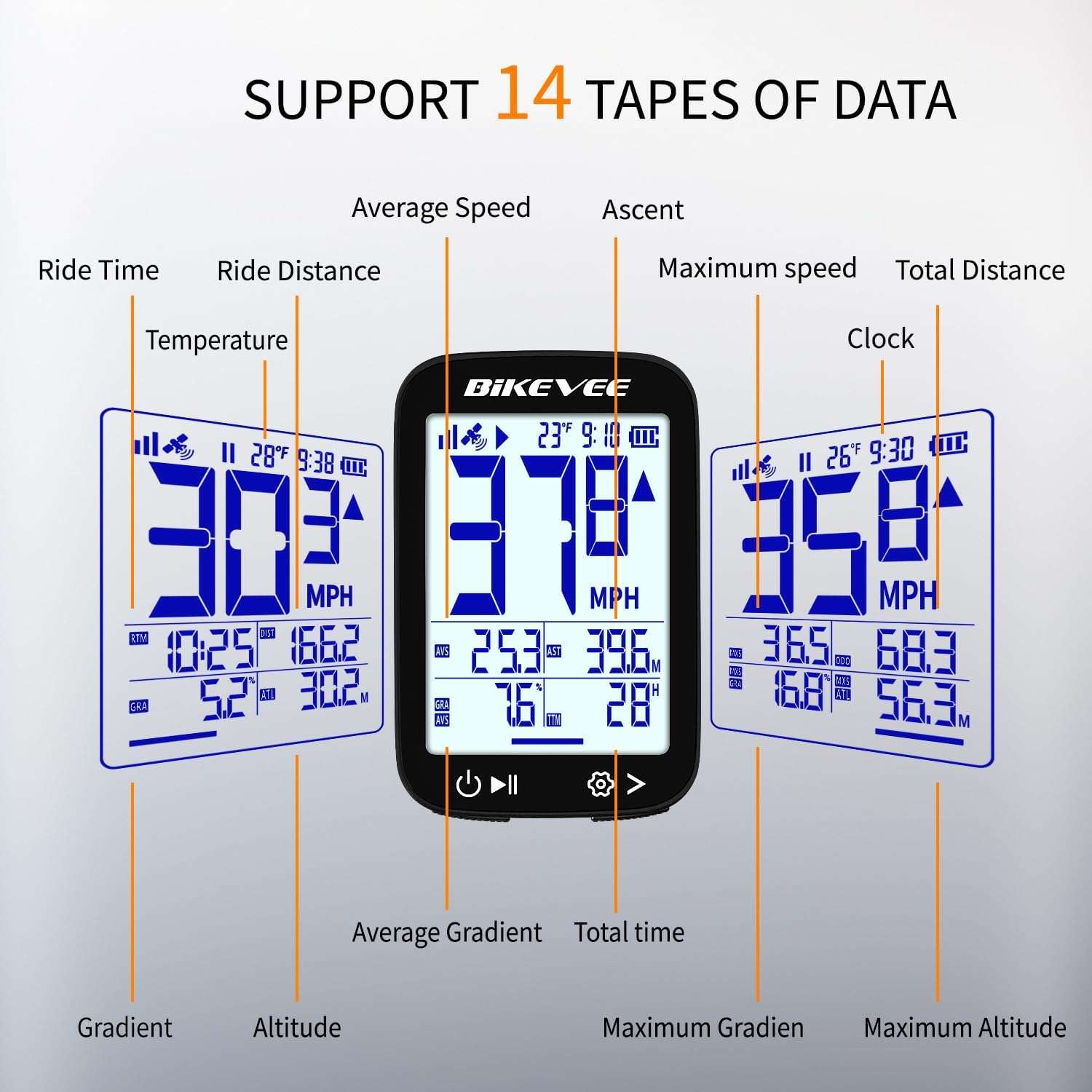
Imatge 4.2: Ex.amples of data displayed on the cycling computer screen.
4.3. Auto Start/Stop and Backlight
- The device automatically begins recording when movement is detected and pauses when you stop, resuming when you start cycling again.
- The automatic backlight adjusts to ambient light conditions, ensuring visibility day or night.
5. Manteniment
5.1. Impermeabilització
The Bikevee GPS Cycling Computer BKV300B features an IPX7 waterproof rating. This means it is protected against temporary immersion in water (up to 1 meter for 30 minutes). It is suitable for use in rain and wet conditions.
Important: Do not immerse the device in water for extended periods or use it for underwater activities. Ensure the USB-C charging port cover is securely closed to maintain water resistance.

Image 5.1: The device is IPX7 waterproof, suitable for rainy conditions.
5.2. Neteja i cura
- Netegeu el dispositiu amb un suau, damp cloth to remove dirt or sweat.
- Avoid using abrasive cleaners or solvents, as these can damage the screen or casing.
- Guardeu el dispositiu en un lloc fresc i sec quan no l'utilitzeu.
6. Solució De Problemes
If you encounter issues with your Bikevee GPS Cycling Computer BKV300B, refer to the following common problems and solutions:
- El dispositiu no s'encén:
- Assegureu-vos que la bateria estigui carregada. Connecteu el dispositiu a una font d'alimentació amb el cable USB-C.
- Manteniu premut el botó d'engegada durant almenys 2 segons.
- GPS signal loss or inaccurate readings:
- Assegureu-vos que esteu en una zona oberta amb claredat view of the sky. Dense tree cover or tall buildings can obstruct the signal.
- For first-time use or after a long period of inactivity, allow more time (30-90 seconds) for initial satellite acquisition.
- If issues persist, try restarting the device.
- La pantalla és difícil de llegir:
- Check if the automatic backlight is functioning correctly. Ensure the screen is clean and free from smudges.
- Some data fields may appear smaller. Focus on the primary speed display for quick readings.
- Mount does not fit securely:
- Ensure the correct sponge or rubber pad is used with the mount to match your handlebar diameter.
- Tighten the hexagon socket screw firmly, but do not overtighten.
- Auto Start/Stop not working:
- Ensure the device is securely mounted and has a clear GPS signal.
- Movement detection requires a certain level of activity to trigger.
7. Especificacions
| Característica | Detall |
|---|---|
| Número de model | BKV300B |
| Marca | Bikevee |
| Tipus de visualització | LCD |
| Mida de la pantalla | 2.4 polzades |
| Dimensions (L x A x A) | 70 x 45 x 16 mm (2.76 x 1.77 x 0.63 polzades) |
| Pes de l'article | 50 grams |
| Tipus de bateria | Ió de liti |
| Capacitat de la bateria | 650 mAh |
| Durada de la bateria | Fins a 28 hores |
| Tipus de sensor | GPS Sensor (supports GPS, BDS, QZSS, Glonass, Galileo) |
| Classificació impermeable | IPX7 |
| Entrada de la interfície humana | Botons |
| Tipus de muntatge | Muntatge de manillar |
| Port de càrrega | USB-C |
8. Garantia i assistència
8.1. Informació de la garantia
The Bikevee GPS Cycling Computer BKV300B comes with a two-year warranty from the date of purchase. This warranty covers manufacturing defects and malfunctions under normal use. It does not cover damage caused by misuse, accidents, unauthorized modifications, or improper installation.
Conserveu el vostre comprovant de compra per a reclamacions de garantia.
8.2. Atenció al client
For technical assistance, troubleshooting, or warranty inquiries, please contact Bikevee customer support through the retailer where the product was purchased or visit the official Bikevee weblloc per obtenir informació de contacte.