
1. Introducció
This user manual provides essential information for setting up, operating, maintaining, and troubleshooting your NINGMEI Gaming PC Desktop Computer, model 5500 1660S. Please read this manual thoroughly before using your new computer to ensure proper functionality and longevity.
The NINGMEI Gaming PC is a prebuilt desktop system designed for gaming and demanding computing tasks. It features an AMD Ryzen 5 5500 processor, NVIDIA GeForce GTX 1660 Super graphics card, 16GB DDR4 RAM, and a 1TB NVMe SSD, running on Windows 11 Home.

Figure 1: NINGMEI Gaming PC Desktop Computer 5500 1660S
2. Contingut del paquet
Verifiqueu que tots els elements siguin presents al paquet:
- NINGMEI Gaming PC Desktop Computer (Model 5500 1660S)
- Cable d'alimentació
- Tapis de ratolí
- Documentació (Guia d'inici ràpid, Informació de garantia)
- Additional accessories (e.g., SATA cables, RGB fan remote control)
3. S'ha acabat el sistemaview
3.1 Ports del panell frontal
El panell frontal proporciona un accés convenient als ports i controls que s'utilitzen amb més freqüència:
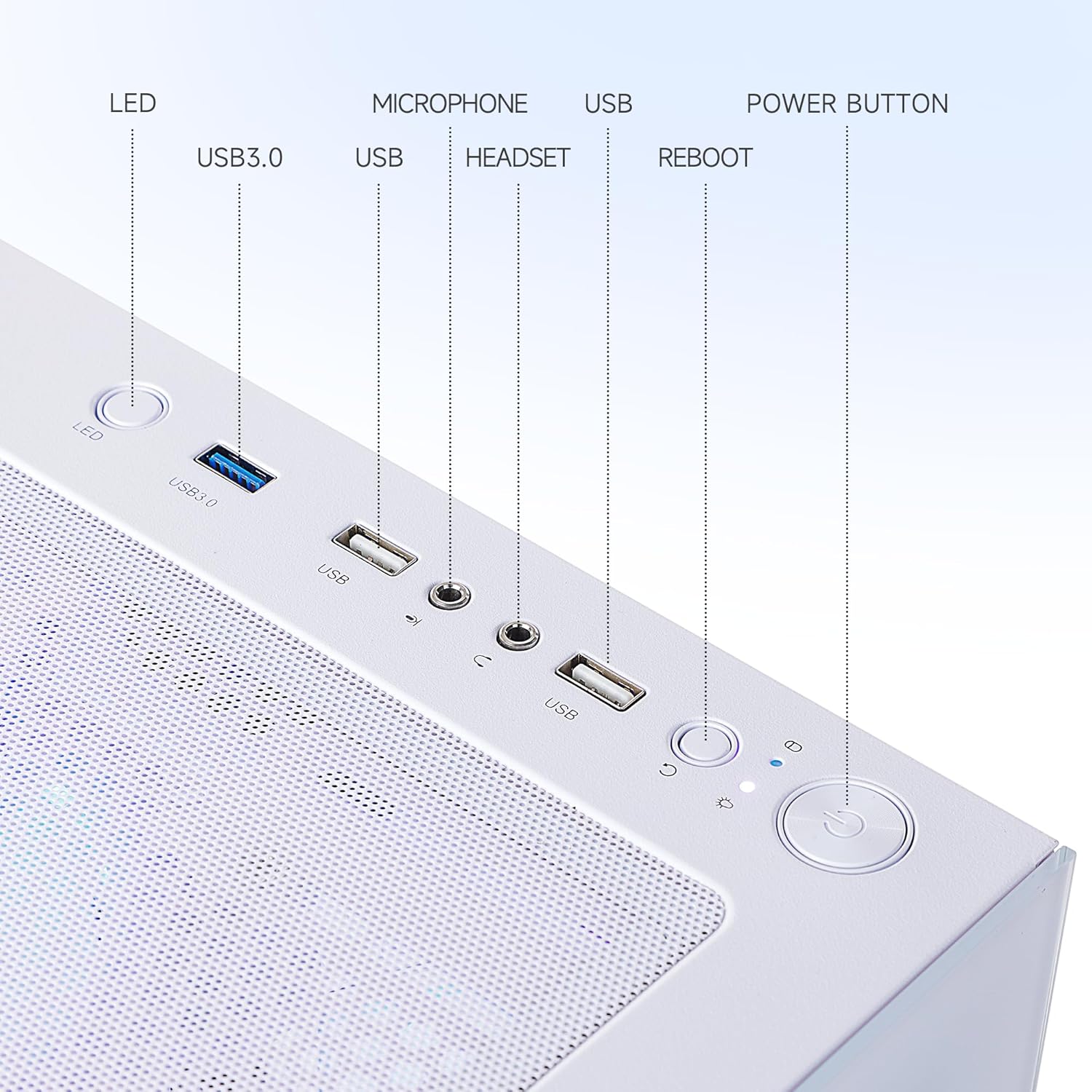
Figure 2: Front Panel Ports and Controls
- Indicador LED: Indica l'estat d'alimentació del sistema.
- Ports USB 3.0 (x2): Per connectar dispositius USB d'alta velocitat.
- Ports USB 2.0 (x2): Per connectar dispositius USB estàndard.
- Presa de micròfon: Per connectar un micròfon.
- Conector d'auriculars: Per connectar auriculars o uns auriculars.
- Botó de reinici: Initiates a system restart.
- Botó d'encesa: Encén o apaga l'ordinador.
3.2 Ports del panell posterior
The rear panel provides connectivity for essential peripherals:
- Ports USB 3.2 Gen 1 (x6): Per connectar dispositius USB d'alta velocitat.
- Ports USB 2.0 (x6): Per connectar dispositius USB estàndard.
- DVI Port (x1): Per connectar una pantalla.
- HDMI Port (x1): Per connectar una pantalla.
- RJ45 Ethernet Port (x1): For wired network connection (Realtek 1Gb Ethernet).
- Preses d'àudio: Per connectar altaveus, auriculars o micròfons.
- Entrada d'alimentació: Per connectar el cable d'alimentació.
3.3 Internal Components and Cooling
The PC features an optimized internal layout for efficient cooling and performance.

Figure 3: Internal Components and Airflow Design
The chassis incorporates a scientific air duct design to facilitate optimal thermal management, ensuring components operate within safe temperature ranges during extended use. This includes multiple cooling fans and a CPU air cooler.
4. Guia de configuració
4.1 Unboxing
- Traieu amb cura l'ordinador i tots els accessoris de l'embalatge.
- Place the computer on a stable, flat surface with adequate ventilation.
- Remove any protective films or internal packaging materials from the PC case.
4.2 Connexió de perifèrics
- Monitor: Connect your monitor to the graphics card's DVI or HDMI port on the rear of the PC using a compatible cable. Ensure the cable is securely fastened.
- Teclat i ratolí: Connect your keyboard and mouse to any available USB ports on the front or rear panel.
- Xarxa: For a wired connection, connect an Ethernet cable from your router or modem to the RJ45 port on the rear panel. For wireless connectivity, ensure the Wi-Fi antenna (if included) is attached.
- Àudio: Connect speakers or headphones to the appropriate audio jacks on the rear or front panel.
- Potència: Connect the power cable to the power input on the rear of the PC, then plug the other end into a grounded electrical outlet.
4.3 Primer engegada
- Assegureu-vos que totes les connexions siguin segures.
- Press the Power Button on the front panel of the PC.
- The system will boot up, and the operating system (Windows 11 Home) will begin its initial setup process. Follow the on-screen instructions to complete the Windows setup, including language, region, network connection, and user account creation.
5. Operating System Basics (Windows 11 Home)
Your NINGMEI Gaming PC comes pre-installed with Windows 11 Home. During the initial setup, you will configure basic settings. Once setup is complete, you can:
- Navigate the desktop and Start Menu.
- Install applications and games.
- Connect to the internet and browse the web.
- Gestionar files and folders using File Explorador.
- Customize system settings and personalize your experience.
For detailed information on Windows 11 features and usage, refer to Microsoft's official documentation or support resources.
6. Manteniment
6.1 Neteja
Regular cleaning helps maintain optimal performance and extends the lifespan of your PC.
- Exterior: Utilitzeu un suau, damp drap per netejar les superfícies exteriors. Eviteu productes químics agressius.
- Filtres de pols: The PC case features a magnetic dust net on the top panel. Regularly remove and clean this filter to prevent dust accumulation inside the chassis.
- Components interns: Periodically, with the PC powered off and unplugged, use compressed air to gently clear dust from internal components such as fans, heatsinks, and vents. Exercise caution to avoid damaging sensitive parts.

Figure 4: Magnetic Dust Filter for Easy Cleaning
6.2 Actualitzacions de programari
Keep your operating system, drivers, and applications updated to ensure security, stability, and optimal performance.
- Actualitzacions de Windows: Regularly check for and install Windows updates via the Settings app.
- Controladors gràfics: Download and install the latest graphics drivers from the NVIDIA website for your GeForce GTX 1660 Super to ensure compatibility and performance in games and applications.
- Other Drivers: Ensure all other system drivers (chipset, audio, network) are up to date.
7. Solució De Problemes
If you encounter issues with your NINGMEI Gaming PC, refer to the following common troubleshooting steps:
- Sense energia:
- Assegureu-vos que el cable d'alimentació estigui connectat correctament tant a l'ordinador com a la presa de corrent.
- Verifiqueu que la presa de corrent funciona connectant-hi un altre dispositiu.
- Check the power supply switch on the rear of the PC (if present) is in the 'ON' position.
- Sense pantalla al monitor:
- Ensure the monitor is powered on and its input source is correctly selected.
- Verify the display cable (HDMI/DVI) is securely connected to both the PC's graphics card port and the monitor.
- Prova un cable de pantalla o monitor diferent si estàs disponible.
- Perifèrics que no funcionen:
- Ensure USB devices (keyboard, mouse) are properly connected to the USB ports.
- Proveu de connectar el dispositiu a un altre port USB.
- Check device drivers in Windows Device Manager.
- Alentiment o congelació del sistema:
- Tanca les aplicacions innecessàries que s'executen en segon pla.
- Consulteu el Gestor de tasques per veure si hi ha processos que consumeixen molta CPU o RAM.
- Assegureu-vos que el sistema tingui una ventilació adequada i que no s'escalfi massa.
- Executeu una anàlisi de virus/programari maliciós.
If these steps do not resolve the issue, please contact NINGMEI customer support.
8. Especificacions
Detailed technical specifications for the NINGMEI Gaming PC Desktop Computer 5500 1660S:

Figura 5: Dimensions del producte
| Component | Especificació |
|---|---|
| Número de model | 5500 1660S |
| Processador | AMD Ryzen 5 5500 (3.6 GHz, 6 Cores, 12 Threads, Max Turbo Frequency 4.2 GHz) |
| Targeta gràfica | NVIDIA GeForce GTX 1660 Super (6GB GDDR6 Dedicated) |
| RAM | 16 GB DDR4 3200 MHz |
| Emmagatzematge | SSD NVMe de 1 TB |
| Sistema operatiu | Windows 11 Home |
| Unitat d'alimentació (PSU) | 650W |
| Ports davanters | 2x USB 3.0, HD-Audio & Mic |
| Ports posteriors | 6x USB 3.2 Gen 1, 6x USB 2.0, 1x DVI, 1x HDMI, 1x RJ45 (Realtek 1Gb Ethernet) |
| Dimensions (LxWxH) | 17 x 9 x 18 polzades (43.5 x 23 x 45.6 cm) |
| Pes de l'article | 23.6 lliures |
| Color | Blanc |
9. Garantia i Suport
NINGMEI provides a standard warranty for its products. Please refer to the warranty card included in your package for specific terms, conditions, and duration of coverage. Keep your proof of purchase for warranty claims.
Atenció al client:
For technical assistance, troubleshooting, or warranty inquiries, please contact NINGMEI customer support through the official weblloc web o la informació de contacte que es proporciona a la documentació del producte.
When contacting support, please have your product model number (5500 1660S) and purchase details readily available.