
Introducció
This manual provides essential instructions for setting up, operating, maintaining, and troubleshooting your OPPO K13 Turbo 5G smartphone. Please read this guide thoroughly to ensure proper use and to maximize the device's performance and longevity.
1. Configuració
1.1 Contingut de la caixa
Verifiqueu que tots els elements siguin presents a la caixa:
- Handset (OPPO K13 Turbo 5G)
- Carregador
- Cable de dades USB
- Eina expulsora de SIM
- Funda protectora
- Guia ràpida
- Fan Cleaning Brush
1.2 Instal·lació de la targeta SIM
- Localitza la safata de la targeta SIM al lateral del dispositiu.
- Introduïu l'eina d'expulsió de la SIM al forat petit que hi ha al costat de la safata i premeu suaument fins que la safata surti.
- Col·loca la targeta o targetes Nano SIM a la safata amb els contactes daurats cap avall. Assegura't que estiguin orientades correctament.
- Torneu a inserir amb cura la safata de la targeta SIM al telèfon.
1.3 Càrrega de la bateria
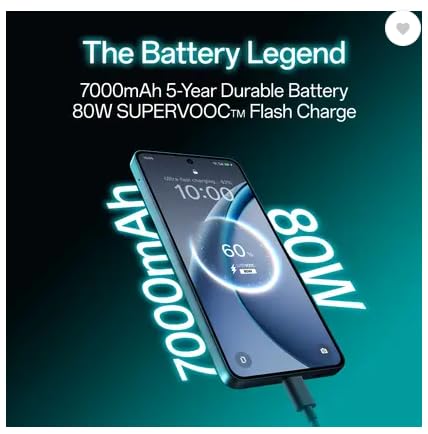
Before first use, fully charge the device. Connect the USB data cable to the phone's USB Type-C port and the charger. Plug the charger into a power outlet. The device supports 80W SUPERVOOC Flash Charge.
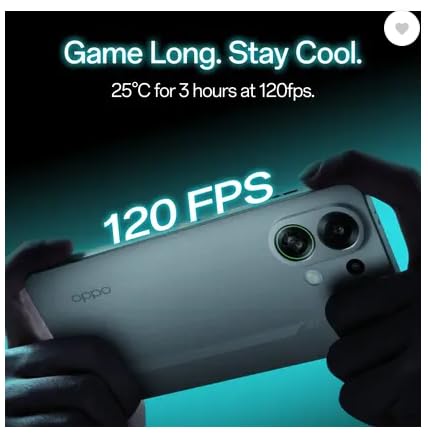
Image: The OPPO K13 Turbo 5G connected to a charger, illustrating the 7000mAh battery and 80W SUPERVOOC Flash Charge capability.
1.4 Engegada inicial i assistent de configuració
Press and hold the Power button until the OPPO logo appears. Follow the on-screen instructions to select your language, connect to Wi-Fi, set up your Google account, and configure other initial settings.
2. Funcionament del vostre dispositiu
Imatge: Anvers i revers view of the OPPO K13 Turbo 5G smartphone, showcasing el seu disseny.
2.1 Navegació bàsica
- Toca: Seleccioneu un element o activeu una funció.
- Llisca: Moure's entre pantalles o desplaçar-se pel contingut.
- Pessigar: Apropar o allunyar les imatges i web pàgines.
- Premsa llarga: Accedir a menús contextuals o moure icones.
2.2 Trucades i missatges
Fes servir l'aplicació Telèfon per fer i rebre trucades. L'aplicació Missatges et permet enviar i rebre missatges SMS/MMS. Assegura't que la teva targeta SIM estigui activa i que tingui cobertura de xarxa.
2.3 Connectivitat
- Wi-Fi: Ves a Configuració > Wi-Fi per connectar-te a les xarxes disponibles.
- Dades mòbils: Enable or disable mobile data in Settings > Mobile Network.
- Bluetooth: Pair with other devices via Settings > Bluetooth.
- USB tipus C: Connect to a computer for data transfer or use with compatible accessories.
2.4 Funcions de la càmera
The OPPO K13 Turbo 5G features a 50MP main rear camera and a 16MP front camera. Open the Camera app to capture photos and videos. Explore various modes like Portrait, Night, and Pro for enhanced photography.
2.5 Cooling System Management
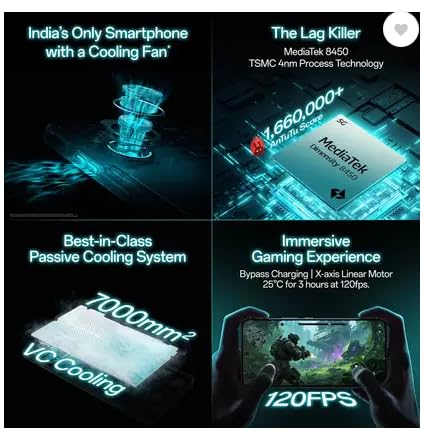
Your device is equipped with an advanced cooling system, including a built-in fan and a 7000mm² VC Cooling system, designed to maintain optimal performance during intensive tasks like gaming. The system automatically activates when needed to prevent overheating.
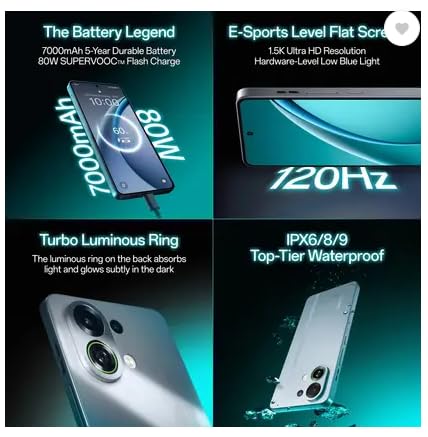
Image: An illustration of the OPPO K13 Turbo 5G's internal cooling fan mechanism.
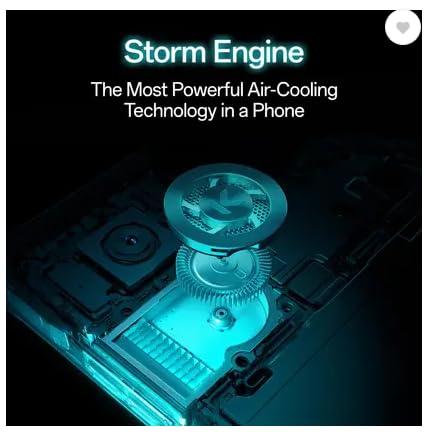
Image: Diagram showing the 7000mm² VC Cooling system for passive heat dissipation.
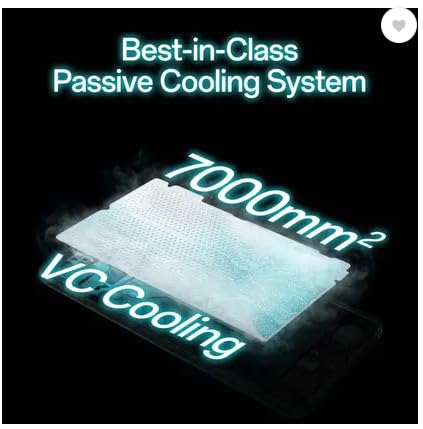
Image: A user holding the OPPO K13 Turbo 5G while gaming, indicating stable performance at 120 FPS due to cooling.
2.6 Gestió de la bateria i l'energia
The 7000 mAh battery provides extended usage. Utilize power-saving modes in Settings > Battery to optimize battery life. The device also supports bypass charging for gaming, which powers the phone directly from the charger, reducing battery strain.
Imatge: Una imatge interna view of the OPPO K13 Turbo 5G illustrating the bypass charging mechanism, allowing direct power delivery during gaming.
3. Manteniment
3.1 Neteja del dispositiu
Use a soft, lint-free cloth to clean the screen and body. For the cooling fan vents, use the provided fan cleaning brush to gently remove dust and debris. Avoid using harsh chemicals or abrasive materials.
3.2 Actualitzacions de programari
Regularly check for and install software updates to ensure optimal performance, security, and access to new features. Go to Settings > About device > Software update.
3.3 Còpia de seguretat de dades
Periodically back up your important data to a cloud service (e.g., Google Drive) or a computer to prevent data loss.
3.4 Cura de la bateria
To prolong battery life, avoid extreme temperatures and do not leave the device fully charged or fully discharged for extended periods. Use the original charger and cable.
3.5 Resistència a l'aigua
The device is water resistant. However, this is not a permanent condition and resistance might decrease as a result of normal wear. Avoid intentional submersion and exposure to high-pressure water or liquids other than fresh water.
4. Solució De Problemes
4.1 Problemes comuns
- El dispositiu no s'encén: Assegureu-vos que la bateria estigui carregada. Premeu i manteniu premut el botó d'engegada durant almenys 10 segons.
- Les aplicacions es bloquegen o es bloquegen: Tanca i torna a obrir l'aplicació. Esborra la memòria cau de l'aplicació (Configuració > Aplicacions > [Nom de l'aplicació] > Emmagatzematge > Esborra la memòria cau). Reinicia el dispositiu.
- Problemes de connectivitat de xarxa: Check SIM card installation. Toggle Airplane Mode on and off. Restart the device. Verify network settings.
- Rendiment lent: Close unused apps. Clear cache. Check for available storage.
4.2 Restabliment de fàbrica
If issues persist, a factory reset may be necessary. This will erase all data on your device. Fes una còpia de seguretat de les teves dades abans de continuar. Ves a Configuració > Sistema > Opcions de restabliment > Esborra totes les dades (restabliment de fàbrica).
5. Especificacions
| Marca | OPPO |
| Model | K13 Turbo 5G |
| Sistema operatiu | Android 15 |
| Processador | Dimensity 8450 Processor |
| RAM | 8 GB |
| Emmagatzematge | 128 GB |
| Mostra | 17.27 cm (6.8 inch) Full HD+ 1.5K AMOLED Flexible Screen (1280 x 2800 resolution, 453 PPI) |
| Càmera posterior | 50MP + 2MP (Dual Camera) |
| Càmera frontal | 16MP |
| Capacitat de la bateria | 7000 mAh |
| Carregant | 80W SUPERVOOC Flash Charge, Bypass Charging |
| Sistema de refrigeració | Built-in Cooling Fan, 7000mm² VC Cooling |
| Tipus de SIM | Nano SIM dual |
| Connectivitat | 5G, USB Type-C |
| Seguretat biomètrica | Reconeixement d'empremtes digitals |
| Resistència a l'aigua | Resistent a l'aigua |
| Dimensions | 15 x 10 x 8 centímetres |
| Pes | 230 grams |
6. Garantia i Suport
6.1 Informació de la garantia
Your OPPO K13 Turbo 5G comes with a 1-Year Manufacturer Warranty for the device i a 6-Month Manufacturer Warranty for in-box accessories. Please retain your proof of purchase for warranty claims. The warranty covers manufacturing defects but does not cover damage caused by misuse, accidents, or unauthorized modifications.
6.2 Atenció al client
For technical assistance, service, or warranty inquiries, please contact OPPO customer support. Refer to the official OPPO website or the Quick Guide included in your box for the most current contact information and support resources.
Fabricant: OPPO Mobiles India Private Limited
Adreça: Plot No.1, Sector Ecotech: VII, Greater Noida, Uttar Pradesh 201306