
1. Informació important de seguretat
Please read all instructions carefully before using this monitor. Keep this manual for future reference.
- Font d'alimentació: Feu servir només el cable d'alimentació i l'adaptador que s'inclouen amb el monitor. Assegureu-vos que la presa de corrent estigui correctament connectada a terra.
- Ventilació: No bloquegeu les obertures de ventilació. Deixeu prou espai al voltant del monitor per a un flux d'aire adequat.
- Humitat: Do not expose the monitor to rain, moisture, or high humidity. Avoid placing liquids near or on the monitor.
- Neteja: Desconnecteu el cable d'alimentació abans de netejar. Feu servir un drap suau i sec. No utilitzeu netejadors líquids ni aerosols.
- Col·locació: Col·loqueu el monitor sobre una superfície estable i plana. Eviteu la llum solar directa o fonts de calor.
- Manteniment: No intenteu atendre aquest producte vosaltres mateixos. Consulteu tots els serveis a personal de servei qualificat.
2. Contingut del paquet
Verifiqueu que tots els elements siguin presents al paquet abans de continuar amb la configuració.
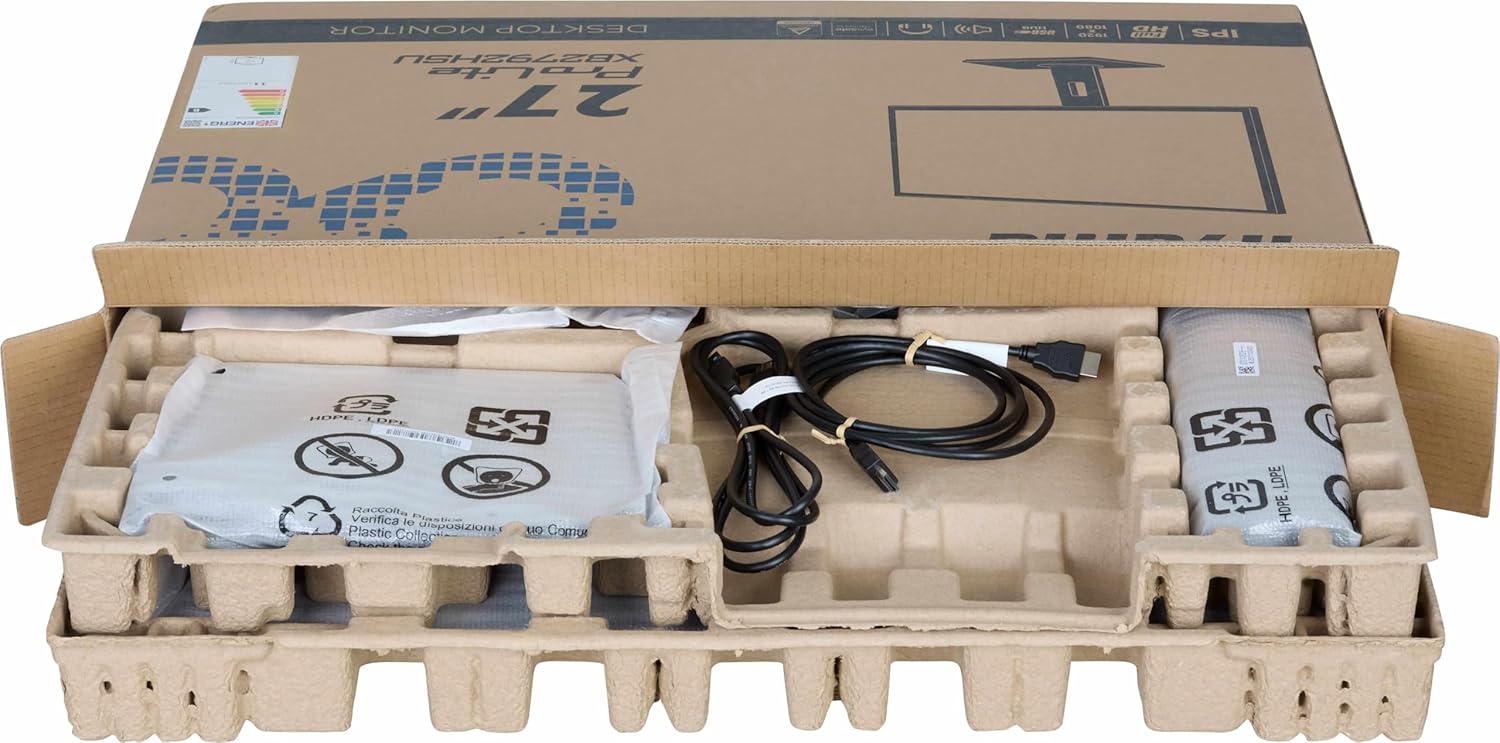
Imatge: The iiyama ProLite XB2792QSU-B1 monitor and its accessories, including cables and stand components, neatly packed in the retail box.
- iiyama ProLite XB2792QSU-B1 Monitor
- Suport de monitor (base i coll)
- Cable d'alimentació
- Cable HDMI
- Cable USB (per a la funcionalitat de concentrador USB)
- Quick Start Guide / Safety Guide

Imatge: Un primer pla view of the power cable, HDMI cable, and USB cable included with the monitor.
3. Instruccions de configuració
3.1 Muntatge del suport
- Carefully remove the monitor from its packaging, keeping it protected on a soft surface (e.g., foam packaging).
- Fixeu el coll del suport a la part posterior del monitor. Assegureu-vos que encaixi correctament al seu lloc o que estigui fixat amb cargols si n'hi ha.
- Attach the stand base to the stand neck. Tighten the thumb screw or screws from the bottom of the base to secure it.

Imatge: The rear of the iiyama ProLite XB2792QSU-B1 monitor, showing the stand securely attached to the monitor panel.
3.2 Cables de connexió
Assegureu-vos que el monitor i l'ordinador estiguin apagats abans de fer cap connexió.
- Connexió d'alimentació: Connecteu el cable d'alimentació a l'entrada d'alimentació del monitor i després a una presa de corrent amb connexió a terra.
- Connexió de vídeo: Connect one end of the HDMI or DisplayPort cable to the corresponding port on your computer's graphics card and the other end to the HDMI or DisplayPort input on the monitor.
- Connexió del concentrador USB (opcional): Connect the supplied USB cable from your computer's USB port to the upstream USB port on the monitor to enable the monitor's built-in USB 3.2 hub.
- Connexió d'àudio (opcional): If you wish to use external speakers or headphones connected to the monitor, connect an audio cable from your computer's audio output to the monitor's audio input, or connect headphones directly to the monitor's audio output jack.

Imatge: Un detallat view of the monitor's connectivity panel, showing the power input, HDMI ports, DisplayPort, USB 3.2 ports, and audio jack.
3.3 Encès inicial
- Enceneu l'ordinador.
- Premeu el botó d'engegada del monitor. L'indicador lluminós d'engegada s'hauria d'il·luminar.
- The monitor should automatically detect the input signal. If not, you may need to manually select the input source using the On-Screen Display (OSD) menu.
4. Funcionament del monitor
4.1 Menú de visualització en pantalla (OSD)
The OSD menu allows you to adjust various monitor settings. The control buttons are typically located on the bottom or rear of the monitor.

Imatge: El davant view of the iiyama ProLite XB2792QSU-B1 monitor, displaying its slim bezel design and the location of the control buttons (usually on the bottom right bezel or rear).
- Premeu el botó Menú per obrir l'OSD.
- Feu servir els botons de navegació (normalment fletxes) per moure's per les opcions del menú.
- Premeu el botó Selecciona/D'acord per confirmar una selecció o entrar en un submenú.
- Press the Exit/Back button to return to the previous menu or exit the OSD.
4.2 Configuració comuna de l'OSD
- Imatge: Adjust Brightness, Contrast, Sharpness, Gamma, OverDrive.
- Color: Adjust Color Temperature, RGB levels, or select preset color modes.
- Selecció d'entrada: Canvia manualment entre les entrades HDMI i DisplayPort.
- Àudio: Adjust volume for the built-in speakers or headphone output.
- Configuració OSD: Adjust OSD language, position, and timeout.
- Informació: Display current resolution, refresh rate, and model information.
4.3 Ajustaments ergonòmics
El suport del monitor permet diversos ajustaments per optimitzar el vostre viewcomoditat.

Imatge: Un professional secundarifile of the iiyama ProLite XB2792QSU-B1 monitor, illustrating its adjustable stand that allows for height, tilt, and swivel movements.
- Ajust d'alçada: Gently push or pull the monitor panel up or down to adjust its height.
- Ajust d'inclinació: Hold the top and bottom edges of the monitor panel and gently tilt it forwards or backwards.
- Ajust de gir: Rotate the monitor panel left or right on its stand base.
- Funció Pivot: The monitor can be rotated 90 degrees to a portrait orientation. Ensure the monitor is at its maximum height and tilted back slightly before pivoting to avoid hitting the desk.
5. Manteniment
5.1 Neteja del monitor
- Desendolleu sempre el monitor de la presa de corrent abans de netejar-lo.
- Utilitzeu un drap suau i sense pelusa lleugerament dampesbandida amb aigua o un netejador de pantalles suau i no abrasiu.
- No ruixeu el netejador directament sobre la pantalla. Apliqueu-lo primer al drap.
- Eviteu utilitzar benzè, diluent, netejadors amb amoníac o materials abrasius, ja que poden danyar la pantalla o el casing.
5.2 Emmagatzematge
If storing the monitor for an extended period, disconnect all cables and pack it in its original packaging if possible. Store in a cool, dry place away from direct sunlight and extreme temperatures.
6. Solució De Problemes
Si teniu problemes amb el monitor, consulteu els problemes i solucions més comuns següents.
| Problema | Possible solució |
|---|---|
| Sense alimentació / LED d'alimentació apagat |
|
| Sense senyal / Missatge "Sense senyal" |
|
| La imatge és borrosa o distorsionada |
|
| Els colors són incorrectes |
|
| Els ports USB no funcionen |
|
If the problem persists after trying these solutions, please contact iiyama customer support.
7. Especificacions tècniques
Below are the key technical specifications for the iiyama ProLite XB2792QSU-B1 monitor.
| Característica | Especificació |
|---|---|
| Número de model | XB2792QSU-B1 |
| Mida de la pantalla | 27 polzades |
| Tipus de panell | IPS |
| Resolució | 2560 x 1440 (QHD) |
| Freqüència d'actualització | 120 Hz |
| Relació d'aspecte | 16:9 |
| Temps de resposta | 5 mil·lisegons |
| Brillantor | 350 cd/m² |
| Viewangle ing | 178° (H) / 178° (V) |
| Connectivitat de maquinari | 1x HDMI, 1x DisplayPort, 2x USB 3.2 Gen 1, 3.5mm Audio Out |
| Dimensions de l'article (D x W x H) | 8.25 "P x 24.25" W x 15.59" H |
| Pes de l'article | 5.5 quilos |
| Color | Negre |
8. Garantia i Suport
This iiyama monitor comes with a manufacturer's warranty. For detailed warranty terms and conditions, please refer to the warranty card included in your product packaging or visit the official iiyama weblloc.
For technical support, troubleshooting assistance, or service inquiries, please contact iiyama customer support through their official channels. Have your monitor's model number (XB2792QSU-B1) and serial number ready when contacting support.
Official iiyama Weblloc: www.iiyama.com