
Introducció
This manual provides comprehensive instructions for the ALLIMITY RC933A FMB1 Voice Remote Control. Designed for ease of use, this remote offers full functionality for compatible TCL Mini LED Smart TV models without requiring complex programming or setup. Its ergonomic design ensures comfortable handling and reliable performance.
Models de televisors compatibles:
- TCL Q8CX7
- TCL 85Q8CX7
- TCL 98Q8CX7
- TCL 75Q8CX7
- TCL 65C8K
- TCL 75C89K
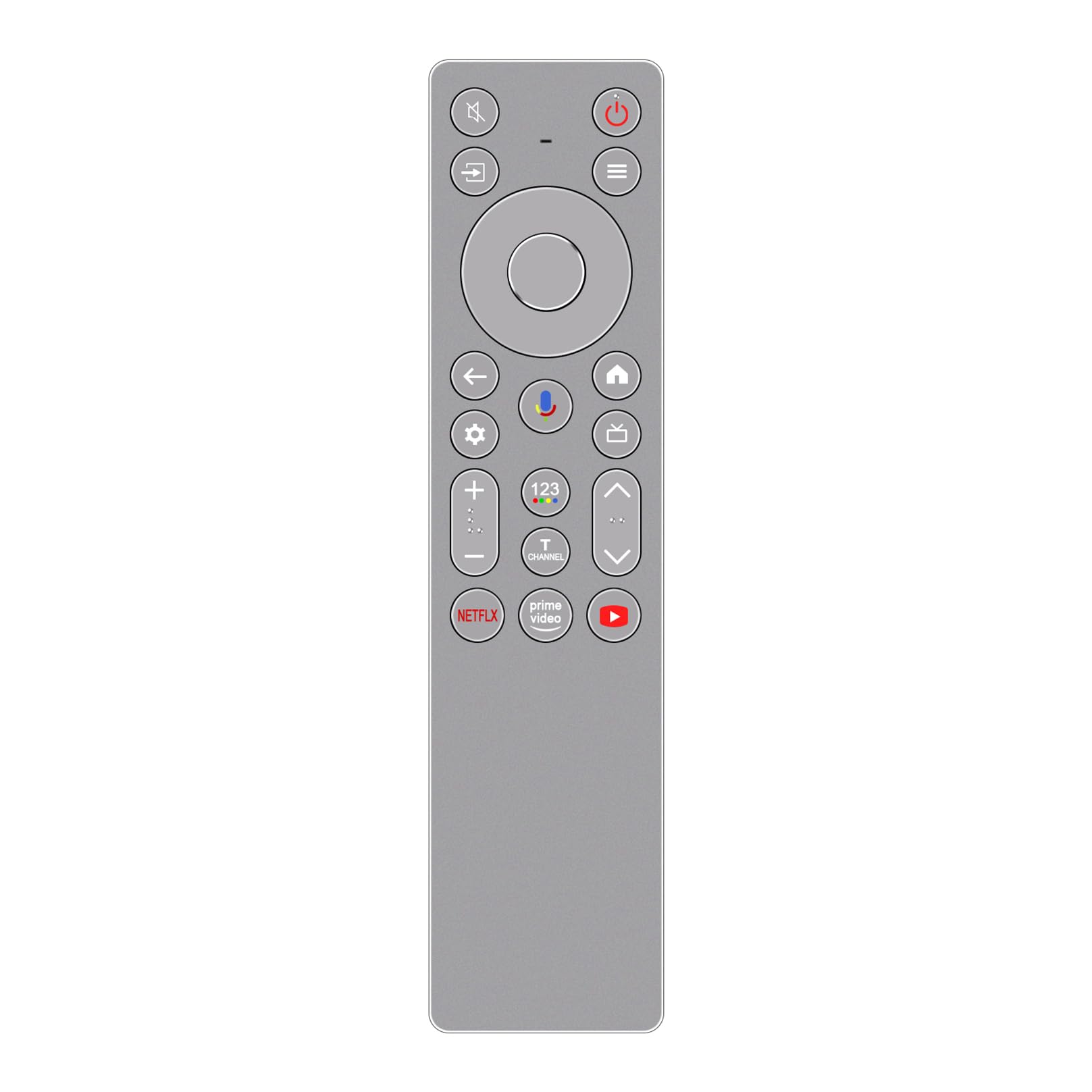
Imatge: Frontal view of the ALLIMITY RC933A FMB1 Voice Remote Control, showcasing its button layout and sleek silver-grey finish.
Configuració
The ALLIMITY RC933A FMB1 remote control is designed for immediate use with compatible TCL Smart TVs. No programming or complex setup is required. Simply install the batteries to begin operation.
Instal·lació de la bateria
- Localitzeu el compartiment de la bateria a la part posterior del comandament a distància.
- Obriu la tapa del compartiment de la bateria.
- Introduïu dues piles AA, assegurant-vos que els terminals positiu (+) i negatiu (-) s'alineïn correctament amb els indicadors de l'interior del compartiment.
- Tanqueu bé la tapa del compartiment de la bateria.
The remote is now ready for use. Point it towards your TCL Smart TV and press any button to confirm functionality.
Instruccions de funcionament
The ALLIMITY RC933A FMB1 remote control provides intuitive access to your TV's functions, including voice commands and dedicated app buttons.
S'han acabat les funcions del botóview
- Botó d'encesa: Encén o apaga el televisor.
- Pad direccional (D-Pad) i botó OK: Navegar pels menús i confirmar les seleccions.
- Botó enrere: Torna a la pantalla o menú anterior.
- Botó d'inici: Accedeix a la pantalla d'inici del televisor.
- Botó de configuració: Obre el menú de configuració del televisor.
- Pujar/baixar el volum: Ajusta el volum del televisor.
- Canal amunt/avall: Canvia els canals de televisió.
- Botó de silenci: Silencia o activa l'àudio del televisor.
- Botó d'entrada/font: Selecciona fonts d'entrada (HDMI, AV, etc.).
- Botons d'aplicació dedicats: Quick access to Netflix, Prime Video, and YouTube.
Voice Control Functionality
The remote features a voice command button for convenient control of your TV. This allows you to search for content, change settings, or launch apps using your voice.
- Premeu el botó Botó de control de veu (typically indicated by a microphone icon).
- Hold the remote approximately 10-30 cm (4-12 inches) from your mouth.
- Speak your command clearly into the remote's microphone.
- Release the button once you have finished speaking.

Imatge: Una imatge detallada view of the ALLIMITY RC933A FMB1 remote control, with a magnified inset showing the multi-colored microphone icon for voice control.
Manteniment
Proper care and maintenance will ensure the longevity and optimal performance of your remote control.
Neteja
- Netegeu el comandament a distància amb un drap suau i sec.
- Per a la brutícia persistent, lleugerament dampNetegeu el drap amb aigua o un netejador suau i no abrasiu. Eviteu la humitat excessiva.
- Do not use harsh chemicals, solvents, or abrasive cleaning pads, as these can damage the remote's surface or internal components.
Canvi de bateria
- Canvieu les piles quan la resposta del comandament a distància esdevingui lenta o deixi de funcionar.
- Always replace both batteries at the same time with new AA batteries.
- No barregeu piles velles i noves, o diferents tipus de piles.
- Traieu les piles si no heu d'utilitzar el comandament a distància durant un període prolongat per evitar fuites.
Emmagatzematge
Guardeu el comandament a distància en un lloc fresc i sec, allunyat de la llum solar directa, de temperatures extremes i d'alta humitat.
Resolució de problemes
If you encounter issues with your ALLIMITY RC933A FMB1 remote control, refer to the following common solutions:
- El comandament a distància no respon:
- Comproveu si les piles estan inserides correctament amb la polaritat correcta.
- Substituïu les piles per piles AA noves.
- Assegureu-vos que no hi hagi obstacles entre el comandament a distància i el receptor d'infrarojos del televisor.
- Assegureu-vos que esteu dins del rang de funcionament efectiu (fins a 10 metres).
- El control per veu no funciona:
- Assegureu-vos que el comandament tingui piles noves.
- Press and hold the voice control button while speaking.
- Parla clar i directament al micròfon.
- Check your TV's settings to ensure voice control is enabled and properly configured.
- Short transmission range:
- Replace batteries with new ones. Low battery power can reduce range.
- Assegureu-vos que no hi hagi fonts de llum fortes (com la llum solar directa o llums fluorescents brillants) que interfereixin amb el senyal infraroig.
- Remove any physical obstructions between the remote and the TV.
Especificacions
| Marca | ALLIMITAT |
| Nom del model | MM-RC933A-FMB1 |
| Color | Silver/Grey (as pictured) |
| Tecnologia de connectivitat | Infrarojos (IR) |
| Tipus de control | Comandament de veu |
| Interval màxim | 10 metres (33 peus) |
| Nombre de botons | 25 |
| Descripció de la bateria | AA (calen 2) |
| Pes del producte | 59 grams |
| Dimensions (Llargada x Amplada) | 18.5 cm (7.28 polzades) x 4.8 cm (1.89 polzada) |
| Dispositius màxims compatibles | 1 (for direct control, though it can be compatible with multiple models) |

Imatge: En paral·lel view of the ALLIMITY RC933A FMB1 remote control, illustrating its length (18.5 cm / 7.28 in) and width (4.8 cm / 1.89 in).
Garantia i Suport
For specific warranty information or technical support regarding your ALLIMITY RC933A FMB1 Voice Remote Control, please refer to the documentation provided with your purchase or contact the retailer/manufacturer directly. Keep your purchase receipt as proof of purchase for any warranty claims.